
Mindmap
Design, Prototyping & Construction
Inhalt der Mindmap
Design, Prototyping & Construction
Preece, Jennifer. (2002). Interaction Design. United States of America: John Wiley & Sons Inc.
- Aranza Estrada A01176250
Design activities begin once a set of requirements has been established
- To effectively evaluate the design of an interactive product, design- ers must produce an interactive version of their ideas
Prototyping
- Ex: paper-based outline of a screen or set of screens, an electronic "picture," a video simulation of a task
- Allows stakeholders to interact with an envisioned product, to gain some experience of using it in a realistic setting
- Prototypes answer questions and support designers in choosing between alter- natives
- Prototyping is used to get feedback on emerging designs. This feedback may be from users, or from colleagues
- Prototypes answer questions and support designers in choosing between alter- natives
- Is a limited representation of a design that allows users to inter- act with it and to explore its suitability.
- Low Fidelity Prototyping
- Does not look very much like the final product.
- Useful because they tend to be simple, cheap, and quick to produce.
- Storyboarding: low-fidelity prototyping that is often used in conjunction with scenarios
- Sketching: Many people find it difficult to engage in this activity because they are inhibited about the quality of their drawing
- They don't have to be anything more than simple boxes, stick figures, and stars.
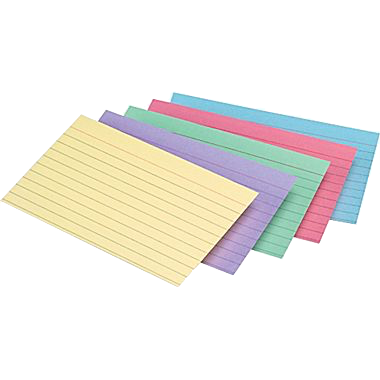
- Prototyping with Index Cards: Is a successful and simple way to prototype an interaction, and is used quite commonly when developing websites
- Sketching: Many people find it difficult to engage in this activity because they are inhibited about the quality of their drawing
- Does not look very much like the final product.
- High Fidelity Prototyping
- Uses materials that you would expect to be in the final product and produces a prototype that looks much more like the final thing.
- Offers: Complete functionality, Use for exploration and test.
- Bad side: More expensive to develop, Not effective for requirements gathering.
- High-fidelity prototyping is useful for selling ideas to people and for testing out technical issues.
- Offers: Complete functionality, Use for exploration and test.
- Uses materials that you would expect to be in the final product and produces a prototype that looks much more like the final thing.
- Compromises in Prototyping
- The intention is to produce something quickly to test an aspect of the product.
- Functionality Provided: Horizontal prototyping (providing a wide range of functions but with little detail)
- Depth: Vertical prototyping (providing a lot of detail for only a few functions).
Construction:
- Throwaway Prototyping, uses the prototypes as stepping stones towards the final design.
- Evolutionary prototyping: involves evolving a prototype into the final product.
- Conceptual Design: concerned with transforming the user requirements and needs into a conceptual model
- Guidelines: Keep an open mind but never forget the users and their context. Use low-fidelity prototyping to get rapid feedback. Iterate.
- 3 Perspectives to look out for
- Which interaction mode? is most suitable for the product depends on the activities the user will engage in while using it.
- Based on activities, we introduced four general styles: instructing, conversing, manipulating and navigating
- Models based on objects provide a different perspective since they are structured around real-world objects
- Based on activities, we introduced four general styles: instructing, conversing, manipulating and navigating
- Is there a suitable interface metaphor? Interface metaphors are another way. Combine familiar knowledge with new knowledge in a way that will help the user understand the system
- 3 Steps to chose a Metaphor
- 1) Understand what the system will do.
- 2) Understand which bits of the system are likely to cause users problems.
- 3) Generate metaphors. Looking for metaphors in the users' description of the tasks.
- 2) Understand which bits of the system are likely to cause users problems.
- 1) Understand what the system will do.
- 3 Steps to chose a Metaphor
- Which interaction paradigm? Design philosophies that help you think about the product being developed. Include the now traditional desktop paradigm, with WIMP interface (windows, icons, menus and pointers)
- Ubiquitous computing
- Pervasive computing
- Wearable computing
- Which interaction mode? is most suitable for the product depends on the activities the user will engage in while using it.
- 3 Perspectives to look out for
- Guidelines: Keep an open mind but never forget the users and their context. Use low-fidelity prototyping to get rapid feedback. Iterate.
- Expanding Conceptual Model
- Understanding the tasks the product will support is a fundamental aspect of developing the conceptual model
- Functions may be related temporally, e.g., one must be performed before another
- What data is required to perform a task? How is this data to be transformed by the system?
- Scenarios
- Used to explicate existing work situations, more commonly used for expressing proposed or imagined situations to help in conceptual design
- Physical Design
- Physical design involves considering more concrete, detailed issuer; of designing the interface
- Guidelines: Strive for consistency. Enable frequent users to use shortcuts. Offer informative feedback. Design dialogs to yield closure. Offer errorprevention and simple error handling
- Widgets: elements such as dialog boxes, menus, icons, toolbars, etc. Each element must be designed or chosen from a predesigned set of widgets.
- Menus: provide users with a choice that can be a choice of com- mands or a choice of options related to a command
- Icon design: Designing a good icon takes more than a few minutes. However, icons are cultural and context-specific. Designing a good icon takes time.
- information display: Making sure that the relevant information is available for the task is one aspect of information display, but another concerns the format.
- Tools Provided: help design the interface given a specification of the end users' tasks help implement the interface given a specification of the design create easy-to-use interfaces
- Icon design: Designing a good icon takes more than a few minutes. However, icons are cultural and context-specific. Designing a good icon takes time.
- Screen design. There are two aspects to screen design: how the task is split across a number of screens, and how the individual screens are designed.
- Menus: provide users with a choice that can be a choice of com- mands or a choice of options related to a command
- Physical design involves considering more concrete, detailed issuer; of designing the interface
- Throwaway Prototyping, uses the prototypes as stepping stones towards the final design.
Bilder und Dateien der Mindmap










Informationen
- Beschreibung
- Mindmap am Design, Prototyping & Construction, erstellt von Ara Estrada am 06/10/2017.
- Erstellt von
- Ara Estrada
- Aufrufe
- 0
- Bewertung