
Human-Computer Interaction and User Interfaces
106 resources created by 84 users
This Human-Computer Interaction and User Interfaces page on GoConqr gathers community-made quizzes, mind maps, flashcards, notes and slide sets, from command line and graphical interfaces to mental models, usability testing and error types. It's built for university students and professional candidates, school students, and teachers after ready-made material. There are over 1,000 resources here, including more than 60 quizzes and over 700 mind maps, made by more than 700 contributors. Pick a topic, try a quiz to find your gaps, then revise from the maps.
Top Human-Computer Interaction and User Interfaces resources
-
78 questionsHCI Final The art and science of organizing and labeling websites, intranets, online communities and software to supp...
-
33 questionsChapter 14 (Multiple Choice) 1) To reach HCI goals, managers and developers need to be knowledgeable about the interplay among:
-
11 questionsUser Interfaces Select two disadvantages of command line interfaces
-
Mind map 28. Some Types of Mental Processing Are More Challenging Than Others This section describes different types of mental processing that are more challenging than others
-
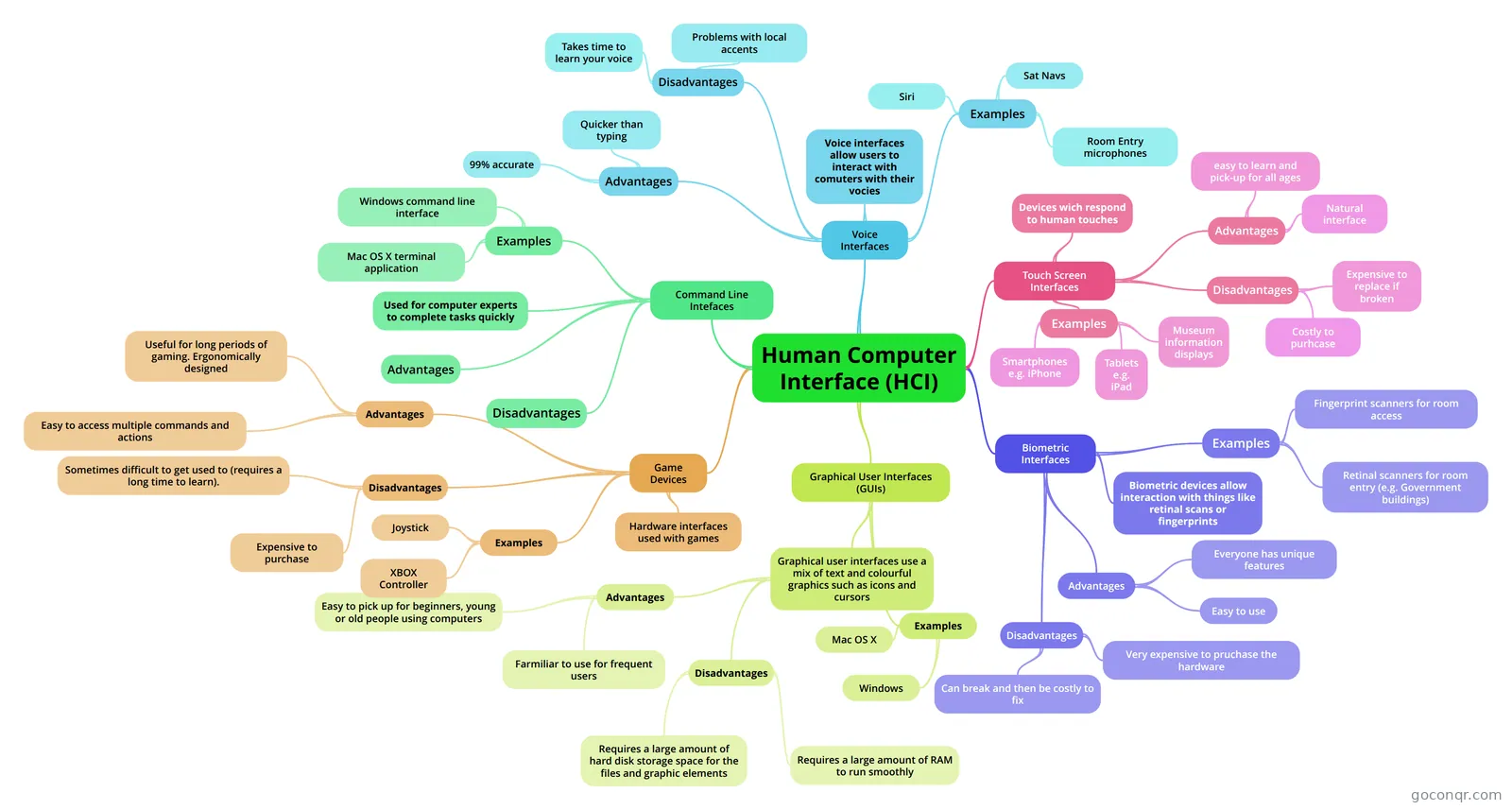 Mind map Human Computer Interface (HCI) A mindmap showing content from the WJEC HCI topic
-
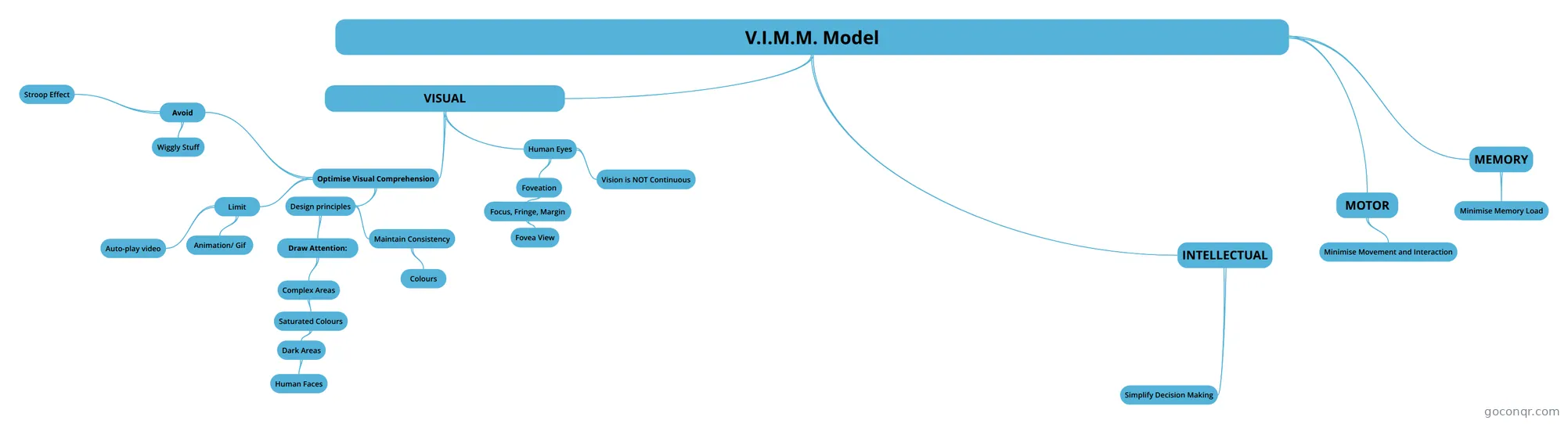 Mind map V.I.M.M. Model VIMM - Visual, Intellectual, Memory, Motor
-
9 cards58. People will Look for Shortcuts Only if the Shortcuts are Easy This point details why we use some shortcuts but not others.
-
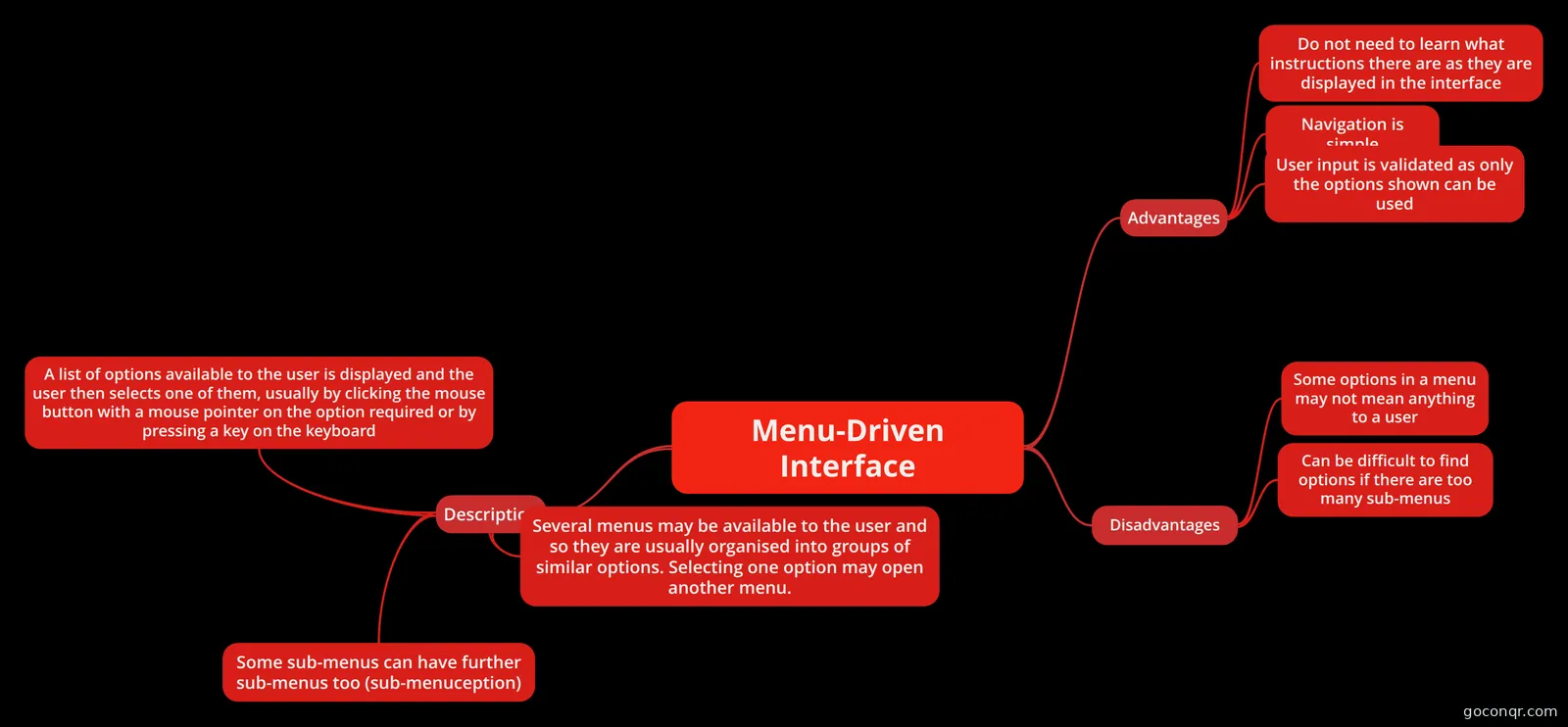 Mind map Menu-Driven Interface
Quizzes
See all 27 quizzes-
78 questionsHCI Final The art and science of organizing and labeling websites, intranets, online communities and software to supp...
-
33 questionsChapter 14 (Multiple Choice) 1) To reach HCI goals, managers and developers need to be knowledgeable about the interplay among:
-
11 questionsUser Interfaces Select two disadvantages of command line interfaces
-
5 questionsMental model quiz Which of these isn't a benefit of having a mental model?
-
100 questionsSDP7 (2) ☉ IITU 2017 101. Recognition rather than recall
-
80 questionsSDP 7 (2017) 1. Select main types of usability testing
-
40 questionsChapter 14 (True or False) 1) The over arching goal of human-computer interaction is to achieve efficiency.
-
28 questionsHCI What is a strategy to begin the design process to get to know your users?
Mind maps
See all 35 mind maps-
28. Some Types of Mental Processing Are More Challenging Than Others This section describes different types of mental processing that are more challenging than others
-
Human Computer Interface (HCI) A mindmap showing content from the WJEC HCI topic
-
V.I.M.M. Model VIMM - Visual, Intellectual, Memory, Motor
-
Menu-Driven Interface
-
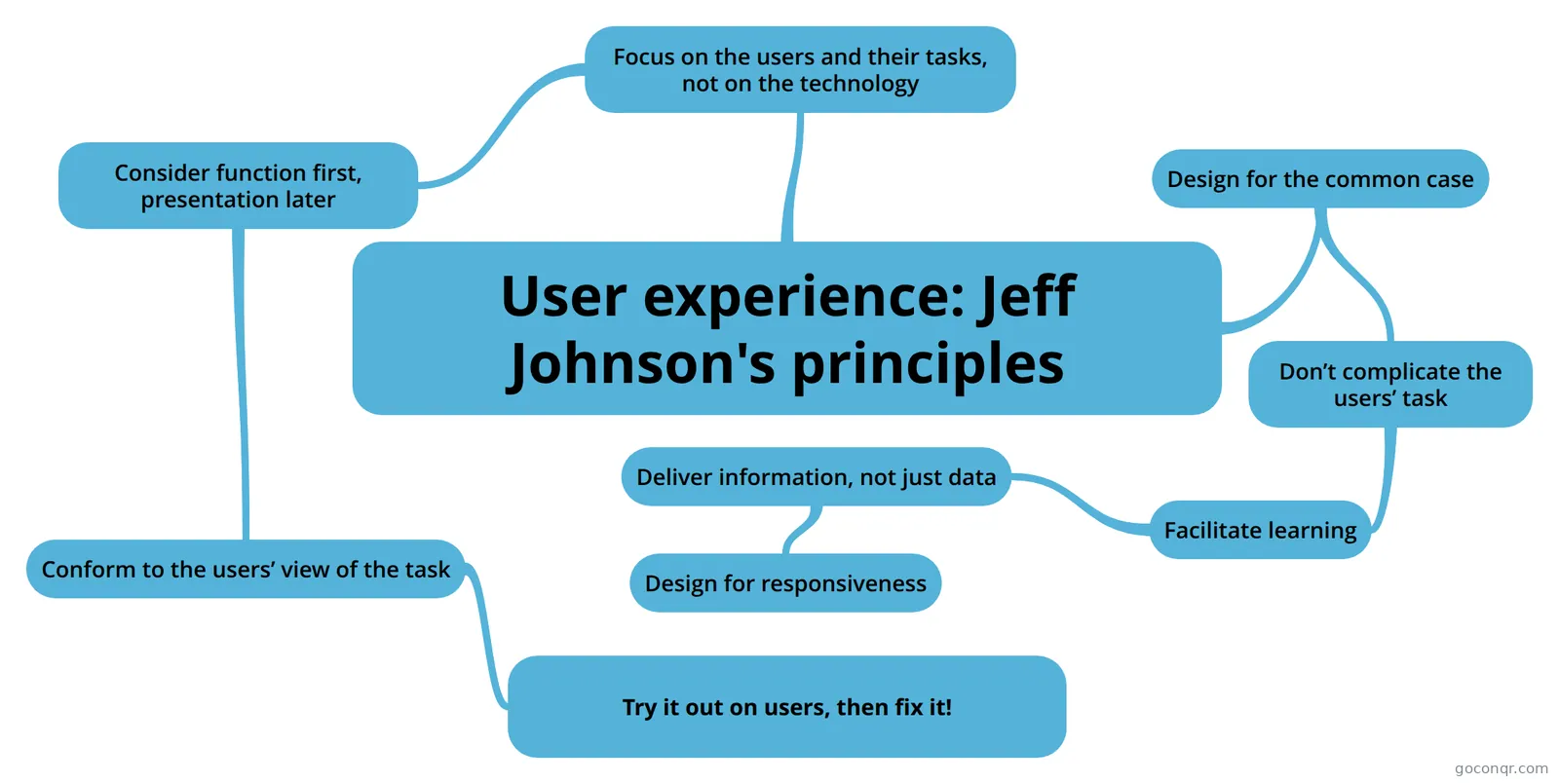 User experience: Jeff Johnson's principles Brief summation of Jeff Johnson's principles from Give Me The Why (2007)
-
Cognitive Interaction Design
-
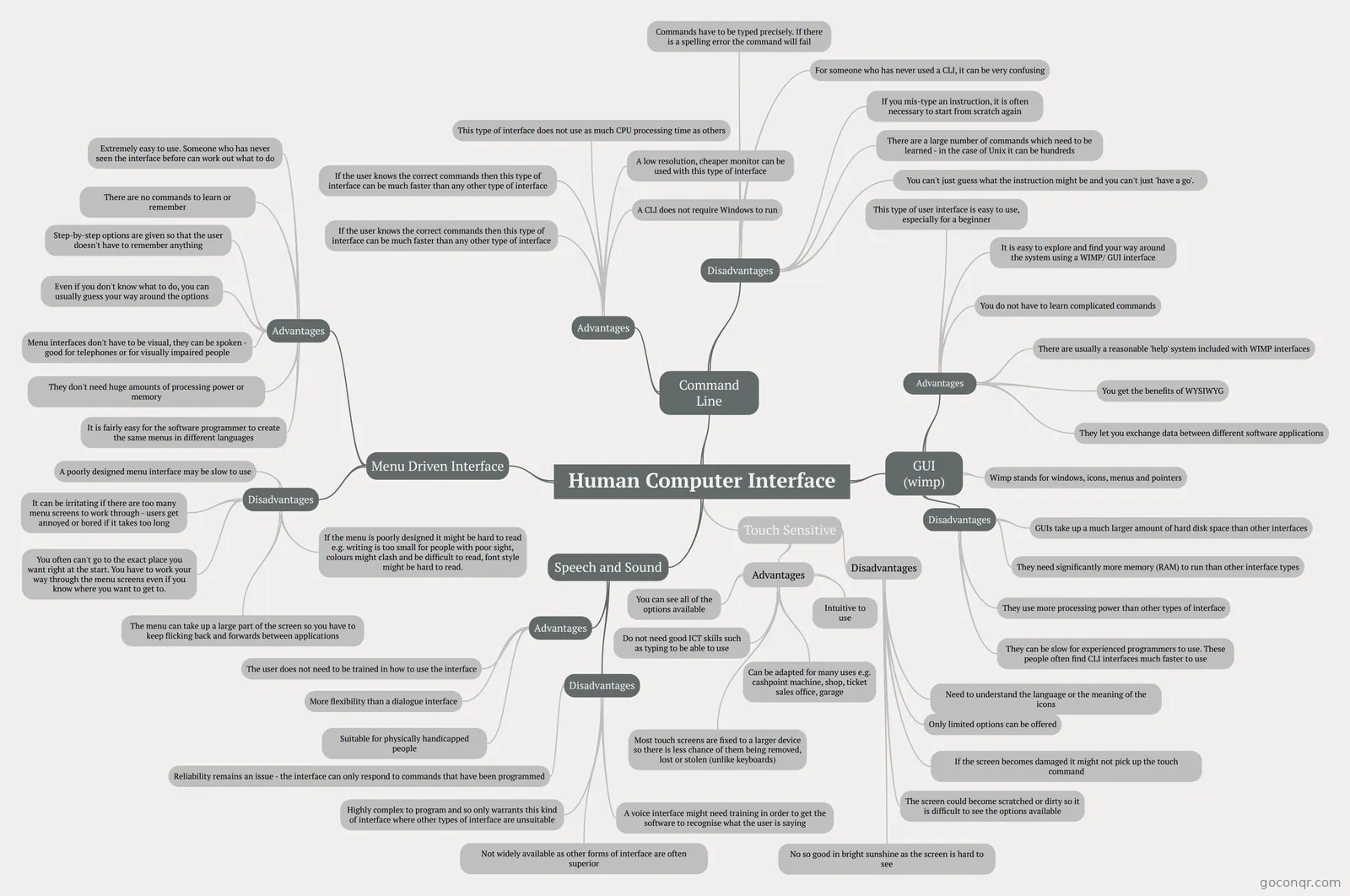 Human Computer Interface
-
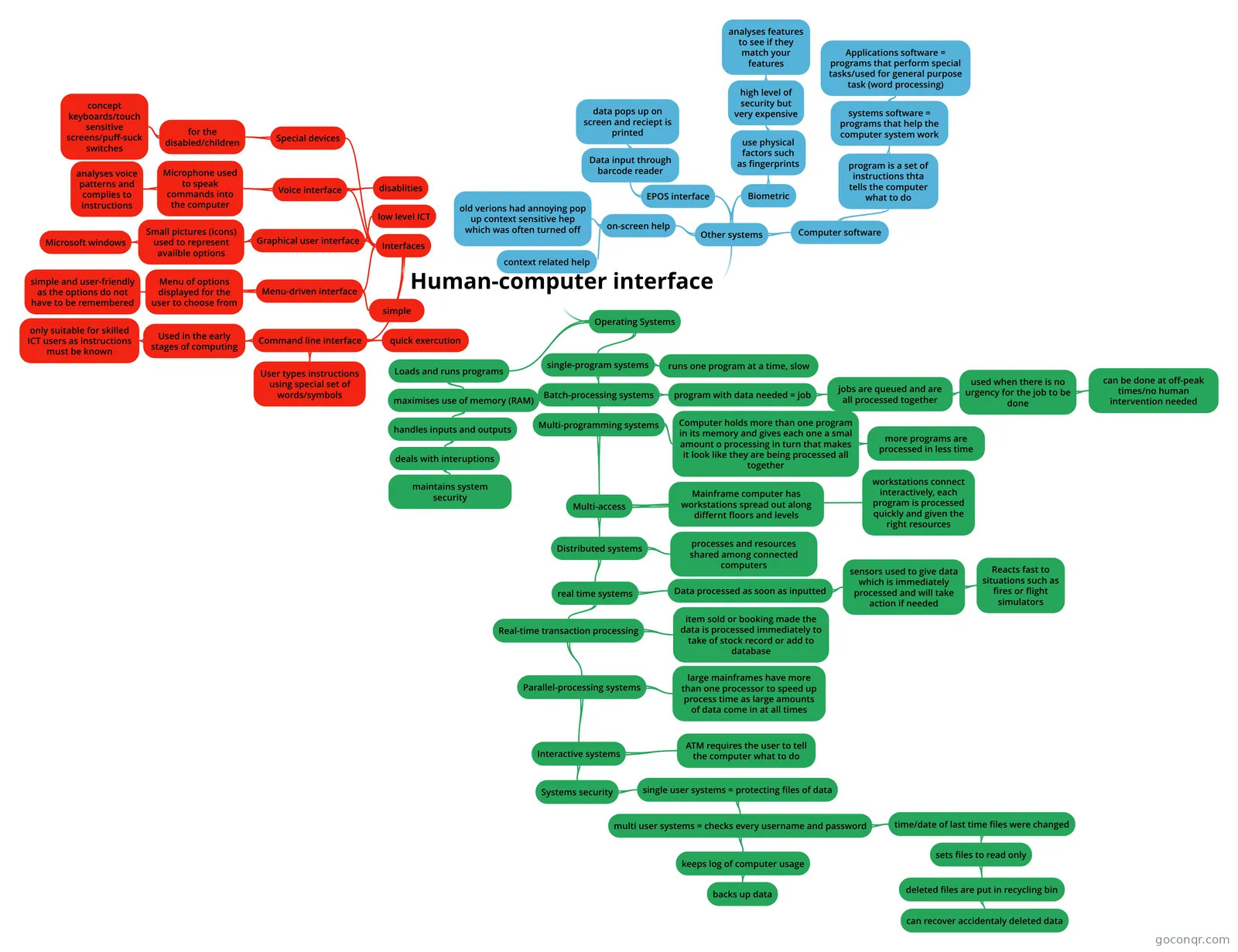 Human-computer interface
Flashcards
See all 20 flashcards-
9 cards58. People will Look for Shortcuts Only if the Shortcuts are Easy This point details why we use some shortcuts but not others.
-
79 cardsflash cards jty
-
50 cardsHCI 1 Low fidelity prototypes
-
19 cardsInteraction Design M364 Interaction Design.
-
37 cardsIPM_V How are Conceptual Models formed?
-
24 cardsIPM_III Slides III
-
26 cardssdp7 Guerilla Usability Testing
-
12 cardsIPM_II What are the 3 main areas of the "Model Human Processor?"
Notes
-
6. People Scan Screens Based On Past Experience And Expectations At First Glance When we first look at a computer screen, we tend to look at the center, not the edges because most people assume that the top most corner, and even across the top, is taken up by logos, white space or ...
-
First UX Notes Do not exaggerate the overall size, though, because larger targets are effective up to a point, after which they hit a plateau and will only make users ignore other important elements on the page.For example, Duolingo...
-
57. People are Inherently Lazy People are Inherently Lazy Is Lazy another word for efficient? People learned that if they conserve their energy they will survive longer and live better You want to spend enough energy to keep the basic resources but...
-
16. Font Size Matters Font size should always be large enough for users to read text withou strain. Some fonts look bigger at the same point size, because they have a larger x-height.
Slides
See all 20 slidesMore Computing and ICT (programming, computer science, digital skills, educational technology) topics
About Human-Computer Interaction and User Interfaces
GoConqr OriginalWhat the resources cover
The page opens with the types of interface. The quiz User Interfaces asks you to tick advantages and disadvantages of command line interfaces. The mind map Human Computer Interface (HCI) branches into graphical user interfaces, command line interfaces, voice interfaces, touch screen interfaces, biometric interfaces and game devices. Smaller maps cover the Menu-Driven Interface, the Command-Line Interface and the Graphical User Interface (GUI).
Design principles and how people think
A large share of the page looks at the person using the screen. The V.I.M.M. Model map splits design into visual, intellectual, memory and motor concerns. It links these to ideas such as minimising memory load and movement. The map on Jeff Johnson's principles starts from focusing on users and their tasks, not the technology. Several slide sets and notes are about how people scan screens, process information in small chunks, take shortcuts and make predictable errors.
A sensible order
- Start with Human Computer Interface (HCI) to see the main interface types in one view.
- Take the User Interfaces quiz to check what stuck.
- Move on to the design maps, such as V.I.M.M. Model and the Johnson principles.
- Finish with the Mental model quiz and the longer chapter quizzes, including HCI Final, which also touches on information architecture and prototyping tools.
Using quizzes and maps together
Read a map first, then close it and answer a quiz on the same topic. Whatever you miss tells you which branch to reread. The flashcard decks, such as Types of User Interface, suit short bursts of recall before an exam. Some resources mention GCSE ICT, A-level ICT, WJEC A2 ICT and GCSE Computing, so school students will find familiar wording as well as university-style material.
Where this fits
This unit sits in the Software and Systems Development strand of Computing and ICT. It is the place to look when your course turns from how software is built to how people actually use it.
Open a map or quiz that matches your next lesson and see what you already know.
Frequently asked questions
Which resource should I open first?
Try the mind map Human Computer Interface (HCI). It lays out graphical, command line, voice, touch screen and biometric interfaces, plus game devices, on one page. Then take the User Interfaces quiz, which tests the advantages and disadvantages of command line interfaces, to see what you remember.
What do the mind maps on this page cover?
Most cover interface types, such as menu-driven, command line and graphical interfaces. Others deal with design thinking, including the V.I.M.M. Model, Jeff Johnson's principles, asking users and experts, and the factors to consider when designing an interface. There are over 700 maps, so many topics appear more than once.
Are these resources free to use?
Yes. Every resource listed here is free to open, study and take, with no account needed. They were made by GoConqr users, not by GoConqr itself. A free account also saves your quiz scores and lets you create your own quizzes, mind maps, flashcards and notes.
Which levels and exams do they suit?
The mix leans towards university students and professional candidates, with a good share for school students. Some resources mention GCSE ICT, A-level ICT, WJEC A2 ICT and GCSE Computing. Teachers can also use the quizzes, slide sets and notes as ready-made material.
What can I use for the human side of design?
Look at the slide sets and notes about how people scan screens, process information in bite-sized chunks and make predictable errors. The Mental model quiz and the quiz on the mental model, system models and the Model Human Processor let you test those ideas.
What if I can't find my exact topic?
Try a different wording, such as HCI, user interfaces or interaction design, as resources use all three. Many contributors have shared their own revision sets, so a nearby deck or map may cover it. You can also build your own notes or flashcards.