
Mindmap
Chapter 2 - Hardware and Software
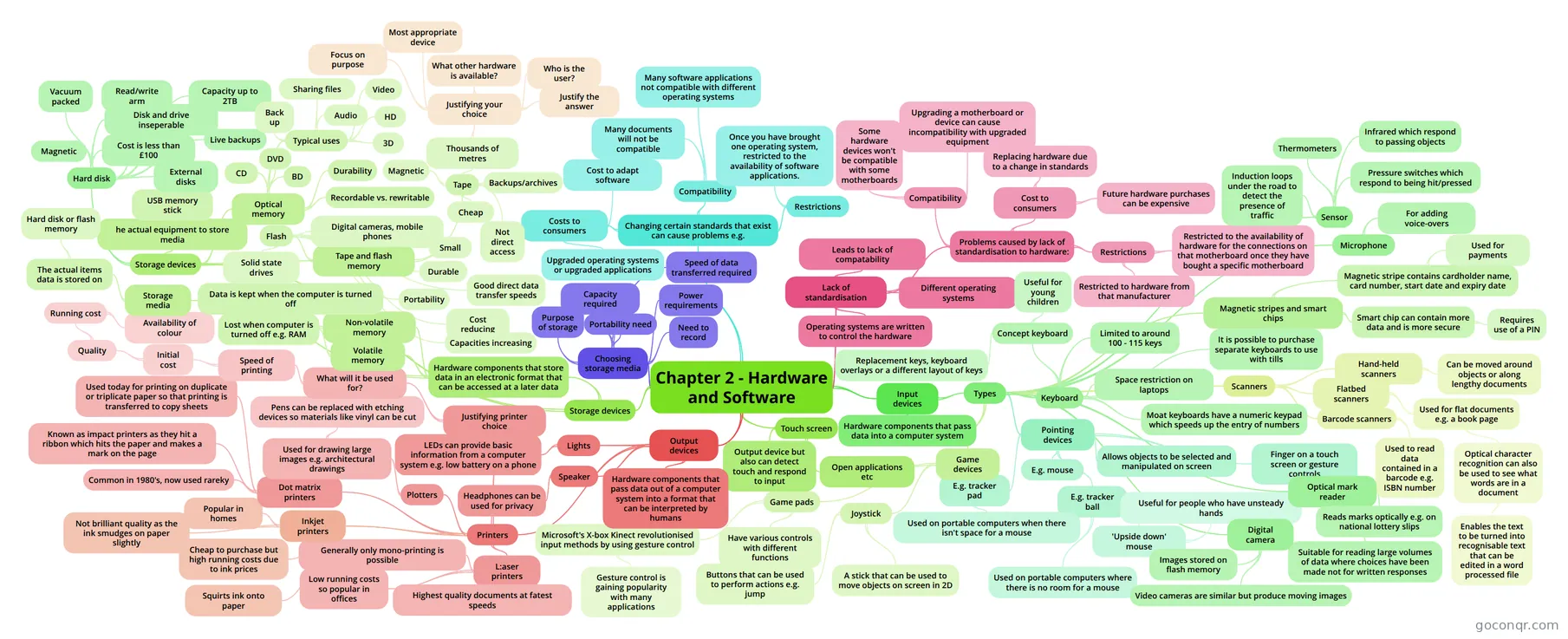
Mind map: Hardware and software
Inhalt der Mindmap
Chapter 2 - Hardware and Software
Changing certain standards that exist can cause problems e.g.
- Costs to consumers
- Cost to adapt software
- Upgraded operating systems or upgraded applications
- Compatibility
- Many software applications not compatible with different operating systems
- Many documents will not be compatible
- Restrictions
- Once you have brought one operating system, restricted to the availability of software applications.
- Costs to consumers
Lack of standardisation
- Operating systems are written to control the hardware
- Leads to lack of compatability
- Different operating systems
- Problems caused by lack of standardisation to hardware:
- Compatibility
- Some hardware devices won't be compatible with some motherboards
- Upgrading a motherboard or device can cause incompatibility with upgraded equipment
- Cost to consumers
- Replacing hardware due to a change in standards
- Future hardware purchases can be expensive
- Restrictions
- Restricted to the availability of hardware for the connections on that motherboard once they have bought a specific motherboard
- Restricted to hardware from that manufacturer
- Compatibility
Input devices
- Hardware components that pass data into a computer system
- Types
- Keyboard
- Limited to around 100 - 115 keys
- Space restriction on laptops
- Moat keyboards have a numeric keypad which speeds up the entry of numbers
- It is possible to purchase separate keyboards to use with tills
- Concept keyboard
- Replacement keys, keyboard overlays or a different layout of keys
- Useful for young children
- Pointing devices
- Allows objects to be selected and manipulated on screen
- E.g. mouse
- E.g. tracker pad
- Used on portable computers when there isn't space for a mouse
- E.g. tracker ball
- 'Upside down' mouse
- Useful for people who have unsteady hands
- Used on portable computers where there is no room for a mouse
- 'Upside down' mouse
- Finger on a touch screen or gesture controls
- Game devices
- Joystick
- A stick that can be used to move objects on screen in 2D
- Buttons that can be used to perform actions e.g. jump
- Game pads
- Have various controls with different functions
- Microsoft's X-box Kinect revolutionised input methods by using gesture control
- Gesture control is gaining popularity with many applications
- Joystick
- Magnetic stripes and smart chips
- Magnetic stripe contains cardholder name, card number, start date and expiry date
- Used for payments
- Smart chip can contain more data and is more secure
- Requires use of a PIN
- Magnetic stripe contains cardholder name, card number, start date and expiry date
- Scanners
- Hand-held scanners
- Can be moved around objects or along lengthy documents
- Flatbed scanners
- Used for flat documents e.g. a book page
- Optical character recognition can also be used to see what words are in a document
- Enables the text to be turned into recognisable text that can be edited in a word processed file
- Optical character recognition can also be used to see what words are in a document
- Used for flat documents e.g. a book page
- Barcode scanners
- Used to read data contained in a barcode e.g. ISBN number
- Hand-held scanners
- Optical mark reader
- Reads marks optically e.g. on national lottery slips
- Suitable for reading large volumes of data where choices have been made not for written responses
- Digital camera
- Images stored on flash memory
- Video cameras are similar but produce moving images
- Microphone
- For adding voice-overs
- Sensor
- Pressure switches which respond to being hit/pressed
- Thermometers
- Infrared which respond to passing objects
- Induction loops under the road to detect the presence of traffic
- Keyboard
Output devices
- Hardware components that pass data out of a computer system into a format that can be interpreted by humans
- Speaker
- Headphones can be used for privacy
- Lights
- LEDs can provide basic information from a computer system e.g. low battery on a phone
- Printers
- L:aser printers
- Highest quality documents at fatest speeds
- Low running costs so popular in offices
- Generally only mono-printing is possible
- Inkjet printers
- Squirts ink onto paper
- Cheap to purchase but high running costs due to ink prices
- Popular in homes
- Not brilliant quality as the ink smudges on paper slightly
- Dot matrix printers
- Common in 1980's, now used rareky
- Known as impact printers as they hit a ribbon which hits the paper and makes a mark on the page
- Used today for printing on duplicate or triplicate paper so that printing is transferred to copy sheets
- Plotters
- Used for drawing large images e.g. architectural drawings
- Pens can be replaced with etching devices so materials like vinyl can be cut
- Used for drawing large images e.g. architectural drawings
- Justifying printer choice
- What will it be used for?
- Speed of printing
- Initial cost
- Quality
- Running cost
- Availability of colour
- Running cost
- Quality
- Initial cost
- Speed of printing
- What will it be used for?
- L:aser printers
Touch screen
- Output device but also can detect touch and respond to input
- Open applications etc
Storage devices
- Hardware components that store data in an electronic format that can be accessed at a later data
- Volatile memory
- Lost when computer is turned off e.g. RAM
- Non-volatile memory
- Data is kept when the computer is turned off
- Storage media
- The actual items data is stored on
- Hard disk or flash memory
- The actual items data is stored on
- Volatile memory
- Storage devices
- he actual equipment to store media
- USB memory stick
- Hard disk
- Magnetic
- Vacuum packed
- Read/write arm
- Disk and drive inseperable
- Capacity up to 2TB
- Cost is less than £100
- External disks
- Live backups
- Optical memory
- CD
- DVD
- BD
- Typical uses
- Back up
- Sharing files
- Audio
- Video
- HD
- 3D
- Durability
- Recordable vs. rewritable
- Tape and flash memory
- Flash
- Digital cameras, mobile phones
- Small
- Durable
- Good direct data transfer speeds
- Cost reducing
- Portability
- Solid state drives
- Capacities increasing
- Tape
- Magnetic
- Thousands of metres
- Justifying your choice
- Focus on purpose
- Most appropriate device
- What other hardware is available?
- Who is the user?
- Justify the answer
- Justifying your choice
- Backups/archives
- Not direct access
- Cheap
- Flash
- he actual equipment to store media
- Hardware components that store data in an electronic format that can be accessed at a later data
Choosing storage media
- Purpose of storage
- Capacity required
- Speed of data transferred required
- Portability need
- Power requirements
- Need to record
Informationen
- Beschreibung
- Mindmap am Chapter 2 - Hardware and Software, erstellt von jonea211 am 05/09/2014.
- Erstellt von
- jonea211
- Aufrufe
- 14
- Bewertung
Mehr zu Computer Hardware and Software