
Mindmap
Choice and Use of user interface
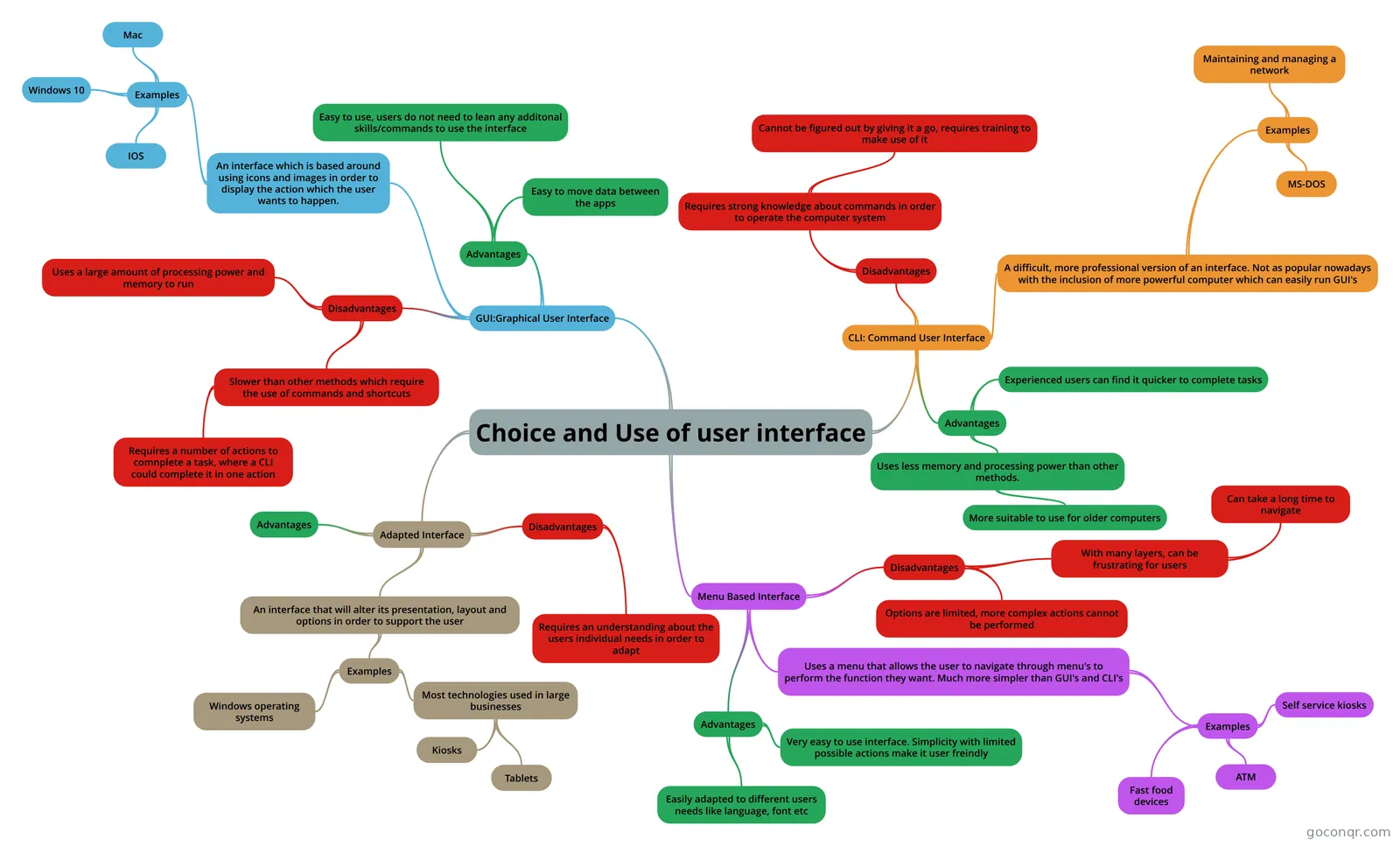
Mind map: Choice and use of user interface
Inhalt der Mindmap
Choice and Use of user interface
GUI:Graphical User Interface
- Disadvantages
- Uses a large amount of processing power and memory to run
- Slower than other methods which require the use of commands and shortcuts
- Requires a number of actions to comnplete a task, where a CLI could complete it in one action
- An interface which is based around using icons and images in order to display the action which the user wants to happen.
- Examples
- Windows 10
- Mac
- IOS
- Examples
- Advantages
- Easy to use, users do not need to lean any additonal skills/commands to use the interface
- Easy to move data between the apps
- Disadvantages
Menu Based Interface
- Uses a menu that allows the user to navigate through menu's to perform the function they want. Much more simpler than GUI's and CLI's
- Examples
- Self service kiosks
- ATM
- Fast food devices
- Examples
- Disadvantages
- With many layers, can be frustrating for users
- Can take a long time to navigate
- Options are limited, more complex actions cannot be performed
- With many layers, can be frustrating for users
- Advantages
- Very easy to use interface. Simplicity with limited possible actions make it user freindly
- Easily adapted to different users needs like language, font etc
- Uses a menu that allows the user to navigate through menu's to perform the function they want. Much more simpler than GUI's and CLI's
Adapted Interface
- An interface that will alter its presentation, layout and options in order to support the user
- Examples
- Windows operating systems
- Most technologies used in large businesses
- Kiosks
- Tablets
- Examples
- Disadvantages
- Requires an understanding about the users individual needs in order to adapt
- Advantages
- An interface that will alter its presentation, layout and options in order to support the user
CLI: Command User Interface
- A difficult, more professional version of an interface. Not as popular nowadays with the inclusion of more powerful computer which can easily run GUI's
- Examples
- Maintaining and managing a network
- MS-DOS
- Examples
- Disadvantages
- Requires strong knowledge about commands in order to operate the computer system
- Cannot be figured out by giving it a go, requires training to make use of it
- Requires strong knowledge about commands in order to operate the computer system
- Advantages
- Experienced users can find it quicker to complete tasks
- Uses less memory and processing power than other methods.
- More suitable to use for older computers
- A difficult, more professional version of an interface. Not as popular nowadays with the inclusion of more powerful computer which can easily run GUI's
Informationen
- Beschreibung
- Mindmap am Choice and Use of user interface, erstellt von Andy Clare am 09/05/2019.
- Erstellt von
- Andy Clare
- Aufrufe
- 2
- Bewertung
Mehr zu Types of User Interfaces