
Mindmap
Graphical User Interface (GUI)
Inhalt der Mindmap
Graphical User Interface (GUI)
Interaction channel between the user and the system
Key Factor: Usability
- Intuitive Clear Friendly
Tech & Lang. to build GUI
- Standalone (Computer) - JAVA Swing
- Web (Browser) - HTML, CSS, JS
- Mobile (Cellphone) - IOS, Android
Containers
- The Frame - JFrame
- Main container for all graphical elements
- Key: Minimize Close Move Maximize
- setSize(width, height);
- setResizable(boolean input);
- setDefaultCloseOperation(EXIT_ON_CLOSE);
- setVisible(boolean input);
- add(GUI component);
- Main container for all graphical elements
- The Panels
- Creates divisions within the Frame
- Groups elements based on purpose for usability
- Creates divisions within the Frame
- The Frame - JFrame
Graphical Distributors (Layouts)
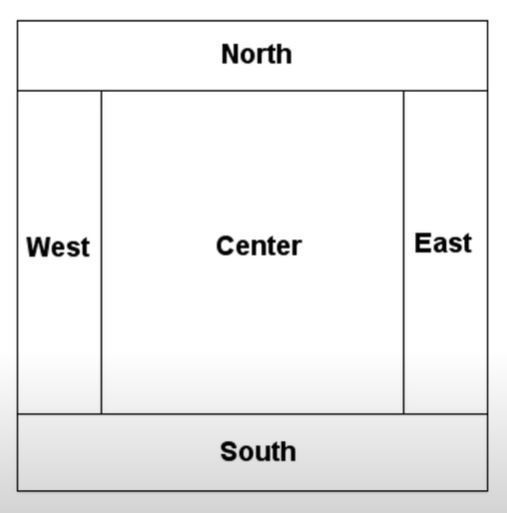
- BorderLayout (Think Compass Rose)
- setLayout(new BorderLayout());
- add(GUI component, BorderLayout.*insert a direction*);
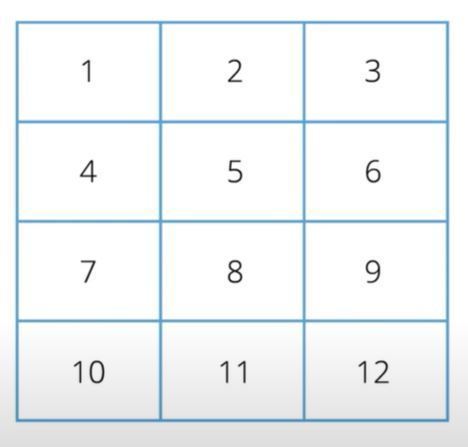
- GridLayout (Think Matrix)
- setLayout(new GridLayout(rows, columns));
- add(GUI component);
- BorderLayout (Think Compass Rose)
Messages' Management
- Error Message
- Warning Message
- Info Message
- Warning Message
- Error Message
Data Input
- JOptionPane
Bilder und Dateien der Mindmap
Informationen
- Beschreibung
- Mindmap am Graphical User Interface (GUI), erstellt von Zach Assid am 09/08/2020.
- Erstellt von
- Zach Assid
- Aufrufe
- 0
- Bewertung