
Mindmap
Week 1
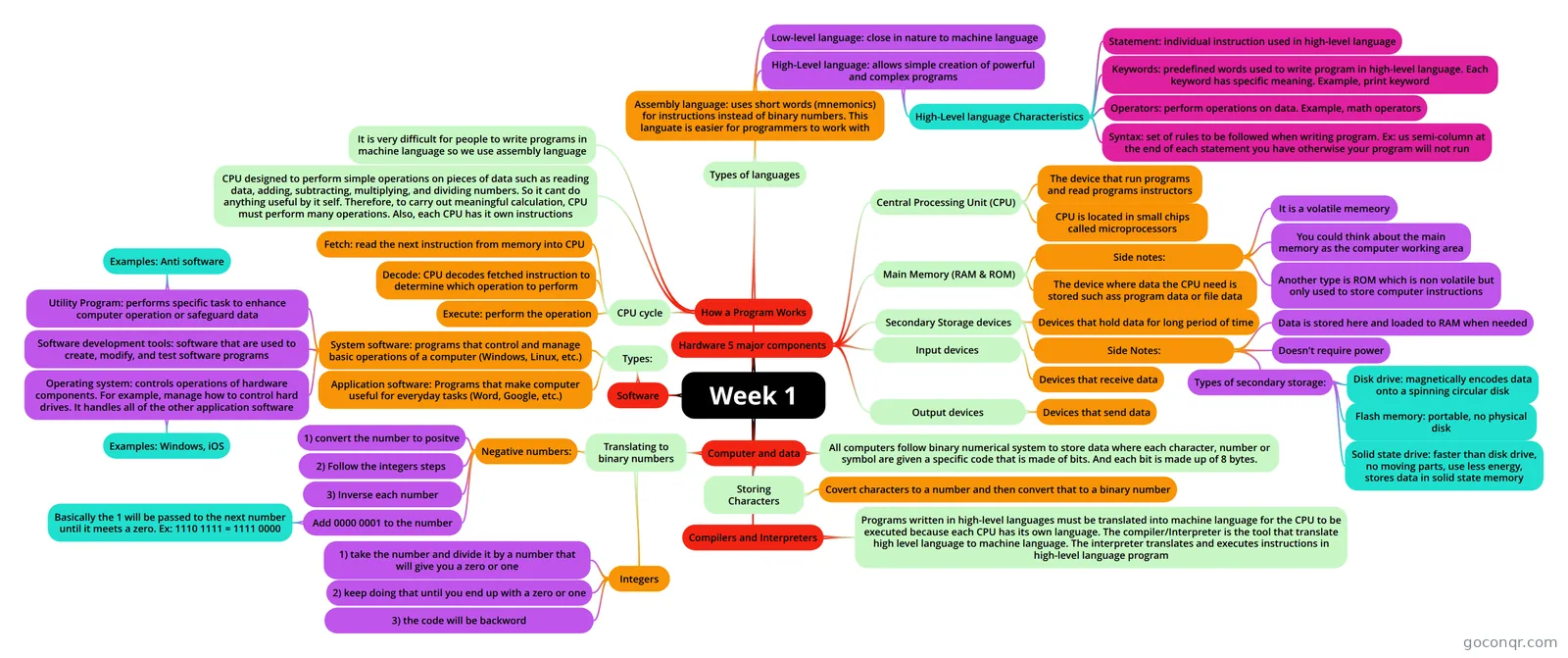
Mind map: computer hardware and software basics
Inhalt der Mindmap
Week 1
Hardware 5 major components
- Central Processing Unit (CPU)
- The device that run programs and read programs instructors
- CPU is located in small chips called microprocessors
- Main Memory (RAM & ROM)
- The device where data the CPU need is stored such ass program data or file data
- Side notes:
- It is a volatile memeory
- You could think about the main memory as the computer working area
- Another type is ROM which is non volatile but only used to store computer instructions
- Secondary Storage devices
- Devices that hold data for long period of time
- Side Notes:
- Data is stored here and loaded to RAM when needed
- Doesn't require power
- Types of secondary storage:
- Disk drive: magnetically encodes data onto a spinning circular disk
- Solid state drive: faster than disk drive, no moving parts, use less energy, stores data in solid state memory
- Flash memory: portable, no physical disk
- Input devices
- Devices that receive data
- Output devices
- Devices that send data
- Central Processing Unit (CPU)
Software
- Types:
- Application software: Programs that make computer useful for everyday tasks (Word, Google, etc.)
- System software: programs that control and manage basic operations of a computer (Windows, Linux, etc.)
- Operating system: controls operations of hardware components. For example, manage how to control hard drives. It handles all of the other application software
- Examples: Windows, iOS
- Utility Program: performs specific task to enhance computer operation or safeguard data
- Examples: Anti software
- Software development tools: software that are used to create, modify, and test software programs
- Operating system: controls operations of hardware components. For example, manage how to control hard drives. It handles all of the other application software
- Types:
Computer and data
- All computers follow binary numerical system to store data where each character, number or symbol are given a specific code that is made of bits. And each bit is made up of 8 bytes.
- Translating to binary numbers
- Integers
- 1) take the number and divide it by a number that will give you a zero or one
- 2) keep doing that until you end up with a zero or one
- 3) the code will be backword
- Negative numbers:
- 1) convert the number to positve
- 2) Follow the integers steps
- 3) Inverse each number
- Add 0000 0001 to the number
- Basically the 1 will be passed to the next number until it meets a zero. Ex: 1110 1111 = 1111 0000
- Integers
- Storing Characters
- Covert characters to a number and then convert that to a binary number
How a Program Works
- CPU designed to perform simple operations on pieces of data such as reading data, adding, subtracting, multiplying, and dividing numbers. So it cant do anything useful by it self. Therefore, to carry out meaningful calculation, CPU must perform many operations. Also, each CPU has it own instructions
- CPU cycle
- Fetch: read the next instruction from memory into CPU
- Decode: CPU decodes fetched instruction to determine which operation to perform
- Execute: perform the operation
- Types of languages
- Assembly language: uses short words (mnemonics) for instructions instead of binary numbers. This languate is easier for programmers to work with
- Low-level language: close in nature to machine language
- High-Level language: allows simple creation of powerful and complex programs
- High-Level language Characteristics
- Keywords: predefined words used to write program in high-level language. Each keyword has specific meaning. Example, print keyword
- Operators: perform operations on data. Example, math operators
- Syntax: set of rules to be followed when writing program. Ex: us semi-column at the end of each statement you have otherwise your program will not run
- Statement: individual instruction used in high-level language
- High-Level language Characteristics
- Assembly language: uses short words (mnemonics) for instructions instead of binary numbers. This languate is easier for programmers to work with
- It is very difficult for people to write programs in machine language so we use assembly language
Compilers and Interpreters
- Programs written in high-level languages must be translated into machine language for the CPU to be executed because each CPU has its own language. The compiler/Interpreter is the tool that translate high level language to machine language. The interpreter translates and executes instructions in high-level language program
Informationen
- Beschreibung
- Mindmap am Week 1, erstellt von Jay Jay am 10/02/2022.
- Erstellt von
- Jay Jay
- Aufrufe
- 0
- Bewertung
Mehr zu Computer Hardware and Software