
Mindmap
Computer Science - Advanced Information Revision Notes
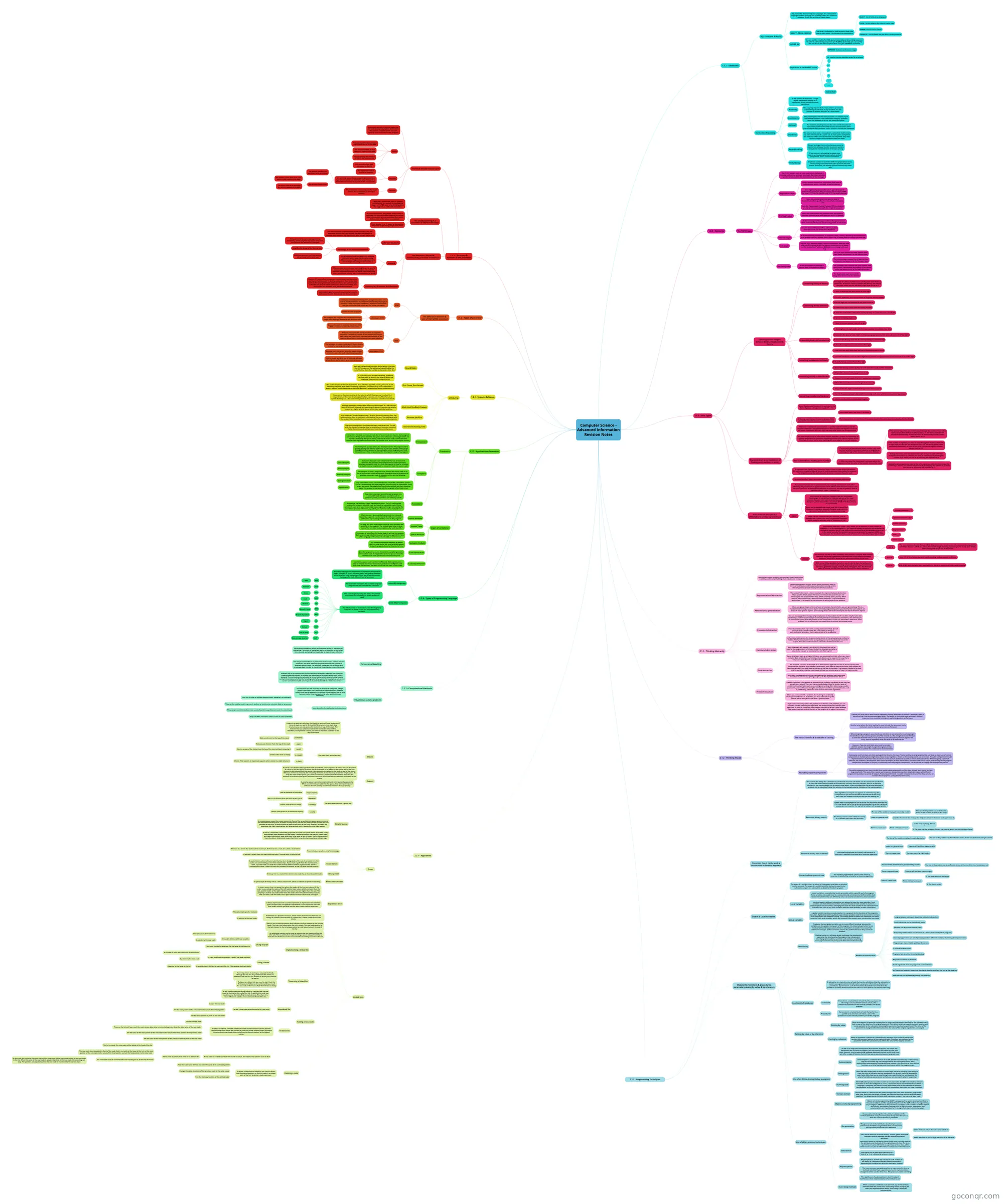
Mind map: Computer science advanced information revision notes
Inhalt der Mindmap
Computer Science - Advanced Information Revision Notes
1.1.1 - Structure & function of the processor
- The Fetch-Decode-Execute Cycle
- Processors operate in defined stages that are used to carry out program instructions. The process is repeated over and over again for each instruction in the program.
- Fetch
- The address of the instruction is copied from the PC to the MAR
- The instruction held at that address is copied to the MDR
- Simultaneously, the contents of the PC are incremented
- The contents of the MDR are copied to the CIR
- Decode
- The instruction held in the CIR is decoded
- It is split into operand and opcode to determine the type of instruction it is. Additional data, if required is fetched from memory and passes to the accumulator
- The opcode specifies the operation to be carried out
- The operand holds either
- The address of the data to be used, which is then copied to the MAR
- The actual data to be operated on, which is passed to the MDR
- Execute
- The instruction is executed and the result held in the accumulator or stored in memory
- The use of pipelining in a processor to improve efficiency
- Pipelining is a technique used to improve performance, for example by overlapping stages in the FDE cycle, or by breaking down the stages in an arithmetic instruction
- An instruction enters the pipeline, and as soon as one stage has been completed, another instruction enters the pipeline. a third instruction then enters before either of the others is completed.
- There may be 10 or 12 stages in the pipeline, with some stages taking longer than others
- Von Neumann, Harvard & contemporary processor architecture
- John Von Neumann
- The most commom implementation of this concept is the von Neumann architecture. Instructions and data are stored in a common main memory and transferred using a single shared bus
- Advantages of von Neumann architecture
- Owing primarily to cost and programming complexity, almost all general-purpose computers are based on von Neumann's principles
- Simplifies the design of the Control Unit
- Data from memory and from devices are accessed in the same way
- Harvard
- An alternative model separates the data and instructions into separate memories using different buses. Program instructions and data are no longer competing for the same bus
- Different sized memories and word lengths can be used for data and instructions. Harvard principles are used wth specialist embedded systems and digital signal processing, where speed takes priority over the complexities of design
- Contemprary Processor Architectures
- Modern CPU chips often incorporate aspects of both von Neumann and Harvard architecture. In desktop computers, there is one main memory for holding both data and instructions, but cache memory is divided into an instruction cache and a data cache so data and instructions are retrieved using Harvard architecture
- Some digital signal processors have multiple parallel data buses (2 write, 3 read) and one instruction bus
- John Von Neumann
- The Fetch-Decode-Execute Cycle
1.1.2 - Types of processor
- The differences between & uses of CISC & RISC processors
- CISC
- In Complex Instruction Set Computers, a large instruction set is used to accomplish tasks in as few lines of assembly language as possible. A CISC instruction combines a 'load/store' instruction with the instruction that carries out the actual calculation
- Advantages of CISC
- Quicker to code programs
- The compiler has very little work to do to translate a high-level language statement into machine code
- Because the code is relatively short, very little RAM is required to store the instructions
- RISC
- Reduced Instruction Set Computers take an opposite approach. a minimum number of very simple instructions, each taking one clock cycle, are used to accomplish all the required operations in multiple general-purpose registers
- Advantages of RISC
- The hardware is simpler to build with fewer circuits needed for carrying out complex instructions
- Because each instruction takes the same amount of time, i.e. one click cycle, pipelining is possible
- RAM is cheap, and RISC use of RAM and software allows better performance processors at less cost
- CISC
- The differences between & uses of CISC & RISC processors
1.2.1 - Systems Software
- Scheduling
- Round Robin
- Each job is allocated a time slice during which it can use the CPU's resources. If a job has not completed by the end of its time slice, the next job is allocated a time slice
- First Come, First Served
- In First Come, First Served scheduling, processes run from start to finish in the order in which the processor receives their request to run
- This is the simplest method to implement. Also, with this algorithm, once a job starts, it will definitely complete. With other scheduling algorithms, starvation may occur. Starvation is when a process cannot complete its execution because it is constantly denied processor time
- However, as the processes run in the order in which the processor receives their request to run, there can be a long wait before a process can run. Therefore, in a system that only has a few concurrent processes, first come, first served can work well
- Multi-level Feedback Queues
- Multiple queues are created with different priority levels. If a job uses too much CPU time it is moved to a lower priority queue. Processes can also be moved to a higher priority queue is they have waited a long time
- Shortest Job First
- Also known as "shortest process next". As with shortest remaining time, the total execution time of each job is estimated by the user. The waiting job with the smallest total execution time is executed when the current job completes
- Shortest Remaining Time
- The time to completion is estimated as each new job arrives. The job with the shortest remaining time to completion is executed, meaning that a shorter new job can take over from the current process
- Round Robin
- Scheduling
1.2.2 - Applications Generation
- Translators
- Interpreters
- Interpreters translate and execute each line of source code one by one. Each program, when run, is firstly syntax-checked. If a syntax error is found, e.g. missing bracket, it is reported. Following the syntax check, each line of source code is converted into machine code equivalent and executed. If a runtime error occurs, the program crashes
- This line-by-line apprach allows the developer to test the program and to quickly identify and remedy each error as it occurs, without having to go through the whole process of translating the entire program every time. Interpreters are thus very useful at the development stage of a program
- Compilers
- Compilers translate code into a form that can be executed. However, the compiler does not execute the code. Compilers produce executable code in a form that cannot be read by a human or readily reverse-engineered i.e. converted back into source code
- The compiler is itself a program suite. It takes the source code as its set of instructions, which it then puts through a series of processes to produce executable code. A compiler carries out the following processes:
- Lexical Analysis
- Syntax analysis
- Semantic analysis
- Code generation
- Optimisation
- Any compilation errors are reported at the end of the compilation process. This is a disadvantage for large programs, as errors may be interlinked. If any errors are found, the program will need to be rectified and then compiled again; this process is repeated until the program is free from errors.
- Assemblers
- Assemblers translate assembly code program into executable code. Because assembly code is platform-specific, assemblers are similarly specific
- Assembling is a relatively simple translation process. There is a one-to-one relationship between assembly code and machine-executable code. Where comments have been used in assembly code programs, they get removed by the assembler. Symbolic references, e.g. labels, are replaced with actual addresses
- Interpreters
- Stages of compilation
- Lexical Analysis
- All unnecessary spaces and all comments are removed. Keywords, e.g. print, constants and identifiers are replaced with tokens representing their function in the program.
- Symbol Table
- The lexer will build up a symbol table for every keyword and identifier in the program. The symbol table helps to keep track of the run-time memory address for each identifier
- Syntax Analysis
- The stream of token from the lexing stage is split up into phrases. Each phrase is parsed which means it is checked against the rules of the language. If the phrase is not valid, an error occurs
- Semantic Analysis
- It is possible to create a sequence of tokens which is valid syntax but is not a valid program. Semantic analysis checks for this kind of error
- Code Generation
- Once the program has been checked, the compiler generates the machine code. It may do this in several 'passes' over the code because code optimisation will also take place
- Code Optimisation
- Sometimes source code is written inefficiently. Code optimisation aims to remove redundant instructions and replace inefficient code with code that achieves the same result but in a more efficient way
- Lexical Analysis
- Translators
1.2.4 - Types of Programming Language
- Assembly Language
- Assembly language uses mnemonics to represent the operation codes. Typically, 2, 3, or 4-character codes are used to represent all the machine code instructions. There are different assembly languages for each different type of processor
- The assembler translates the assembly language program into machine code for execution
- Little Man Computer
- This is an imaginary computer with a very limited instruction set, created by Dr Stuart Madnick in 1965.
- The LMC has only 11 instructions, and the imaginary computer on which it runs has only 100 memory locations
- ADD
- Add
- SUB
- Subtract
- STO
- Store
- LDA
- Load
- BR
- Branch
- BRZ
- Branch if zero
- BRP
- Branch if positive
- IN
- Input
- OUT
- Output
- HLT
- Halt or Stop
- DAT
- Data storage location
- ADD
- Assembly Language
1.3.2 - Databases
- SQL - Interpret & Modify
- SQL stands for Structured Query Language. It is a declarative language used for querying and updating tables in a relational database. It can also be used to create tables
- SELECT...FROM...WHERE
- The SELECT statement is used to extract field from one or more tables. The syntax of the statement is
- SELECT - list of fields to be displayed
- FROM - list the table(s) the data will come from
- WHERE- List of search criteria
- ORDER BY - list the fields that the data is to be sorted on
- The SELECT statement is used to extract field from one or more tables. The syntax of the statement is
- ORDER BY
- You can sort the results of an SQL query in ascending or descending sequence. To order in a descending sequence, specify DESC. Optionally, you can specify ASC but that is the default option when using the ORDER BY statement
- Operators in the WHERE clause
- BETWEEN - between an inclusive range
- IN - specify multiple possible values for a column
- =
- <>
- >
- <
- >=
- <=
- AND/OR/NOT
- Transaction Processing
- In the context of databases, a single logical operation is defined as a transaction. It may consist of several operations
- Atomicity
- This property requires that a transaction is processed in its entirety or not at all. In any situation, it is not possible to process only part of a transaction
- Consistency
- This property ensures that no transaction can violate any of the defined validation rules. Referential Integrity, specified when the database is set up, will always be upheld
- Isolation
- The isolation property ensures that concurrent execution of transactions leads to the same result as if transactions were processed one after the other. This is crucial in a multi-user database
- Durability
- This ensures that once a transaction is committed, it will remain so, even in the event of a power cut. As each part is completed it is held in a buffer until all elements are completed. Only then will the changes to the database tables be made
- Record Locking
- Record locking prevents simultaneous access to objects in a database in order to prevent updates being lost or inconsistencies in the data arising
- If two users are attempting to update two records, a situation can arise in which neither can proceed. This is known as deadlock
- Redundancy
- Duplicate hardware, located in different geographical areas, mirrors every transaction that takes place on the main system. If this fails, the backup system automatically takes over
- SQL - Interpret & Modify
1.3.3 - Networks
- The TCP/IP stack
- The TCP/IP stack is a set of rules used in turn, to format a message so it can be sent over a network. Each layer provides a specific function within the transmission of the message
- Application Layer
- Used to provide services for applications that want to communicate across a network, often the Internet
- Uses high-level protocols that set an agreed standard between the communicating end-points. For example, SMTP (for email), FTP (for file transfer) and HTTP (for web browsing)
- Does not actually determine how the data is transmitted, rather specifies the rules of what should be sent
- Transport Layer
- Uses the Transmission Control Protocol (TCP) to establish an end-to-end connection with the recipient computer
- Splits data into packets and numbers them sequentially. Adds port number to be used based on the HTTP protocol
- At the receiving end this layer confirms that packets have been received and requests any missing packets to be resent
- Internet Layer
- Uses the Internet Protocol (IP) to address packets with the source and destination IP address
- A router forwards each towards an endpoint called a socket, defined by the combination of IP address and port number. Each router uses a routing table to instruct the next hop
- Link Layer
- The link layer operates across a physical connection. Adds the MAC address of the physical NIC that packets should be sent to based on the destination IP address. MAC addresses change with each hop
- Receiving data
- At the destination the message is passed back up through the layers
- The Link layer removes the MAC address from each packet and passes it to the Internet layer
- The Internet layer removes the IP address from each packet and passes it to the Transport layer
- The Transport layer removes the port number from each packet, reassembles the packets in the correct order and passes them to the Application layer
- The Application layer presents the image data for the user in a browser
- At the destination the message is passed back up through the layers
- The TCP/IP stack
1.4.1 - Data Types
- Convert positive integers between Binary, Hexadecimal & Denary
- Converting binary to denary
- Each digit of a binary number has a specific place value that is a power of 2. To convert a binary number into denary, you add up the place values only for the binary digits that are set to 1
- Converting denary to binary
- 1. Draw a table with the place values of each digit
- 2. Find the maximum place value divisor of the given denary number
- 3. Set the digit that corresponds to that place value to 1
- 4. Subtract the place value from the denary number
- 5. Take the result of the subtraction and repeat steps 1-4 until you have a result of 0
- 6. Set the remaining digits to 0
- 7. Read the binary number from left to right
- Converting binary to hexadecimal
- 1. Working from the right (LSB), split the binary number into nibbles (four bits)
- 2. Calculate the value of each nibble in denary using appropriate place values for each set of four digits
- 3. Convert the denary value into the corresponding hexadecimal digit
- 4. Read the hexadecimal number from left to right
- Converting hexadecimal to binary
- 1. Take each hex digit separately and find its equivalent denary value
- 2. Convert each denary value to a four-digit binary number using appropriate place values for each of the digits
- 3. Read the binary number from left to right
- Converting denary to hexadecimal
- 1. Divide the denary number by 16, and write down the result and the remainder
- 2. Repeat the division until you get a result of 0
- 3. Convert the denary numbers to their hexadecimal equivalent
- 4. Write the remainders in reverse to get the final result
- Converting Hexadecimal to denary
- 1. Separate the hex digits and find their equivalent denary values
- 2. Use the hexadecimal place values table to multiply each value with its correspondent place value
- 3. Add the results of the multiplications together
- Converting binary to denary
- Representation & normalisations of floating-point numbers in binary
- Binary floating-point number are expressed in the form: Mantissa x 2^exponent, e.g. 0.101 x 2^4.
- A floating-point number in binary consists of bits allocated to store the mantissa and the exponent
- The number base is not store, it is always 2
- The binary point is also not stored, it is always found in the same place immediately after the first bit
- The two's complement representation is used for both the mantissa and the exponent. The two's complement mantissa allows positive and negative values to be stored. This means that very large and very small values can be represented
- The normalised version of a fractional number provides a unique representation for a number and allows the maximum possible precisions with a given number of bits. Therefore, it is very useful when working with very large or very small numbers
- How to normalise a floating point number
- 1. To normalise a floating-point binary number, you need to check whether the number is positive or negative by checking the sign of the mantissa, and act as follows:
- If the number is positive, you need to move through the mantissa from left to right until you find the first bit whose value is 1. The binary point will be positioned immediately in front of this bit. A normalised positive number always starts as 0.1
- If the number is negative, you need to move through the mantissa from left to right until you find the first bit whose value is 0. The binary point will be positioned immediately in front of this bit. A normalised negative number always starts as 1.0
- 2. After you move the binary point, you must adjust the exponent so that the value of the number remains the same
- Moving the binary point one place to the right is equal to a left shift that multiplies the number by 2. Hence, you need to compensate by dividing the number by 2, which you can do by reducing the exponent by 1
- Moving the binary point one place to the left is equal to a right shift that divides the number by 2. Hence, you need to compensate by multiplying the number by 2, which you can do by increasing the exponent by 1
- 1. To normalise a floating-point binary number, you need to check whether the number is positive or negative by checking the sign of the mantissa, and act as follows:
- How character sets (ASCII & UNICODE) are used to represent text
- To represent text digitally, each character needs to have its own unique bit-pattern. Bit-patterns are combinations of 1s and 0s used to represent data inside of a computer. The bit-pattern used for each character becomes a numeric character code.
- A character can be a letter, punctuation, numbers or non-printing commands
- For computers to be able to communicate and exchange text between each other efficiently, they must have an agreed standard that defines which character code is used for which character. A standardised collection of characters and the bit-patterns used to represent them is called a character set
- ASCII
- ASCII stands for 'American Standard Code for Information Interchange'. It was defined in 1963 and was one of the most common character sets used. It started by using 7 bits to represent characters, which allowed for a maximum of 128 (2^7) characters to be represented
- When text is encoded and stored using ASCII, each of the characters is assigned a denary character code, which is represented and stored in the computer as binary
- There are also extensions on this standard, such as extended ASCII, which uses 8 bits to represent characters, which raises the possible range of characters to 256
- UNICODE
- The problem with ASCII is that it only allows you to represent a small number of characters (128 for standard ASCII). This might be enough to represent the characters in the English alphabet, but it is not sufficient to represent all of the languages and scripts in the world, and all of the possible numbers and symbols. For example, ASCII cant possibly store the hundreds of thousands of characters in the following scripts in 8 bits.
- Chinese characters 汉字
- Japanese characters 漢字
- Cyrillic Кири́ллица
- Gujarati ગુજરાતી
- Urdu اردو
- Greek ελληνικά
- The character set that is most commonly used instead is Unicode. Each Unicode character set can be encoded on a computer with three different encoding standards, which differ based on the minimum number of bits used:
- UTF-8
- The most common Unicode format is 8-bit. Characters can use as few as 8 bits, maximising compatibility with ASCII. However, UTF-8 also allows for variable-length encoding, expanding to 16, 24, 32, 40 or 48 bits when dealing with larger sets of characters
- UTF-16
- Like UTF-8, 16-bit allows variable-length encoding, and can expand to 32 bits
- UTF-32
- With 32-bit, each character uses exactly 32 bits; this is an example of fixed-length encoding
- UTF-8
- With over a million possible characters, we are able to store every character from every alphabet, and include a range of special symbols (e.g. mathematical operators, geometric shapes, arrows, emojis, ideograms, etc.). The first 128 codes in Unicode and ASCII are used to represent the same characters
- The problem with ASCII is that it only allows you to represent a small number of characters (128 for standard ASCII). This might be enough to represent the characters in the English alphabet, but it is not sufficient to represent all of the languages and scripts in the world, and all of the possible numbers and symbols. For example, ASCII cant possibly store the hundreds of thousands of characters in the following scripts in 8 bits.
- Convert positive integers between Binary, Hexadecimal & Denary
2.1.1 - Thinking Abstractly
- Abstraction means removing unnecessary detail. Abstraction is widely used to simplify things that may be very complex
- Representational Abstraction
- Abstraction appears in many forms within computing, both in terms of techniques used to approach problem-solving, and in the computational tools employed to develop solutions.
- The London Tube map is a classic example of a representational abstraction. Many specific details about the lines are removed because they are not necessary for the purpose of the map, which is to help plan a journey. What remains when unnecessary detail has been removed is a representational abstraction, i.e. a simpler version directed at solving a particular problem
- Abstraction by generalisation
- When you group things in terms of a set of common characteristics, you are generalising. This is a fundamental technique used in object-oriented programming when you identify that some objects are 'kinds of' more generic objects. Generalising allows code to be developed and shared between objects
- You can also apply the technique of generalisation to the problem itself. It is often helpful to be able to identify a problem as an example of a more general set of problems. Sometimes, this will help you to understand quickly that the problem is non-computable, or that it is intractable. Otherwise, if the problem can be solved, you can benefit from a solution that already exists
- Procedural abstraction
- Procedural abstraction represents a computational method. One of the skills that is needed with this is the ability to design a well-abstracted procedure that is generalised as far as possible
- Functional abstraction
- In functional abstraction, the implementation detail of the computational method is hidden. The functional will receive an input(s), process the input(s) and return the output. How the transformation is achieved is hidden from the user.
- Most languages will provide a set of built-in functions that can be used by the programmer. In Python, the built-in function to display a value to the console or command line interface is print
- Data abstraction
- Some data types, such as unsigned integers, are conceptually simple; others are more complex. Data abstraction is a technique that allows you to separate the way that a compound data object is used, from the details of how it is constructed
- For example, a stack is an example of an abstract data type and is a last in, first out (LIFO) data structure that supports three standard operations: push (add an item to the stack), pop (remove an item from a stack), and peek (look at the item at the top of the stack). The abstract concept of a stack, and its operations, can be understood without any consideration of how it is implemented.
- With more complex data structures, data abstraction becomes more and more important to prevent you getting caught up in the implementation detail
- Problem reduction
- Problem reduction is the process of generalising or reducing a problem to one that has already been solved. There are many standard algorithms for a wide range of problems. Common tasks, such as searching and sorting, often allow many possible approaches, and each has its strengths and weaknesses. More specialised tasks, such as pathfinding, often also have several alternative algorithms
- When you are faced with a problem, the challenge is to identify what type of problem it is. To do this, you must abstract away the specific detail until you are left with a generalisation
- If you can successfully reduce the problem to a shortest path problem, you can choose a suitable shortest path algorithm, for example Dijkstra's shortest path algorithm, to solve it. A shortest path problem requires us to find a path between two nodes in a graph so that the sum of the weights of its edges is minimised
2.1.2 - Thinking Ahead
- The nature, benefits & drawbacks of caching
- Caching is a term that is much used in computer science. When data is cached, a temporary copy is stored so that it can be accessed again faster. The ability to cache and reuse previously fetched resources is an essential technique in optimising system performance
- Another area where the term 'caching' is used is inside the processor; cache memory is used to improve processor performance
- When designing a program, you should pay attention to any areas where caching might be beneficial. If you need to process all of the records in a file, it might be more effective to read the whole file into an array, and carry out subsequent processes against the array, than to repeatedly read and write to an external file
- However, if you do cache data, you need to consider whether anyone else might change the original version while the data is cached. This could lead to inconsistencies
- Reusable program components
- Commonly used functions are often packaged into libraries for reuse. Teams working on large projects that are likely to make use of certain components in multiple places might also choose to put together a library so these components can be reused. Reusable components include implementations of abstract data structures such as queues and stacks as well as classes and subroutines. When designing a piece of software, the problem is decomposed. This allows developers to think ahead about how each task can be solved, and identify where program components developed in the past, or externally-sourced program components, can be reused to simplify the development process
- Reusable components are more reliable than newly-coded components, as they have already been tested and any bugs dealt with. This saves time, money and resources. Subroutines can then simply be reused with different arguments to produce a variety of outputs. Producing well-tested, reusable components means that they can also be reused in future projects, saving development costs.
- The nature, benefits & drawbacks of caching
2.2.1 - Programming Techniques
- Recursion, how it can be used & compares to an iterative approach
- Recursion is the ability of a subroutine to call itself. A recursive call makes use of a stack and sack frames to store the data from each depth of function call. For every recursive solution, there is an iterative solution (i.e. the same problem can be solved using loops). A recursive algorithm can be used wherever a problem can be solved by finding the solution to increasingly smaller instances of the same problem
- Recursive binary search
- This algorithm can only be run against an ordered array. This is important as you have to be able to discard half of the array each time you attempt to find the item you are looking for
- Always look at the endpoint of the array for the item being searched for. If it is not found, half of the array can be discarded; the array is ordered; so, you can next examine the top half or bottom half, as appropriate
- The binary search can be coded recursively as it satisfies the criteria for recursion
- The size of the problem must get repeatedly smaller
- The size of the problem can be defined in terms of the number of items in the array
- There is a general case
- Look for the item in the array at the midpoint between the lower and upper bounds
- There is a base case
- There are two base cases:
- 1. The array is empty. Return -1
- 2. The item is at the midpoint. Return the index at which the item has been found
- There are two base cases:
- The size of the problem must get repeatedly smaller
- Recursive binary tree traversal
- The standard algorithm for a binary tree traversal is recursive. It satisfies the criteria for a recursive algorithm:
- The size of the problem must get repeatedly smaller
- The size of the problem can be defined in terms of the size of the tree being traversed
- There is a general case
- Traverse left and then traverse right
- There is a base case
- There are no left or right nodes
- The size of the problem must get repeatedly smaller
- The standard algorithm for a binary tree traversal is recursive. It satisfies the criteria for a recursive algorithm:
- Recursive binary search tree
- The standard algorithm for a binary tree search is recursive. It satisfies the criteria for a recursive algorithm:
- The size of the problem must get repeatedly smaller
- The size of the problem can be defined in terms of the size of the tree being traversed
- There is a general case
- Traverse left and then traverse right
- There is a base case
- There are two base cases:
- 1. The node matches the target
- 2. The tree is empty
- There are two base cases:
- The size of the problem must get repeatedly smaller
- The standard algorithm for a binary tree search is recursive. It satisfies the criteria for a recursive algorithm:
- Global & Local Variables
- The scope of a variable refers to where in the program a variable or constant can be accessed. The scope of a variable an either be local to a particular subroutine, or part of a subroutine, or global to the whole program
- Local Variables
- A local variable is a variable that is only accessible within a specific part of a program. These variables are usually local to a subroutine and are declared or defined within that routine. Parameters that are defined by value can also be considered as local variables
- Local variables in different subroutines are allowed to have the same identifier. Such variables are distinct from each other, because the data of each variable is stored in a separate place in main memory. Changing the value of a local variable in one subroutine will not affect the value of any local variables with the same identifier in other subroutines
- Global variables
- A global variable can be accessed anywhere in a program for the duration of the program's execution. A global variable has global scope. Global variables need to be preserved in memory until the program has stopped running. This means global variables can sometimes use more resources than local variables, which are removed from memory once a subroutine has ended
- Programs that use global variables can be more difficult to debug, because the variables can be updates in any part of the program. It is almost always better to use local variables and to pass values between subroutines to avoid errors caused by unforeseen changes. Global constants are less of a problem because they cannot be modified
- Modularity, functions & procedures, parameter passing by value & by reference
- Modularity
- Modularisation is a software design technique that emphasizes separating the functionality of a program into independent, interchangeable modules, such that each contains everything necessary to execute only one aspect of the desired functionality
- Benefits of modularisation
- Large programs are broken down into subtasks/subroutines
- Each subroutine can be individually testes
- Modules can be re-used several times
- Frequently used modules can be saved in a library and used by other programs
- Several programmers can simultaneously work on different modules, shortening development time
- Programs are more reliable and have few errors
- It is easier to find errors
- Programs take less time to test and debug
- Programs are easier to maintain
- A well-organised, modular program is easier to follow
- Self-contained modules mean that the change should not affect the rest of the program
- New features can be added by adding new modules
- Functions & Procedures
- A subroutine is a named section of code that can be called by writing the subroutine's name in a program statement. Subroutine can also be referred to as functions or procedures. A procedure is a set of instructions that will be executed when the procedure is called, whilst a function will return a value when it has finished executing
- Functions
- A function is a named block of code that has a purpose of returning a value (called the 'return value'). Like a procedure a function can be called by another part of the program
- Procedures
- A procedure is a named block of code that performs a specific task, but does not return a value. The procedure can be called by another part of the program
- Passing by value or by reference
- Passing by value
- When an argument is passed to a subroutine by value, each parameter specified for the subroutine will hold a copy of the data from the original argument. This data is held in a separate memory location and is only available to the subroutine (meaning the parameter has local scope). Even if the value of the parameter is changed within the subroutine, the value of the original argument is unchanged
- Passing by reference
- When an argument is passed to a subroutine by reference, this creates a pointer that contains the memory address of the original variable. Therefore, any changes to the parameter within the subroutine also affects the value of the original variable
- Passing by value
- Use of an IDE to develop/debug a program
- An IDE is an Integrated Development Environment. Programs are simple text documents and, to create a program, you only need a text editor to enter your code. However, most programming language downloads include an IDE, and these will offer a range of features that will help you as you develop your program code
- Autocomplete
- Autocomplete is a common feature of an IDE. JSFiddle automatically creates closing tags for each HTML tag and closing brackets for each open bracket. More sophisticated autocomplete functionality may provide a list of built-in or user-defined functions, or a list of variable and class names within the program scope
- Debug tools
- Most IDEs offer debug tools as well as instant logic and error checking. The ability to trace the value of variables and set breakpoints can be very useful for debugging code. Some IDEs allow you to step through your code line by line, and examine the value of variables as you proceed, so that you can see exactly what is happening
- Running code
- Most IDEs allow you to run code. In order to run your code, the IDE must include a relevant translator or must be configured to access a translator that is installed elsewhere. Where a language is compiled, the IDE will usually allow some form of interpretation to allow for development 'on the fly' without requiring full compilation every time the code is changed
- Version control
- Version control is a feature that will record changes that have been made to a program file over time. Every time you make a change, you record a note that explains what has been modified. This allows you to find and recall a previous version if you 'mess up' your code.
- Use of object-oriented techniques
- Object-oriented programming
- Object-oriented programming (OOP) is an approach to system development that is focused on objects and the way that they interact. The OOP method of programming (or paradigm) is different to the procedural paradigm. Code is written to define objects and classes, and certain principles such as encapsulation, inheritance and polymorphism are important to the design of an object-oriented program
- Encapsulation
- Encapsulation binds together the attributes (data) and the methods (functions and procedures) that manipulate the data. It does this so that the data is protected.
- The general rule is that attributes should only be access (retrieved or modified using methods that are contained (encapsulated) within the class definition
- Data should never be accessed directly. Instead, getter and setter methods must be provided that will allow access to the attributes:
- Getter methods return the value of an attribute
- Setter methods let you change the value of an attribute
- Inheritance
- Inheritance makes it possible to create a new child class that inherits the attributes and methods of the original (parent) class. The term 'parent class' is also referred to as superclass or base class, while 'child classes' can also be referred to as subclasses or derived classes
- Inheritance can be used when you observe a 'kind-of' or 'is-a' relationship between classes
- Polymorphism
- Polymorphism is another key concept of OOP. It refers to the ability of a method to exhibit different behaviours depending on the object on which the method is invoked
- The most common way polymorphism is experienced is when a method, inherited from a parent class, has its implementation changed to better suit the child class. This process is called overriding
- The significance of polymorphism is that the object itself knows which implementation of a method to use
- Overriding methods
- When a subclass is defined, it can override any of the methods inherited from the parent class. Overriding means changing the code (the implementation detail). Overriding is a form of polymorphism
- Object-oriented programming
- Modularity
- Recursion, how it can be used & compares to an iterative approach
2.2.2 - Computational Methods
- Performance Modelling
- Performance modelling, often performance testing, is a process of evaluating if a system or a program works as expected or not before it is released, and using this knowledge to make it more effective
- One way to achieve this is to produce a set of success criteria and test scenarios, and then measure the performance of the system or program against them. For example, a program can be tested with erroneous data in order to check that it can handle errors effectively
- Another way is to simulate real-life circumstances and check how well the system or program operates usually to validate the robustness of a system when there is high demand. This method can be extended to stress testing, which means testing beyond normal circumstances, to find the 'breaking point' of a system. For example, a web server can be overwhelmed with web requests in order to identify the limit in its service
- Visualisation to solve problems
- Visualisation includes a variety of techniques (diagrams, images, graphs, flow charts, etc.) that aim to illustrate what a problem entails, and how to approach its solution. Visualisations aim to help humans (rather than computers) to solve problems more effectively.
- Some benefits of visualisation techniques are:
- They can be used to explain complex tasks, scenarios, or situations
- They can be used to model, represent, analyse, or summarise concepts, data, or processes
- They can present information more succinctly and in ways that are easier to understand
- They can offer alternative views as how to solve problems
- Performance Modelling
2.3.1 - Algorithms
- Stacks
- A stack is an abstract data type that holds an ordered, linear sequence of items. A stack is a last in, first out (LIFO) structure. In a stack data structure, you can only access the element on top of the stack. The element that was added last will be the one to be removed first. Therefore, to implement a stack, you need to maintain a pointer to the top of the stack
- The main stack operations are:
- push(data)
- Adds an element to the top of the stack
- pop()
- Removes an element from the top of the stack
- peek()
- Returns a copy of the element on the top of the stack without removing it
- is_empty()
- Checks if the stack is empty
- is_full()
- Checks if the stack is at maximum capacity when stored in a static structure
- push(data)
- Queues
- A queue is an abstract data type that holds an ordered, linear sequence of items. You can describe it as a first in, first out (FIFO) structure; the first element to be added to the queue will be the first element to be removed from the queue. New elements are added to the back or rear of the queue. When an element is removed, the remaining elements do not move up to take the empty space. To keep the order of the queue, you need to maintain a pointer to the front which indicates the element at the front of the queue and one to the rear which indicates the element at the back of the queue
- A priority queue is one where each element in the queue has a priority. When new elements are added to the queue, they are inserted ahead of those of lower priority and behind elements of equal priority
- The main operations on a queue are:
- enqueue(data)
- Add an element to the queue
- dequeue()
- Return an element from the front of the queue
- is_empty()
- Checks if the queue is empty
- is_full()
- Checks if the queue is at maximum capacity
- enqueue(data)
- Circular queue
- A circular queue reuses the empty slots at the front of the array that are caused when elements are removed from the queue. AS items are enqueued, and the rear index pointer reaches the last position of the array, it wraps around to point to the start of the array. Similarly, as items are dequeued the front index pointer will wrap around until it passes the rear index pointer
- Trees
- A tree is a connected, undirected graph with no cycles. No cycles means that there is only one possible path between any two nodes. Connected means that there is a path from any node to any other node, and there is no node, or set of nodes, that is disconnected from the others. Undirected means that there is no direction associated with an edge
- Trees introduce another set of terminology:
- The root of a tree is the start node for traversals. If the tree has a root, it is called a rooted tree
- A branch is a path from the root to an end point. The end point is called a leaf
- Rooted trees
- A rooted tree is a tree with one node that has been designated as the root. In a rooted tree, the nodes are connected by parent-child relationships. If you mark a path from the root towards a node, a parent node is a node that comes directly before another adjacent node, which is considered its child. A node can have any number of children. A leaf is a node with no children
- Binary trees
- A binary tree is a rooted tree where every node has at most two child nodes
- Binary search trees
- A special type of binary tree is a binary search tree, which is ordered to optimise searching.
- A binary search tree is a rooted tree where the nodes of the tree are ordered. If the order is ascending, the nodes of the left subtree have values which are lower than the root, and the nodes of the right subtree have values that are higher than the root. This property is true for any node of the tree; the nodes of its left subtree will have values that are lower, and the nodes of its right subtree will have values that are higher
- Expression trees
- A binary expression tree is used to represent an expression. Two common types of expression are algebraic and Boolean. In an expression tree, the lead nodes contain operands and the other nodes contain operators.
- Linked Lists
- A linked list is a dynamic structure, which means that the size of the list can change at runtime. Each element in a linked list is called a node. Each node stores:
- The data relating to the element
- A pointer to the next node
- There is also a separate pointer that indicates the first element in the list (the head). This has a null value when the list is empty. The next node pointer of the last element in the list always points to a null value to mark the end of the list
- An additional pointer can be used to indicate the last element of the list (the tail). This is useful when implementing a queue using a linked list so that the end of the list can be accessed without needing to traverse the list.
- Implementing a linked list
- Using records
- A record is defined with two variables
- The data value of the element
- A pointer to the next node
- You must also define a pointer for the head of the linked list
- A record is defined with two variables
- Using classes
- A class is defined to represent a node. The node contains:
- A variable to store the data value of the element
- A pointer to the next node
- A second class is defined to represent the list. This needs a single attribute:
- A pointer to the head of the list
- A class is defined to represent a node. The node contains:
- Using records
- Traversing a linked list
- Traversing means to work your way systematically through the list. You may need to do this to find an element in the list or if you wanted to display the contents of the list
- To traverse a linked list, you need to start from the first node and follow each next link until you reach the last node. If the head is Null then the list is empty
- Adding a new node
- Unordered list
- To add a node to an unordered linked list, you can add the new node to the start or the end of the list. To add it at the end, you must traverse the list to find the last element. Therefore, it is more efficient to add the new node to the front of the list.
- To add a new node to the front of a list, you must:
- Create the new node
- Set the next pointer of the new node to the value of the head pointer
- Set the head pointer to point to the new node
- Ordered list
- If the list is ordered , the new element must be inserted into the correct position. The following steps define the process for inserting a new element into a list where the elements are ordered numerically from the lowest number to the highest number
- Create the new node
- Traverse the list until you reach the node whose data value is numerically greater than the data value of the new node
- Set the value of the next pointer of the new node to the value of the next pointer of the previous node
- Set the value of the next pointer of the previous node to point to the new node
- A new node is created based on the record structure. The node's next pointer is set to Null
- There are 3 situations that need to be allowed for:
- The list is empty; the new node will be added at the head of the list
- The new node must be added in front of the node that is currently at the head of the list; set the next pointer of the new node to the value of the head pointer and set the head pointer to the new node
- The new node must be inserted within the existing list or at the end of the list
- To deal with this situation, the data value of the new node will be compared to that of the next node in the list. When the value of the next node is greater than that of the new node, the searching can stop. The pointers are adjusted so that the new node is inserted into the correct place
- There are 3 situations that need to be allowed for:
- If the list is ordered , the new element must be inserted into the correct position. The following steps define the process for inserting a new element into a list where the elements are ordered numerically from the lowest number to the highest number
- Unordered list
- Deleting a node
- To delete a node from a linked list you need to find it and then adjust pointers so that the node is no longer part of the list. To delete a node, you must:
- Find the node to be deleted and note the value of its next node pointer
- Change the value of pointer of the previous node to the value noted
- Free the memory location of the deleted node
- To delete a node from a linked list you need to find it and then adjust pointers so that the node is no longer part of the list. To delete a node, you must:
- A linked list is a dynamic structure, which means that the size of the list can change at runtime. Each element in a linked list is called a node. Each node stores:
- Stacks
Informationen
- Beschreibung
- Mindmap am Computer Science - Advanced Information Revision Notes, erstellt von Dane Owen am 16/05/2022.
- Erstellt von
- Dane Owen
- Aufrufe
- 1
- Bewertung