
Mindmap
OSPF Routing
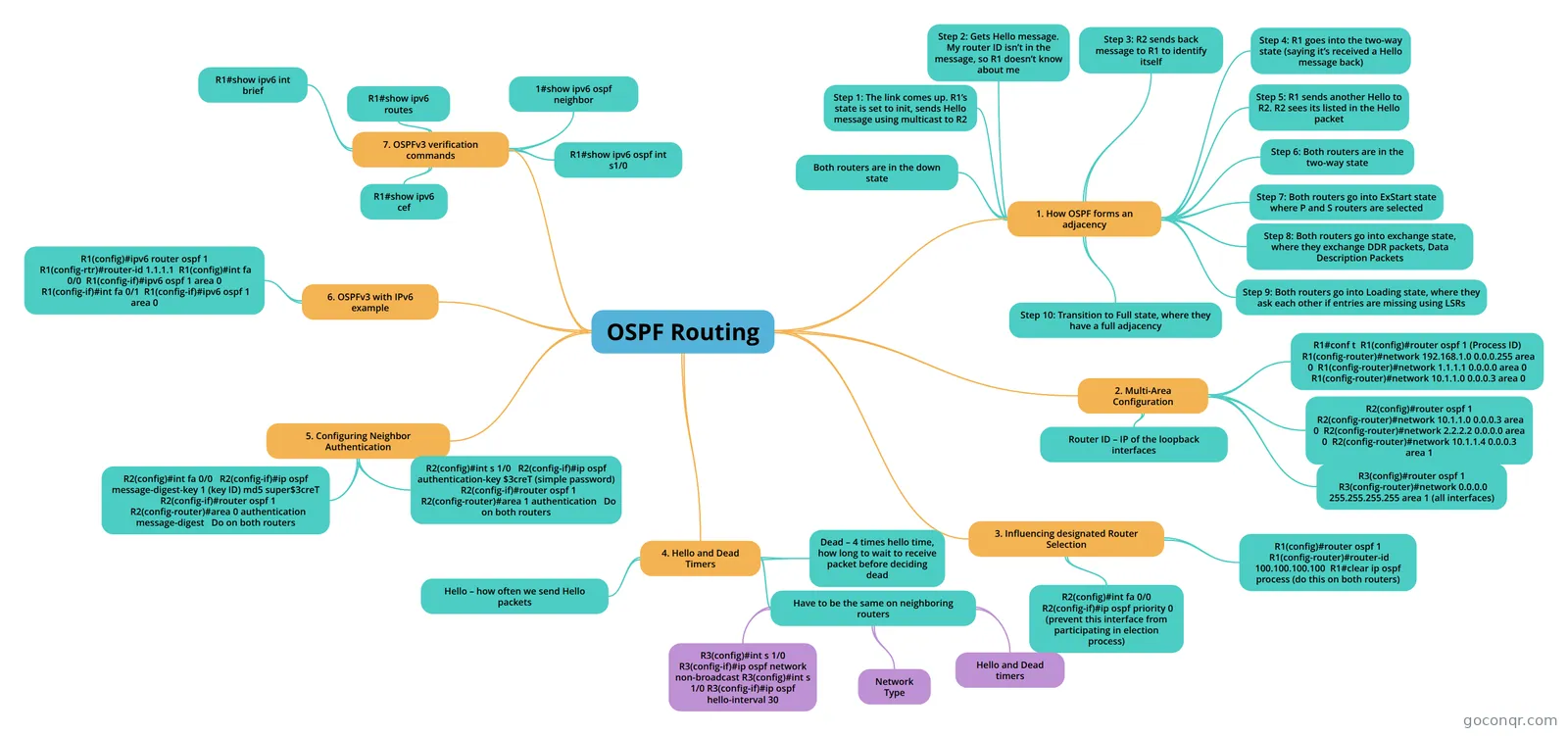
Mind map: OSPF Routing
Inhalt der Mindmap
OSPF Routing
1. How OSPF forms an adjacency
- Both routers are in the down state
- Step 1: The link comes up. R1’s state is set to init, sends Hello message using multicast to R2
- Step 2: Gets Hello message. My router ID isn’t in the message, so R1 doesn’t know about me
- Step 3: R2 sends back message to R1 to identify itself
- Step 4: R1 goes into the two-way state (saying it’s received a Hello message back)
- Step 5: R1 sends another Hello to R2. R2 sees its listed in the Hello packet
- Step 6: Both routers are in the two-way state
- Step 7: Both routers go into ExStart state where P and S routers are selected
- Step 8: Both routers go into exchange state, where they exchange DDR packets, Data Description Packets
- Step 9: Both routers go into Loading state, where they ask each other if entries are missing using LSRs
- Step 10: Transition to Full state, where they have a full adjacency
2. Multi-Area Configuration
- R1#conf t R1(config)#router ospf 1 (Process ID) R1(config-router)#network 192.168.1.0 0.0.0.255 area 0 R1(config-router)#network 1.1.1.1 0.0.0.0 area 0 R1(config-router)#network 10.1.1.0 0.0.0.3 area 0
- R2(config)#router ospf 1 R2(config-router)#network 10.1.1.0 0.0.0.3 area 0 R2(config-router)#network 2.2.2.2 0.0.0.0 area 0 R2(config-router)#network 10.1.1.4 0.0.0.3 area 1
- R3(config)#router ospf 1 R3(config-router)#network 0.0.0.0 255.255.255.255 area 1 (all interfaces)
- Router ID – IP of the loopback interfaces
3. Influencing designated Router Selection
- R1(config)#router ospf 1 R1(config-router)#router-id 100.100.100.100 R1#clear ip ospf process (do this on both routers)
- R2(config)#int fa 0/0 R2(config-if)#ip ospf priority 0 (prevent this interface from participating in election process)
4. Hello and Dead Timers
- Hello – how often we send Hello packets
- Dead – 4 times hello time, how long to wait to receive packet before deciding dead
- Have to be the same on neighboring routers
- Hello and Dead timers
- Network Type
- R3(config)#int s 1/0 R3(config-if)#ip ospf network non-broadcast R3(config)#int s 1/0 R3(config-if)#ip ospf hello-interval 30
5. Configuring Neighbor Authentication
- R2(config)#int s 1/0 R2(config-if)#ip ospf authentication-key $3creT (simple password) R2(config-if)#router ospf 1 R2(config-router)#area 1 authentication Do on both routers
- R2(config)#int fa 0/0 R2(config-if)#ip ospf message-digest-key 1 (key ID) md5 super$3creT R2(config-if)#router ospf 1 R2(config-router)#area 0 authentication message-digest Do on both routers
6. OSPFv3 with IPv6 example
- R1(config)#ipv6 router ospf 1 R1(config-rtr)#router-id 1.1.1.1 R1(config)#int fa 0/0 R1(config-if)#ipv6 ospf 1 area 0 R1(config-if)#int fa 0/1 R1(config-if)#ipv6 ospf 1 area 0
7. OSPFv3 verification commands
- R1#show ipv6 int brief
- R1#show ipv6 routes
- 1#show ipv6 ospf neighbor
- R1#show ipv6 ospf int s1/0
- R1#show ipv6 cef
Informationen
- Beschreibung
- Mindmap am OSPF Routing, erstellt von Sharni Knight am 05/10/2015.
- Erstellt von
- Sharni Knight
- Aufrufe
- 18
- Bewertung