
Mindmap
Part 1: Mind Map
Inhalt der Mindmap
Part 1: Mind Map
Data structures
- XML
- Elements
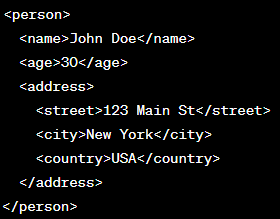
- Elements are the fundamental building blocks of an XML document. They are enclosed within start tags and end tags and can contain other elements, text, or attributes. Elements can be nested to create hierarchical structures.
- Text Nodes
- Text nodes represent the actual content within an element. They can contain plain text or data.
- <description>This is a sample XML document.</description>
- Processing Instructions
- Processing instructions provide instructions to applications or processors that handle the XML document. They are typically used to specify actions such as transforming the XML or applying stylesheets.
- <?xml-stylesheet type="text/xsl" href="style.xsl"?>
- Attributes
- Attributes provide additional information about an element. They are specified within the start tag of an element and consist of a name-value pair. Attributes are handy for providing metadata or additional details about an element.
- <person gender="male"> <name>John Doe</name> <age>30</age> </person>
- Comments
- <!-- This is a comment -->
- Comments allow you to include explanatory or informational text within an XML document. They are enclosed within <!-- and --> delimiters.
- Namespaces
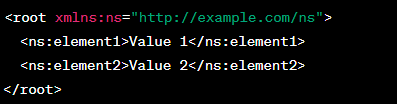
- Namespaces allow elements and attributes to be identified uniquely in XML documents. They help avoid naming conflicts in XML documents that use multiple vocabularies.
- Elements
- JSON
- Arrays
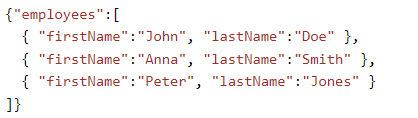
- Arrays are ordered lists of values enclosed within square brackets []. They can contain values of any JSON data type, including objects and other arrays
- ["apple", "banana", "orange"]
- Objects
- { "name": "John", "age": 30, "city": "New York" }
- Objects are enclosed within curly braces {} and consist of key-value pairs. Keys are strings, and values can be any valid JSON data type.
- Value
- A value can be a number, a string, an array, an object or a boolean value (i.e. true or false) or Null. Values can be nested.
- [100, 200, 300, 400] (Example of an array)
- Arrays
- XML
Digital Methods of Exchanging Data
- XML
- Pros
- Namespaces are supported by XML, making it possible to combine data from various sources without naming conflicts.
- XML can be validated against a schema or DTD, ensuring that it conforms to a specific set of rules and requirements.
- XML has a well-defined structure and syntax, making it easy to read and understand.
- XML is extremely extensible and can be tailored to suit the requirements of applications.
- Many different programming languages, tools, and platforms support XML, due to its age.
- Cons
- XML can be wordy and requires more typing than JSON to represent the same data.
- XML can be more difficult to parse and manipulate than JSON, especially in languages that lack built-in support for XML.
- When sending large amounts of data over a network, the larger file sizes of XML and JSON can be problematic.
- XML can be susceptible to security vulnerabilities, such as XXE (XML External Entity) attacks
- Pros
- JSON
- Pros
- JSON is a compact data format that uses less storage space and bandwidth than XML.
- JSON is easily parsed and manipulated and is widely supported by contemporary programming languages.
- JSON is simple to read and code, making it more developer friendly.
- JSON is less verbose than XML, which can make it simpler to work with in some situations.
- Because JSON is native to JavaScript, it works well in web applications and APIs.
- Cons
- Due to JSON's lack of built-in support for namespaces, combining data from various sources may result in naming conflicts.
- Since JSON lacks a formal validation mechanism, it may be challenging to guarantee that data complies with a given set of guidelines or specifications.
- JSON is less extensible than XML, which can make it more challenging to modify for applications.
- Because JSON does not support comments, it can be more challenging to explain complex data structures and code.
- Pros
- REST
- Cons
- REST does not have a strict standard like SOAP, which can lead to inconsistencies in how APIs are designed and implemented.
- REST is primarily suited for CRUD (Create, Read, Update, Delete) operations and may not provide built-in features for advanced functionalities like transactions and security.
- REST APIs often lack a formal contract or description language, making it harder to generate client-side code automatically.
- RESTful APIs may require multiple round trips to the server to accomplish a task, leading to higher network overhead.
- Pros
- REST is straightforward and easy to understand, making it easier to develop and maintain APIs.
- REST allows for a wide range of data formats (such as JSON, XML) and supports various protocols (HTTP, HTTPS).
- RESTful services are stateless, meaning each request contains all the necessary information, making them scalable and highly cacheable.
- REST is the prevailing architectural style for web services, and there is extensive tooling and support available.
- Cons
- Protocols
- User Datagram Protocol
- UDP, is a protocol that is used for fast data applications like video and audio streaming. It doesn't provide error-checking or reliability guarantees, but it offers faster transmission compared to TCP.
- Transmission Control Protocol
- TCP is a protocol that establishes a reliable connection between devices, ensuring secure data transmission. It breaks data into segments for transmission and reassembles them at the receiving end. TCP is commonly used for transmitting data over networks and the internet.
- Hypertext Transfer Protocol
- HTTP facilitates the transfer of web pages and content on the internet. It defines communication between web browsers and servers, ensuring proper display of web pages.
- Hypertext Transfer Protocol Secure
- HTTPS, an extension of HTTP, enables secure communication over computer networks. HTTP encrypts the communication protocols using TLS (Transport Layer Security) or SSL (Secure Sockets Layer), providing security during data transmission.
- File Transfer Protocol
- FTP facilitates the transfer of files between devices on a network. It provides a standardized method for exchanging files and supports secure transfers using encryption.
- Simple Mail Transfer Protocol
- SMTP is responsible for sending and receiving email messages over the internet. It ensures proper communication between email servers, leading to accurate email delivery.
- Domain Name System
- DNS serves the purpose of translating domain names into IP addresses. It enables the mapping of human-readable domain names, like www.example.com, to IP addresses that computers can understand.
- Virtual Private Network
- An IP address is a unique identifier assigned to every device connected to an IP-based network. It acts as the device's distinct address, allowing communication with other devices on the network.
- User Datagram Protocol
- SOAP
- Pros
- SOAP supports advanced features like security, transactions, reliability, and message-level integrity.
- SOAP has a well-defined standard and protocol for building web services, ensuring interoperability across different platforms and programming languages.
- SOAP provides a standardized way of handling errors and exceptions.
- SOAP APIs are described using WSDL (Web Services Description Language), which allows for code generation and automatic client-side stubs.
- Cons
- SOAP primarily uses XML for data representation, limiting the options for data formats and making it less compatible with modern web development approaches.
- SOAP messages tend to be larger due to XML format and the additional protocol layers, resulting in higher bandwidth consumption and slower performance.
- SOAP is more complex than REST, requiring additional layers of protocols and XML-based messaging, which can increase development and maintenance effort.
- While SOAP is widely adopted in enterprise systems, its popularity has decreased in favor of REST for public-facing APIs.
- Pros
- XML
Data Specfication
- Data types
- Integer
- Boolean
- Decimal
- String
- Date
- XML only
- Time
- XML only
- Null
- JSON only
- Array
- JSON only
- Object
- JSON only
- Data Validation and Constraints
- JSON
- External Methods
- Backend Validation: If the JSON data is being processed on a server or backend system, users can perform validation and constraint checking in your application code. This involves parsing the JSON data and applying the necessary validation rules using programming constructs and logic.
- Database Constraints: If the JSON data is stored in a database, userscan utilize database constraints to enforce data validation rules
- Custom Code: Userscan write custom code or use programming languages with built-in validation capabilities, such as Python with the json and jsonschema libraries. By parsing the JSON data and writing custom validation logic, userscan check for specific conditions, types, ranges, or other constraints.
- JSON Schema
- Allows usersto describe the structure, format, and constraints of JSON data. It provides a way to define schemas that can be used to validate JSON documents.
- External Methods
- XML
- XML Schema
- XML Schema is a way to define the structure and constraints of an XML document. It provides a set of validation rules and allows usersto define data types, element relationships, uniqueness constraints, and more.
- External Methods
- Document Type Definition (DTD): DTD is a simple way to define the structure and constraints of an XML document. It specifies the elements, attributes, and entity declarations allowed in the XML document. By defining a DTD, userscan enforce constraints on the XML data, such as element order, data types, and cardinality.
- Schematron is a rule-based validation language for XML. It allows usersto define validation rules using XPath expressions. Schematron focuses on business and application-specific constraints that may be difficult to express using DTD or XML Schema alone.
- XML Schema
- JSON (JavaScript Object Notation) and XML do not have built-in mechanisms for data validation and constraints.
- JSON
- Data types
Data Interface
- Sample Data
- JSON
- XML
- JSON
- Tables
- Rows
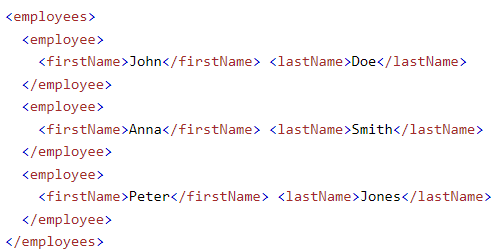
- In data, a row refers to a horizontal arrangement of data values within a table or spreadsheet. It represents a single record or instance of data.
- Cells
- In data, a cell refers to a single intersection point within a table or spreadsheet where a row and a column intersect. It is the smallest unit of data within the table.
- Columns
- a column refers to a vertical arrangement of data values within a table or spreadsheet. It represents a specific attribute or data field for each record or row in the table.
- Rows
- Sample Data
Bilder und Dateien der Mindmap
Informationen
- Beschreibung
- Year 10 Digital Technologies Mindmap am Part 1: Mind Map, erstellt von Ray Dew am 14/10/2022.
- Erstellt von
- Ray Dew
- Aufrufe
- 1
- Verlauf
-
- Erstellt von Ray Dew · 27 Jul 2022
- Kopiert von Ray Dew · 14 Okt 2022
- Bewertung