
Notizen
Ohne Titel
Inhalt der Notizen (11)
Seite 1
to make a react project we have couple of options: one is using script tag in html and css
we need to include cdn of react and react-dom
Sigle page appliction:
Advantages:
Good user experience
Catching: if offline then website will work
Disadvateges:
Low SEO optimization
History - since javascript manipulates the page so no history track- solved by certain libraries
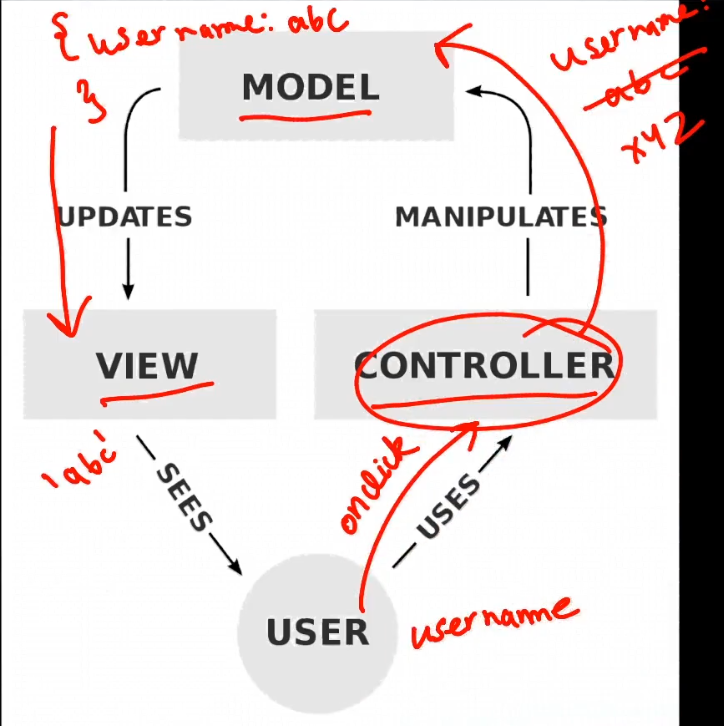
React is Model in MVC architecture
Seite 2
Libraray vs Framework
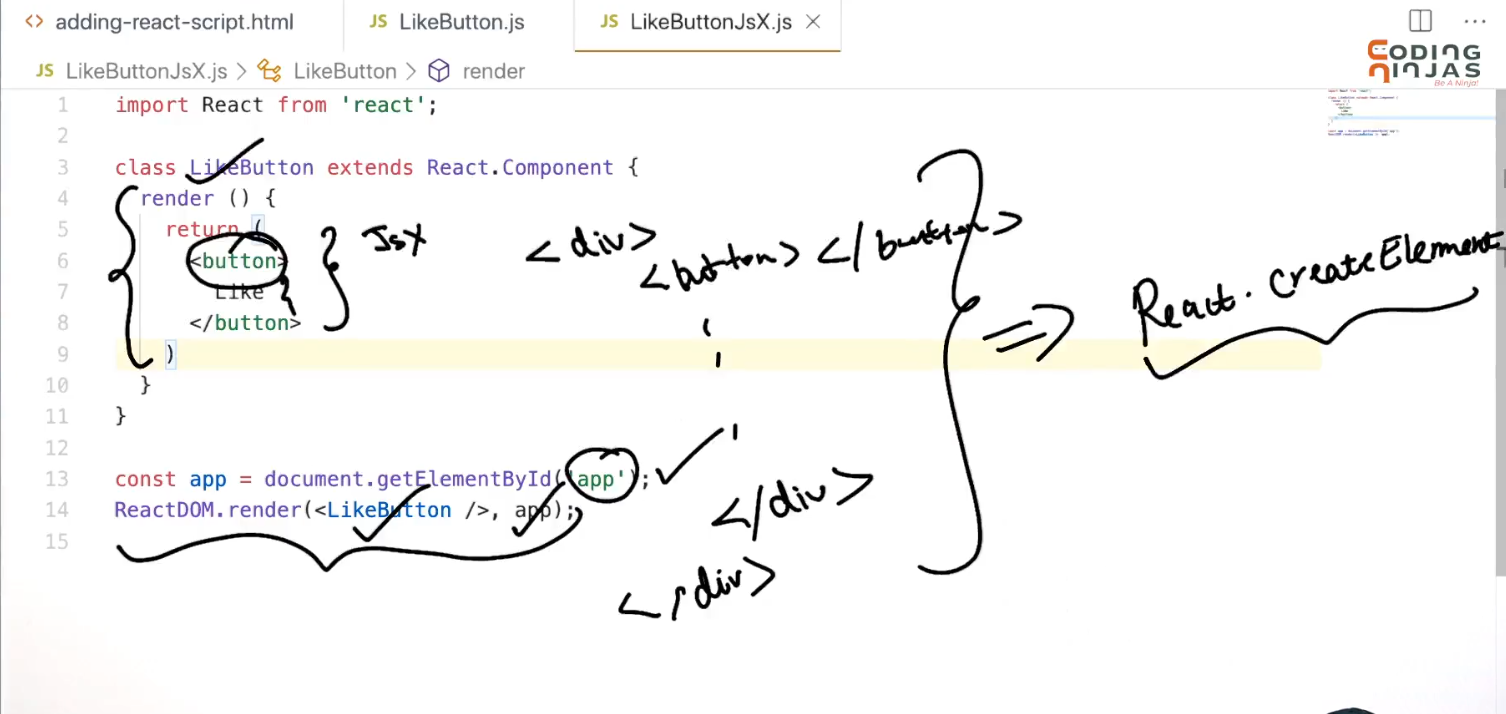
JSX introdution: Allows to write html in javascript and place them in dom
But browser dont understand this jsx.
how will we solve this jsx also browser doesnt understands import statement.
Solution:
Seite 3
solution:
for jsx
JSX ->>> use BAbel ->>>> pure javascript that browser understands
for import error:
we use webpack
webpack bundles all the js files all the html files into a single file
we dont need to cofigure everything before building the app. we have a tool create-React-App that will do everything for us.
Seite 4
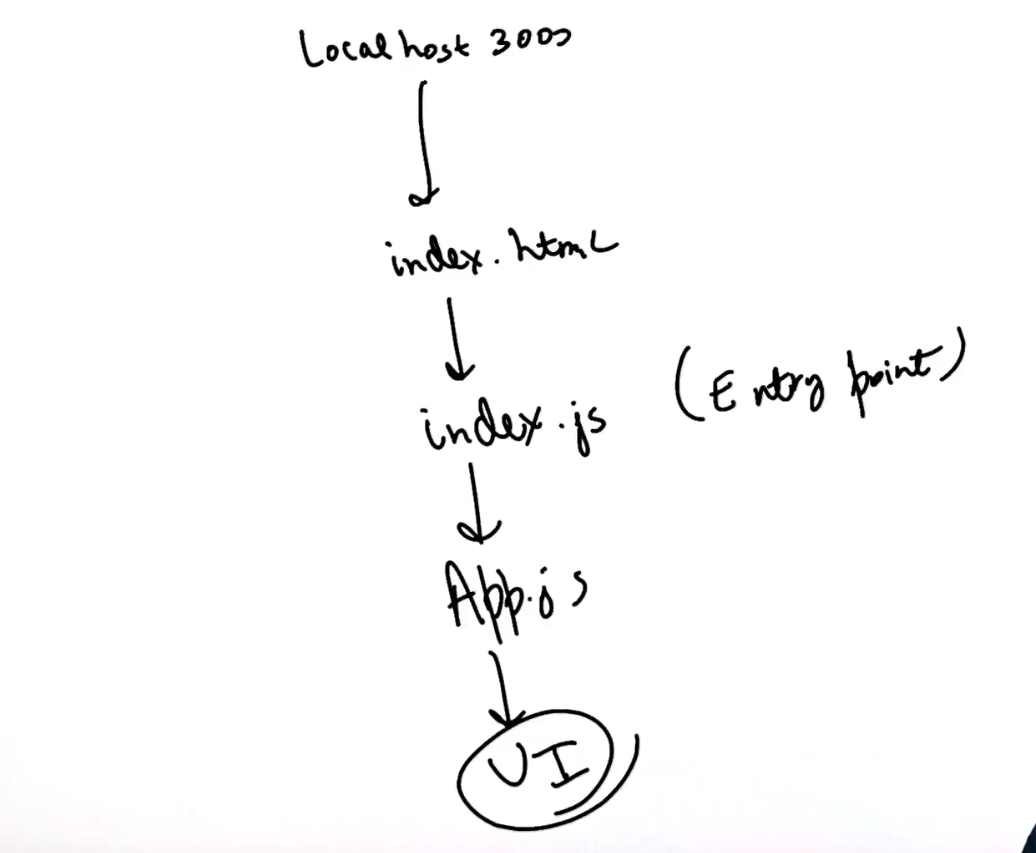
we run create-react-app helloworld
and it creates basic react app with a lot of files:
the flow can be defined as.
Seite 5
MOre on JSX:
we use className instread of class
if we want to use javascript inside the jsx we wrap the js content inside {} (cutllt braces)
If we dont want to wrap everything around div we wrap all of it around React.Fragment. like:
Component should always be named in capital letters to differentiate html and componenets
App in index.js is a component
Seite 6
Conditional Rendering:
We have couple of ways to this:
1. using if statement to check whter any value is true the return accordingly
2. using conditinal stastement in curly braces
3. using ampersand
{!isLogged && "world"}
{isLogged && {name}}
javascript me {truthy value && anything} returns anything.
Seite 7
Styling of JSX:
add a object below the page in name of styles like:
const styles = {
image: {
height: 110,
width: 110,
borderRadius: 4,
backgroundColor: '#777'
}
}
nd tags which want to use it will be given style = { defined style } eg.
img style={styles.image}/>
FOr definige in oneline:
Phone
Seite 8
State:
A object to store data for that particular component and render it in page.
For saving the data we use constructor for class and keep the details of page in this.state object.
super() constructer needs to be called since this class extends React.component
sample constructor:
constructor(){
super();
this.state= {
price: 999,
title: 'mobile phone',
qty: '2',
img: ''
}
}
In place of using:
{this.state.title}
Hadling CLick events :
where function is increaseQuantity.
for defining the function we use arrow syntax so that value of this automatically binds to the instance of the class.
if we will not use arrow syntax we deliberately need to bind that using :
this.increasedQuantity = this.increasedQuantity.bind(this);
Seite 9
setState function:
if we directly increase the value of any variable in the this.state object
we also need to update re-render the component with the updated state. Here the setState comes into picture.
it can be used in two ways:
1. with a object
this.setState({
qty: this.state.qty + 1,
})
2. with funtion
this.setState((prevState) => {
return {
qty : prevState.qty+1
}
});
when there is dependency on previous stste we prefer using the second one.
Seite 10
More Description on setState:
React performs batching in all the event handlers.
In case of form 1(Object ender)
If we call setState with object multiple times in a fuction it will merge into one, and take the value of last setState(SHALLOW MERGING). this is called as bacthing. The ent is rendered only once in batching.
in case of form 2(Function Render)
If we use the function way the previState will be updated every time and now it will work with multiple times using. bu still react will perform the batching.
OUR SETState call is Asyncronous
react provides a feature for callback in setstate function. when the setstate function completes the call back will run.
The callback will be written in the secind parameter of setState.
example:
this.setState({
qty: this.state.qty + 1,
}, ()=> {
console.log('this.state', this.state);
})
Seite 11
Informationen
- Beschreibung
- Notiz am Ohne Titel, erstellt von Govind Kumar am 24/05/2021.
- Erstellt von
- Govind Kumar
- Aufrufe
- 8
- Bewertung