
Notizen
make a website css review
Inhalt der Notizen (6)
Seite 1
web concepts
css = language used to style websites; colors, fonts and page layouts for a site are managend using css
css selectors. used to target classes of html elements
idselectors. used to style an html element which has an id attribite.
external stylesheet: css file that styles an html file externally via the HTML link element.
css properties
font-family. sets font for a css selector
color. sets font color for the css selector.
font-size: sets font size for text.
background-image: sets a background image of your choosing for a given selector.
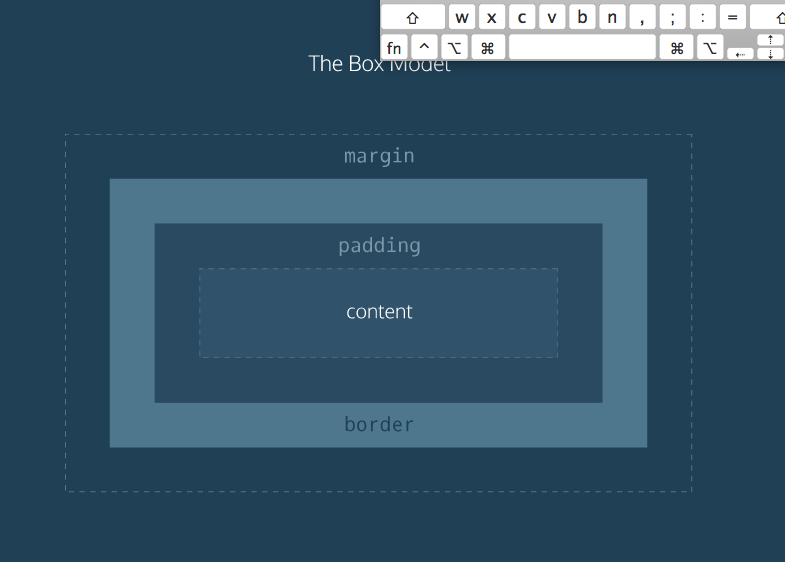
css box model
1. content : includes text, images or other media contained within an HTML element.
2.padding: the space between the content ant the border. you can think of this like inner space.
3. border: The outline of an HTML page element.
4. margin: The space between the Html page element and the next nearest element(s)
Seite 2
border
the border property can be used to visually define a page element's outer edge.
in css, the border property's value requires three parts:
1. thickness. sets the thickness of the border, using pixels, ems, or rems.
2. type: sets the border type. common options are "solid, "dotted, and dashed
3. color: sets the border's color, using named colors, hex, or RGB values.
example: p{ border: 2px solid black;}
padding
the css padding property controls the empty space between the page element's content and its border. increasing a page element's padding makes the space around the content more spacious, while decreasing it makes the space more compact.
example: p{ padding: 20px;}
margin
the css margin property controls the space between different html elements on a webpage.
use margin to bring page elements closer together or to move them further apart.
the margin property creates space on all sides pf a page element. it's also possible to separate margin spacings on each side of an element.
additional margin properties:
1. margin-top: sets the top margin.
2. margin bottom: sets the botom margin.
3. margin-left: sets the left margin.
4. margin-right: sets the right margin.
--> using borders, padding and margines allows us to control boundaries and space for individual HTML elements.
Seite 3
css properties available to move elements around on the page and create unique layouts = css display a,d position properties.
display
Not all HTML elements are displayed on a page in the same way. Displays types determine how HTML elements will be arranged in relation to each other.
in the diagram, notice:
1. the two dotted rectangles represent webpages.
2. HTML heading, paragraph, and unordered list elements are block level: each appaers on its own line on the webpage.
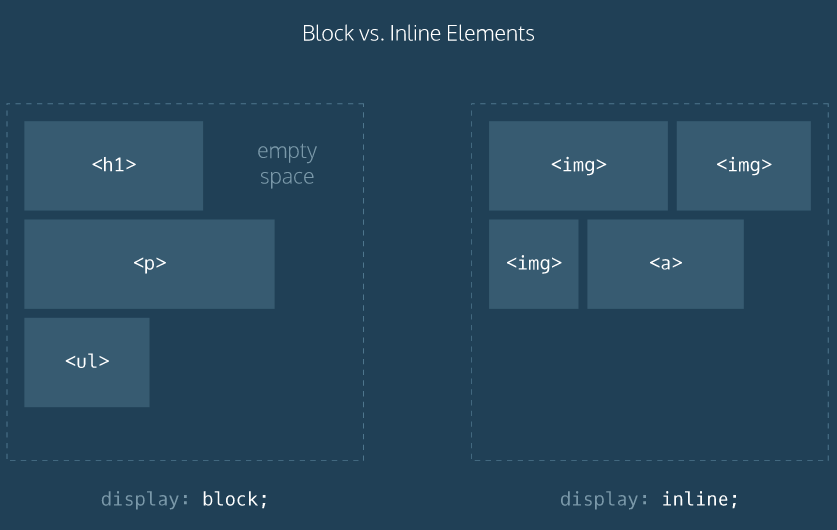
display types can be overwritten in CSS by using the display property.
for example, we can make list items apear on the same line by setting display to inline:
Seite 4
web and CSS concepts
web concepts
CSS box model: illustrates the space and boundary properties of ann HTML element that can be controlled using CSS.
CSS SKILLS
border.=sets the outline of an HTML page element, like a picture frame that contains the element.
padding=sets the amount of space between an element's content and its border.
margin=sets the amount of space between an HTML element and the next nearest element(s)
display=property that determines how the selected element will be arranged in relation to other HTML elements on the page.
inline=display value used to arrange HTML elements on the same line as neighbouring elements.
flex=display values that allows us to easily align multiple page elemnts vertically or horizontally
float =property used to float HTML elemnts left or right of neighbouring elements
position=property used to position HTML elements in exact locations on a webpage
Seite 5
figure= foto's , afbeeldingen
nav=are used to organize site navigation menus on a webpage.
li = list
lu=insprong
flex= flex can be used to easly align multiple page elements horizontally.
flex-wrap: wrap; = can make sure no child element moves off the page.
justify-content: center;= center rows of childeren elements
position=enables you to position HTML elements in exact locations on a webpage.
one useful value for this property is
relative=this value positions page elements on a webpage relative to where they would normally appear.
©= copyright symbol
Seite 6
Bootstrap
css framework with prewritten css rules designed to help you build webpages faster.
1. header , used to organize headers on a webpage
2. footer. used to organize footers on a webpage.
3. section: Defines sections on a webpage.
The HTML link element makes bootstrap available to us.
https://maxcdn.bootstrapcdn.com/bootstrap/3.3.6/css/bootstrap.min.css"/>
bootstrap grid
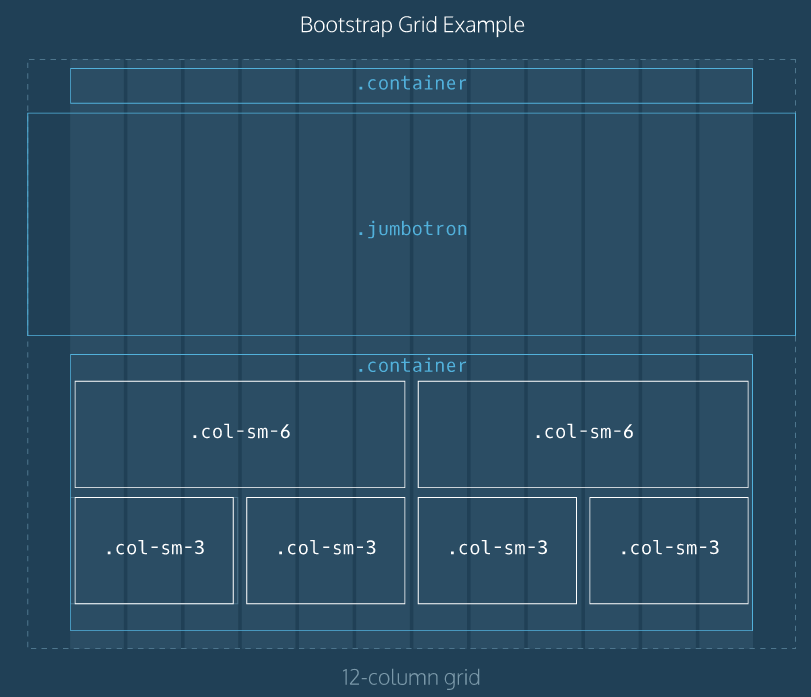
One of the reasons Bootstrap and frameworks like it are so popular is because they offer grids. A grid makes it possible to organize HTML elements using preconfigured columns. Using a grid, you can customize responsive page layouts quickly and reliably.The Bootstrap grid contains 12 equal-sized columns, as seen in the diagram on the right. HTML elements are arranged to span different numbers of columns in order to create custom page layouts.
review
web concepts
CSS Frameworks: set of prewritten CSS rules designed to help you build webpages faster.
Bootstrap grid: 12 equal-sized columns which can be utilized via bootstrap classes to build responsive page layouts quickly and reliably.
Bootstrap classes
row: arranges HTML elements in rows, and can be useful when building headers/navigation menus, main feature sections, supporting content sections and footers.
jumbotron: used to create large showcase sections featuring important content.
col-sm-*. used to span a specified number of columns on the bootstrap grid. The "sm" is short for "small", and maintains desired CSS layouts on small screens ( tablet-sized).
text-right: Bootstrap class used to orient text to the right side of the webpage.
btn btn-primary : Bootstrap class used to style page elements buttons
Informationen
- Beschreibung
- Notiz am make a website css review, erstellt von arnevanneste_7 am 31/03/2016.
- Erstellt von
- arnevanneste_7
- Aufrufe
- 1
- Bewertung