
Notizen
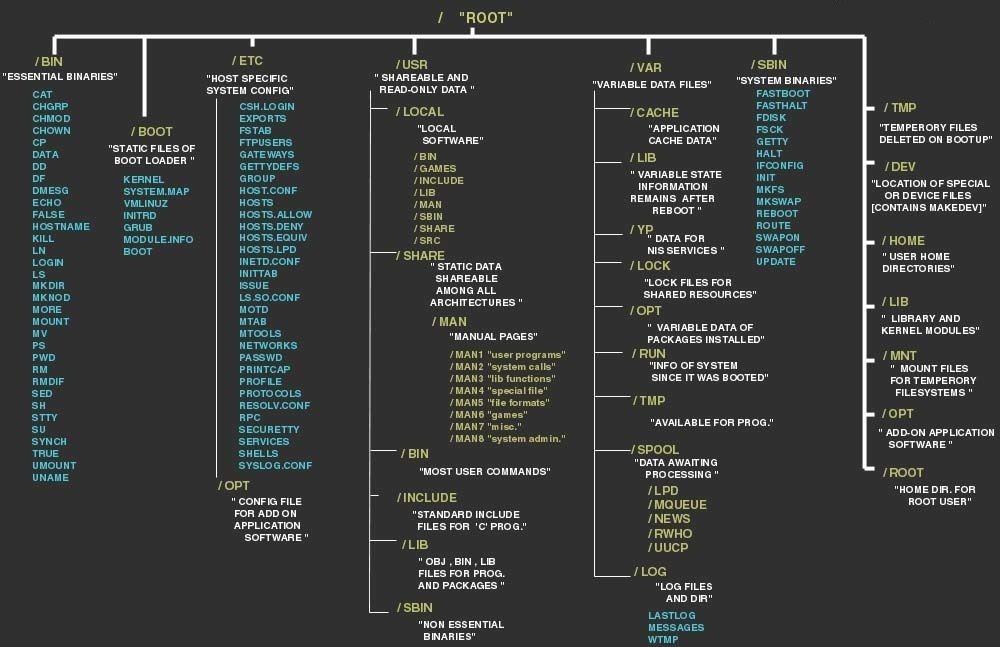
Linux File System
Inhalt der Notizen (2)
Seite 1
The purpose of the recommended Linux file system hierarchy standard by FHS - File Hierarchy Standard
This standard recomendations enable:
• Software to predict the location of installed files and directories
• Users to predict the location of installed files and directories
This is done by:
• Specifying guiding principles for each area of the filesystem,
• Specifying the minimum files and directories required,
• Enumerating exceptions to the principles
• Enumerating specific cases where there has been historical conflict.
The FHS document can be useful to:
• Independent software suppliers to create applications which are FHS compliant, and work with
distributions which are FHS compliant
• OS creators to provide systems which are FHS compliant
• Users to understand and maintain the FHS compliance of a system
The limited scope of the FHS recommendations:
• Local placement of local files is a local issue, so FHS does not attempt to usurp system administrators.
• FHS addresses issues where file placements need to be coordinated between multiple parties such as
local sites, distributions, applications, documentation, etc...
This standard assumes that the operating system underlying an FHS-compliant file system supports the
same basic security features found in most UNIX filesystems.
It is possible to define two independent distinctions among files. In general, files that differ in either of these respects should be located in different directories. This makes it easy to store files with different usage characteristics on different file-systems:
- shareable : Files that can be stored on one host and used on others
- unshareable : files that are not shareable. For example, the files in user home directories are shareable whereas device lock
files are not
- Static : "Static" files include binaries, libraries, documentation files and other files that do not change without
system administrator intervention
- variable : "Variable" files are files that are not static
===========================================================================================================
===========================================================================================================
===========================================================================================================
/ - Root
/bin - Essential command binaries, that could be used by all users
Purpose
/bin contains commands that may be used by both the system administrator and by users, but which are
required when no other file-systems are mounted (e.g. in single user mode). It may also contain commands which are used indirectly by scripts.
Requirements
There must be no subdirectories in /bin.
The following commands, or symbolic links to commands, are required in /bin:
Command Description
cat Utility to concatenate files to standard output
chgrp Utility to change file group ownership
chmod Utility to change file access permissions
chown Utility to change file owner and group
cp Utility to copy files and directories
date Utility to print or set the system data and time
dd Utility to convert and copy a file
df Utility to report filesystem disk space usage
dmesg Utility to print or control the kernel message buffer
echo Utility to display a line of text
false Utility to do nothing, unsuccessfully
hostname Utility to show or set the system's host name
kill Utility to send signals to processes
ln Utility to make links between files
login Utility to begin a session on the system
ls Utility to list directory contents
mkdir Utility to make directories
mknod Utility to make block or character special files
more Utility to page through text
mount Utility to mount a filesystem
mv Utility to move/rename files
ps Utility to report process status
pwd Utility to print name of current working directory
rm Utility to remove files or directories
rmdir Utility to remove empty directories
sed The `sed' stream editor
sh POSIX compatible command shell
stty Utility to change and print terminal line settings
su Utility to change user ID
sync Utility to flush filesystem buffers
true Utility to do nothing, successfully
umount Utility to unmount file systems
uname Utility to print system information
Optionallly
csh The C shell (optional)
ed The `ed' editor (optional)
tar The tar archiving utility (optional)
cpio The cpio archiving utility (optional)
gzip The GNU compression utility (optional)
gunzip The GNU uncompression utility (optional)
zcat The GNU uncompression utility (optional)
netstat The network statistics utility (optional)
ping The ICMP network test utility (optional)
/bin/csh may be a symbolic link to /bin/tcsh or /usr/bin/tcsh.
Rationale:
The tar, gzip and cpio commands have been added to make restoration of a system possible
(provided that / is intact).
/boot (Static & Unsharable) - Static files of the boot loader
Purpose
This directory contains everything required for the boot process except configuration files not needed at
boot time and the map installer. Thus /boot stores data that is used before the kernel begins executing
user-mode programs. This may include saved master boot sectors and sector map files.
Programs necessary to arrange for the boot loader to be able to boot a file must be placed in /sbin.
Configuration files for boot loaders that are not required at boot time must be placed in /etc.
Optionally
The operating system kernel must be located in either / or /boot.
Certain architectures may have other requirements for /boot related to limitations or expectations
specific to that architecture. These requirements are not enumerated here; distributions are allowed to add
requirements as needed to enable system startup on these architectures.
/dev - Device files
Purpose
The /dev directory is the location of special or device files.
Optionally
If it is possible that devices in /dev will need to be manually created, /dev must contain a command
named MAKEDEV, which can create devices as needed. It may also contain a MAKEDEV.local for any
local devices.
If required, MAKEDEV must have provisions for creating any device that may be found on the system, not
just those that a particular distribution installs.
/etc - (Static & Unsharable) Host−specific system configuration
/lib - Essential shared libraries and kernel modules
/media - Mount point for removeable media
/mnt - Mount point for mounting a filesystem temporarily
/opt (Static & Shareable) Add−on application software packages
/run - Data relevant to running processes
/sbin - Essential system binaries
/srv - Data for services provided by this system
/tmp - Temporary files
/usr (Static & Shareable) - Secondary hierarchy
/var - Variable data
- Optionals that could be included in Root Directory:
/home - User home directories (optional)
/lib - Alternate format essential shared libraries (optional)
/root- Home directory for the root user (optional)
The Linux FileSystem Standard Hierarchy - FHS
Seite 2
The Linux FileSystem Standard Hierarchy - FHS
The PURPOSE of the recommended Linux Filesystem Hierarchy Standard
This standard recomendations enable:
• Software to predict the location of installed files and directories
• Users to predict the location of installed files and directories
This is done by:
• Specifying guiding principles for each area of the filesystem,
• Specifying the minimum files and directories required,
• Enumerating exceptions to the principles
• Enumerating specific cases where there has been historical conflict.
The FHS document can be useful to:
• Independent software suppliers to create applications which are FHS compliant, and work with
distributions which are FHS compliant
• OS creators to provide systems which are FHS compliant
• Users to understand and maintain the FHS compliance of a system
The limited scope of the FHS recommendations:
• Local placement of local files is a local issue, so FHS does not attempt to usurp system administrators.
• FHS addresses issues where file placements need to be coordinated between multiple parties such as
local sites, distributions, applications, documentation, etc...
Informationen
- Beschreibung
- Notiz am Linux File System, erstellt von victor bykvh am 03/06/2018.
- Erstellt von
- victor bykvh
- Aufrufe
- 0
- Bewertung