
Android UI knowledge share
Folien in diesem Satz (6)
-
- Activities
- Fragments
- Views
- XML resource files
- Activity - A single, focused thing that the user can do. Almost all activities interact with the user, so the Activity class takes care of creating a window for you in which you can place your UI.
- Fragment - A piece of an application's user interface or behaviour that can be placed in an Activity.
- View - Basic building block for all UI components e.g.
- XML resource files - xml files that can define the UI for layouts, shapes, animations, dimensions, colours etc.
-
- Activities are the heart of the Android app. They can loosely be viewed as the "controller" in the Android framework.
- In the diagram on the left we see the 'activity lifecycle' from creation to being destroyed. Typically the only methods we need to worry about are onCreate(), onResume() and onPause() / onStop().
- Example of a simple onCreate() method that defines what layout the activity should display on screen.
- @Override
- protected void onCreate(Bundle savedInstanceState) {
- super.onCreate(savedInstanceState);
- setContentView(R.layout.activity_home);
- }
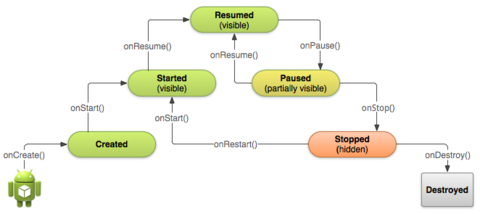
- Bildunterschrift: Activity Lifecycle
-
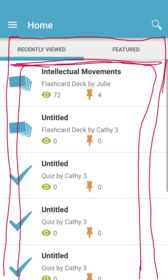
- A Fragment represents a behavior or a portion of user interface in an Activity. You can combine multiple fragments in a single activity to build a multi-pane UI and reuse a fragment in multiple activities. You can think of a fragment as a modular section of an activity, which has its own lifecycle, receives its own input events, and which you can add or remove while the activity is running (sort of like a "sub activity" that you can reuse in
- different activities).
-
- A view is the basic building block of any UI element.
- Anything that you can see on the screen inherits from view.
- A view will typically have it's style defined in xml, and it's behaviour defined in Java. It's worth noting that it is possible to style views programmatically, but generally it's cleaner to keep this stuff separate.
- We can define our own custom views if the behaviour we require is not included in the standard framework.
- For example our Mind Maps uses a custom zoomable view to draw the nodes on to a canvas.
-
- XML files are used to define the appearence of many UI elements in Android including:
- Layouts
- Animations
- Styles
- Colors
- Shapes
- Views
- Drawables
-
- Thank you.
- Any questions please feel free to ask or email peter.smith@examtime.com
- For a comprehensive API reference and really good training material checkout http://developer.android.com/
Informationen
- Beschreibung
- A brief Slide Set for the second Android knowledge share with new starts.
- Erstellt von
- dfsdgas dfgdfgsgdfsgsd · Mär 2016
- Aktualisiert
- 20 Jul 2018
- Aufrufe
- 22
- Bewertung