
Test
Visual Basic
Este test tiene tipos de pregunta que se abren en el reproductor de siempre.
Preguntas del test (20)
1¿Esto es una CheckBox?
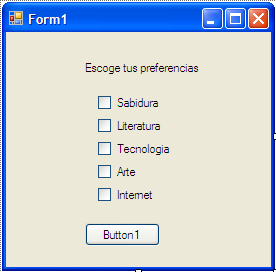
- AVerdadero
- BFalso
2Seleccione la(s) correctas de ingresar el código de limpiar dentro de un botón:
- Atxt.text=" "
- Btxt.Clear()
- Ctxt.Clear
- Dtxt.text=
3Completa el código;
[blank_start]Dim[blank_end] n1, n2, n3, n4, v, p [blank_start]As[blank_end] Double
n1 = TextBox1.Text
n2 = [blank_start]TextBox2[blank_end].Text
n3 = TextBox3.Text
n4 = TextBox4.Text
v = n1
[blank_start]If[blank_end] n2 < v Then
v = n2
End If
If [blank_start]n3[blank_end] < v Then
v = n3
End If
If n4 < v [blank_start]Then[blank_end]
v = n4
[blank_start]End[blank_end] If
p = (n1 + n2 + n3 + n4 - [blank_start]v[blank_end]) / 3
[blank_start]TextBox5.Text = p[blank_end]- AAs
- BTextBox2
- CTextBox5.Text = p
- Dv
- EIf
- FThen
- GEnd
- Hn3
- IDim
4¿Este código es para colocar mensajes en el programa?
MessageBox.Show()- AVerdadero
- BFalso
5Complete;
Dim n1, n2 As [blank_start]Double[blank_end]n1 = [blank_start]TextBox1[blank_end].Text
n2 = TextBox2.Text
If n1 > n2 Then
MessageBox.Show("El número mayor es "& [blank_start]n1[blank_end])
Else
[blank_start]MessageBox[blank_end].Show("El número mayor es "& n2)
End If- AMessageBox
- Bn1
- CTextBox1
- DDouble
6Seleccione la respuesta correcta;
Dim C As [blank_start]Integer[blank_end]- AInteger
- BDouble
7¿Es un Progress Bar?
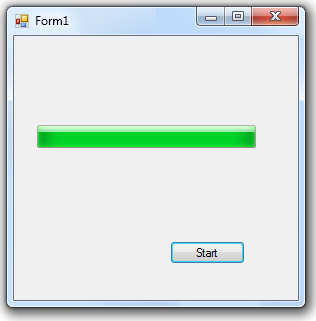
- AVerdadero
- BFalso
8Dim x, y, z, r As [blank_start]Double[blank_end]
x = [blank_start]TexBox1.Text[blank_end]
[blank_start]y[blank_end] = TexBox2.Text
z = TexBox3.Text
r = ((2 * [blank_start]Math.[blank_end]Pow(x, 4)) + [blank_start]3 *[blank_end] Math.Pow(x, 2) * [blank_start]Math.Pow[blank_end](y, 2)) / (y+(Math.[blank_start]Sqrt[blank_end](4 * x * y * Math.Pow[blank_start](z, 2)[blank_end])) - 2 * z)
TexBox4.Text = [blank_start]r[blank_end]- ATexBox1.Text
- By
- CMath.
- D3 *
- EMath.Pow
- FSqrt
- G(z, 2)
- Hr
- IDouble
9El siguiente código sirve para resolver ecuaciones de 3 variables?
Dim x, y, z, r As Double
x = TexBox1.Text
y = TexBox2.Text
z = TexBox3.Text
r = ((2 * Math.Pow(x, 4)) + 3 * Math.Pow(x, 2) * Math.Pow(y, 2)) / (y+(Math.Sqrt(4 * x * y * Math.Pow(z, 2))) - 2 * z)
TexBox4.Text = r- AVerdadero
- BFalso
10Complete;
[blank_start]If[blank_end] Me.BackColor = Color.[blank_start]Blue[blank_end] Then
Me.BackColor = Color.Red
ElseIf Me.[blank_start]Back[blank_end]Color = [blank_start]Color[blank_end].Red Then
[blank_start]Me.BackColor[blank_end] = Color.Blue- AColor
- BBlue
- CMe.BackColor
- DIf
- EBack
11El siguiente fragmento de código sirve para cambiar de color el formulario;
If Me.BackColor = Color.Blue Then
Me.BackColor = Color.Red
ElseIf Me.BackColor = Color.Red Then
Me.BackColor = Color.Blue- AVerdadero
- BFalso
12¿El siguiente código sirve para calcular promedios y eliminar la nota menor?
Dim n1, n2, n3, n4, v, p As Double
n1 = TextBox1.Text
n2 = TextBox2.Text
n3 = TextBox3.Text
n4 = TextBox4.Text
v = n1
If n2 < v Then
v = n2
End If
If n3 < v Then
v = n3
End If
If n4 < v Then
v = n4
End If
p = (n1 + n2 + n3 + n4 - v) / 3
TextBox5.Text = p- AVerdadero
- BFalso
13[blank_start]Dim[blank_end] n1, n2, n3, n4, v, p As [blank_start]Double[blank_end]
n1 = [blank_start]Text[blank_end]Box1.Text
[blank_start]n2[blank_end] = TextBox2.Text
n3 = TextBox3.Text
[blank_start]n4[blank_end] = [blank_start]TextBox4[blank_end].Text
v = n1
[blank_start]If[blank_end] n2 < v [blank_start]Then[blank_end]
v = n2
End If
If n3 < v Then
v = n3
[blank_start]End[blank_end] If
If n4 < v Then
v = n4
End If
p = (n1 + n2 + n3 + n4 - v) / 3
[blank_start]TextBox5.Text = p[blank_end]- AIf
- BEnd
- CTextBox5.Text = p
- DTextBox4
- En4
- FDouble
- GText
- HThen
- In2
- JDim
14¿Está bien estructurado este código?
Dim n1, n2 As Doublen1 = TextBox1.Text
n2 = TextBox2.Text
If n1 > n2 Then
MessageBox.Show("El número mayor es "& n1)
Else
MessageBox.Show("El número mayor es "& n2)
End If- AVerdadero
- BFalso
15[blank_start]Dim[blank_end] C As [blank_start]Intinger[blank_end]C = 0
If [blank_start]CheckBox1[blank_end].Checked Then
C = C + 1
If CheckBox2.[blank_start]Checked[blank_end] Then
[blank_start]C = C + 1[blank_end]
End If
If CheckBox3.Checked [blank_start]Then[blank_end]
C = C + 1
End If
MessageBox.Show("Han sido seleccionados " + Strc(C) + [blank_start]" checkbox"[blank_end])
[blank_start]End If[blank_end]- ADim
- BCheckBox1
- CIntinger
- DChecked
- EC = C + 1
- FThen
- G" checkbox"
- HEnd If
16¿El siguiente código esta bien estructurado?
Dim C As Intinger
C = 0
If CheckBox1.Checked
C = C + 1
CheckBox2.Checked Then
C = C + 1
End If
If CheckBox3.Checked Then
C = C + 1
MessageBox.Show("Han sido seleccionados " + Strc(C) + " checkbox")
End If- AVerdadero
- BFalso
17Dim C As IntingerC = 0
If Check[blank_start]Box1[blank_end].Checked Then
C = C + 1
If Check[blank_start]Box2[blank_end].Checked Then
C = C + 1
End If
If CheckBox3.[blank_start]Checked[blank_end] Then
C = C + 1
End If
[blank_start]MessageBox[blank_end].Show("Han sido seleccionados " + Strc(C) + " checkbox")
End If- ABox1
- BBox2
- CBox3
- DBox2
- EBox1
- FBox3
- GChecked
- HSelec
- IMessageBox
- JForm2
- KForm3
18¿Qué opciones podemos ver en el siguiente Form?
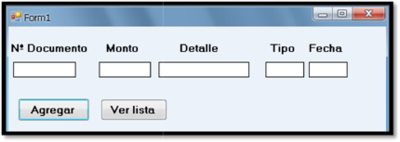
- ALabel
- BTextBox
- CButton
- DProgress Bar
- ECheck Box
- FCombo Box
19Complete
CheckBox1.- AShow
- BChecked
- CText
20¿Cómo se llama ésta parte de Visual Basic?
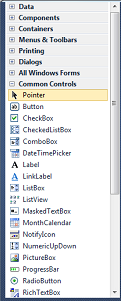
- AToolBox
- BForm
- COrígenes de datos
Información
- Descripción
- Examen de Visual Basic
- Autor
- rafgss
- Idioma
- Español
- Visitas
- 35
- Etiquetas
- Valoración
- Aún sin valoraciones Valora este test