
Fichas
Chapter 8-9
Fichas del conjunto (200)
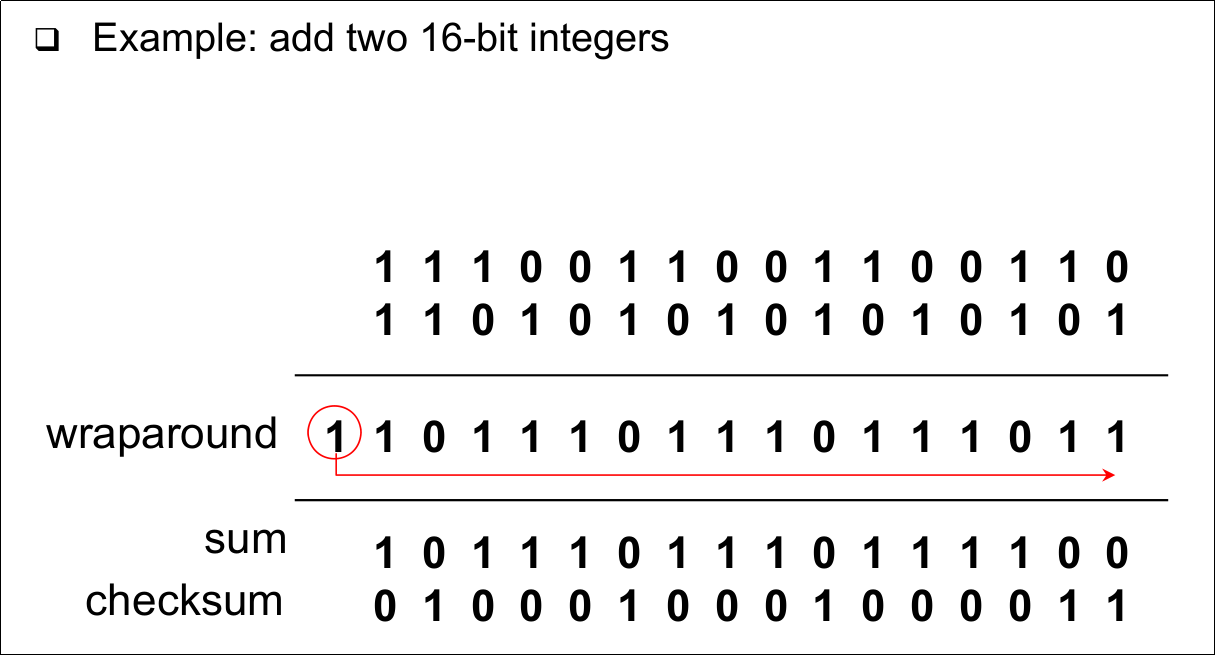
- 1Internet Checksum Example- Note
-> When adding numbers, a carryout from the most significant bit needs to be added to the result - 2Internet Checksum Example (add two 16-bit integers)
- 3Transport Control Protocol (TCP) (Point-to-point)- One sender, one receiver
- 4Transport Control Protocol (TCP) (Reliable, in-order byte stream)- no "message boundaries"
- 5Transport Control Protocol (TCP) (Pipelined)- TCP congestion and flow control set window size
- 6Transport Control Protocol (TCP) (Full duplex data)- Bi-directional data flow in same connection
- MSS: maximum segment size - 7Transport Control Protocol (TCP) (Connection-oriented)- Handshaking (exchange of control msgs) init's sender, receiver state before data exchange
- 8Transport Control Protocol (TCP) (Flow controlled)- Sender will not overwhelm receiver
- 9Transport Control Protocol (TCP) (Send & receive buffers)

- 10TCP Segment Structure

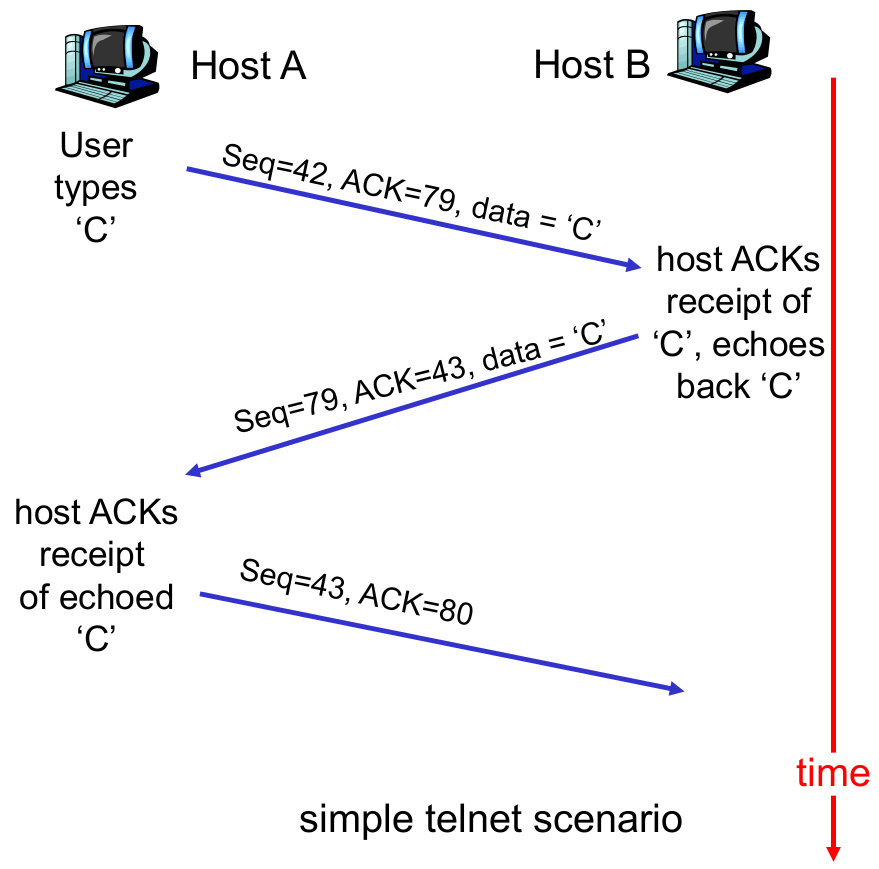
- 11TCP Sequence Numbers and ACKs (Seq. #'s)- Byte stream "number" of first byte in segment's data
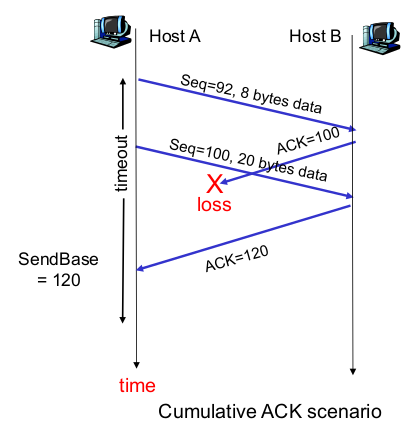
- 12TCP Sequence Number and ACKs (ACKs)- Seq # of next byte expected from other side
- Cumulative ACK - 13TCP Sequence Numbers and Acks (How does receiver handle out-of-order segments?)- TCP spec doesn't say, - up to implementor
- 14TCP Sequence Numbers and ACKs (Bild)
- 15TCP Round Trip Time and Timeout (Recall)- Reliable data transfer needs to handle timeouts
- 16TCP Round Trip Time and Timeout (How to set TCP timeout value)- Longer than RTT
-> But RTT varies
- Too short: premature timeout
-> Unnecessary retransmissions
- Too long: slow reaction to segment loss - 17TCP Round Trip Time and Timeout (How to estimate RTT?)
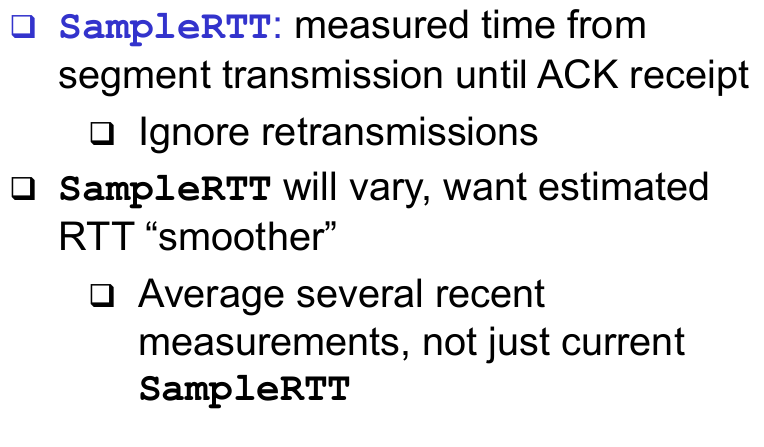
- 18TCP Round Trip Time and Timeout
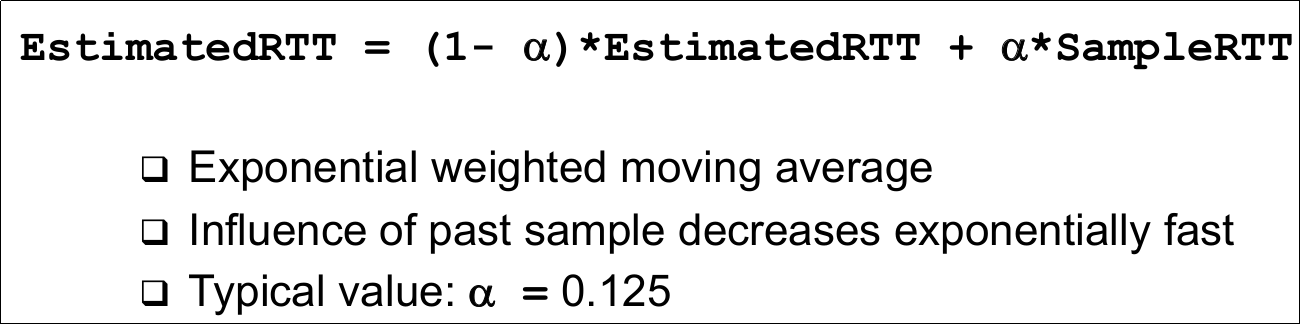
- 19Example RTT Estimation
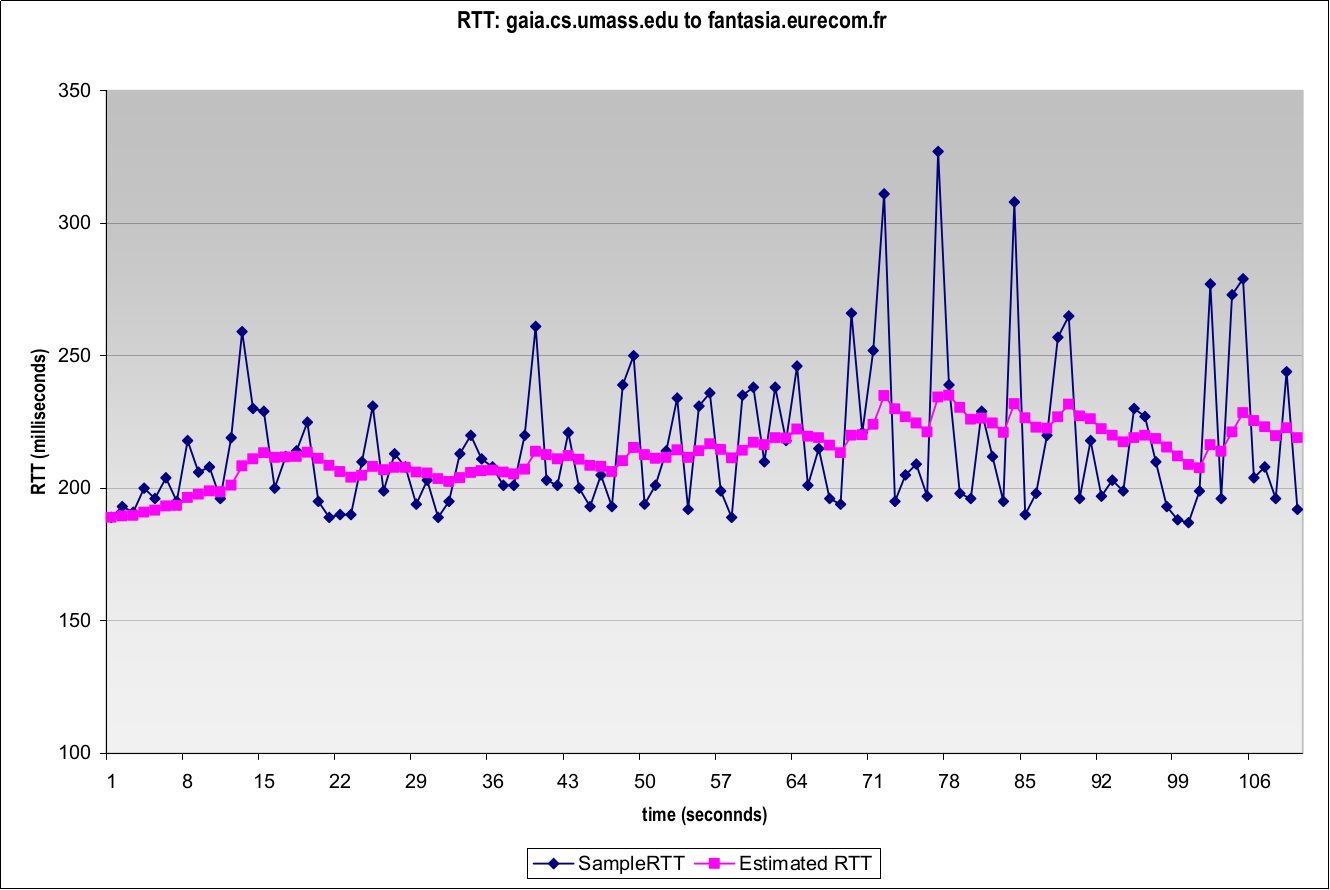
- 20TCP Round Trip Time and Timeout
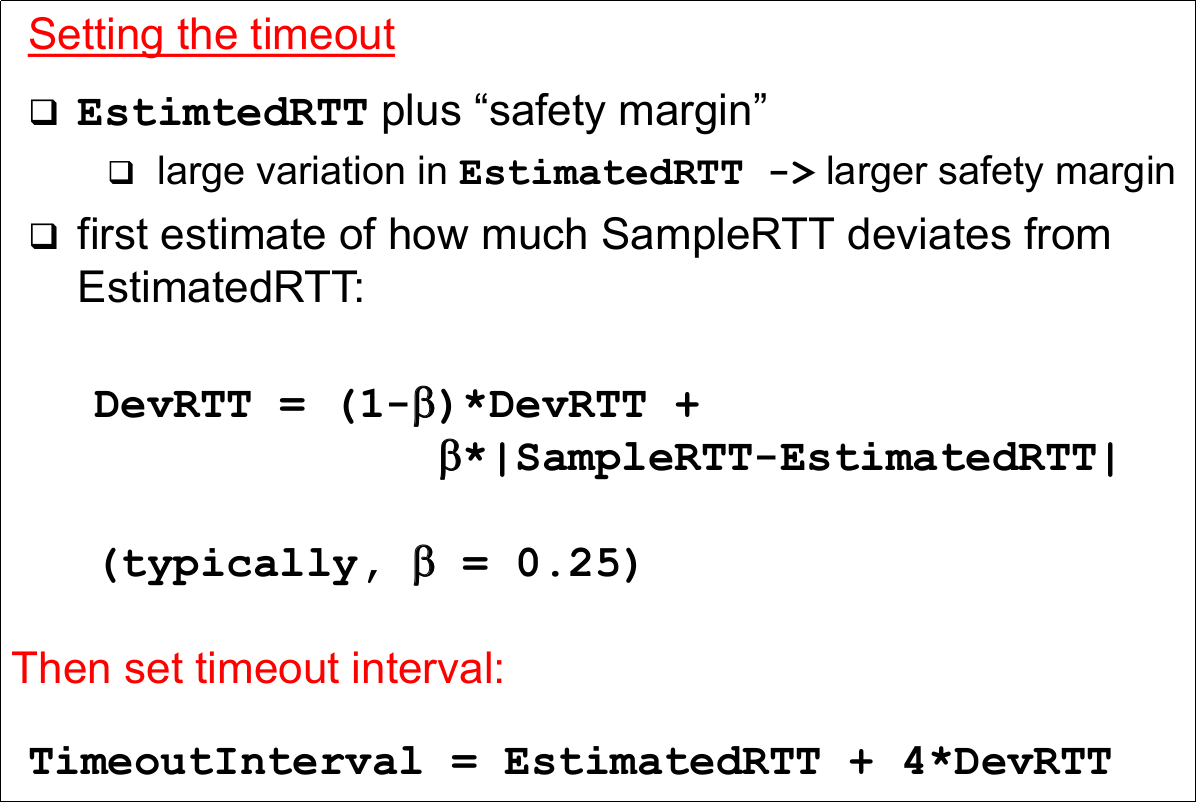
- 21TCP Connection Establishment- TCP connections can be established in active (connect) or passive mode (using listen/accept)
- Note: The connection is established by the TCP-entities without further interaction with the application, i.e. there is no service primitive corresponding to T-CONNECT.Rsp - 22TCP Connection Establishment (Active Mode)- Requesting a TCP connection with a specified transport service user (identified via IP address and port number)
- 23TCP Connection Establishment (Passibe Mode)- An application informs TCP, that it is ready to accept an incoming connection
-> Can specify a specific socket, on which an incoming connection is expected, or
-> all incoming connections will be accepted (unspecified passive open)
-> Upon an incoming connection request, a new socket is created that will serve as connection endpoint - 24Connection Identification in TCP (a TCP connection is setup)- Between a single sender and a single receiver
- More precisely, between application processes running on these systems
- TCP can multiplex several such connections over the network layer, using the port numbers as Transport SAP identifiers - 25Connection Identification in TCP- (So
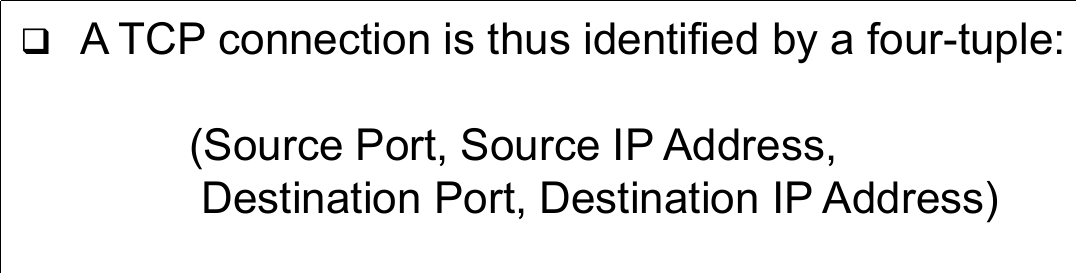
- 26TCP Connection Management (1)
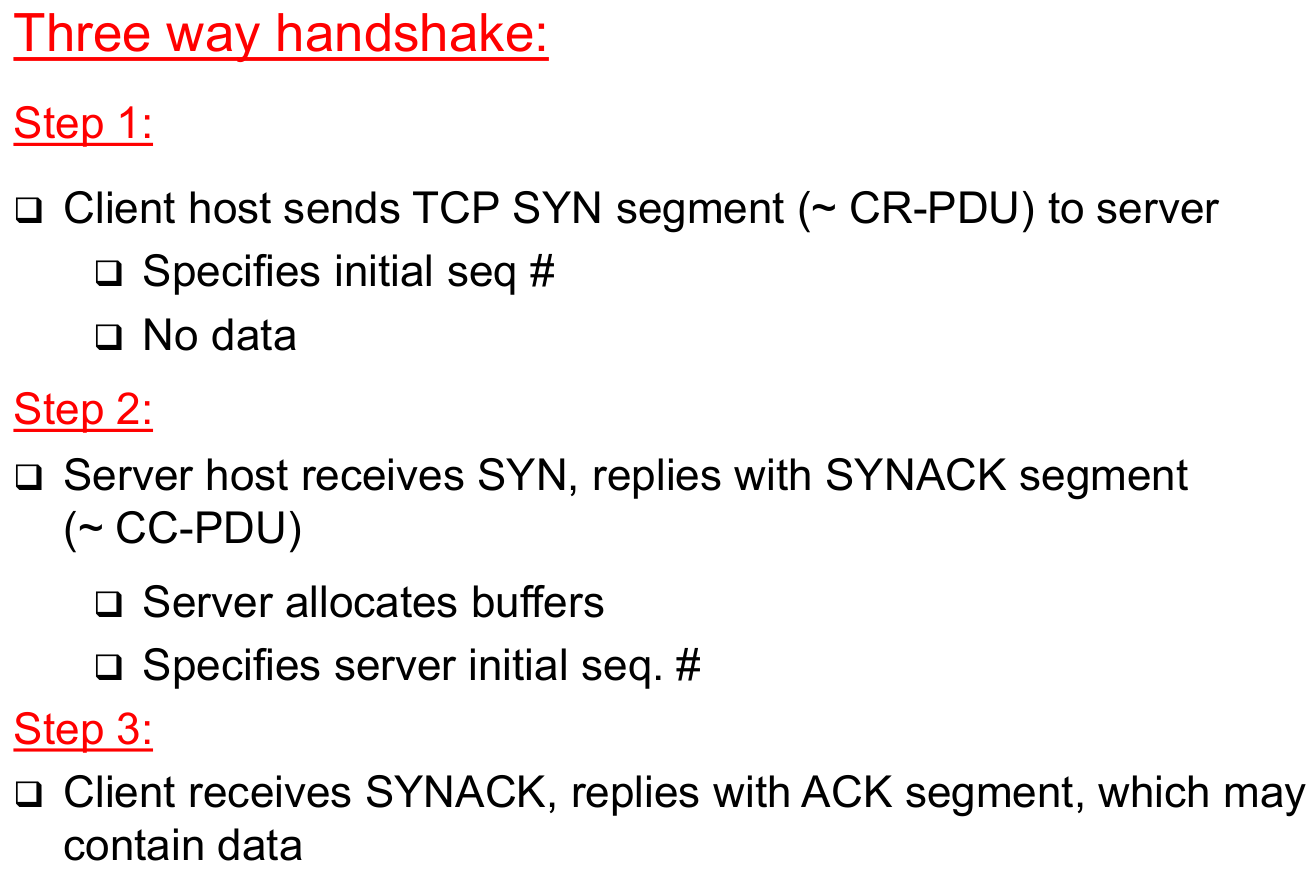
- 27TCP Connection Management (2)
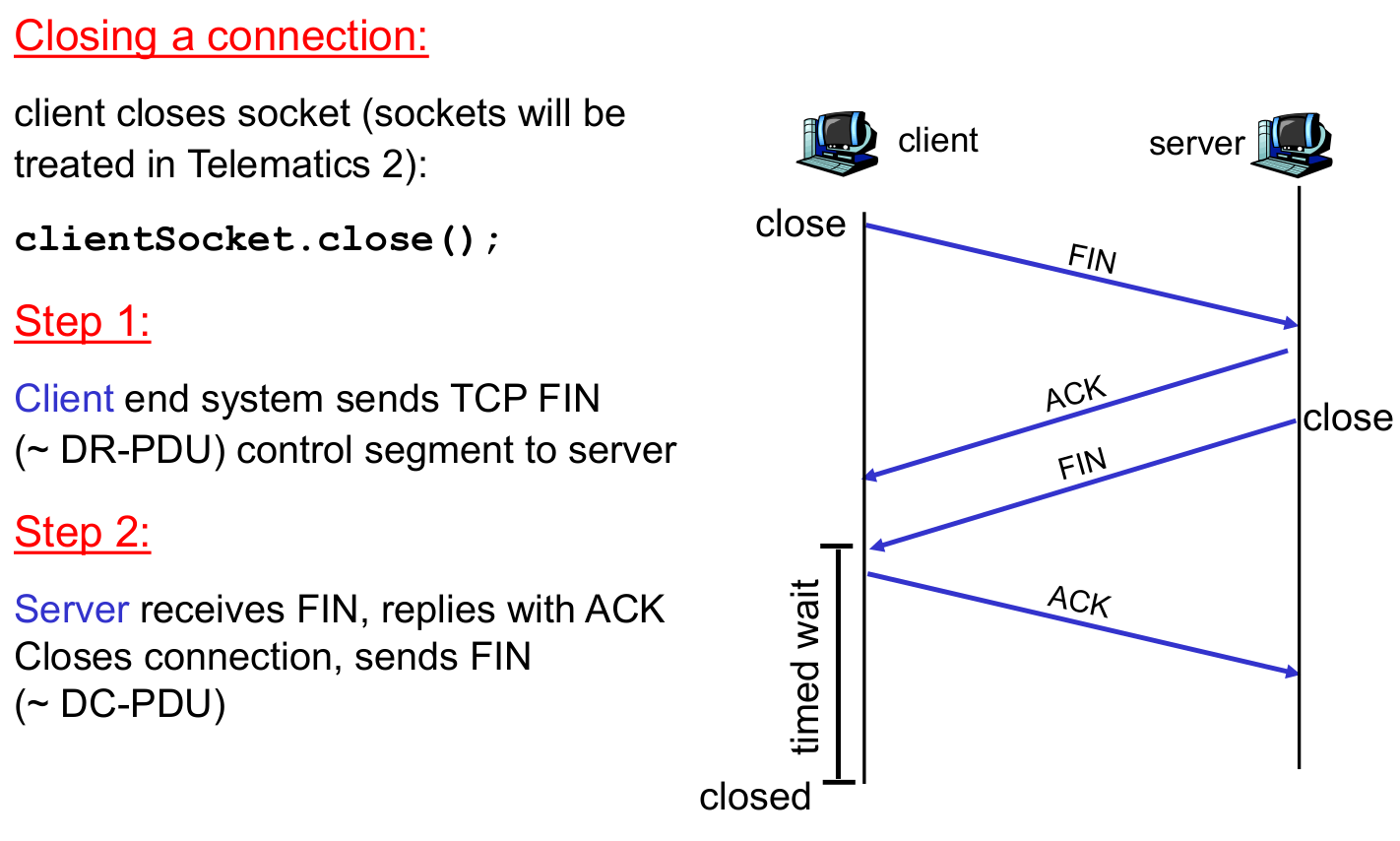
- 28TCP Connection Management (3)

- 29A TCP Connection in all Three Phases (Connection Establishment)- 3-Way-Handshake
- Negotiation of window size and sequence numbers - 30A TCP Connection in all Three Phases (Data transfer)- Piggybacking of acknowledgements
- 31A TCP Connection in all Three Phases (Connection Release)- Confirmed (!)
- Avoids loss of data that has already been sent - 32A TCP Connection in all Three Phases (Bild)
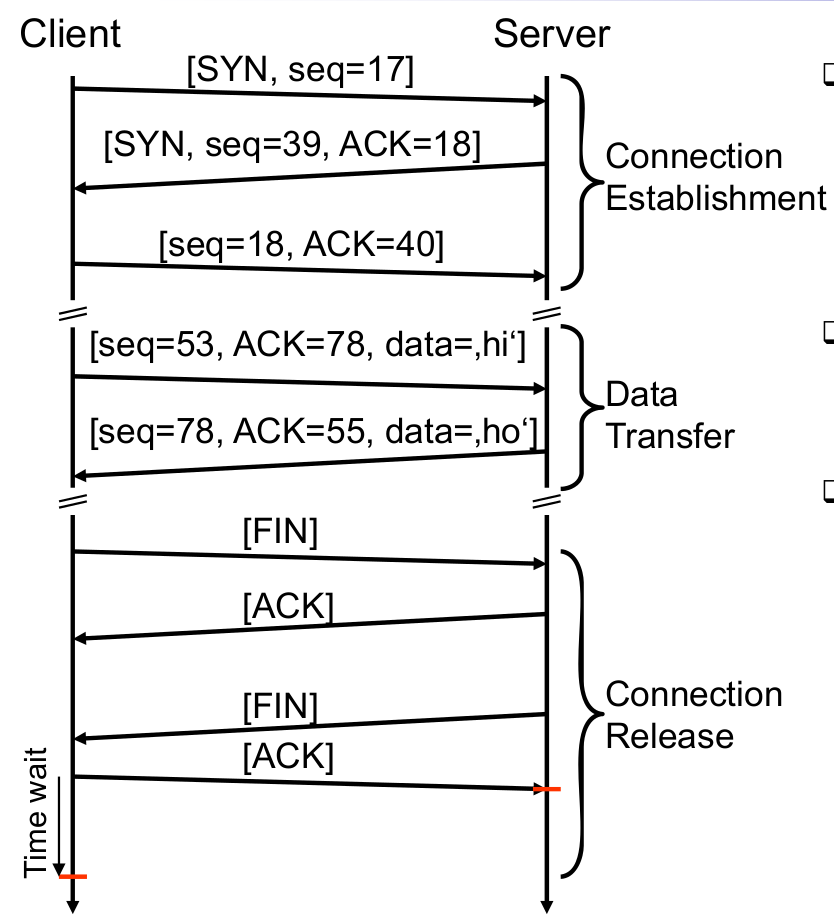
- 33TCP Connection Management: State Transitions

- 34TCP Connection Management: State Diagram

- 35TCP Reliable Data Transfer
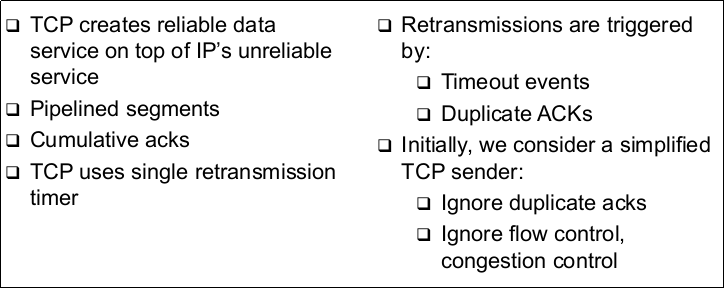
- 36TCP Sender Events (Data received from application)
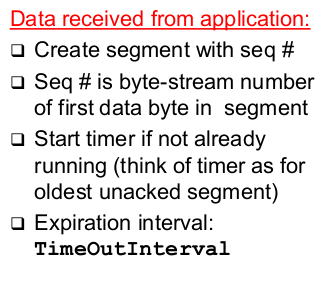
- 37TCP Sender Events (Timeout)- Retransmit segment that caused timeout
- Restart timer - 38TCP Sender Events (Ack received)- If it acknowledges previously unacked segments
-> Update what is known to be acked
-> Start timer if there are outstanding segments - 39TCP Sender (simplified) (Comments)- SendBase-1:
-> Last cumulatively ack'ed byte (so SendBase is next expected pkt) - 40TCP Sender (simplified) (Example)- SendBase = 72;
y = 73, so the rcvr wants 73+;
y > SendBase, so that new data is acked - 41TCP Sender (simplified) (Bild)
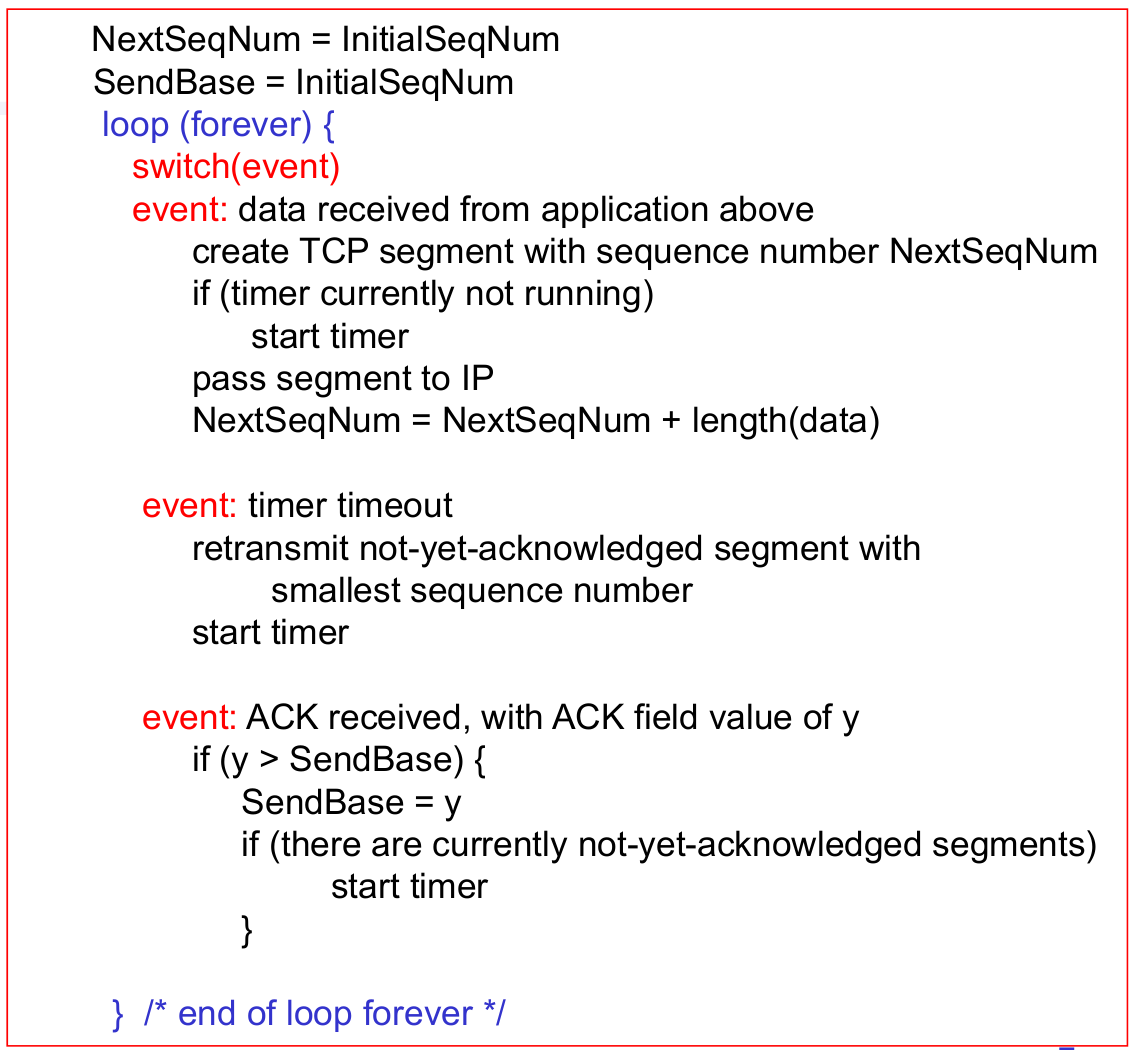
- 42TCP: Retransmission Scenarios (1)
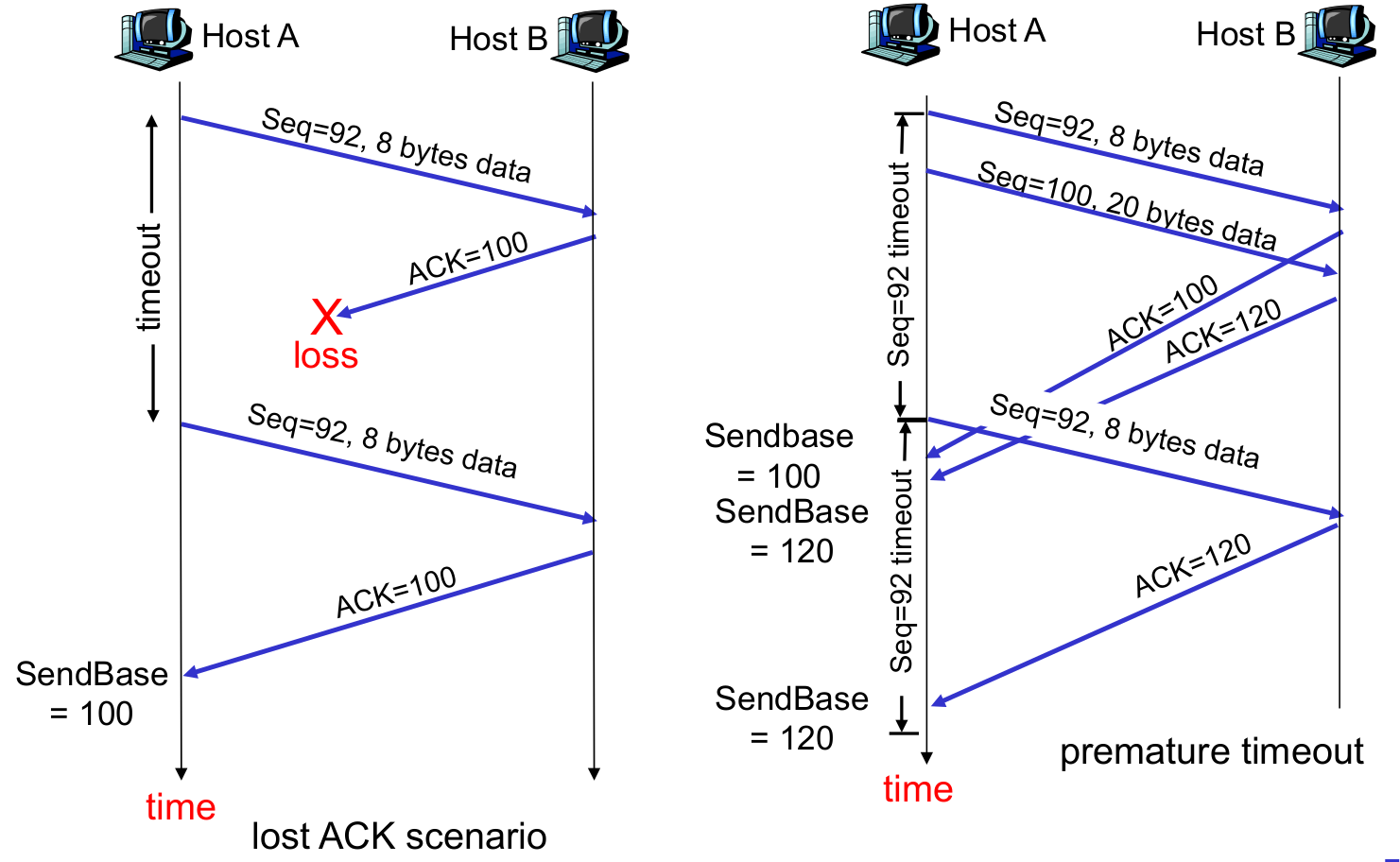
- 43TCP: Retransmission Scenarios (2)
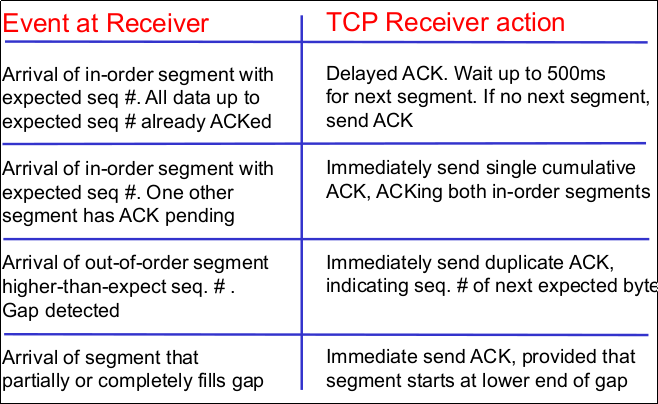
- 44TCP ACK Generation [RFC 1122, RFC 2581]
- 45Fast Retransmit (Time-out period often relatively long)- Long delay before resending lost packet
- 46Fast Retransmit (Detect lost segments via duplicate ACKs)- Sender often sends many segments back-to-back
- If segment is lost, there will likely be many duplicate ACKs - 47Fast Retransmit- If sender receives 3 ACKs for the same data, it supposes that segment after ACKed data was lost:
-> Fast retransmit
--> resend segment before timer expires - 48Fast Retransmit Algorithm

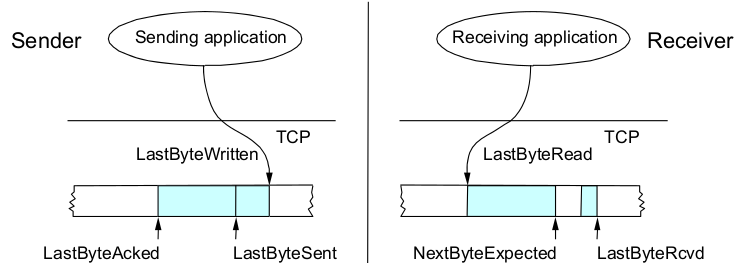
- 49Send and Receive Buffers in TCP (TCP maintains buffer)- Sender, to service for error control
- Receiver, to store packets not yet retrieved by application or received out of order
-> Old TCP implementations used GoBack-N, and discarded out-of-order packets - 50Send and Receive Buffers in TCP (Bild)
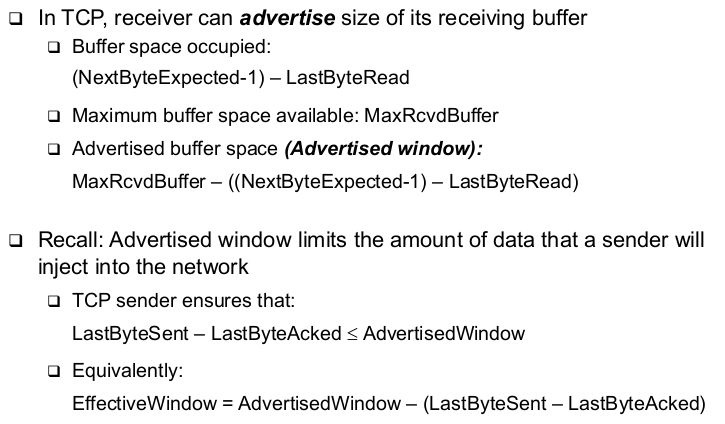
- 51TCP Flow Control: Advertised Window
- 52Nagle's Algorithm - Self-Clocking and Windows (TCP self-clocking)- Arrival of an ACK is an indication that new data can be injected into the network (see also later)
- 53Nagle's Algorithm - Self-Clocking and Windows (What happens when an ACK for only small amount of data (e.g., 1 byte arrives)? (Send immediately?)- Network will be burdened by small packets ("silly window syndrome")
- 54Nagle's Algorithm - Self-Clocking and Windows (Nagle's algorithm describes how much data TCP is allowed to send)- When application produces data to send if both available data and advertised window >= MSS send a full segment, else if there is unpacked data in flight, buffer new data until MSS is full else send all the new data now
- 55Congestion Control in TCP (TCP's mechanism for congestion control) (Implicit feedback by dropped packets)- Implicit feedback by dropped packets
-> Whether the packets were dropped because queues were full or by a mechanism like RED is indistinguishable (and immaterial) to TCP
- There are some proposals for explicit router feedback as well, but not part of original TCP
- Assumption: Congestion is the only important source of packet drops! - 56Congestion Control in TCP (TCP's mechanism for congestion control) (Window-based congestion control)- I.e., TCP keeps track of how many bytes it is allowed to inject into the network as a window that grows and shrinks
- Sender limits transmission (in addition to limit due to flow control):
-> LastByteSent - LastByteAcked <= CongWin
- Note: in the following discussion the flow control window will be ignored - 57TCP ACK/Self-Clocking- Suppose TCP has somehow determined a correct size of its congestion window
-> Suppose also that the TCP source has injected this entire amount of data into the network but sill has more data to send
- Thus: ACK not only serves as a confirmation, but also as a permit to inject a corresponding amount of data into the network
-> ACK-clocking (self-clocking) behaviour of TCP - 58TCP ACK/Self-Clocking (When to send more data?)- Only acceptable when there is space in the network again
- Space is available when packets leave the network
- Sender can learn about packets leaving the network by receiving an acknowledgement! - 59Good and Bad News (Good news: Ack arrival)- Network could cope with the current offered load; it did not drop the packet
- Let's be greedy and try to offer a bit more load - and see if it works
=> Increase congestion window - 60Good and Bad News (Bad news: No ACK, timeout occurs)- Packet has been dropped, network is overloaded
- Put less load onto the network
=> Reduce congestion window - 61Reduce Congestion Window by How Much?

- 62Increase Congestion Window by How Much?
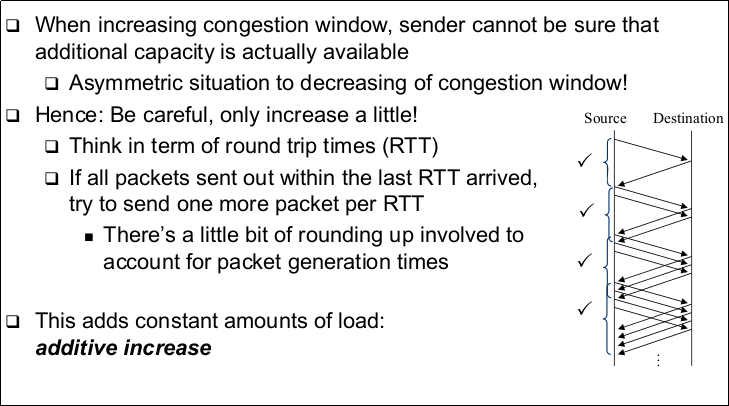
- 63Additive Increase - Details- Additive increase does not wait for a full RTT before it adds additional load
- Instead, each arriving ACK is used to add a little more load (not a full packet) - 64Additive Increase - Details (Specifically)- Increment = MSS x (MSS / Congestion Window)
- Congestion Window += Increment
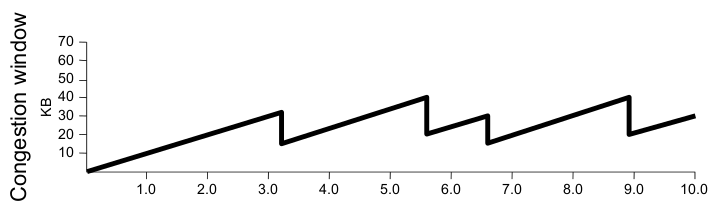
- Where MSS is the Maximum Segment Size, the size of the largest allow packet - 65AIMD - Sawtooth Pattern of TCP's Offered Load (Summary)- TCP uses an additive increase multiplicative decrease (AIMD) scheme
- 66AIMD - Sawtooth Pattern of TCP's Offered Load (Consequence)- A TCP connection perpetually probes the network to check for additional bandwidth
- Will repeatedly exceed it and fall back, owing to multiplicative decrease
- Sawtooth pattern of TCP's congestion window/offered load
-> Thi is simplified; we have to introduce one more mechanism! - 67AIMD - Sawtooth Pattern of TCP's Offered Load (Bild)
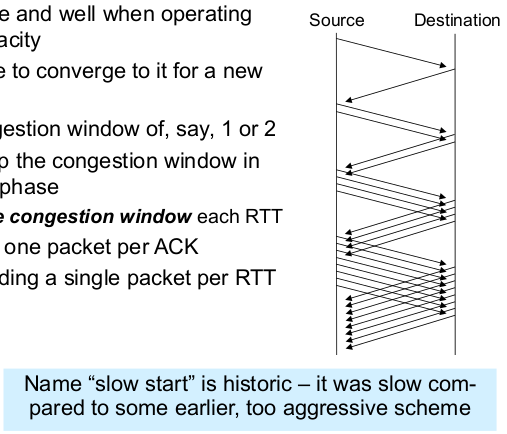
- 68Quickly Initialize a Connection: Slow Start- Additive increase nice and well when operating close to network capacity
- But takes a long time to converge to it for a new connection
-> Starting at a congestion window of, say, 1 or 2 - 69Quickly Initialize a Connection: Slow Start (Idea)- Quickly ramp up the congestion window in such an initialization phase
-> One option: double congestion window each RTT
- Equivalently: add one packet per ACk
- Instead of just adding a single packet per RTT - 70Quick Initialize a Connection: Slow Start (Bild)
- 71Leaving Slow Start- When doubling congestion window, network capacity will eventually be exceeded
- Packet loss and timeout will result
- Congestion window is halved and TCP switches to "normal", linear increase of congestion window
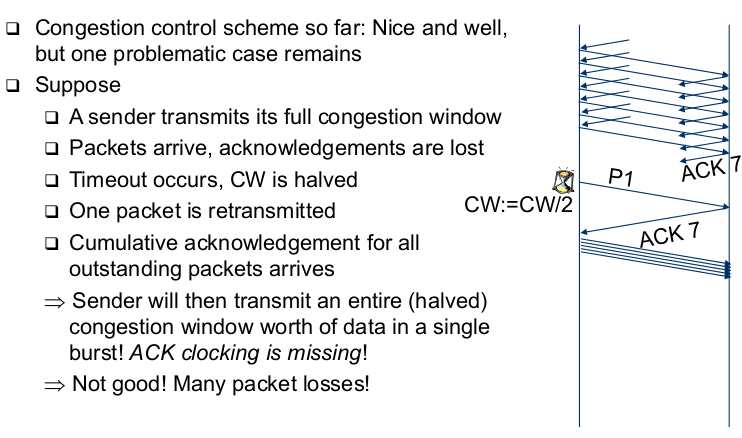
- The "congestion avoidance" phase - 72Remaining Problem: Packet Bursts
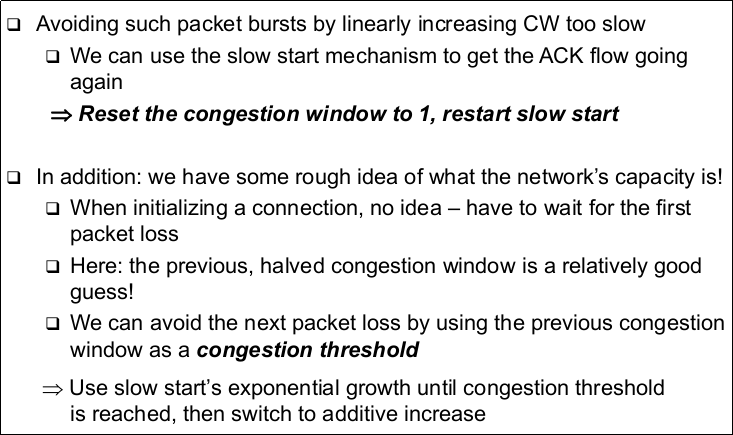
- 73Solution: Use Slow Start Here As Well
- 74TCP Congestion Window Dynamics
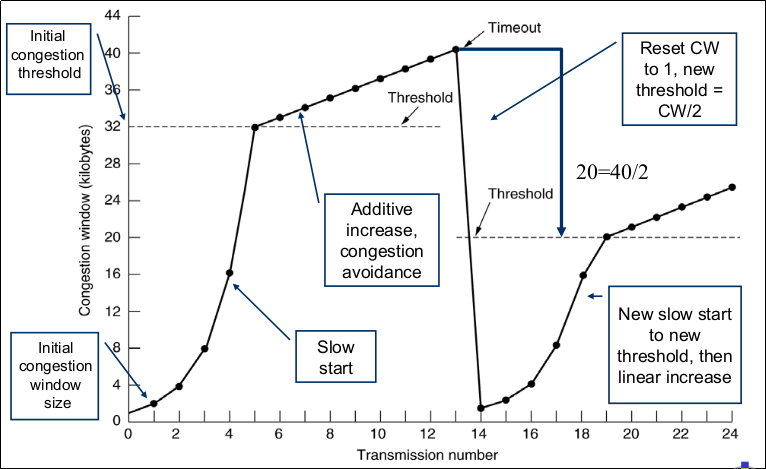
- 75Summary: TCP Congestion Control- When CongWin is below Threshold, sender in slow-start phase, window grows exponentially
- When CongWin is above Threshold, sender is in congestion-avoidance phase, window grows lineraly
- When a triple duplicate ACK occurs, Threshold set to CongWin/2 and CongWin set to Threshold
- When timeout occurs, Threshold set to CongWin/2 and CongWin is set to 1 MSS - 76Summary: TCP Sender Congestion Control

- 77Another Summary: TCP Congestion Control- This description still glosses over some (minor) details, but captures the essence
- Main source of complications: Stupidity of the network - 78Another Summary: TCP Congestion Control (Extensions to TCP)- Fast retransmit, fast recovery
-> Take corrective actions without having to wait for a timeout
-> Necessary for large delay*data rate networks - 79Another Summary: TCP Congestion Control (Different TCP versions)- TCP Tahoe, TCP Reno, TCP Vegas
-> Main difference is the congestion control
- Correct interoperation is a tricky question (e.g. fairness)
- Complicated dynamics - 80Short Advertisement For Those Who Want More On This...
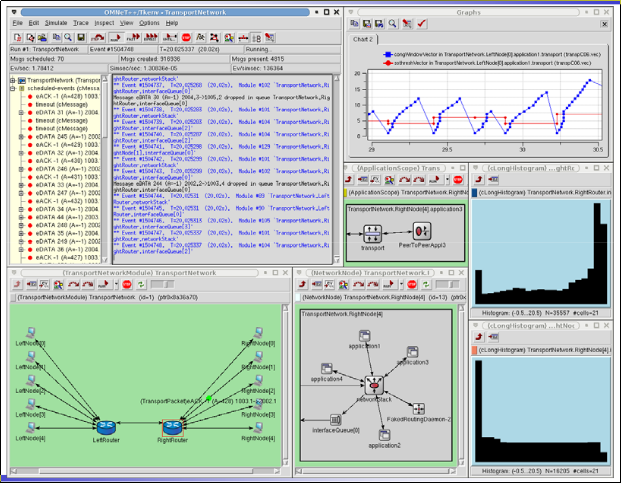
- 81Example: Evaluation of TCP Congestion Control
- 82TCP Throughput (What's the average throughout of TCP as a function of window size and RTT?)- For the sake of simplicity, let us ignore slow start
- When W be the window size when loss occurs.
- When window is W, throughput is W/RTT
- Just after loss, window drops to W/2, throughput to W/2RTT
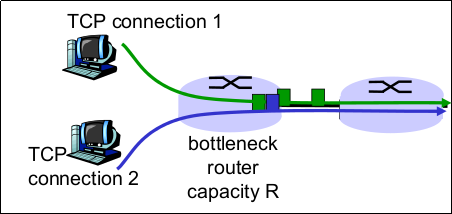
- Average throughput: .75 W/RTT - 83TCP Fairness (Fairness goal)- If K TCP sessions share same bottleneck link of bandwidth R, each should have average rate of R/K
- 84TCP Fairness (Bild)
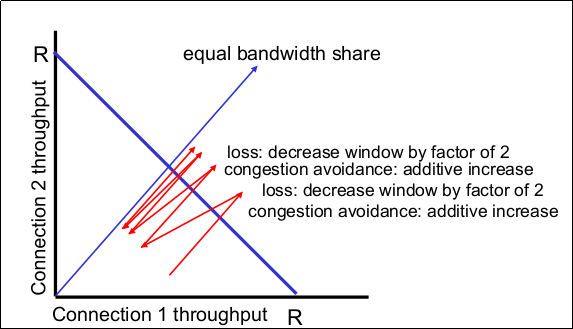
- 85Why is TCP fair? (Two competing sessions)- Additive increase gives slope of 1, as throughout increases
- Multiplicative decreases throughput proportionally - 86Why is TCP fair? (Bild)
- 87Fairness (Fairness and UDP)- Multimedia apps often do not use TCP
-> Do not want rate throttled by congestion control
- Instead, use UDP
-> Pump audio/video at constant rate, tolerate packet loss
- Research area: TCP friendly - 88Fairness (Fairness and parallel TCP connections)- Nothing prevents applications from opening parallel connections between 2 hosts
- Web browsers do this
- Example: link of rate R supporting 9 connections
-> New application asks for 1 TCP, get rate R/10
-> New application asks for 9 TCPs, gets R/2! - 89Delay Modeling (How long does it take to receive an object from a Web server after sending a request?)- Ignoring congestion delay is influenced by:
-> TCP connection establishment
-> Data transmission delay
-> Slow start - 90Delay Modeling (Notation, assumptions)- Assume one link between client and server of rate R
- S: MSS (max. segement size, bits)
- O: object size (bits)
- no retransmissions (no loss, no corruption) - 91Delay Modeling (Window size)- First assume: fix congestion window, W segments
- Then dynamic window, modelling slow start - 92Fixed Congestion Window (1)
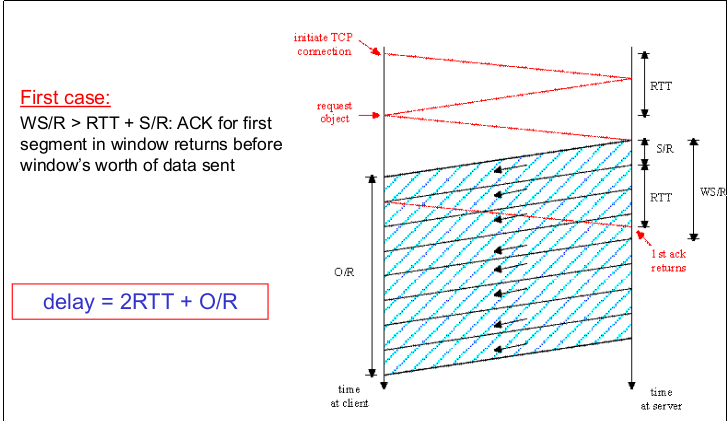
- 93Fixed Congestion Window (2)

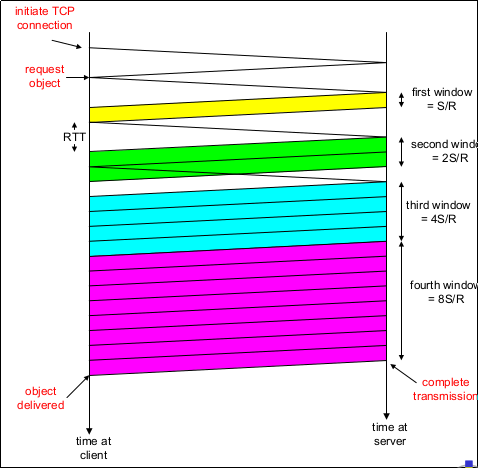
- 94TCP Delay Modeling: Slow Start (1)

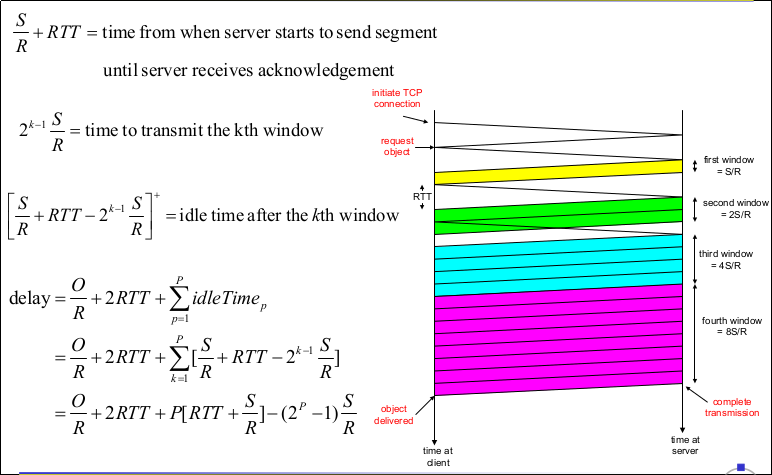
- 95TCP Delay Modeling: Slow Start (Delay components)- 2 RTT for connection estab. and request
- O/R to transmit object
- time server idles due to slow start
- Server idles:
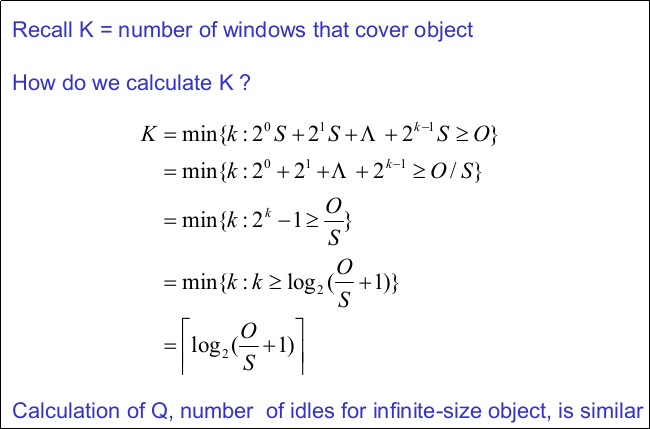
-> P = min{K-1, Q} times - 96TCP Delay Modeling: Slow Start (Example)- O/S = 15 segments
- K = 4 windows
- Q = 2
- P = min{K-1, Q} = 2
- Server idles P=2 times - 97TCP Delay Modeling: Slow Start (2)
- 98TCP Delay Modeling (3)
- 99TCP Delay Modeling (4)
- 100Case Study: HTTP Modeling
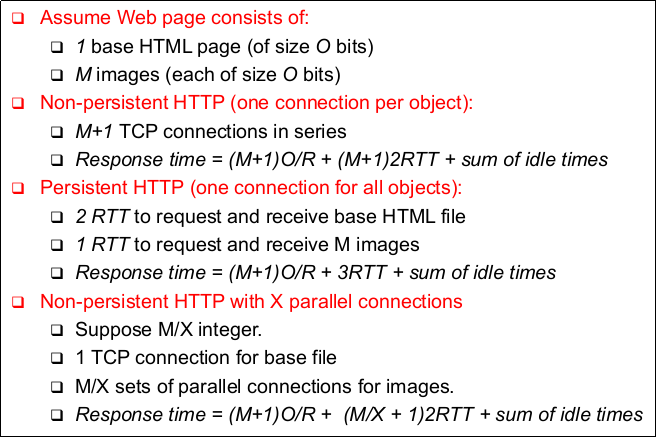
- 101HTTP Response Time (in seconds) (1)
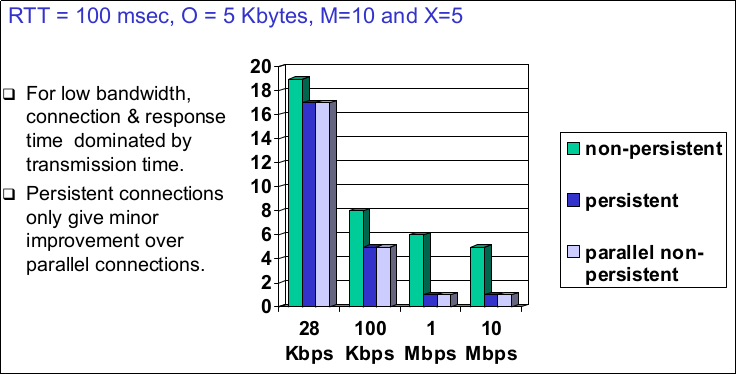
- 102HTTP Response Time (in seconds) (2)
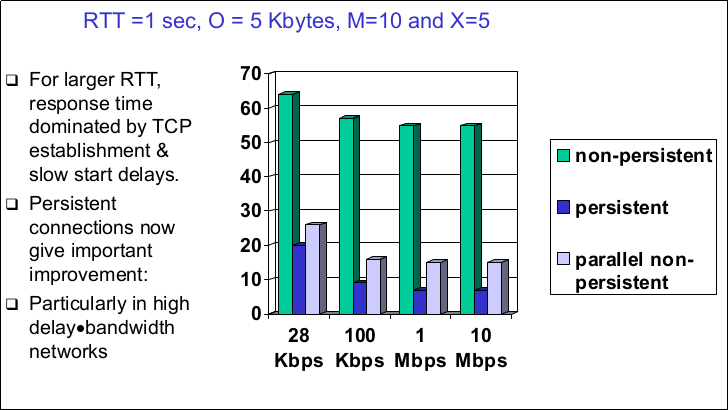
- 103Chapter Summary (Principles behind transport layer services)- Addressing, multiplexing, demultiplexing
- Connection control
- Flow control
- Congestion control - 104Chapter Summary (Instantiation and implementation of the Internet)- UDP
- TCP - 105Chapter Summary- As we have seen, in TCP three important protocol functions are implemented "altogether" in one sliding window protocol
- 106Chapter Summary (Error control)- by sequence numbers, ACKs & retransmissions
- 107Chapter Summary (Flow control)- by looking at acknowledgements and permits (& seqnums)
- 108Chapter Summary (Congestion control)- by further slowing down the sender if packets or ACKs get lost (assumption: packets mainly get lost because of congestion!)
- 109Some Network Applications
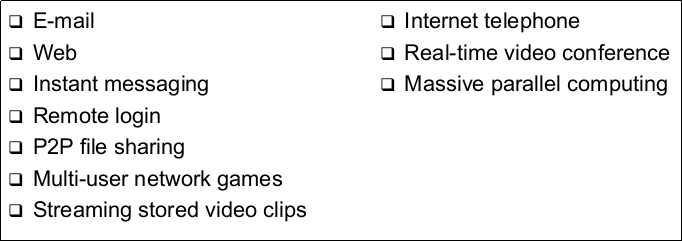
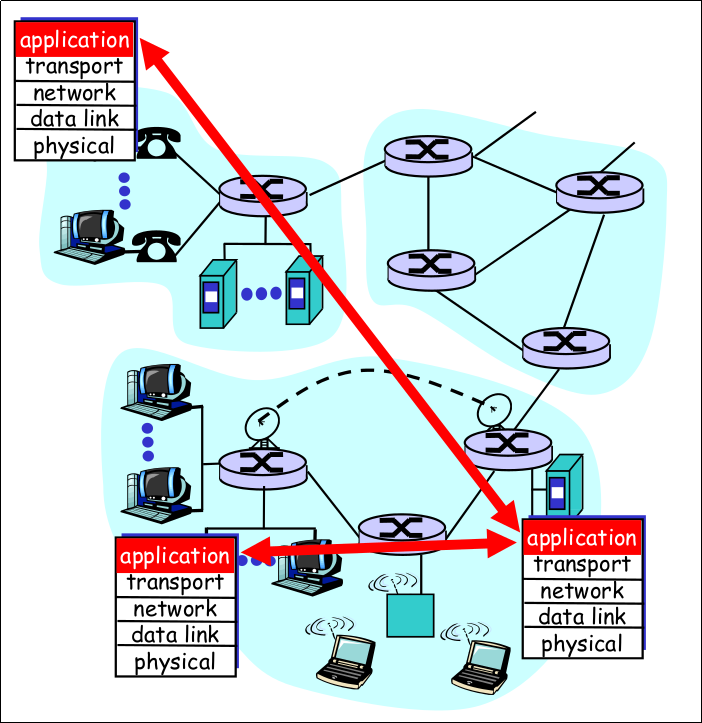
- 110Creating a Network Application (Write programs that)- Run on different end systems
and
-Communicate over a network
- E.g., Web:
-> Web server software communicates with browser software - 111Creating a Network Application (No software written for devices in network core)- Network core devices do not function at app layer
- This design allows for rapid app development - 112Creating a Network Application
- 113Principles of Network Applications: Architectures (Principle alternatives)- Client-server
- Peer-to-peer (P2P
- Hybrid of client-server and P2P - 114Client-Server Architecture (Server)- always-on host
- permanent IP address
- server farms for scaling - 115Client-Server Architecture (Clients)- communicate with server
- may be intermittently connected
- may have dynamic IP addresses
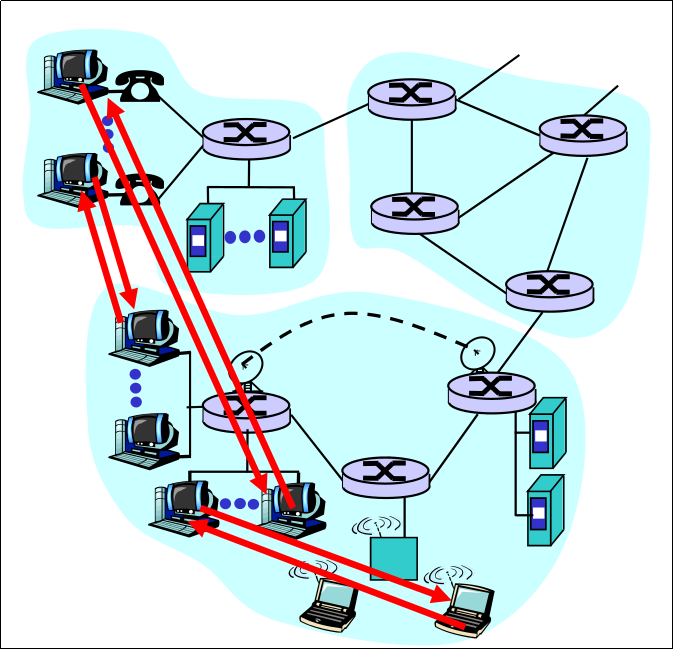
- do not communicate directly with each other - 116Pure P2P Architecture- Not always on server
- Arbitrary end systems directly communicate
- Peers are intermittently connected and change IP address
- Example: Gnutella
=> Highly scalable
=> But difficult to manage - 117Pure P2p Architecture (Bild)
- 118Hybrid of Client-Server and P2p ((Original) Napster)- File transfer P2p
- File search ceontralized:
-> Peers register content at central server
-> Peers query same central server to locate content - 119Hybrid of Client-Server and P2p (Instant messaging)- Chatting between two users is P2P
- Presence detection/location centralized:
-> User registers its IP address with central server when it comes online
-> User contacts central server to find IP addresses of buddies - 120Processes Communicating- Within same host, two processes communicate using inter-process communication (defined by OS)
- Processes in different hosts communicate by exchanging messages - 121Processes Communicating (Process)- program running within a host
- 122Processes Communicating (Client process)- Process that initiates communication
- 123Processes Communicating (Server process)- Process that waits to be contacted
- 124Processes Communicating (Note)- Applications with P2P architectures have client processes & sever processes
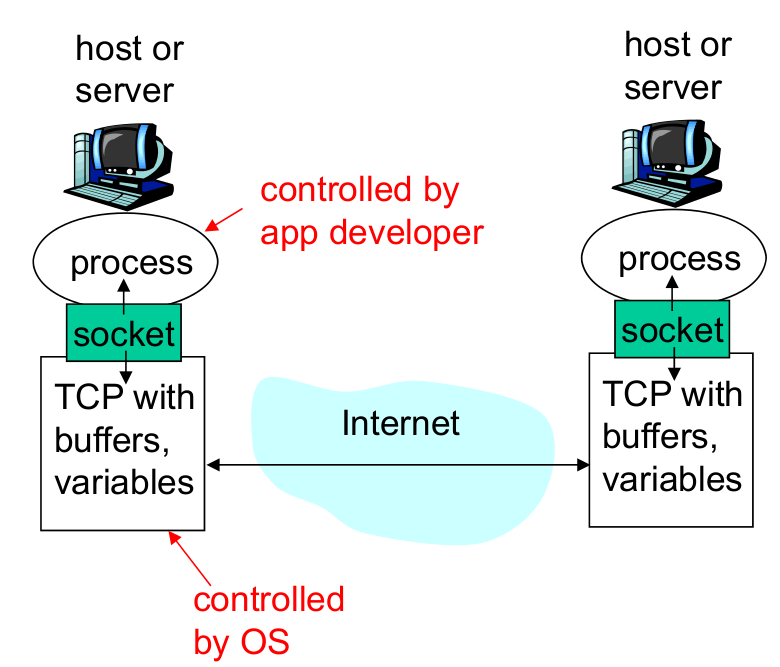
- 125Sockets- Process sends/receives messages to/from its socket
- 126Sockets (Socket analogous to door)- Sending process shoves messages outdoor
- Sending process relies on transport infrastructure on other side of door which brings messages to socket at receiving process - 127Sockets (API)- Application programming interface (API)
-> (1) choice of transport protocol
-> (2) ability to fix a few parameters - 128Sockets (Bild)
- 129Addressing Processes- For a process to receive messages, it must have an identifier
- A host has a unique32-bit IP address - 130Addressing Processes (Does the IP address of the host on which the process runs suffice for identifying the process?)- No, many processes can be running on same host
- 131Addressing Processes (Identifier)- Identifier includes both the IP address and port numbers associated with the process on the host
- 132Addressing Processes (Example port numbers)- Example port numbers:
-> HTTP server: 80
-> Mail server: 25 - 133Issues Defined by an Application-Layer Protocol (Types)- Types of messages exchanged, e.g. request & response messages
- 134Issues Defined by an Application-Layer Protocol (Syntax of message types)- Syntax of message types: what fields in messages & how fields are delineated
- 135Issues Defined by an Application-Layer Protocol (Semantics of the field)- Semantics of the fields, ie, meaning of information in fields
- 136Issues Defined by an Application-Layer Protocol (Rules)- Rules for when and how processes send & respond to messages
- 137Issues Defined by an Application-Layer Protocol (Open vs Proprietary protocols) (Public-domain protocols)- open specification available to everyone
- allows for interoperability
- most protocols commonly used in the Internet are defined in RFCs
- e.g. HTTP, FTP, SMTP - 138Issues Defined by an Application-Layer Protocol (Open vs Proprietary protocols) (Proprietary protocols)- defined by a vendor
- specification often not publicly available
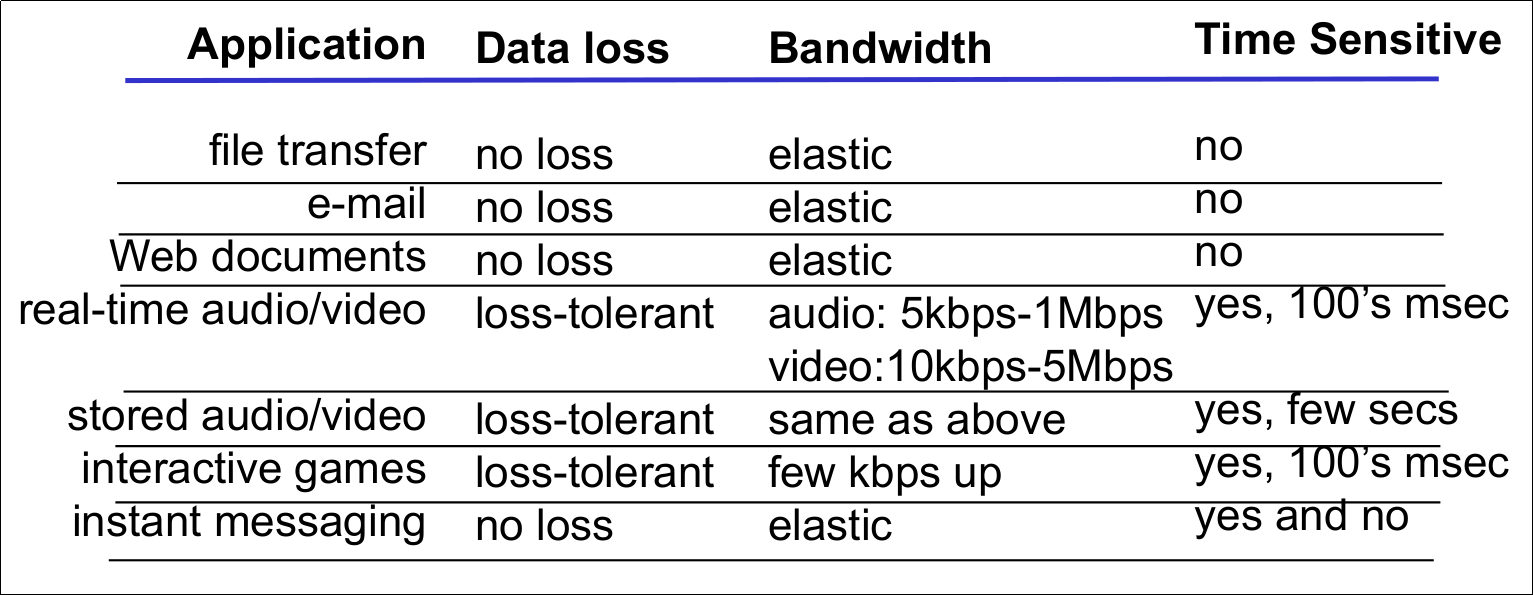
- e.g., KaZaA - 139What Transport Service does an Application Need? (Data loss)- Some apps (e.g., audio) can tolerate some loss
- Other apps (e.g., file transfer, telnet) require 100% reliable data transfer - 140What Transport Service does an Application Need? (Timing)- Some apps (e.g., Internet telephony, interactive games) require low delay to be "effective"
- 141What Transport Service does an Application Need? (Bandwidth)- Some apps (e.g., multimedia) require minimum amount of bandwidth to be "effective"
- Other apps ("elastic apps") make use of whatever bandwidth they get - 142Transport Service Requirements of Common Applications
- 143Internet Transport Protocols Services (TCP Service) (Connection-oriented)- Setup required between client and server processes
- 144Internet Transport Protocols Services (TCP Service) (Reliable transport)- between sending and receiving process
- 145Internet Transport Protocols Services (TCP Service) (Flow control)- Sender won't overwhelm receiver
- 146Internet Transport Protocols Services (TCP Service) (Congestion control)- Throttle sender when network overloaded
- 147Internet Transport Protocols Services (TCP Service) (Does not provide)- Timing, minimum bandwidth guarantees
- 148Internet Transport Protocols Services (UDP Service) (Unreliable data transfer)- Between sending and receiving process
- 149Internet Transport Protocols Services (UDP Service) (Does not provide)- Connection setup,
- Reliability,
- Flow & congestion control,
- Timing, or bandwidth guarantee - 150Internet Applications & Transport Protocols
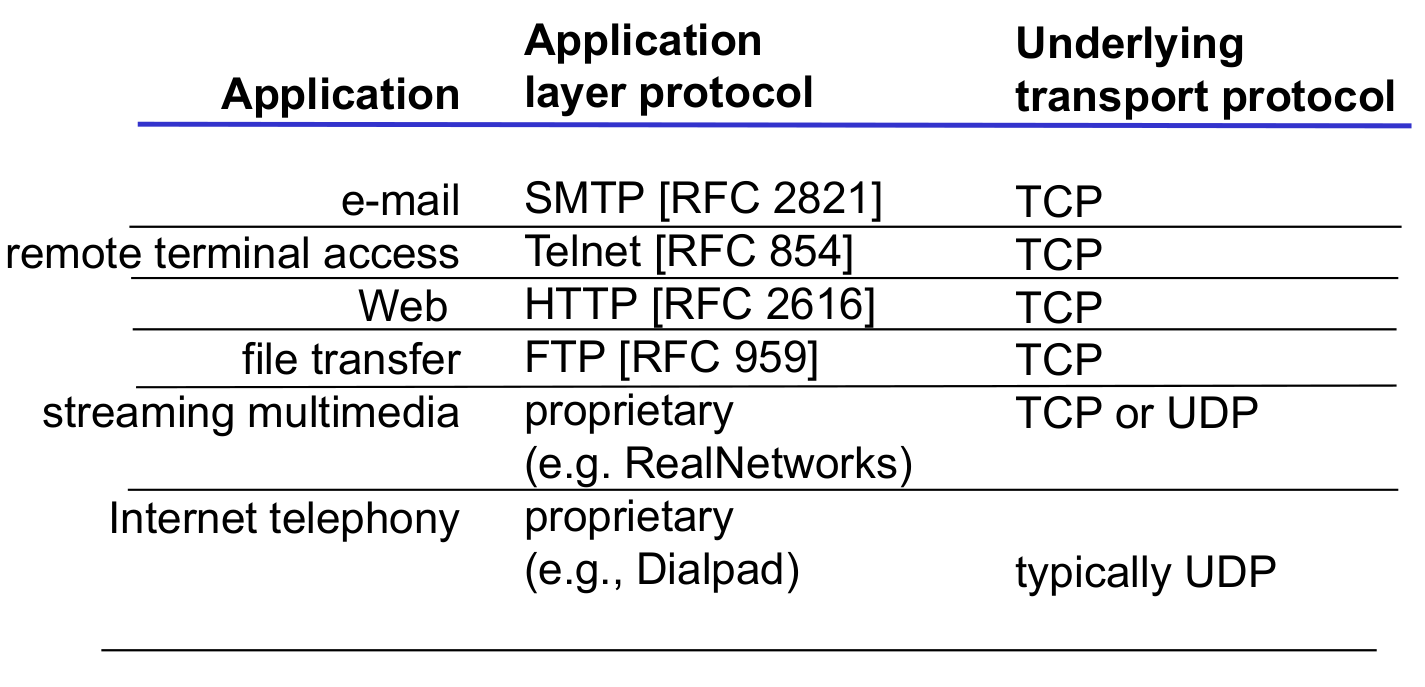
- 151Web and HTTP
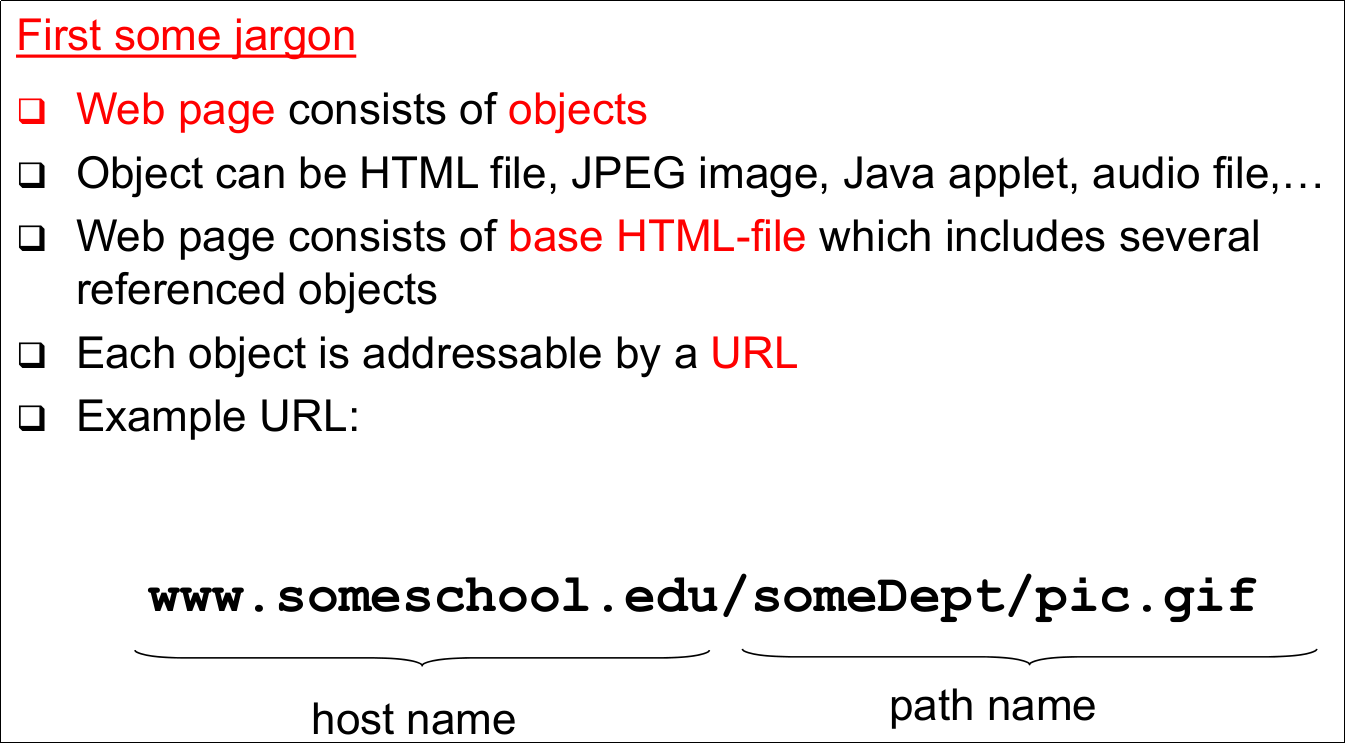
- 152HTTP Overview- Web's application layer protocol
- HTTP 1.0: RFC 1945
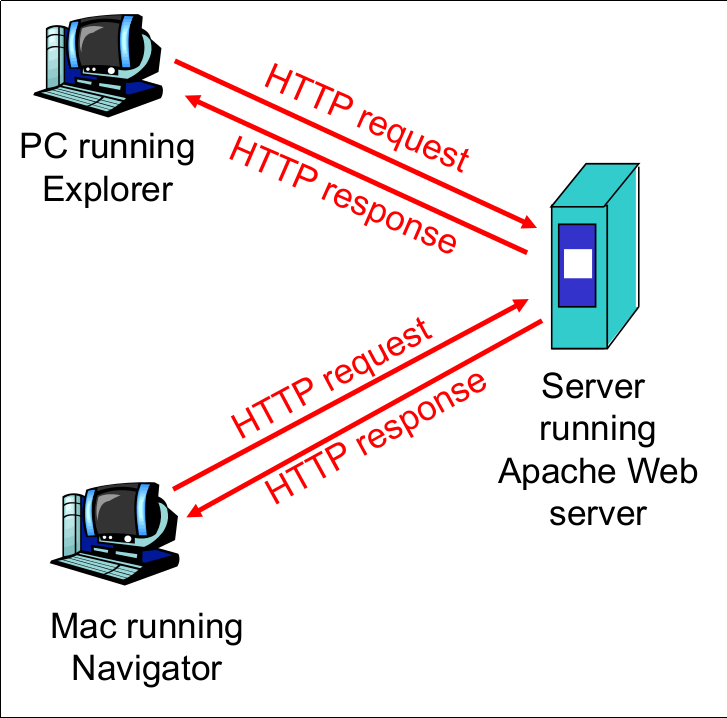
- HTTP 1.1: RFC 2068 - 153HTTP Overview (Client/Server model) (Client)- browser that requests, receives, "displays" Web objects
- 154HTTP Overview (Client/Server model) (Server)- Web server sends object in response to requests
- 155HTTP Overview (Bild)
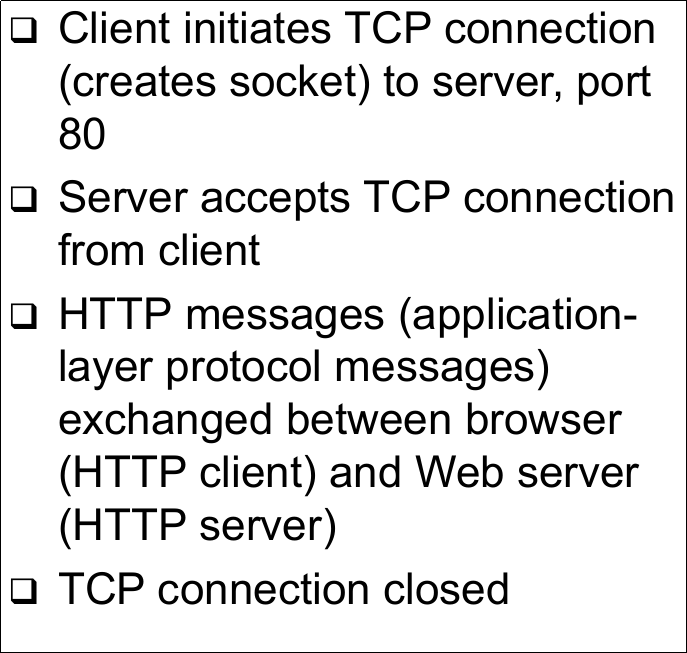
- 156HTTP Overview (Uses TCP)
- 157HTTP Overview (HTTP is "stateless")- Server maintains no information about past client requests
- 158HTTP Overview (Aside)- Protocols that maintain "state" are complex!
-> Past history (state) must be maintained
-> If server/client crashes, their views of "state" may be inconsistent, must be reconciled - 159HTTP Connections (Nonpersistent HTTP)- At most one object is sent over a TCP connection
- HTTP/1.0 uses nonpersistent HTTP - 160HTTP Connections (Persistent HTTP)- Multiple objects can be sent over single TCP connection between client and server
- HTTP/1.1. uses persistent connections in default mode - 161Nonpersistent HTTP (1)
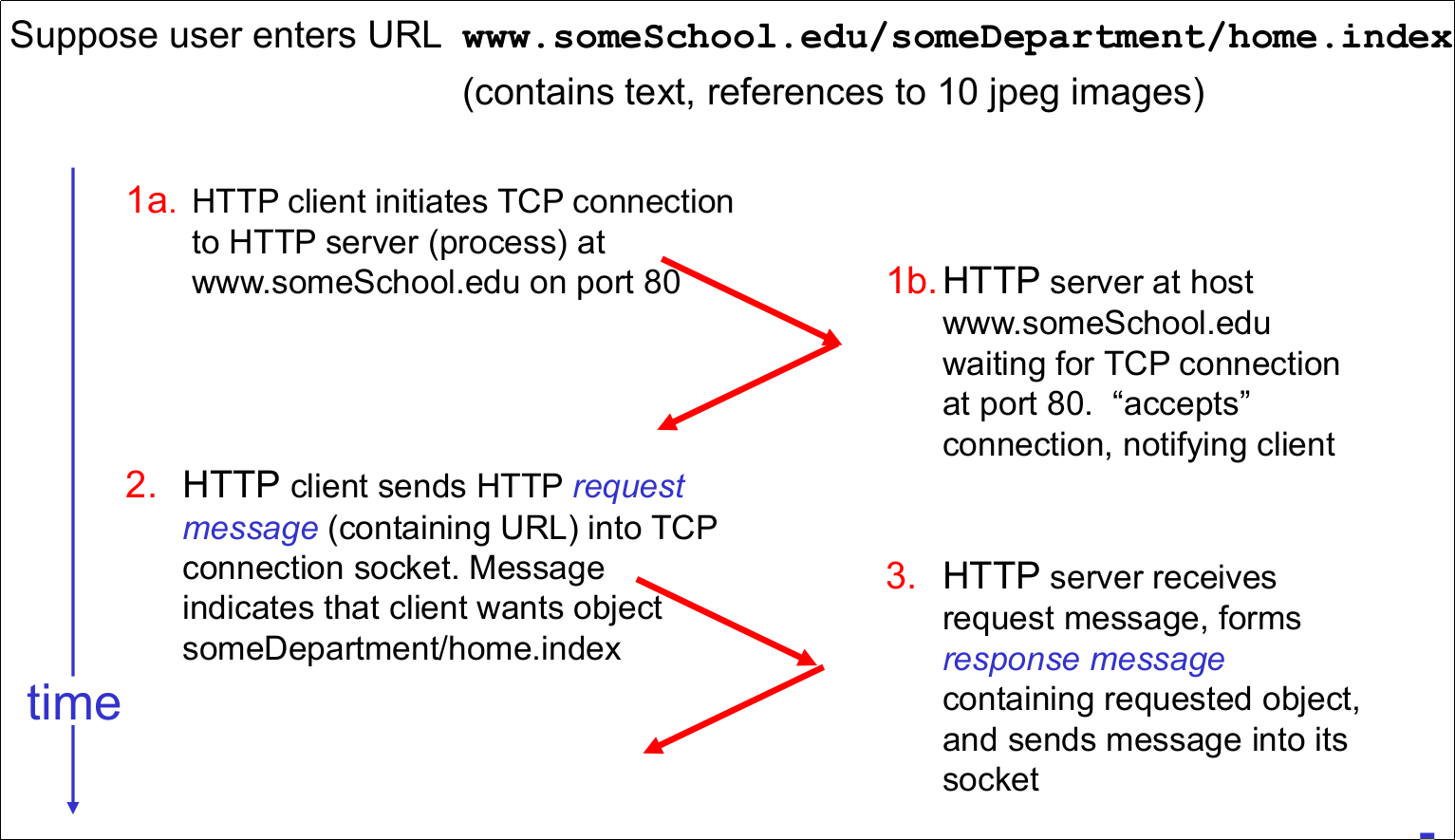
- 162Nonpersistent HTTP (2)
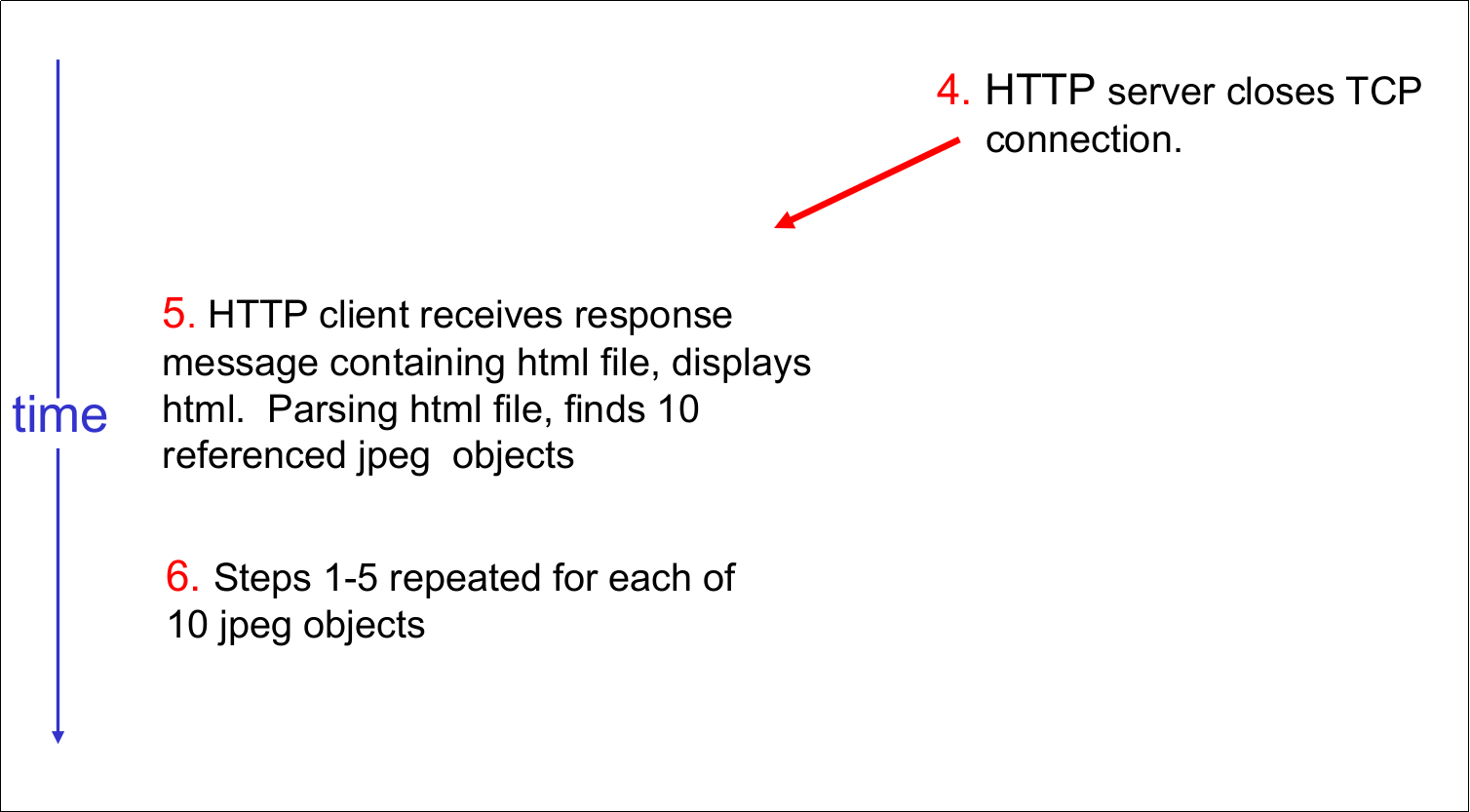
- 163Response Time Modeling (Definition of RTT)- time to send a small packet to travel from client to server and back
- 164Response Time Modeling (Response time)- one RTT to initiate TCP connection
- one RTT of HTTP request and first few bytes of HTTP response to return
- file transmission time
=> total = 2RTT + transmit time - 165Response Timing Model (Bild)
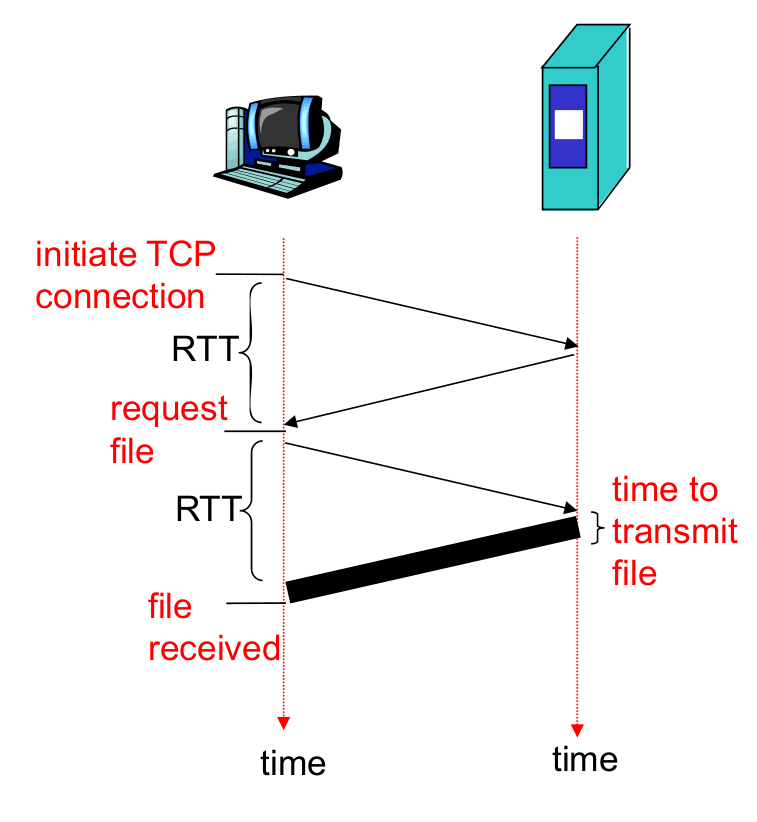
- 166Persistent HTTP (Nonpersistent HTTP issues)- Requires 2 RTTs per object
- OS must work and allocate host resources for each TCP connection
- But browsers often open parallel TCP connections to fetch referenced objects - 167Persistent HTTP (Persistent HTTP)- Server leaves connection open after sending response
- Subsequent HTTP messages between same client/server are sent over connection - 168Persistent HTTP (Persistent without pipelining)- Client issues new request only when previous response has been received
- One RTT for each referenced object - 169HTTP Request Message- Two types of HTTP messages: request, response
- HTTP request message
-> ASCII (human-readable format) - 170HTTP Request Message (Bild)
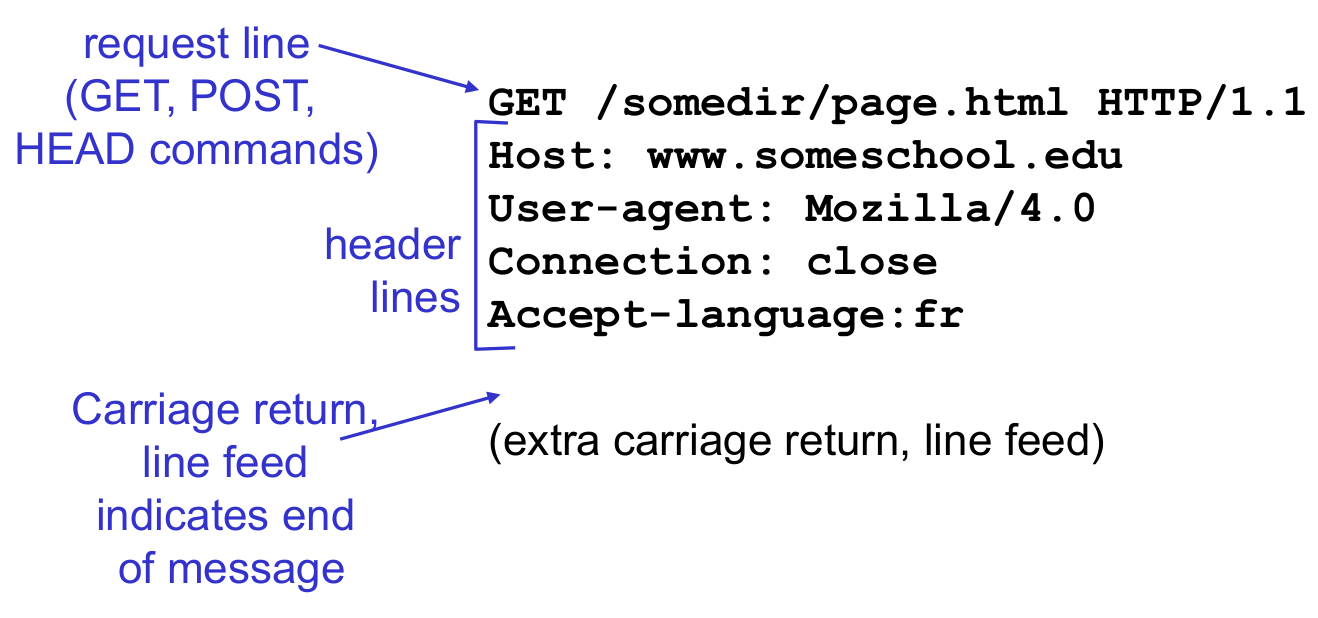
- 171HTTP Request Message: General Format
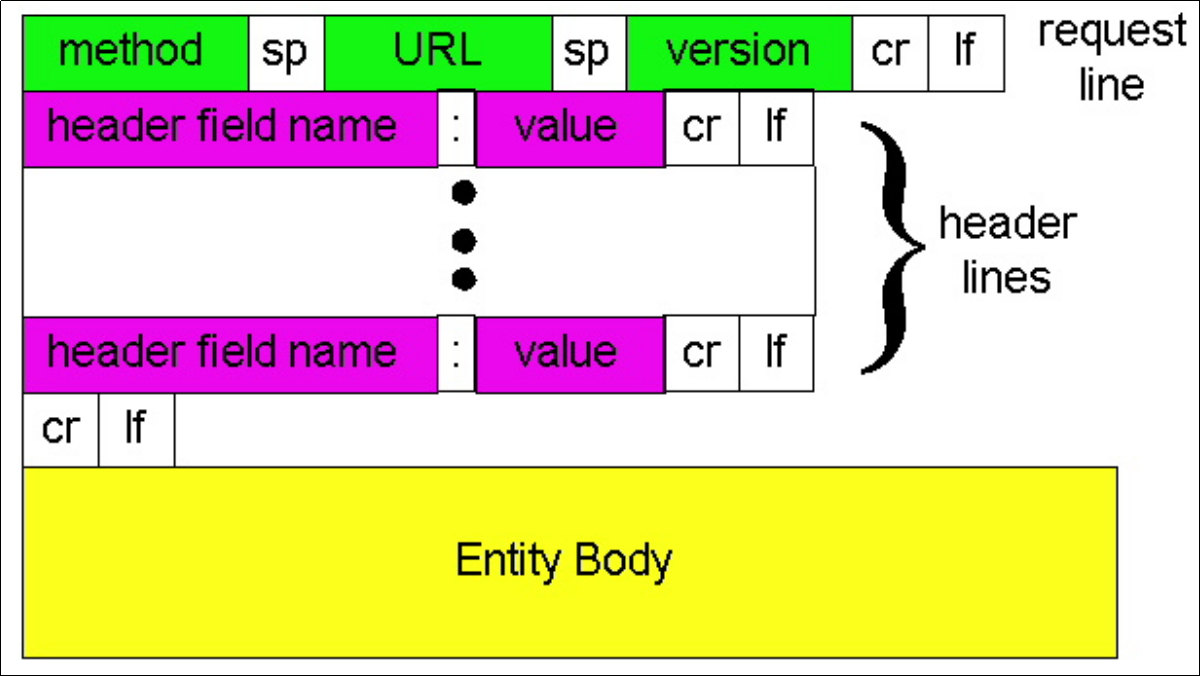
- 172Uploading Form Input (Post method)- Web page often includes from input
- Input is uploaded to server in entity body - 173Uploading From Input (URL method)- Uses GET method
- Input is uploaded in URL field of request line:
=> www.somesite.com/animalsearch?monkeys&banana - 174Method Types (HTTP/1.0)- GET
-POST
-HEAD
-> Asks server to leave requested object out of response - 175Method Types (HTTP/1.1)- GET, POST, HEAD
- PUT
-> Uploads file in entity body to path specified in URL field
- DELETE
-> Deletes file specified in the URL field - 176HTTP Response Message
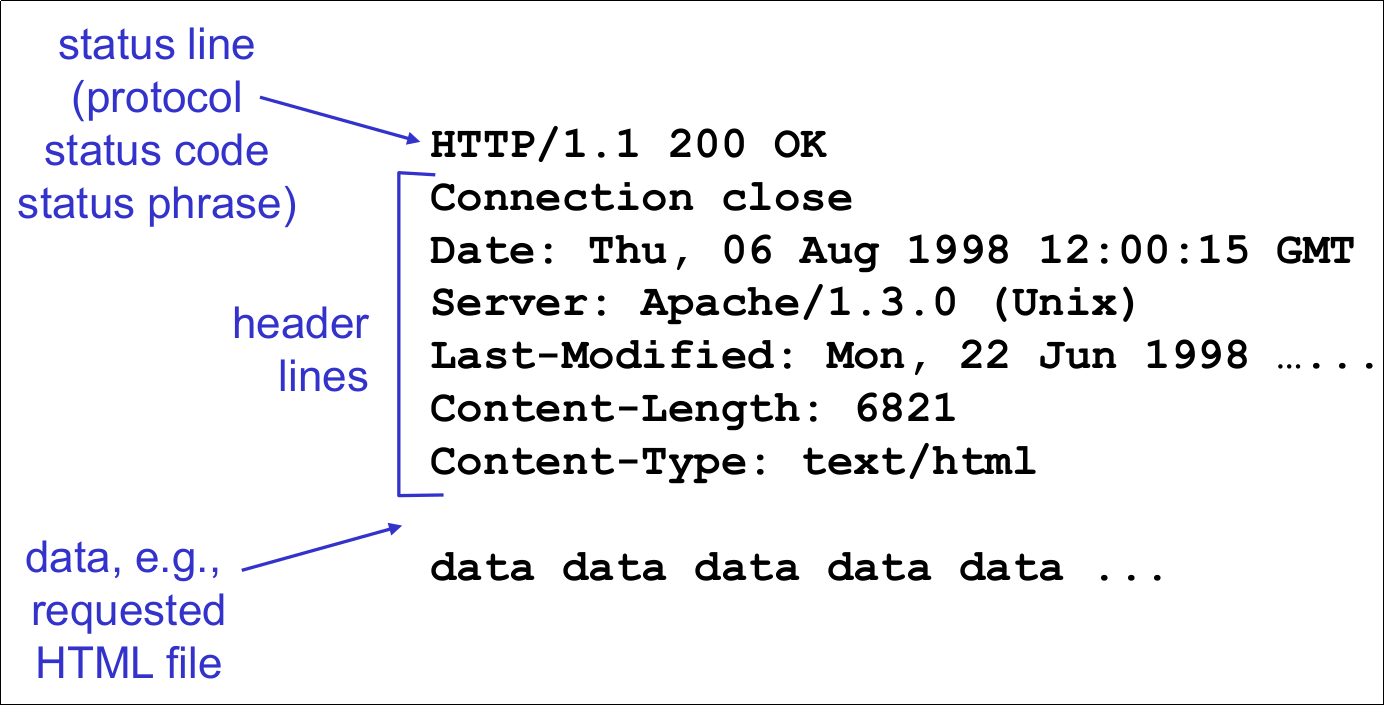
- 177HTTP Response Status Codes
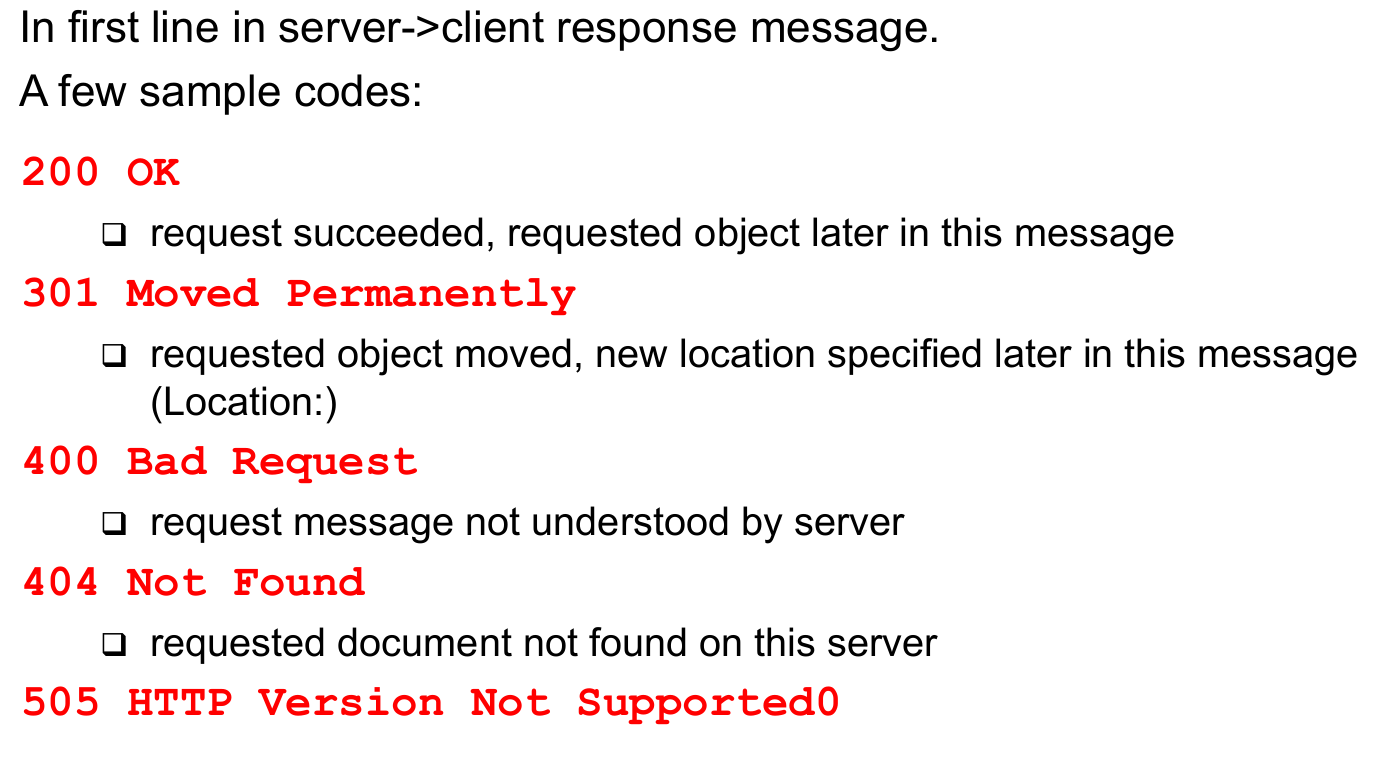
- 178Trying Out HTTP (Client Side) for Yourself
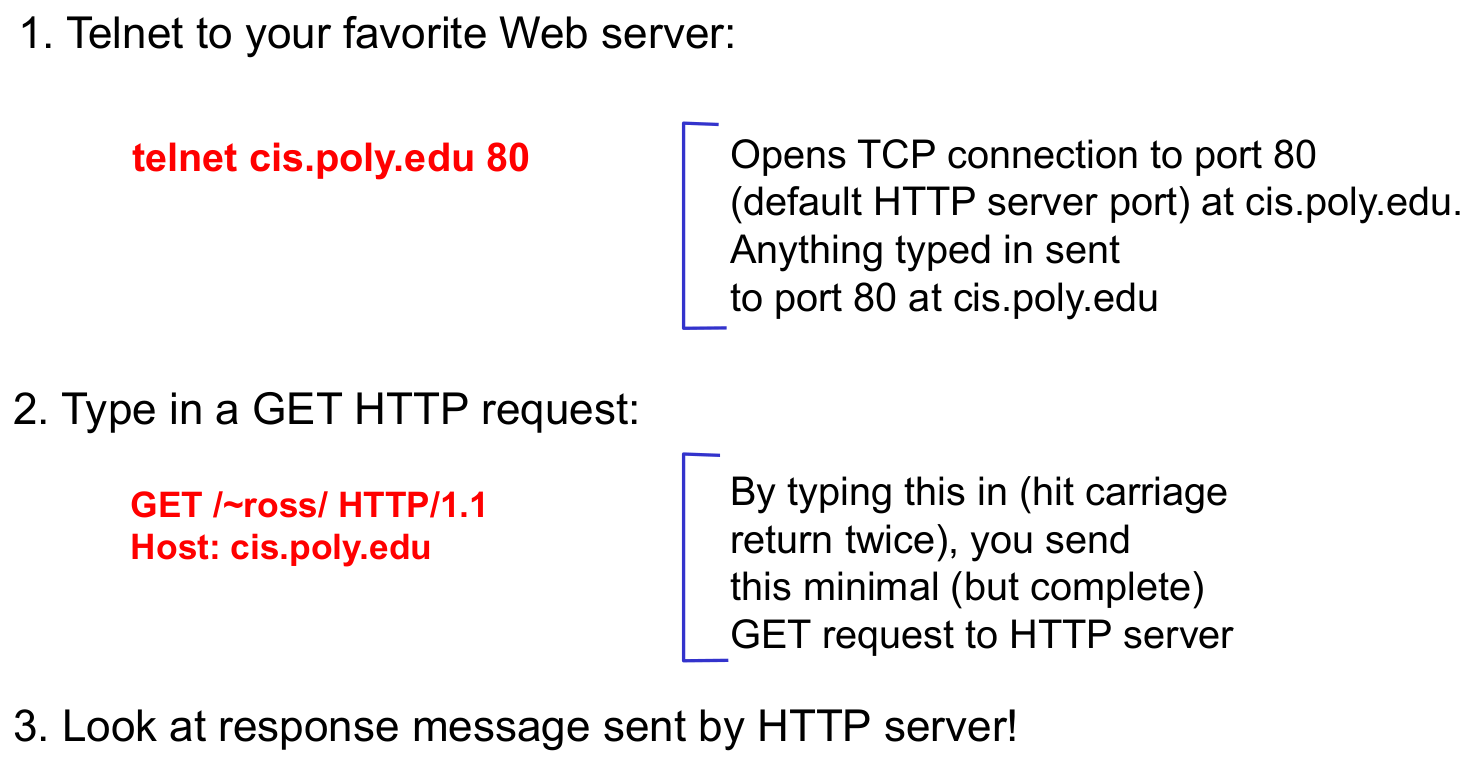
- 179User-Server State: Cookies (Four components)- Many major Web sites use cookies
- Four components:
-> 1) Cookie header line in the HTTP response message
-> 2) Cookie header line in HTTP request message
-> 3) Cookie file kept on user's host and managed by user's browser
-> 4) Back-end database at Web site - 180User-Server State: Cookies (Example)- Susan access Internet always from same PC
- She visits a specific e-commerce site for first time
- When initial HTTP requests arrive at site, site creates a unique ID and creates an entry in backend database for ID - 181Cookies: Keeping "State"
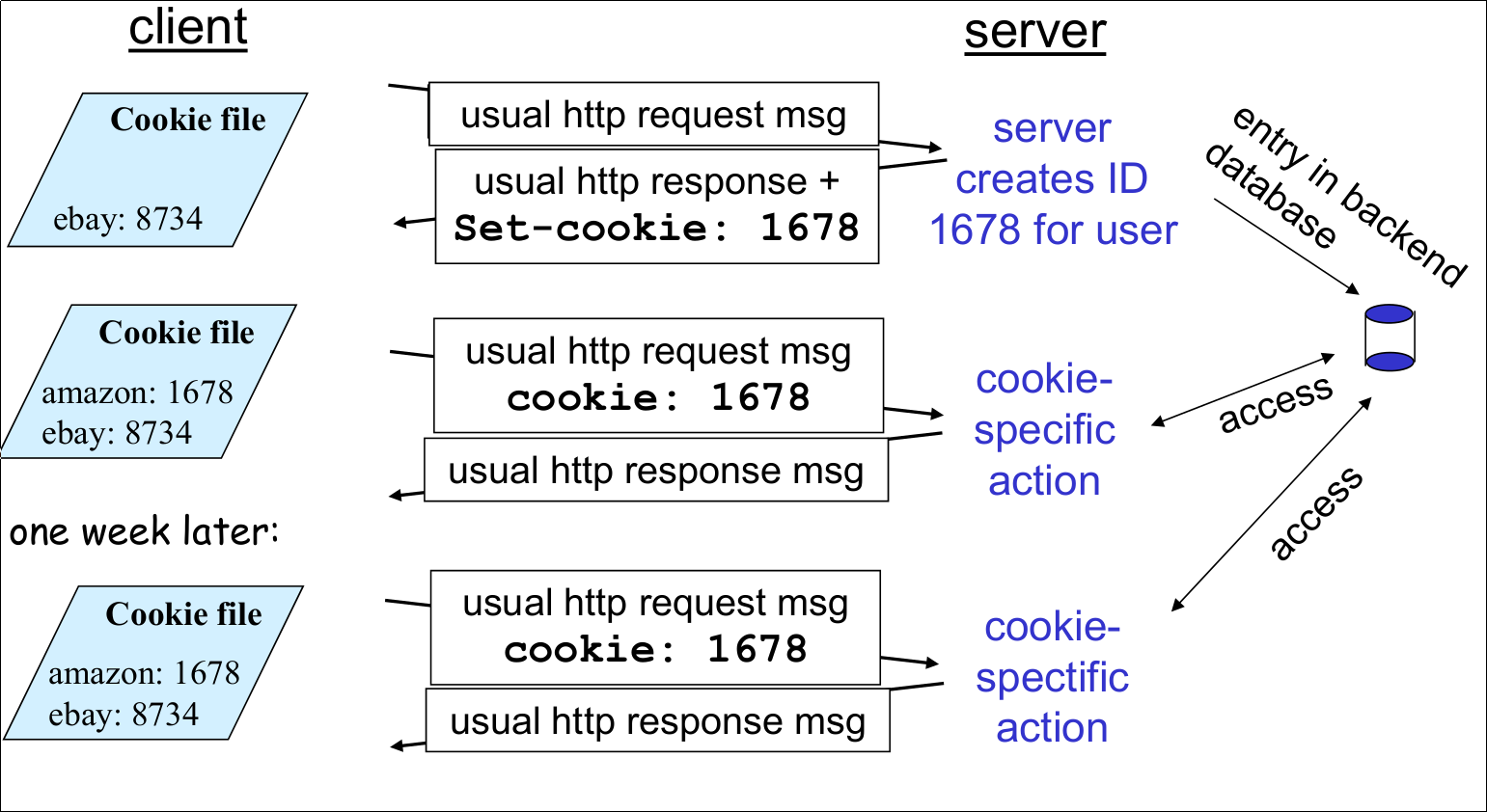
- 182Cookies (What cookies can bring)- Authorization
- Shopping carts
- Recommendations
- User session state (Web e-mail) - 183Cookies (Aside) (Cookies and privacy)- Cookies permit sites to learn a lot about you
- You may supply name and e-mail to sites
- Search engines use redirection & cookies to learn yet more
- Advertising companies obtain info across sites - 184Web Caches (Proxy Server)
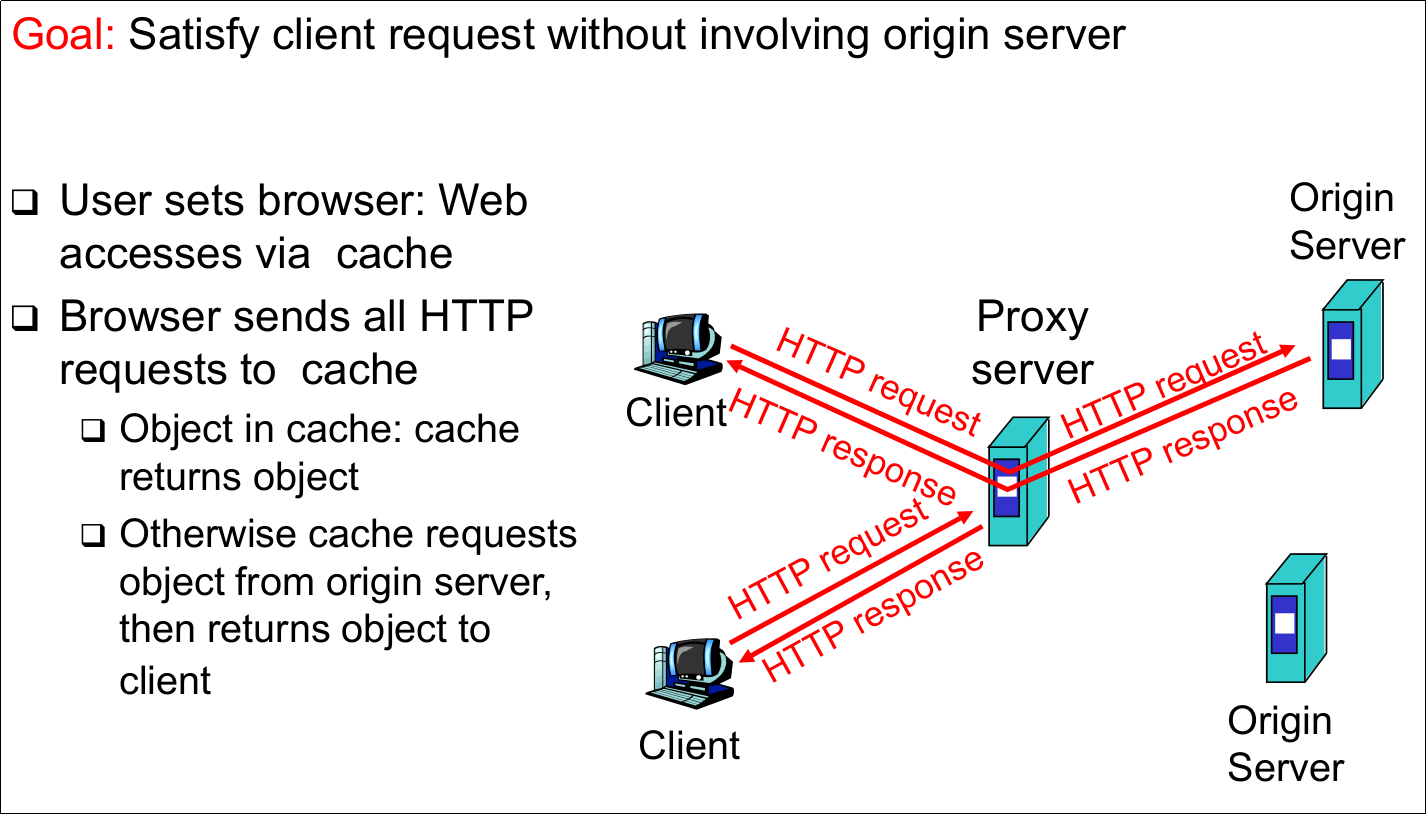
- 185More About Web Caching- Cache acts as both client and server
- Typically cache is installed by ISP (university, company, residential ISP) - 186More About Web Caching (Why Web caching?)- Reduce response time for client request
- Reduce traffic on an institution's access link
- Internet dense with caches enables "poor" content providers to effectively deliver content (but so does P2P file sharing) - 187Caching Example (1)
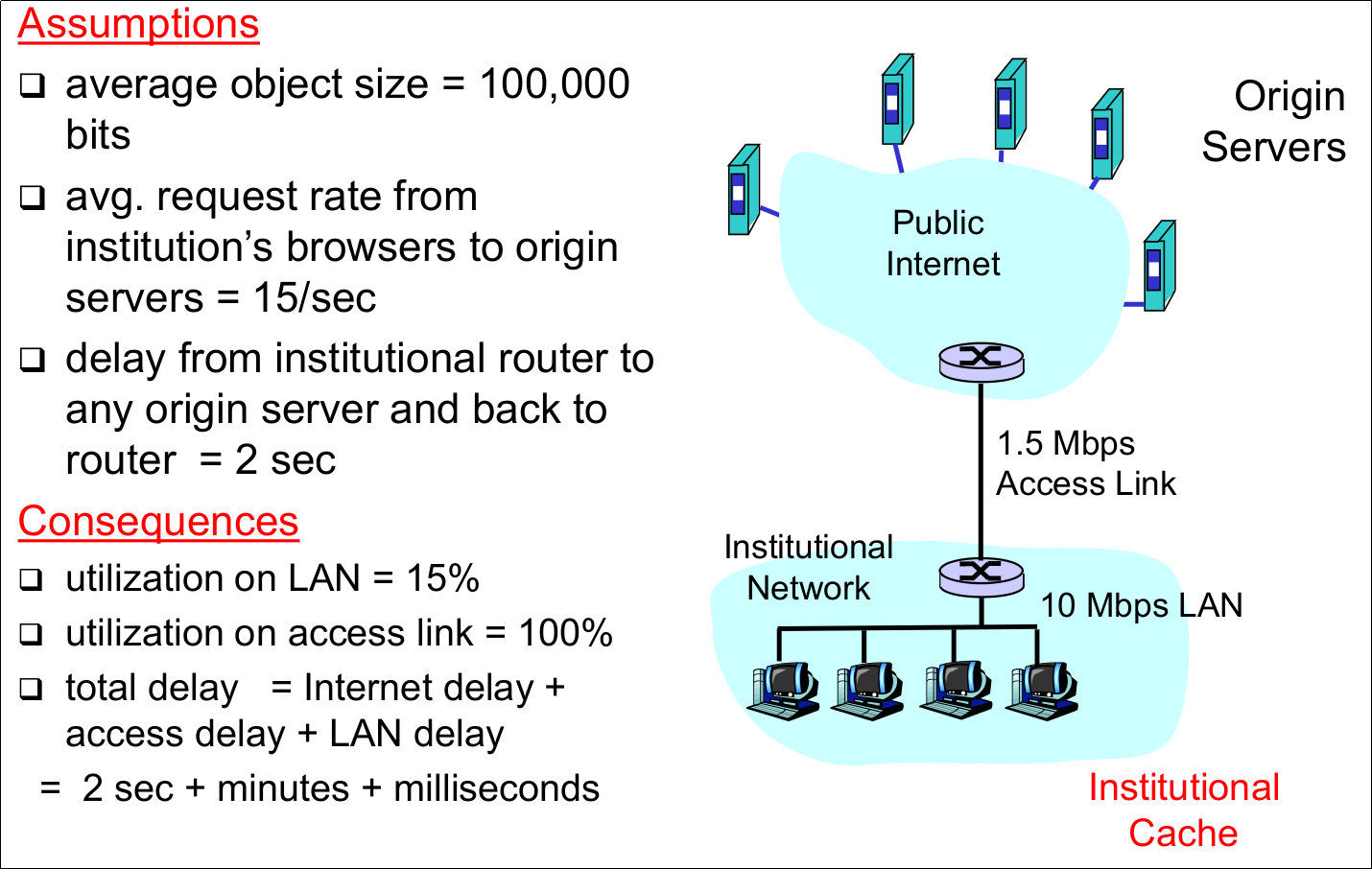
- 188Caching Example (2)
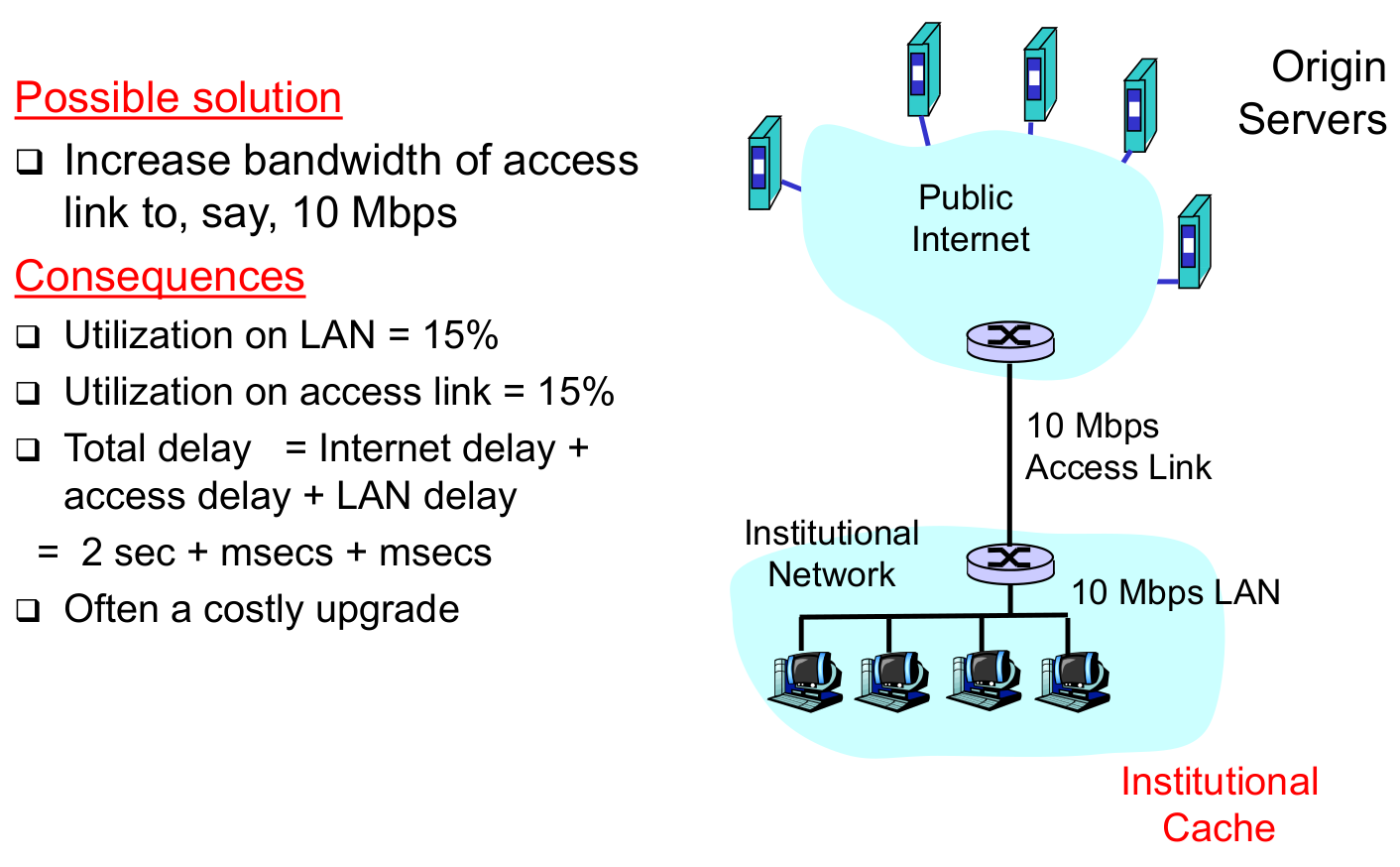
- 189Caching Example (3)
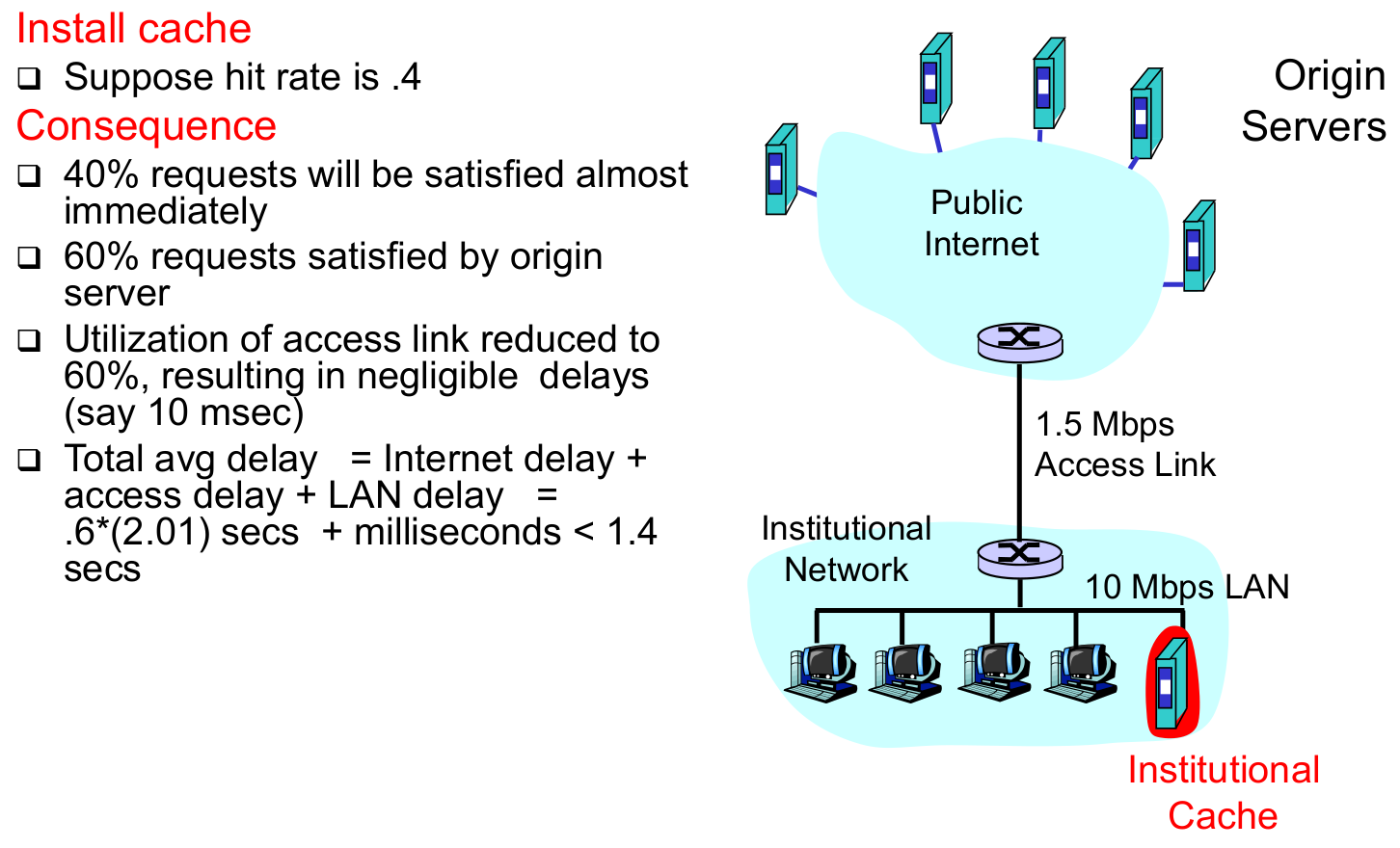
- 190Conditional GET (Goal)- don't send object if cache has up-to-date cached version
- 191Conditional GET (Cache)- specify date of cache copy in HTTP request:
If-modified-since: - 192Conditional GET (Server)- response contains no object if cached copy is up-to-date:
HTTP/1.0 304 Not Modified - 193Conditional GET (Bild)
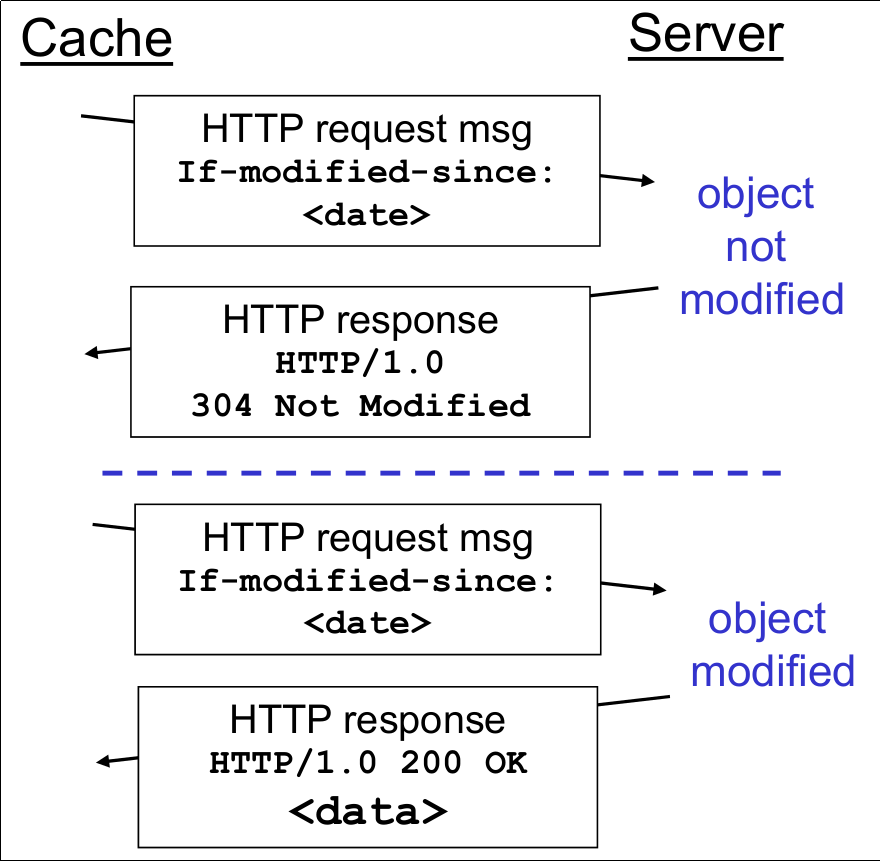
- 194Basic Web Server Tasks (1)

- 195Basic Web Server Tasks (Prepare and accept requests)
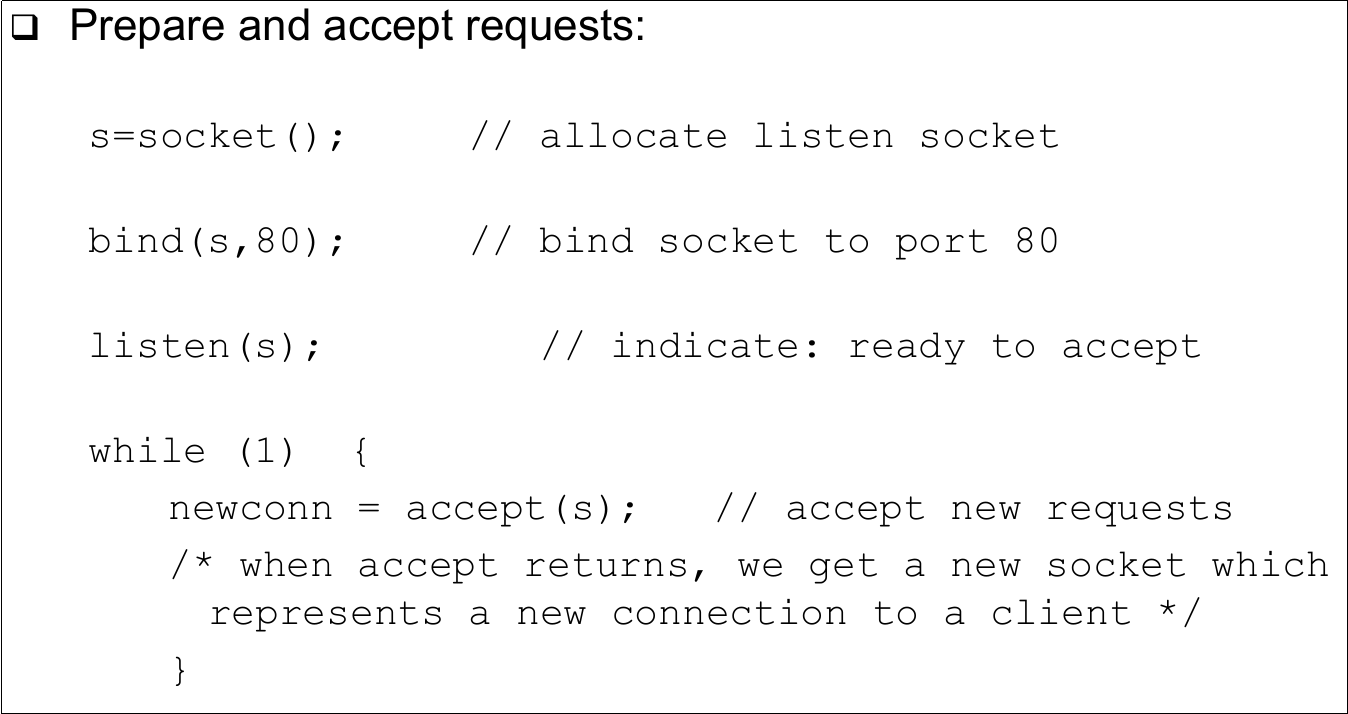
- 196Basic Web Server Tasks (Read and Process)
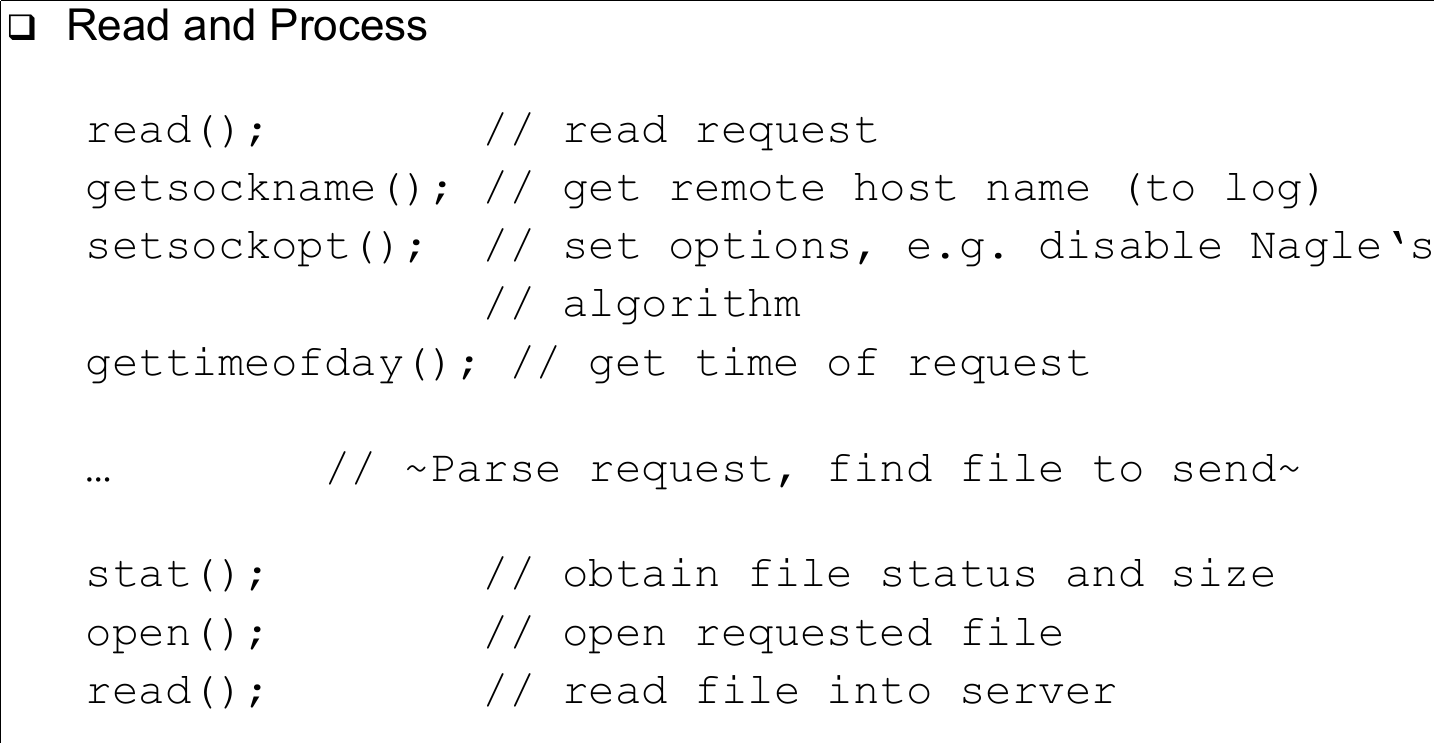
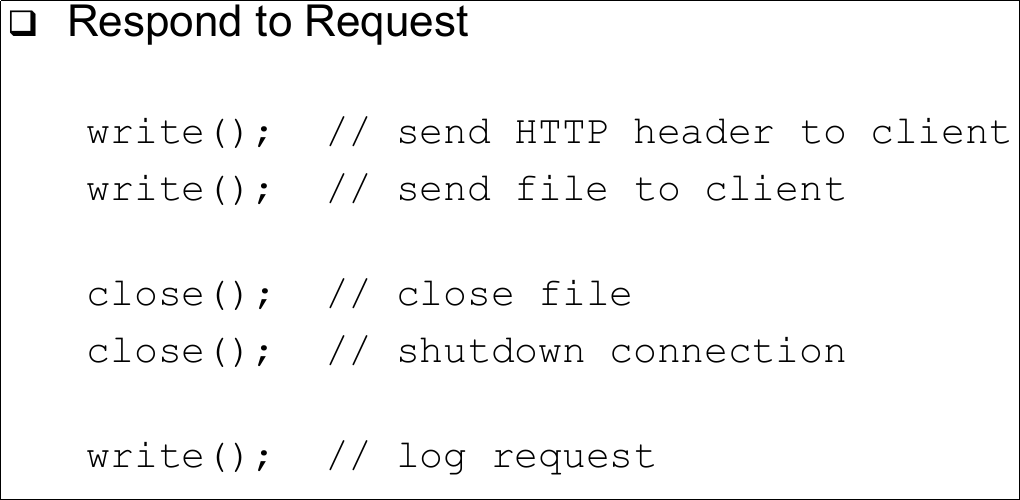
- 197Basic Web Server tasks (Respond to Request)
- 198Web Server Architectures (Four basic models)- Process model
- Thread model
- In-kernel model
- Event-driven model - 1991. Process Model

- 2001. Process Mode (Advantages)- Synchronization when handling different requests inherent in process model
- Protection between processes (one process crashes, other unaffected)
Información
- Descripción
- Fichas sobre Chapter 8-9, creado por Julian Rottenberg el 23/06/2018.
- Creado por
- Julian Rottenberg
- Visitas
- 13
- Etiquetas
- Valoración