
Fichas
Computer Science
Fichas del conjunto (35)
- 1What is a Computer System?A device that can receive data, store data, process data and output the data.
- 2Examples of Input DevicesMouse, Microphones, Joystick, Touchscreen, Scanner and Keyboard
- 3Examples of Output DevicesText, Displays, Monitors, Lights and Printer
- 4Reliability in ComputersIt does the job its designed to do without any glitches or problems.
- 5Data TypesA letter such as 'A' is a character
A word/phrase like 'Hello' is a string
A number e.g. '2' is an integer
A decimal like '2.9' is real
'yes/no' is Boolean
A phone number '07543988157' is a STRING - 6UtilitiesThis is a software tool that helps make maintaining a system easier.
Antivirus - detect/remove viruses
Anti Spyware - Removes programs that record data
Firewalls - Blocks unauthorised material - 7StandardsStandards are important because:
- They enable equipment from different manufactures to work together
- Makes learning new systems easier as they have similar characteristics. - 8De Facto StandardsDevelop overtime due to common usage.
-Word or QWERTY
This ensures files and systems can be used by anyone. - 9De Jure Standards'By law' these have become universally accepted meaning they have to be adhered to.
-ASCII or Unicode - 10Open Standards-Publically available
-Free of charge
HTML / HTTP - 11CPUCentral Processing Unit
Commonly referred to as the 'brains' of the computer.
-It is responsible for executing a sequence of stored instructions called a program. - 12RAM VOLATILE MEMORY'Random Access Memory'
It is referred to as main memory it is a hardware device that allows information to be stored and retrieved on a computer. - 13AlgorithmsAlgorithms provide a computer with a set of instructions or rules that are followed to complete a task.
Step- by - step instructions that are precise. - 14Off The Shelf SoftwareOff the shelf can be bought from a supplier ready to install.
- 15Advantages of Off the Shelf-Ready to install straight away
-It has probably been tested a lot
-Problems would have already been reported and fixed
-Online forums to help with confusion
-The cost will be low - 16Custom Written SoftwareCustom written software is specifically coded for a certain person/business/customer.
- 17Custom Written Software Advantages-It should have the features you require
-The developer can be contacted if there is any problems
-The developer may provide training
-It should not require any new adaptations after the installation. - 18Open Source SoftwareOpen source software can be modified as the code is shown and is publically accessible.
- 19Open source Advantages-It may be free of charge
-It can be altered as the code is available
-It could be reliable because many people can improve it - 20Proprietary SoftwareThis is software that is developed for profit by a company, only the compiled code is released meaning it can't be changed.
You have to buy a licence to use it - 21Propriety Advantages-There is someone to go to if there is a problem
-Updates are usually regularly
-It should have been extensively tested - 22File Typesdoc - word document
pdf - portable document format
html - hypertext mark up language
jpg - compressed image format file
mp3 - music file
mp4 - movie - 23NetworksA network is a group of 2 or more computer systems linked together.
There are many different types of networks but the main two are LANs and WANs - 24LANs WANsLANs - Local Area Networks - these are usually very close together e.g. in the same building.
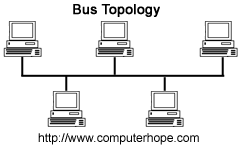
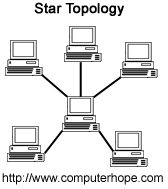
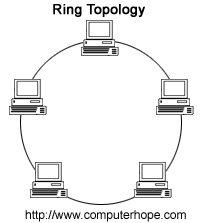
WANs - Wide Area Networks - these are further apart (the internet can be considered a WAN) - 25TopologiesTopologies refers to the layout of a network. The three most common topologies are Bus, Star and Ring
- 26BusA bus topology is the simplest of the network topologies.
- 27StarA star topology is one of the most common network setups.
- 28RingA ring topology is where the devices are connected to each other in a circular shape.
- 29CompressionCompression is often used to speed up the transmission of data such as images. It changes the data into a form that uses fewer bits of data than the original data.
- 30Lossy (Compression)Lossy compression reduces a file by permanently deleting certain information. When the file is uncompressed only a small amount of the information is
there. This cannot not be detected by most users (e.g. images only using one shade of blue) - 31Lossless CompressionLossless compression is where every single bit of data that was originally in the file remains after the file is uncompressed. The information is completely restored. This is mainly used for text or spreadsheets where losing words or data could be a problem
- 32IP / MAC addressesMAC - Media Access Control
A MAC address is given to a network adapter when it is manufactured.
IP - Internet Protocol
Unique string of numbers separated by periods that identify each computer to communicate over a network. - 33OS - Operating SystemsOperating systems are a program designed to run other programs on a computer. A computer’s operating system is its most important program it can manage both software and hardware resources.
- 34DatabasesA database is a collection of information that is organized so that it can easily be accessed, managed, and updated.
Features - Fields and Records - 35Fields and RecordsFields - A field is one piece of data or information about one person or one thing.
Records - all of the data or information about one person or one thing.