
Mapa mental
Hardware mindmap
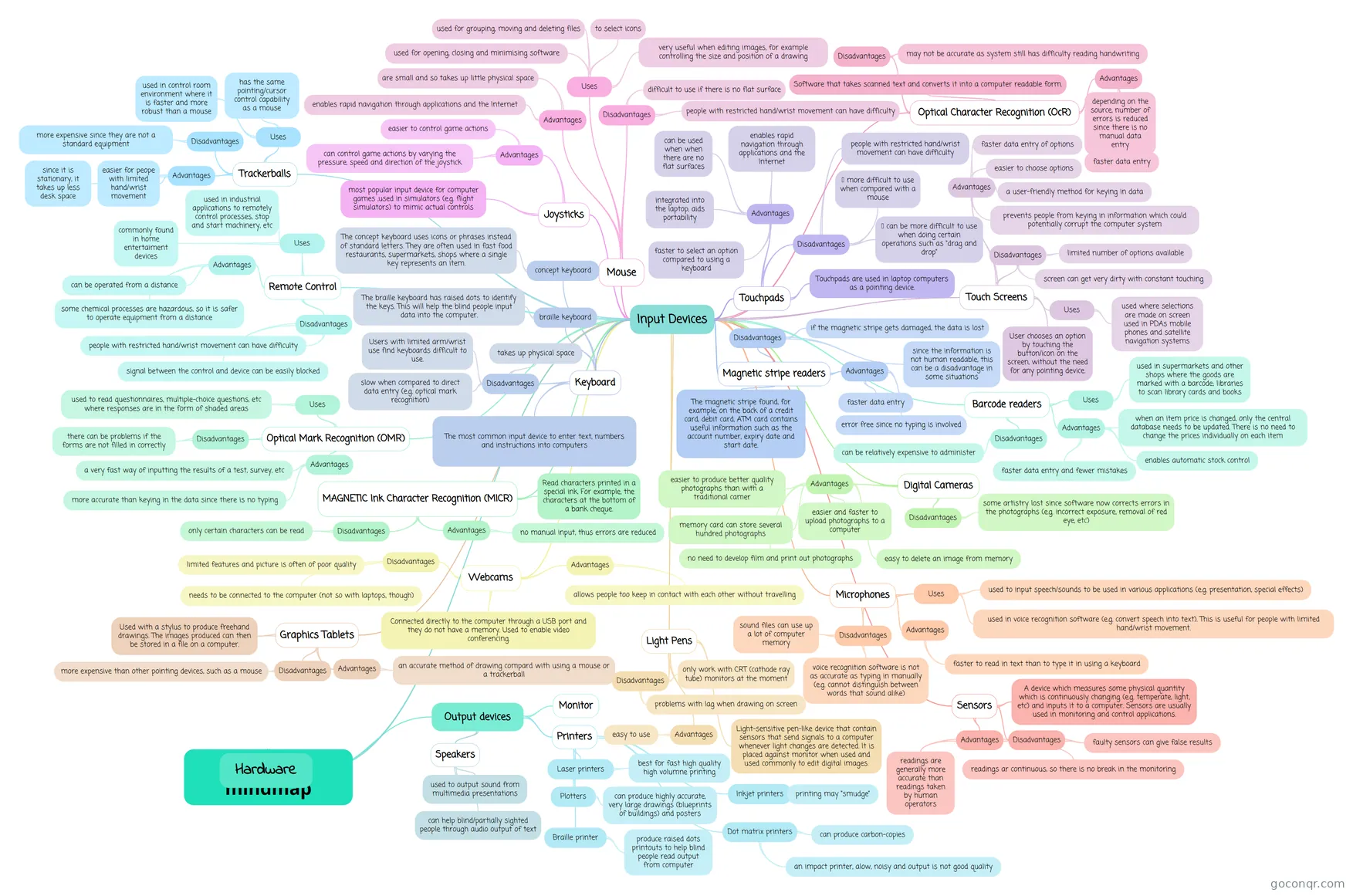
Mind map: Hardware mind map
Contenido del mapa
Hardware mindmap
Hardware
- Input Devices
- Keyboard
- The most common input device to enter text, numbers and instructions into computers
- Disadvantages
- Users with limited arm/wrist use find keyboards difficult to use.
- slow when compared to direct data entry (e.g. optical mark recognition)
- takes up physical space
- braille keyboard
- The braille keyboard has raised dots to identify the keys. This will help the blind people input data into the computer.
- concept keyboard
- The concept keyboard uses icons or phrases instead of standard letters. They are often used in fast food restaurants, supermarkets, shops where a single key represents an item.
- Mouse
- Uses
- used for opening, closing and minimising software
- used for grouping, moving and deleting files
- very useful when editing images, for example controlling the size and position of a drawing
- to select icons
- Advantages
- enables rapid navigation through applications and the Internet
- are small and so takes up little physical space
- Disadvantages
- people with restricted hand/wrist movement can have difficulty
- difficult to use if there is no flat surface
- Uses
- Touchpads
- Touchpads are used in laptop computers as a pointing device.
- Advantages
- enables rapid navigation through applications and the Internet
- integrated into the laptop, aids portability
- can be used when when there are no flat surfaces
- faster to select an option compared to using a keyboard
- Disadvantages
- people with restricted hand/wrist movement can have difficulty
- more difficult to use when compared with a mouse
- can be more difficult to use when doing certain operations such as “drag and drop”
- Trackerballs
- Uses
- has the same pointing/cursor control capability as a mouse
- used in control room environment where it is faster and more robust than a mouse
- Advantages
- easier for peope with limited hand/wrist movement
- since it is stationary, it takes up less desk space
- Disadvantages
- more expensive since they are not a standard equipment
- Uses
- Remote Control
- Uses
- commonly found in home entertaiment devices
- used in industrial applications to remotely control processes, stop and start machinery, etc
- Advantages
- can be operated from a distance
- some chemical processes are hazardous, so it is safer to operate equipment from a distance
- Disadvantages
- people with restricted hand/wrist movement can have difficulty
- signal between the control and device can be easily blocked
- Uses
- Joysticks
- most popular input device for computer games ,used in simulators (e.g. flight simulators) to mimic actual controls
- Advantages
- easier to control game actions
- can control game actions by varying the pressure, speed and direction of the joystick
- Touch Screens
- User chooses an option by touching the button/icon on the screen, without the need for any pointing device.
- Advantages
- faster data entry of options
- easier to choose options
- a user-friendly method for keying in data
- prevents people from keying in information which could potentially corrupt the computer system
- Disadvantages
- limited number of options available
- screen can get very dirty with constant touching
- Uses
- used where selections are made on screen used in PDAs mobile phones and satellite navigation systems
- Magnetic stripe readers
- The magnetic stripe found, for example, on the back of a credit card, debit card, ATM card contains useful information such as the account number, expiry date and start date.
- Advantages
- faster data entry
- error free since no typing is involved
- Disadvantages
- if the magnetic stripe gets damaged, the data is lost
- since the information is not human readable, this can be a disadvantage in some situations
- Barcode readers
- Uses
- used in supermarkets and other shops where the goods are marked with a barcode; libraries to scan library cards and books
- Advantages
- faster data entry and fewer mistakes
- enables automatic stock control
- when an item price is changed, only the central database needs to be updated. There is no need to change the prices individually on each item
- Disadvantages
- can be relatively expensive to administer
- Uses
- Optical Mark Recognition (OMR)
- Uses
- used to read questionnaires, multiple-choice questions, etc where responses are in the form of shaded areas
- Disadvantages
- there can be problems if the forms are not filled in correctly
- Advantages
- a very fast way of inputting the results of a test, survey, etc
- more accurate than keying in the data since there is no typing
- Uses
- Optical Character Recognition (OcR)
- Software that takes scanned text and converts it into a computer readable form.
- Disadvantages
- may not be accurate as system still has difficulty reading handwriting
- Advantages
- faster data entry
- depending on the source, number of errors is reduced since there is no manual data entry
- MAGNETIC Ink Character Recognition (MICR)
- Disadvantages
- only certain characters can be read
- Advantages
- no manual input, thus errors are reduced
- Read characters printed in a special ink. For example, the characters at the bottom of a bank cheque.
- Disadvantages
- Digital Cameras
- Advantages
- easier to produce better quality photographs than with a traditional camer
- memory card can store several hundred photographs
- easier and faster to upload photographs to a computer
- no need to develop film and print out photographs
- easy to delete an image from memory
- Disadvantages
- some artistry lost since software now corrects errors in the photographs (e.g. incorrect exposure, removal of red eye, etc)
- Advantages
- Webcams
- Disadvantages
- limited features and picture is often of poor quality
- needs to be connected to the computer (not so with laptops, though)
- Advantages
- allows people too keep in contact with each other without travelling
- Connected directly to the computer through a USB port and they do not have a memory. Used to enable video conferencing.
- Disadvantages
- Microphones
- Uses
- used to input speech/sounds to be used in various applications (e.g. presentation, special effects)
- used in voice recognition software (e.g. convert speech into text). This is useful for people with limited hand/wrist movement.
- Advantages
- faster to read in text than to type it in using a keyboard
- Disadvantages
- sound files can use up a lot of computer memory
- voice recognition software is not as accurate as typing in manually (e.g. cannot distinguish between words that sound alike)
- Uses
- Sensors
- A device which measures some physical quantity which is continuously changing (e.g. temperate, light, etc) and inputs it to a computer. Sensors are usually used in monitoring and control applications.
- Disadvantages
- faulty sensors can give false results
- Advantages
- readings ar continuous, so there is no break in the monitoring
- readings are generally more accurate than readings taken by human operators
- Graphics Tablets
- Used with a stylus to produce freehand drawings. The images produced can then be stored in a file on a computer.
- Advantages
- an accurate method of drawing compard with using a mouse or a trackerball
- Disadvantages
- more expensive than other pointing devices, such as a mouse
- Light Pens
- Light-sensitive pen-like device that contain sensors that send signals to a computer whenever light changes are detected. It is placed against monitor when used and used commonly to edit digital images.
- Advantages
- easy to use
- Disadvantages
- problems with lag when drawing on screen
- only work with CRT (cathode ray tube) monitors at the moment
- Keyboard
- Output devices
- Monitor
- Printers
- Laser printers
- best for fast high quality high volumne printing
- Plotters
- can produce highly accurate, very large drawings (blueprints of buildings) and posters
- Inkjet printers
- printing may “smudge”
- Dot matrix printers
- an impact printer, alow, noisy and output is not good quality
- can produce carbon-copies
- Braille printer
- produce raised dots printouts to help blind people read output from computer
- Laser printers
- Speakers
- can help blind/partially sighted people through audio output of text
- used to output sound from multimedia presentations
- Input Devices