
Mapa mental
3.1.4 - Hardware
Contenido del mapa
3.1.4 - Hardware
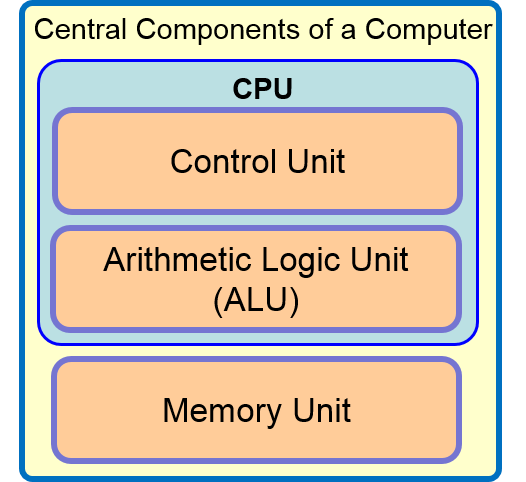
Central Components of a Computer System
- Arithmetic Logic Unit (ALU)
- Performs two sort of operations on data:
- Arithmetic
- Addition
- Subtraction
- Multiplication
- Division
- Logical
- Comparison
- Less than?
- Greater than?
- Equal to?
- Acts as a conduit through which all I/O to the computer is done.
- Gateway to the processor.
- Arithmetic
- Performs two sort of operations on data:
- Control Unit
- Co-ordinates and controls all the operations carried out by the computer.
- Operates by repeating three operations:
- 1. Fetch
- Causes the next instruction to be fetched from main memory.
- 2. Decode
- Produces signals which control other parts of the computer such as the ALU.
- 3. Execute
- Causes the next instruction to be executed.
- 1. Fetch
- Memory Unit (RAM)
- Quick and easily accessible information can be read from and written to by the Control Unit.
- Access to and from the Memory Unit is very fast.
- Normally contains:
- Operating System (OS)
- Software currently in use.
- Data which the software is using.
- Volatile
- Data is lost when the computer is shut down.
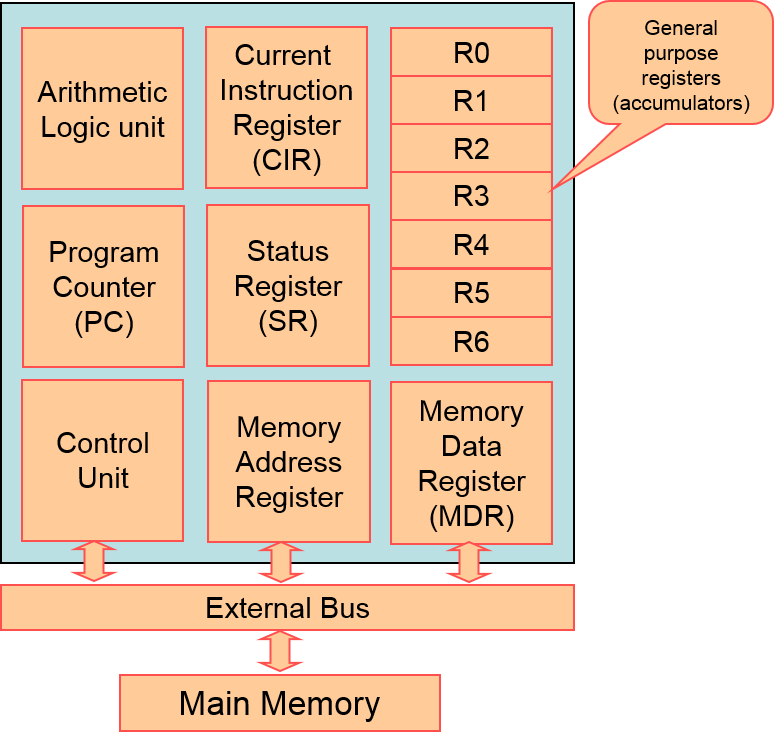
- Registers
- An extremely fast piece of on-chip memory, for temporary storage.
- The registers you need to know are:
- Program Counter (PC)
- Holds the address of the next instruction to be executed.
- Memory Address Register (MAR)
- Holds the address in memory of the location containing:
- The next piece of data to be read.
- The next instruction to be used.
- Holds the address in memory of the location containing:
- Memory Data Register (MDR)
- The contents of the address specified in the MAR are copied to the MDR. This may be:
- An instruction/operation.
- Data to be used (with an instruction).
- Data to be copied to an address.
- The contents of the address specified in the MAR are copied to the MDR. This may be:
- Current Instruction Register (CIR)
- Holds the instruction while it is being decoded/executed.
- The contents of the MDR are copied to the CIR if it is an instruction.
- Contains the operator and the operand of the current instruction.
- Status Register
- Contains "status" bits or flags that are set or cleared based on the result of an instruction.
- Accumulator
- Works with the ALU to performs arithmetic functions.
- Temporary storage areas.
- Program Counter (PC)
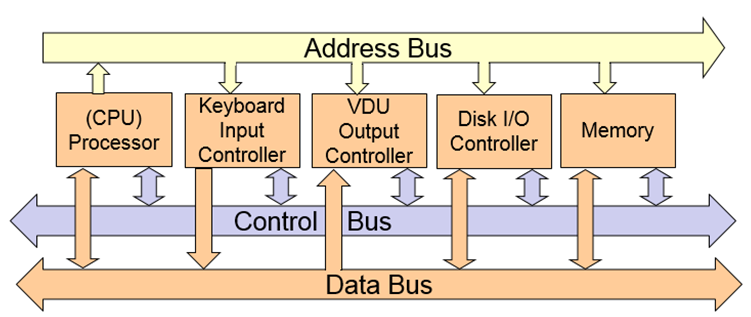
- Buses
- A set of parallel wires connecting two or more components of the computer.
- There are three buses:
- Control Bus
- Carries command and control signals to and from every connected device.
- Fully bi-directional for all connected devices.
- Address Bus
- Communicates the physical addresses of computer memory elements/locations that the requesting device wants to access.
- Data Bus
- Transports the actual physical data to and from the memory.
- Both single-directional and bi-directional.
- Control Bus
- Arithmetic Logic Unit (ALU)
Device Connectivity
- Hard-wire (Physical)
- Copper Coaxial
- Fibre Optic
- Copper Twisted Cable
- Wireless (Non-physical)
- Wifi
- Satellite
- Bluetooth
- Measured in the rate at which data can be transmitted.
- Baud Rate
- Data rate can be increased by:
- Using higher quality cable.
- Less attenuation.
- Increasing frequency at which data is sent.
- Using higher quality cable.
- Each signal can be sent on a different frequency or wavelength.
- The number of frequencies that can be used before they interfere with each other is called the bandwidth.
- Copper has low bandwidth.
- Wireless has high bandwidth.
- Fibre optic has very high bandwidth.
- The number of frequencies that can be used before they interfere with each other is called the bandwidth.
- Hard-wire (Physical)
Memory
- Main Memory
- Random Access Memory (RAM)
- Volatile (Wiped when the computer is turned off).
- Used to store programs which are currently running.
- Stores data which is currently being processed.
- Read Only Memory (ROM)
- Non-Volatile
- Contents are permanently etched into the memory chip at the manufacturing stage.
- Random Access Memory (RAM)
- Secondary Storage
- Magnetic
- Data recorded onto magnetic disks.
- Mechanical parts move over the disk's surface to read and write data.
- Advantages
- Cheap.
- Large storage capacity.
- Disadvantages
- Not portable.
- Durability can be an issue.
- Optical
- Data is recorded onto optical disks.
- Lasers read and write data.
- Advantages
- Highly portable.
- Cheap.
- Disadvantages
- Low storage capacity.
- Easily damaged.
- Solid State
- Data is recorded onto solid state memory chips.
- Disadvantages
- Expensive.
- Less storage capacity than magnetic storage.
- No mechanical moving parts.
- Advantages
- Fast.
- Durable.
- Magnetic
- Main Memory
Transfer of Data
- Fetch/Decode/Execute Cycle
- Interrupts
- A signal from some device or source seeking the attention of the processor.
- The interrupt signal is sent along the control line to the processor.
- The currently executing program is suspended and control is passed to an ISR (Interrupt Service Routine).
- There is a register in the CPU called the Interrupt Register.
- It is checked at the beginning of every F/D/E Cycle.
- Buffers (Cache)
- Used to help match the speeds of many devices.
- Used between the high processing speeds of the CPU and the slower speeds of the Main Memory.
- Data can be written to a buffer as though it were Main Memory.
- The high speed processor can then carry out the next operation whilst the Main Memory reads from the buffer instead.
Imágenes y archivos del mapa

Información
- Descripción
- A Level (F451) Computing Mapa Mental sobre 3.1.4 - Hardware, creado por AndrewZV el 24/03/2014.
- Creado por
- AndrewZV
- Visitas
- 59
- Etiquetas
- Valoración