
Mapa mental
ICT Systems Topic 1
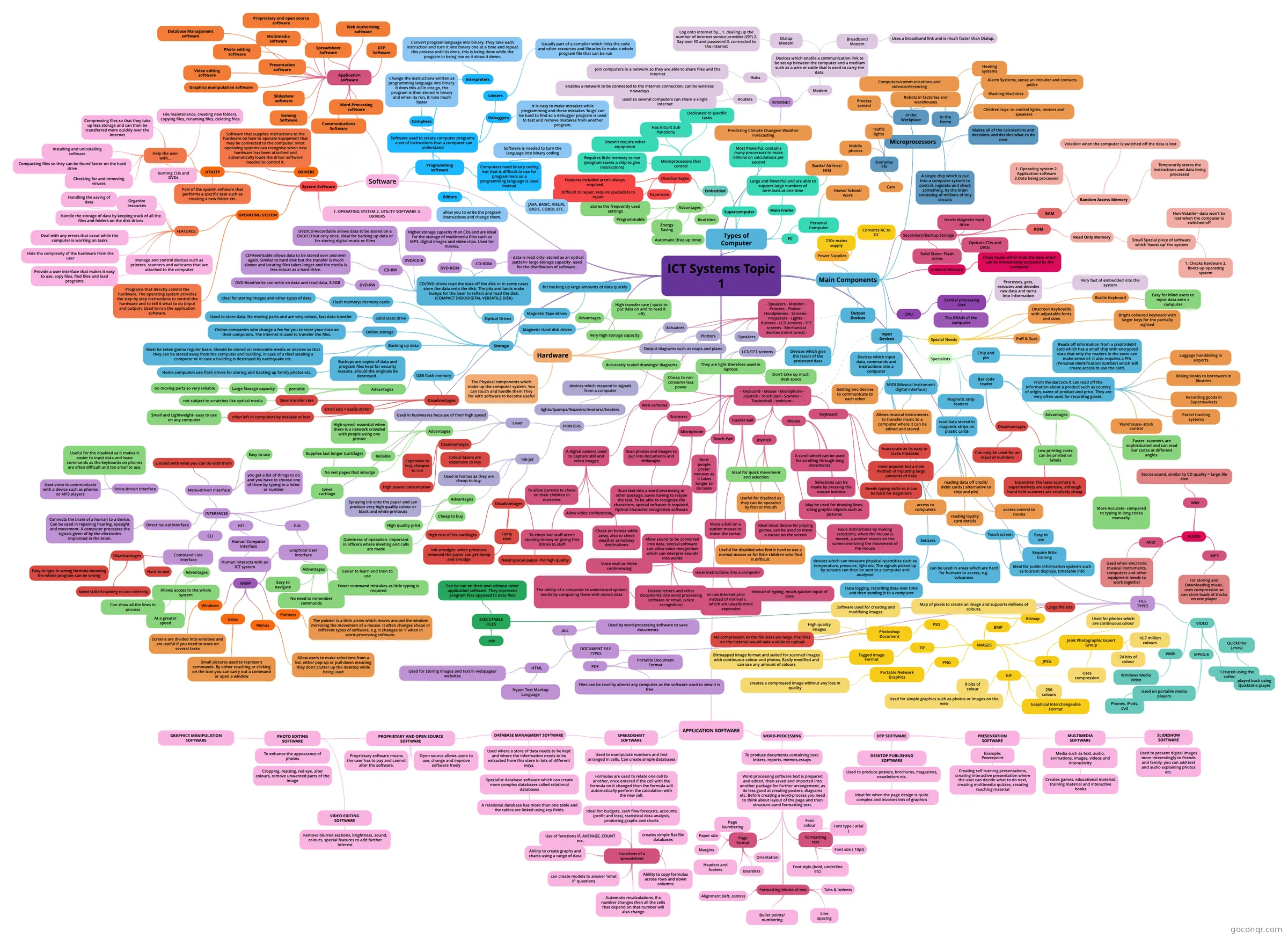
Mind map: ICT systems
Contenido del mapa
ICT Systems Topic 1
Types of Computer
- Supercomputer
- Most Powerful, contains many processors to make billions on calculations per second
- Predicting Climate Changes/ Weather Forecasting
- Most Powerful, contains many processors to make billions on calculations per second
- Main Frame
- Large and Powerful and are able to support large numbers of terminals at one time
- Banks/ Airlines/ NHS
- Large and Powerful and are able to support large numbers of terminals at one time
- PC
- Personal Computer
- Home/ School/ Work
- Personal Computer
- Embedded
- Microprocessors that control
- Dedicated to specific tasks
- Has Inbuilt Sub functions
- Requires little memory to run (program stores a chip to give instructions)
- Doesn't require other equipment
- Disadvantages
- Expensive
- Difficult to repair, require specialists to repair
- Features included aren't always required
- Advantages
- Energy Saving
- Automatic (free up time)
- Real time
- Programmable
- stores the frequently used settings
- Microprocessors that control
- Supercomputer
Hardware
- The Physical components which make up the computer system. You can touch and handle them They for with software to become useful
- - Speakers - Monitor - Printers - Plotter - Headphones - Screens - Projectors - Lights - Buzzers - LCD screens - TFT screens - Mechanical devices (robot arms) -
- LCD/TFT screens
- They are light therefore used in laptops
- Cheap to run- consume less power
- Don't take up much desk space
- Speakers
- Plotters
- Output diagrams such as maps and plans
- Accurately scaled drawings/ diagrams
- Output diagrams such as maps and plans
- Actuators
- devices which respond to signals from a computer
- lights//pumps//buzzers//motors//heaters
- devices which respond to signals from a computer
- PRINTERS
- Laser
- Used in businesses because of their high speed
- Advantages
- High speed- essential when there is a network crowded with people using one printer
- Reliable
- No wet pages that smudge
- Supplies last longer (cartilage)
- toner cartilage
- Disadvantages
- Expensive to buy, cheaper to run
- High power consumption
- Colour lasers are expensive to buy
- Ink-jet
- Used in homes as they are cheap to buy.
- Spraying ink onto the paper and can produce very high quality colour or black and white printouts
- Advantages
- High quality print
- Quietness of operation- important in officers where meeting and calls are made
- Cheap to buy
- Disadvantages
- High cost of ink cartilages
- Ink smudges- when printouts removed the paper can get damp and smudge
- Need special paper- for high quality
- Fairly slow
- Laser
- LCD/TFT screens
- Storage
- USB flash memory
- Advantages
- Small and Lightweight- easy to use on any computer
- Large Storage capacity
- no moving parts so very reliable
- not subject to scratches like optical media
- portable
- Disadvantages
- small size = easily stolen
- often left in computers by mistake or lost
- Slow transfer rate
- Advantages
- Magnetic Hard disk drives
- Advantages
- High transfer rate ( quick to put data on and to read it off)
- Very high storage capacity
- Advantages
- Magnetic Tape drives
- for backing up large amounts of data quickly
- Optical Drives
- CD/DVD drives read the data off the disk or in some cases store the data onto the disk. The pits and lands make bumps for the laser to reflect and read the disk. (COMPACT DISK/DIGITAL VERSATILE DISK)
- CD-ROM
- - data is read only- stored as an optical pattern- large storage capacity- used for the distribution of software -
- DVD-ROM
- Higher storage capacity than CDs and are ideal for the storage of multimedia files such as MP3, digital images and video clips. Used for movies.
- DVD/CD-R
- DVD/CD-Recordable allows data to be stored on a DVD/CD but only once. ideal for backing up data or for storing digital music or films
- CD-RW
- CD-Rewritable allows data to be stored over and over again. Similar to hard disk but the transfer is much slower and locating files takes longer and the media is less robust as a hard drive.
- DVD-RW
- DVD-Read/write can write on data and read data. 8.5GB
- CD-ROM
- CD/DVD drives read the data off the disk or in some cases store the data onto the disk. The pits and lands make bumps for the laser to reflect and read the disk. (COMPACT DISK/DIGITAL VERSATILE DISK)
- Flash memory/ memory cards
- ideal for storing images and other types of data
- Solid state drive
- Used to store data. No moving parts and are very robust, fast data transfer
- Online storage
- Online companies who change a fee for you to store your data on their computers. The internet is used to transfer the files.
- Backing up data
- Backups are copies of data and program files kept for security reasons. should the originals be destroyed .
- Must be taken gonna regular basis. Should be stored on removable media or devices so that they can be stored away from the computer and building, in case of a thief stealing a computer or in case a building is destroyed by earthquake etc.
- Home computers use flash drives for storing and backing up family photos etc.
- USB flash memory
- - Keyboard - Mouse - Microphone - Joystick - Touch pad - Scanner - Trackerball - webcam -
- Web cameras
- A digital camera used to capture still and video images
- To check bar staff aren't stealing money or giving free drinks to staff
- Check on homes while away, also to check weather at holiday destinations
- To allow parents to check on their children in nurseries
- Allow video conferencing
- A digital camera used to capture still and video images
- Scanners
- Scan text into a word-processing or other package, saves having to retype the text, To be able to recognise the characters, special software is required, Optical character recognition software
- Scan photos and images to put into documents and webpages
- Microphone
- Allow sound to be converted into data, special software can allow voice recognition which can interpret sounds into words
- Can use internet phone calls instead of normal ones which are usually more expensive
- Voice mail or Video conferencing
- Dictate letters and other documents into word processing software or email, (voice recognition)
- The ability of a computer to understand spoken words by comparing them with stored data
- Issue instructions into a computer
- Instead of typing, much quicker input of data
- Allow sound to be converted into data, special software can allow voice recognition which can interpret sounds into words
- Touch Pad
- Most people prefer mouses as it takes longer to do tasks
- Tracker ball
- Useful for disabled who find it hard to use a normal mouse or for little children who find it difficult
- Move a ball on a station mouse to move the cursor
- Joystick
- Useful for disabled as they can be operated by foot or mouth
- Ideal inout device for playing games, can be used to move a cursor on the screen
- Ideal for quick movement and selection
- Mouse
- May be used for drawing lines, sizing graphic objects such as pictures
- A scroll wheel can be used for scrolling through long documents
- Selections can be made by pressing the mouse buttons
- Issue instructions by making selections, when the mouse is moved, a pointer moves on the screen mirroring the movement of the mouse
- Keyboard
- Needs typing skills so it can be hard for beginners
- Inaccurate as its easy to make mistakes
- most popular but a slow method of inputting large amounts of data
- Web cameras
Main Components
- CPU
- Central processing Unit
- The BRAIN of the computer
- Processes, gets, executes and decodes raw data and turns into information
- Very fast of embedded into the system
- Central processing Unit
- Internal Memory
- Chips inside which hold the data which can be immediately accessed by the computer
- Secondary/Backup Storage
- RAM
- Random Access Memory
- Temporarily stores the instructions and data being processed
- 1. Operating system 2. Application software 3.Data being processed
- Volatile= when the computer is switched off the data is lost
- Random Access Memory
- ROM
- Read Only Memory
- Small Special piece of software which 'boots up' the system
- 1. Checks hardware 2. Boots up operating system
- Non-Volatile= data won't be lost when the computer is switched off
- Small Special piece of software which 'boots up' the system
- Read Only Memory
- Solid State= Flash drives
- Optical= CDs and DVDs
- Hard= Magnetic hard drive
- RAM
- Power Supplies
- 230v mains supply
- Converts AC to DC
- Input Devices
- Special Needs
- Braille Keyboard
- Easy for blind users to input data onto a computer
- Puff & Suck
- Bright coloured keyboard with larger keys for the partially sighted
- Onscreen Keyboards with adjustable fonts and sizes
- Braille Keyboard
- Specialists
- Bar code reader
- From the Barcode it can read off the information about a product such as country of origin, name of product and price. They are very often used for recording goods.
- Warehouse- stock control
- Recording goods in Supermarkets
- Luggage handdeling in airports
- linking books to borrowers in libraries
- Parcel tracking systems
- Advantages
- Faster- scanners are sophisticated and can read bar codes at different angles.
- More Accurate- compared to typing in long codes manually.
- Low printing costs- can be printed on labels
- Disadvantages
- Can only be used for an input of numbers
- Expensive- the laser scanners in supermarkets are expensive, although hand held scanners are relatively cheap
- From the Barcode it can read off the information about a product such as country of origin, name of product and price. They are very often used for recording goods.
- Magnetic strip readers
- read data stored in magnetic strips on plastic cards
- reading data off credit/ debit cards ( alternative to chip and pin)
- reading loyalty card details
- access control to rooms
- access to computers
- read data stored in magnetic strips on plastic cards
- MIDI (Musical Instrument digital Interface)
- Getting two devices to communicate to each other
- Allows musical instruments to transfer music to a computer where it can be edited and stored
- Chip and pin
- Reads off information from a credit/debit card which has a small chip with encrypted data that only the readers in the store can make sense of. It also requires a PIN (Personal Identification number) which will create access to use the card.
- Bar code reader
- Devices which input data, commands and instructions into a computer
- Sensors
- devices which can measure physical quantities such as temperature, pressure, light etc. The signals picked up by sensors can then be sent to a computer and analysed
- Data logging, recording data over time and then sending it to a computer
- can be used in areas which are hard for humans to access, e.g. volcanoes
- devices which can measure physical quantities such as temperature, pressure, light etc. The signals picked up by sensors can then be sent to a computer and analysed
- Touch screen
- Easy to use
- Require little training
- Ideal for public information systems such as tourism displays, timetable info
- Special Needs
- Output Devices
- Devices which give the result of the processed data
- Microprocessors
- A single chip which is put into a computer system to control, regulate and check something, Its the brain consisting of millions of tiny circuits
- Makes all of the calculations and decisions and decides what to do next
- In the Home
- Children toys- to control lights, motors and speakers
- Washing Machines
- Heating systems
- Alarm Systems, sense an intruder and contacts police
- Everyday life
- Traffic lights
- Mobile phones
- Cars
- In the Workplace
- Computers/communications and videoconferencing
- Robots in factories and warehouses
- Process control
- CPU
Software
- System Software
- 1. OPERATING SYSTEM 2. UTILITY SOFTWARE 3. DRIVERS
- OPERATING SYSTEM
- Programs that directly control the hardware. The operating system provides the step by step instructions to control the hardware and to tell it what to do (input and output). Used to run the application software.
- FEATURES:
- Manage and control devices such as printers, scanners and webcams that are attached to the computer
- Provide a user interface that makes it easy to use, copy files, find files and load programs
- Hide the complexity of the hardware from the user
- Deal with any errors that occur while the computer is working on tasks
- Handle the storage of data by keeping track of all the files and folders on the disk drives
- Handling the saving of data
- Organize resources
- UTILITY
- Part of the system software that performs a specific task such as creating a new folder etc.
- Help the user with...
- File maintenance, creating new folders, copying files, renaming files, deleting files
- Compressing files so that they take up less storage and can then be transferred more quickly over the internet
- Installing and uninstalling software
- Compacting files so they can be found faster on the hard drive
- Checking for and removing viruses
- burning CDs and DVDs
- DRIVERS
- Software that supplies instructions to the hardware on how to operate equipment that may be connected to the computer. Most operating systems can recognise when new hardware has been attached and automatically loads the driver software needed to control it.
- Application software
- Word-Processing software
- DTP Software
- Spreadsheet Software
- Database Management software
- Web Authorising software
- Presentation software
- Multimedia software
- Slideshow software
- Proprietary and open source software
- Photo editing software
- Video editing software
- Graphics manipulation software
- Gaming Software
- Communications Software
- Programming software
- Software used to create computer programs - a set of instructions that a computer can understand
- Compliers
- Change the instructions written as programming language into binary. It does this all in one go, the program is then stored in binary and when its run, it runs much faster
- Interpreters
- Convert program language into binary. They take each instruction and turn it into binary one at a time and repeat this process until its done, this is being done while the program in being run so it slows it down.
- Debuggers
- It is easy to make mistakes while programming and these mistakes 'bugs' can be hard to find so a debugger program is used to test and remove mistakes from another program.
- Linkers
- Usually part of a complier which links the code and other resources and libraries to make a whole program file that can be run
- Editors
- allow you to write the program instructions and change them.
- Compliers
- Computers need binary coding but that is difficult to use for programmers so a programming language is used instead
- JAVA, BASIC, VISUAL BASIC, COBOL ETC.
- Software is needed to turn the language into binary coding
- Software used to create computer programs - a set of instructions that a computer can understand
- System Software
INTERNET
- Modem
- Devices which enable a communication link to be set up between the computer and a medium such as a wire or cable that is used to carry the data.
- Broadband Modem
- Uses a broadband link and is much faster than Dialup.
- Dialup Modem
- Log onto internet by... 1. dealing up the number of internet service provider (ISP) 2. Say user ID and password 3. connected to the internet
- Broadband Modem
- Devices which enable a communication link to be set up between the computer and a medium such as a wire or cable that is used to carry the data.
- Routers
- used so several computers can share a single internet
- enables a network to be connected to the internet connection. can be wireless nowadays
- Hubs
- Join computers in a network so they are able to share files and the internet
- Modem
FILE TYPES
- AUDIO
- WAV
- Stores sound, similar to CD quality = large file size
- MP3
- For storing and Downloading music, uses compression so can store loads of tracks on one player
- MIDI
- Used when electronic musical instruments, computers and other equipment needs to work together
- WAV
- VIDEO
- WMV
- Windows Media Video
- MPEG-4
- Used on portable media players
- Phones, iPods, dvd
- Used on portable media players
- Flash
- Created using the software flash
- Quicktime (.mov)
- played back using Quicktime player
- WMV
- IMAGES
- JPEG
- Joint Photographic Expert Group
- 16.7 million colours
- Uses compression
- Used for photos which are continuous colour
- 24 bits of colour
- Joint Photographic Expert Group
- GIF
- 256 colours
- Used for simple graphics such as photos or images on the web
- 8 bits of colour
- Graphical Interchangeable Format
- PNG
- Portable Network Graphics
- creates a compressed image without any loss in quality
- Portable Network Graphics
- TIF
- Tagged Image Format
- Bitmapped image format and suited for scanned images with continuous colour and photos. Easily modified and can use any amount of colours
- Tagged Image Format
- PSD
- Photoshop Document
- Software used for creating and modifying images
- High quality images
- No compression so the file sizes are large. PSD files on the internet would take a while to upload
- Photoshop Document
- BMP
- Bitmap
- Map of pixels to create an image and supports millions of colours.
- Large file size
- Bitmap
- JPEG
- DOCUMENT FILE TYPES
- PDF
- Portable Document Format
- Files can be read by almost any computer as the software used to view it is free
- HTML
- Hyper Text Markup Language
- Used for storing images and text in webpages/ websites
- .doc
- Used by word-processing software to save documents
- PDF
- EXECUTABLE FILES
- Can be run on their own without other application software. They represent program files opposed to data files
- .exe
- AUDIO
INTERFACES
- GUI
- Graphical User Interface
- Advantages
- Easier to learn and train to use
- Easy to navigate
- No need to remember commands
- Fewer command mistakes as little typing is required
- WIMP
- Windows
- Screens are divided into windows and are useful if you need to work on several tasks
- Icons
- Small pictures used to represent commands. By either touching or clicking on the icon you can carry out a command or open a window
- Menus
- Allow users to make selections from a list, either pop-up or pull-down meaning they don't clutter up the desktop while being used
- Pointers
- The pointer is a little arrow which moves around the window mirroring the movement of a mouse. It often changes shape in different types of software, e.g. it changes to 'I' when in word-processing software.
- Windows
- Advantages
- Graphical User Interface
- CLI
- Command Line Interface
- Advantages
- Allows access to the whole system
- At a greater speed
- Can show all the lines in process
- Allows access to the whole system
- Disadvantages
- Hard to use
- Need skilled training to use correctly
- Easy to type in wrong formula meaning the whole program can be wrong
- Advantages
- Command Line Interface
- Menu-driven Interface
- you get a list of things to do and you have to choose one of them by typing in a letter or number
- Easy to use
- Limited with what you can do with them
- Direct neural Interface
- Connects the brain of a human to a device. Can be used in repairing hearing, eyesight and movement. A computer processes the signals given of by the electrodes implanted in the brain.
- Voice-driven Interface
- Uses voice to communicate with a device such as phones or MP3 players
- Useful for the disabled as it makes it easier to input data and issue commands as the keyboards on phones are often difficult and too small to use.
- HCI
- Human Computer Interface
- Human interacts with an ICT system
- Human Computer Interface
- GUI
APPLICATION SOFTWARE
- WORD-PROCESSING
- To produce documents containing text: letters, reports, memos,essays
- Word processing software text is prepared and edited, then saved and imported into another package for further arrangement, as its less good at creating posters, diagrams etc. Before creating a word-process you need to think about layout of the page and then structure aand formatting text.
- Page format
- Margins
- Boarders
- Paper size
- Page Numbering
- Headers and footers
- Orientation
- Formatting text
- Font colour
- Font style (bold, underline etc)
- Font size ( 10pt)
- Font type ( arial )
- Formatting blocks of text
- Tabs & Indents
- Line spacing
- Bullet points/ numbering
- Alignment (left, centre)
- Page format
- Word processing software text is prepared and edited, then saved and imported into another package for further arrangement, as its less good at creating posters, diagrams etc. Before creating a word-process you need to think about layout of the page and then structure aand formatting text.
- DTP SOFTWARE
- DESKTOP PUBLISHING SOFTWARE
- Used to produce posters, brochures, magazines, newsletters etc.
- Ideal for when the page design is quite complex and involves lots of graphics
- Used to produce posters, brochures, magazines, newsletters etc.
- PRESENTATION SOFTWARE
- Example: Powerpoint
- Creating self running presentations, creating interactive presentation where the user can decide what to do next, creating multimedia quizzes, creating teaching material
- MULTIMEDIA SOFTWARE
- Media such as text, audio, animations, images, videos and interactivity
- Creates games, educational material, training material and interactive books
- SLIDESHOW SOFTWARE
- Used to present digital images more interestingly to friends and family. you can add text and audio explaining photos etc.
- Media such as text, audio, animations, images, videos and interactivity
- Example: Powerpoint
- DESKTOP PUBLISHING SOFTWARE
- To produce documents containing text: letters, reports, memos,essays
- SPREADSHEET SOFTWARE
- Used to manipulate numbers and text arranged in cells. Can create simple databases
- Formulas are used to relate one cell to another, once entered if the cell with the formula on it changed then the formula will automatically perform the calculation with the new cell.
- Ideal for: budgets, cash flow forecasts, accounts (profit and loss), statistical data analysis, producing graphs and charts
- Functions of a spreadsheet
- creates simple flat file databases
- Ability to copy formulas across rows and down columns
- Automatic recalculations, if a number changes then all the cells that depend on that number will also change
- Use of functions IF, AVERAGE, COUNT etc.
- Ability to create graphs and charts using a range of data
- can create models to answer 'what if' questions
- Functions of a spreadsheet
- Ideal for: budgets, cash flow forecasts, accounts (profit and loss), statistical data analysis, producing graphs and charts
- Formulas are used to relate one cell to another, once entered if the cell with the formula on it changed then the formula will automatically perform the calculation with the new cell.
- DATABASE MANAGMENT SOFTWARE
- Used where a store of data needs to be kept and where the information needs to be extracted from this store in lots of different ways.
- Specialist database software which can create more complex databases called relational databases
- A relational database has more than one table and the tables are linked using key fields.
- Specialist database software which can create more complex databases called relational databases
- PROPRIETARY AND OPEN SOURCE SOFTWARE
- Open source allows users to use, change and improve software freely
- Proprietary software means the user has to pay and cannot alter the software.
- PHOTO EDITING SOFTWARE
- To enhance the appearance of photos
- Cropping, resizing, red eye, alter colours, remove unwanted parts of the image
- VIDEO EDITING SOFTWARE
- Remove blurred sections, brightness, sound, colours, special features to add further interest
- GRAPHICS MANIPULATION SOFTWARE
- To enhance the appearance of photos
- Used where a store of data needs to be kept and where the information needs to be extracted from this store in lots of different ways.
- Used to manipulate numbers and text arranged in cells. Can create simple databases
- WORD-PROCESSING
Información
- Descripción
- Mapa Mental sobre ICT Systems Topic 1, creado por freya stimson el 10/04/2017.
- Creado por
- freya stimson
- Visitas
- 0
- Valoración