Mapa mental
Week_Two_Revision
Contenido del mapa
Week_Two_Revision
Give an overview of the Linux Filesystem
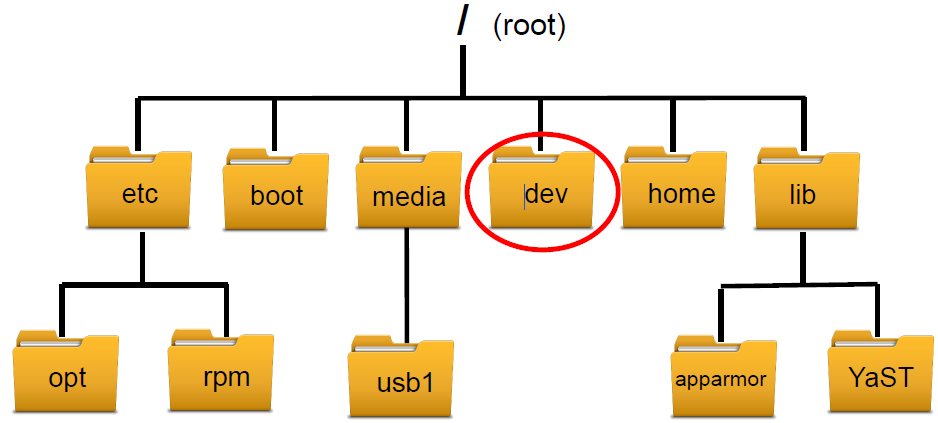
- Linux has only ONE ROOT directory. All files and subdirectories are placed under the root directory in a treelike structure. It operates a Filesystem Hierarchy Standard (FHS)
- Linux has only ONE ROOT directory. All files and subdirectories are placed under the ROOT directory in a treelike structure. It operates a Filesystem Hierarchy Standard (FHS)
What is the difference between Windows and Linux filesystem?
- 1. Windows stores must/all applications in one location (C:\Programs Files\Application) while Linux files stored in multiple locations (/usr/lib OR /etc/). 2. Linux treats everything as a file - Windows does not. 3. Windows is not case sensitive while Linux is. 3. Windows exposes all HDs, partitions, connected USBs under its own drive letter. While Linux everything is stored under / - the root directory. Everything comes under this.
3 root directories commonly used and their uses
- /bin = contains binary commands used by system admins, users and scripts. /dev = contains device files such as CD/DVD-ROM drive./etc = contains static (unshareable/local) config files /lib = contains shared libraries that are loaded when a program starts.
Explain the difference between shareable and non-shareable files
- Shareable = Files that can be stored on one machine and used by multiple users on other machines
- Non-Shareable = Files that can not be accessed by multiple users
Explain the difference between static and variable files
- Static = Files that do not change on their own
- Variable = Files that can change on their own
Wildcards
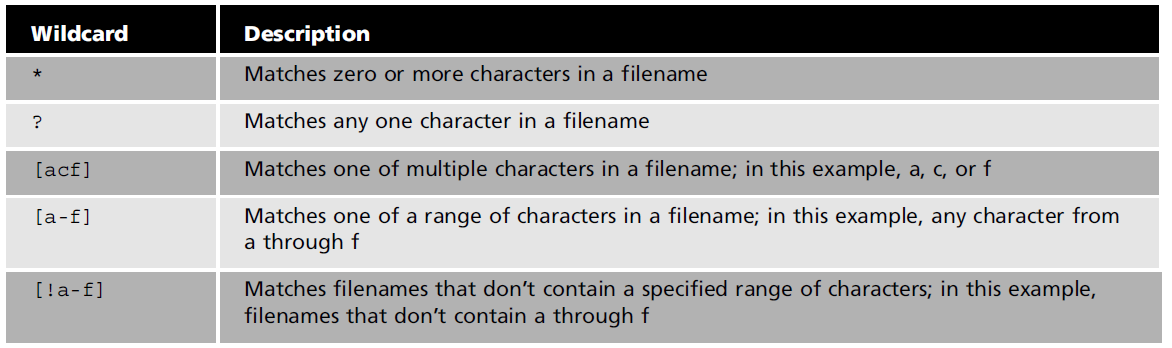
- - Represents letters and characters used to specify a filename for searches. - Used to navigate directories faster, move/delete group of files and locate files based on a portion of their filenames.
inode
- What is an inode?
- - Data structure that stores all information about the file expect for the actual data and filename. (stores file system attributes/information such as Metadata, Owner/permission data and disk block location of data). - inode number is an address that references an entry in the inode table. - command = ls -il
- Difference between hard and symbolic (soft) links
- Hard Links
- - Files that point to data on the hard drive. - When creating a file it is automatically linked to the actual data stored on the partition. (Inode number is assigned for reference). - ln command used to create a hard link.
- Symbolic (Soft) Links
- - Special types of files that point to other files instead of pointing to data on the hard drive. - Benefit is files can be linked that are on separate partitions/computers.
- Hard Links
- What is an inode?
Linux File Permissions
- Refer to week 3 notes slides 8 - 14 for more details notes and explanation.
- How does Linux control access to files and programs using permissions?
- 1. Access permissions are used to control who is able to access a file and the type of access. For example read, write and execute certain files/programs. 2. Access permissions implemented at file level - permissions set based on the file owner, group owner and others. File Permissions. 3. Root user (superuser - su or sudo).4. Restricted groups (I.E each department - Member Off) giving levels of access to different folders and files.
- What does -rwxr--r-- mean?
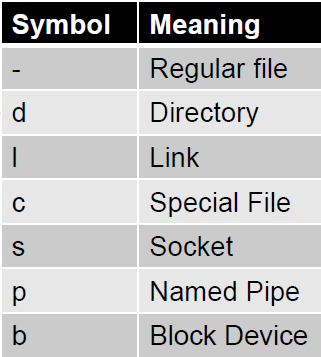
- The current user has Read Write and Execute permissions of the file. The group as Read Only permissions of the file. Others (everyone else) has Read Only permissions of the file.
- Command to change permission of files
- Numeric Notation = chmod 774 file1
- uses numbers 0-7 to represent file permissions.
- Symbolic Notation = chmod u+x file1
- Uses criteria such as categories and operators to change file permissions.
- Numeric Notation = chmod 774 file1