
Mapa mental
Topic 8: Databases
Contenido del mapa
Topic 8: Databases
Data types
- Number integer
- A whole number (positive or negative) but no fractions.
- Number real
- Any number, including whole numbers and fractions.
- Text or string
- Letters, numbers or other characters such as punctuation marks.
- Date/time
- Any time or date; the way the time or date is displayed depends on how it is formatted.
- Currency
- Money £ (including foreign currency $ or €)
- Boolean
- Two opposing states e.g. true or false, male or female, yes or no.
- Number integer
Table
- • A field is a single item of data within a record.
- • surname: text • date of birth: date/time • selling pricing: currency
- • A record consists of a collection of related fields.
- • Pupil’s record in a school database only has the fields related to that pupil (surname, forename, date of birth, from, etc.) and not another pupils data.
- • A file (Known as a table in Microsoft Access) is a collection of related fields.
- • The table of records of all pupils in the school.
- Key fields uniquely identities each record. No two records have the same data in their key field.
- identity number, membership number or bar code.
- • A field is a single item of data within a record.
Validation
- ensure reasonable and sensible data is input in to a system, but there is no certainty that the data is correct.
- As data is entered it is checked to see that it obeys the rules; any data that does not obey the rules is not accepted.
- You can also set validation text – the text that appears if the data is not acceptable.
- Range check
- The data entered must be in a sensible range.
- Type check
- This ensures that the data is of the correct type.
- Format/picture check
- If the data entered has a particular pattern e.g. a postcode or car reg then an input mask can be used to force the data to conform to the rule.
- Length check
- The length of the input is checked for the number of characters used.
- Presence check
- Some data has to be entered.
- Lookup list
- If the data entered consists of a limited number of possible entries then the computer can compare the entry with a list of allowed answers.
Reports, forms and calculated fields
- A report is a printed document that contains data from the database, organised and analysed in a certain way.
- Forms are used to make data entry more attractive and secure rather than entering data into raw tables.
- allows instructions to be entered
- the person entering the data need not see all other data or even the other fields
- If you want to use age in a report it must be calculated. This result is known as a calculated field.
- use the recorded date of birth to calculate the age by subtracting the date of birth from the date of the report.
- Sorting data
- Results of queries can be presented in a sorted order e.g. alphabetical or in numerical order.
- • Easier if lists a printed as reports.
- • You can identify best customer by amount they have spent – sort them according to total amount spent.
Databases
- Uses of a database
- • Add, change or delete records
- • Search for a particular record
- • Sort the records into a given order
- • Print reports about some aspect of the database
- • Sort the records into a given order
- • Search for a particular record
- • Add, change or delete records
- • Fast access: using a database to find data is much faster compared to paper in a filing cabinet.
- • Easy to edit: a database allows for data to be easily updated and changed.
- • Validation: you can set checks on the data being entered to ensure no inappropriate data gets into the system
- • Reports: results of searches can be used to print reports that may help management in their decision making.
- • Sharing: database can be shared with any number of users on a network. Any user can edit the data.
- • Security: passwords may be set so that no unauthorised user can access the database, which may contain personal and sensitive data.
- • Sharing: database can be shared with any number of users on a network. Any user can edit the data.
- • Reports: results of searches can be used to print reports that may help management in their decision making.
- • Validation: you can set checks on the data being entered to ensure no inappropriate data gets into the system
- • Easy to edit: a database allows for data to be easily updated and changed.
- Uses of a database
Query
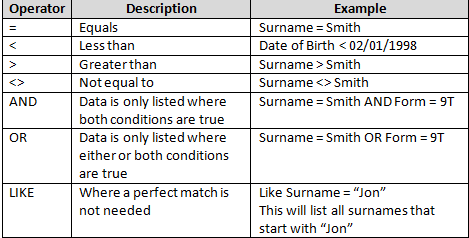
- A query specifies what records you are searching for and what fields from the records you would like to display.
- Simple query search (keyword search) – looks for data in one field.
- Complex query search – looks at data with multiple criteria.
- Simple query search (keyword search) – looks for data in one field.
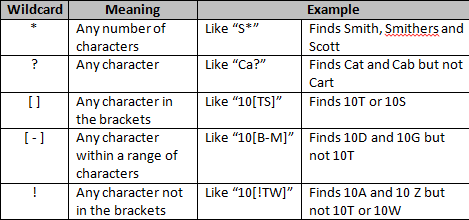
- You use wildcard searches in a query for data that you only know part of.
- A query specifies what records you are searching for and what fields from the records you would like to display.
Security
- If data is secure then it cannot
- be destroyed
- be accidentaly or maliciously altered
- fall in to the hands of unauthorised people
- Consequences of unsafe data
- Loss of customers – unhappy customers go elsewhere
- Payments for goods not being received
- Bad publicity – all businesses rely on a good reputation
- A number of methods are used to keep data secure
- Locks on doors & Alarms
- Biometric systems
- Software methods for keeping data secure
- Passwords
- Authorised users are given a username. Each user also has a password that proves the user is really the one whose username is given. Using passwords is a method of authentication.
- Access rights (file attributes) can be places on individual files
- Read access (user can view file but not alter it) Write access (allowing the user to alter the contents of the file)
- Back-ups
- A back-up is a second copy of the data. If a problem arises with the data file, then the back-up copy is used.
- Passwords
- If data is secure then it cannot
Imágenes y archivos del mapa
Información
- Descripción
- Mapa Mental sobre Topic 8: Databases, creado por DivergentNerd el 22/01/2015.
- Creado por
- DivergentNerd
- Visitas
- 0
- Valoración