
Databases
61 resources created by 57 users
This Databases page on GoConqr gathers community-made quizzes, mind maps, flashcards, slides and notes, from flat-file and relational databases to SQL commands and Microsoft Access. It's built for school students revising a topic and teachers after ready-made material. There are over 800 resources here, including more than 60 quizzes and over 600 mind maps, with many aimed at GCSE ICT and GCSE Computer Science. Try a quiz to find your gaps, then build your own maps and flashcards.
Top Databases resources
-
19 questions2.1.5 Databases A database is a...
-
16 questionsDatabase quiz Which of the following is NOT true of databases?
-
Mind map Secure Database for Mr Banana Mr Binina
-
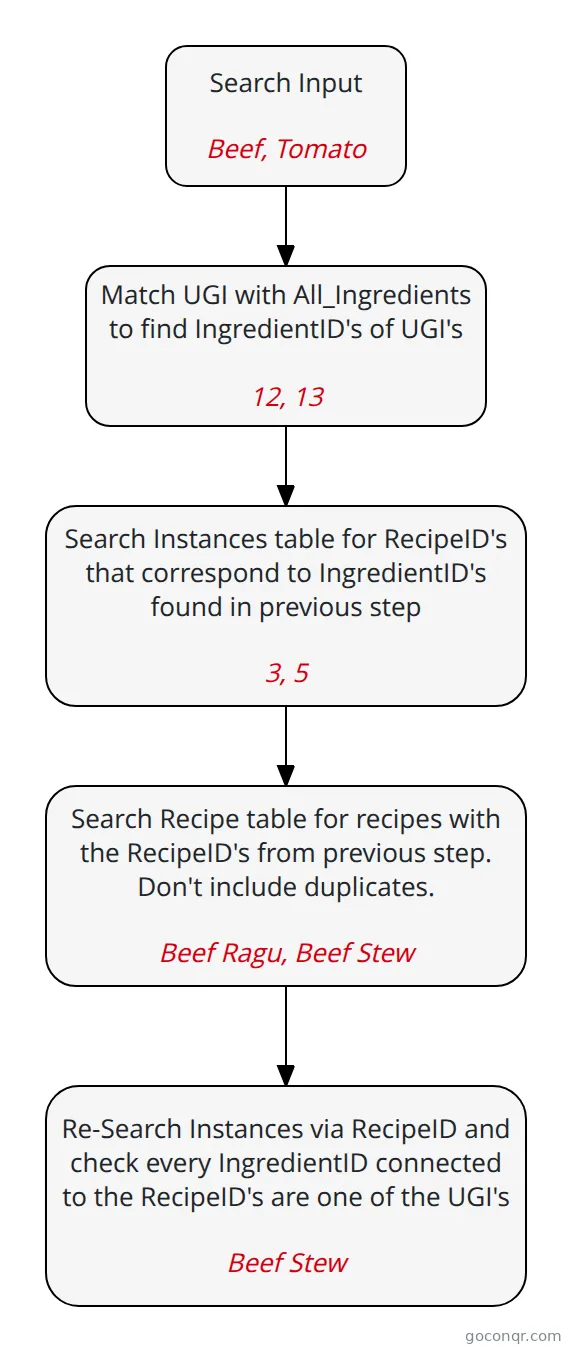 Flowchart Search Flow Chart How the system will search through the database to find recipes
-
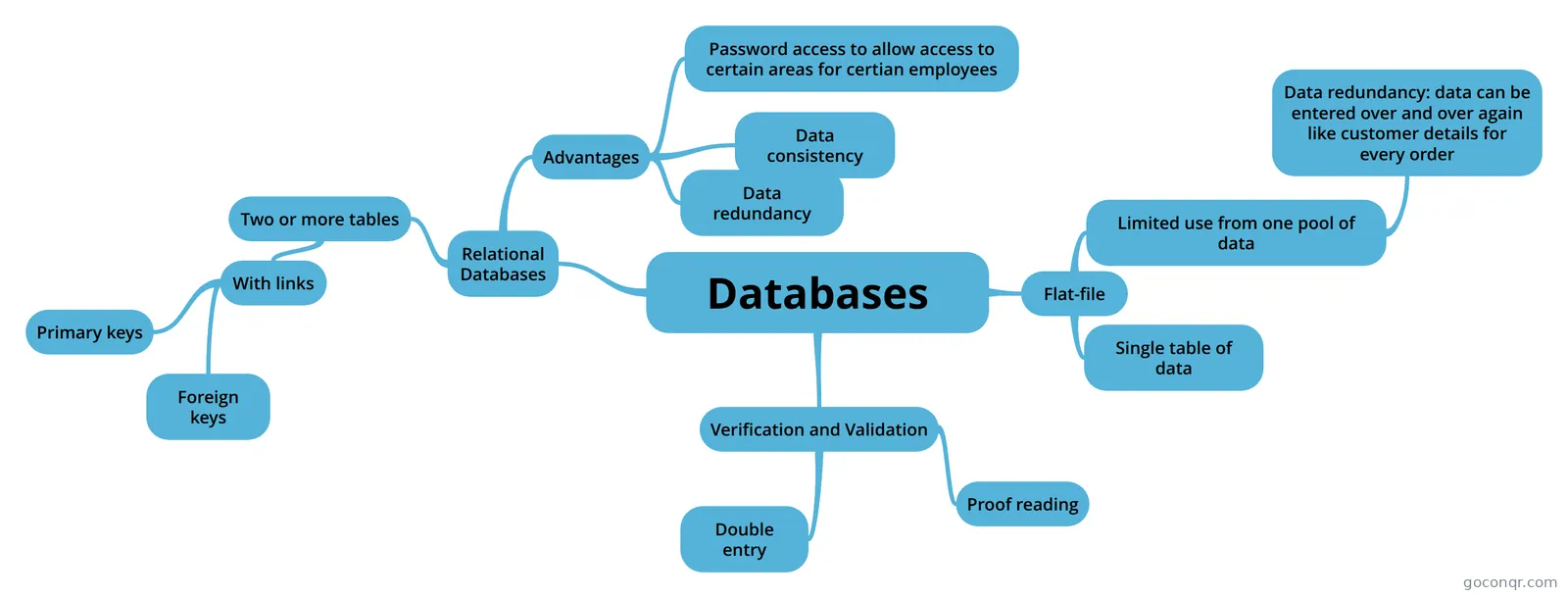 Mind map Databases
-
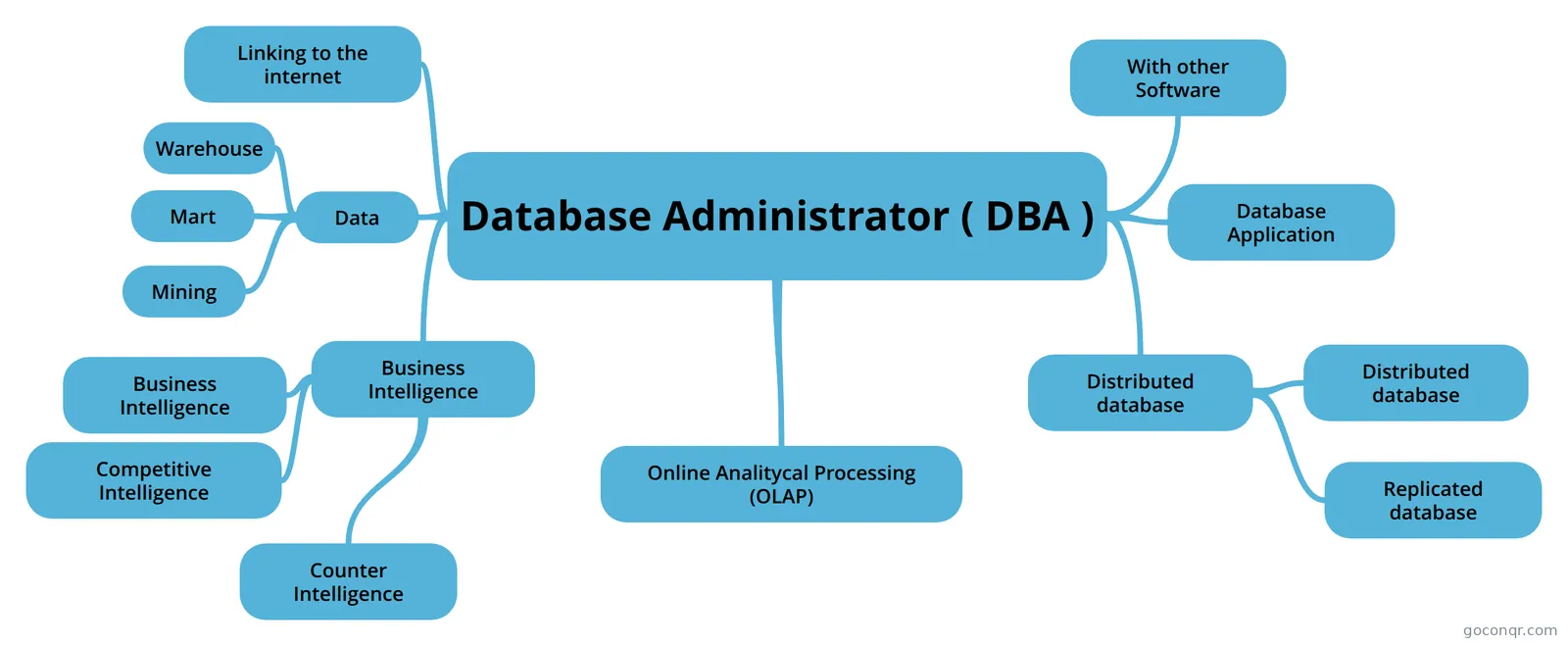 Mind map Database Administrator ( DBA ) hehek
-
21 cardsDatabases What is a database?
-
21 cardsRelational Database Flash Cards! This can be used for computing and IT revision
Quizzes
-
19 questions2.1.5 Databases A database is a...
-
16 questionsDatabase quiz Which of the following is NOT true of databases?
-
8 questionsMy IT test Database What is an automatic computer check to make sure data entered is sensible and reasonable known as? Double e...
-
4 questionsComputing quiz What is an entity in computing?
-
6 questionsData Validation what are two of the rules for validation?
-
6 questionsGCSE CS Data Quiz 5 (Databases) A Database is a persistent and organised store of data.
-
4 questionsDatabase Label the parts in this database
Mind maps
See all 35 mind maps-
Secure Database for Mr Banana Mr Binina
-
Databases
-
Database Administrator ( DBA ) hehek
-
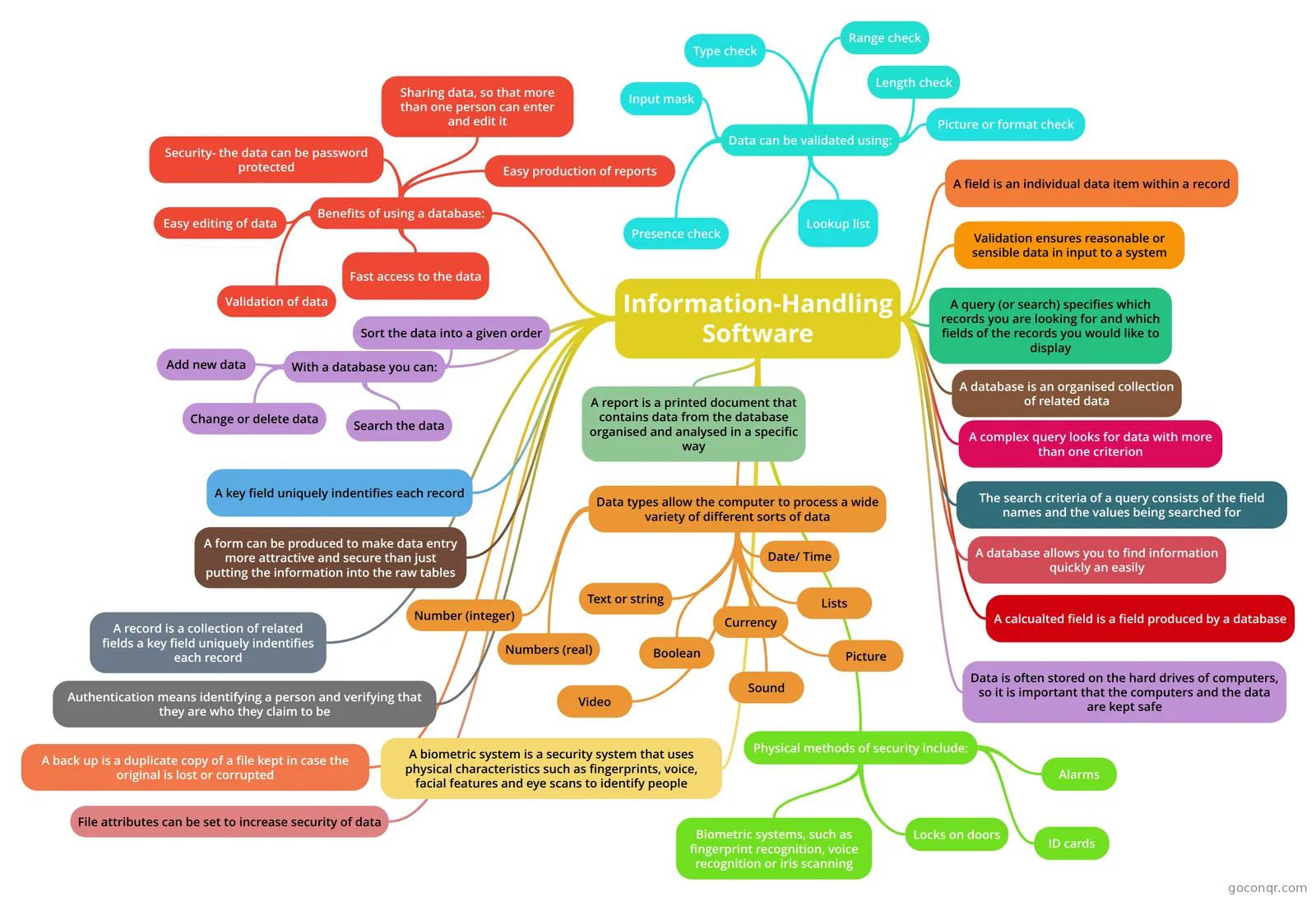 Information-Handling Software GCSE ICT Year 10 (Mind Maps) Mind Map on Information-Handling Software, created by Sammy Blanking on 03/04/...
-
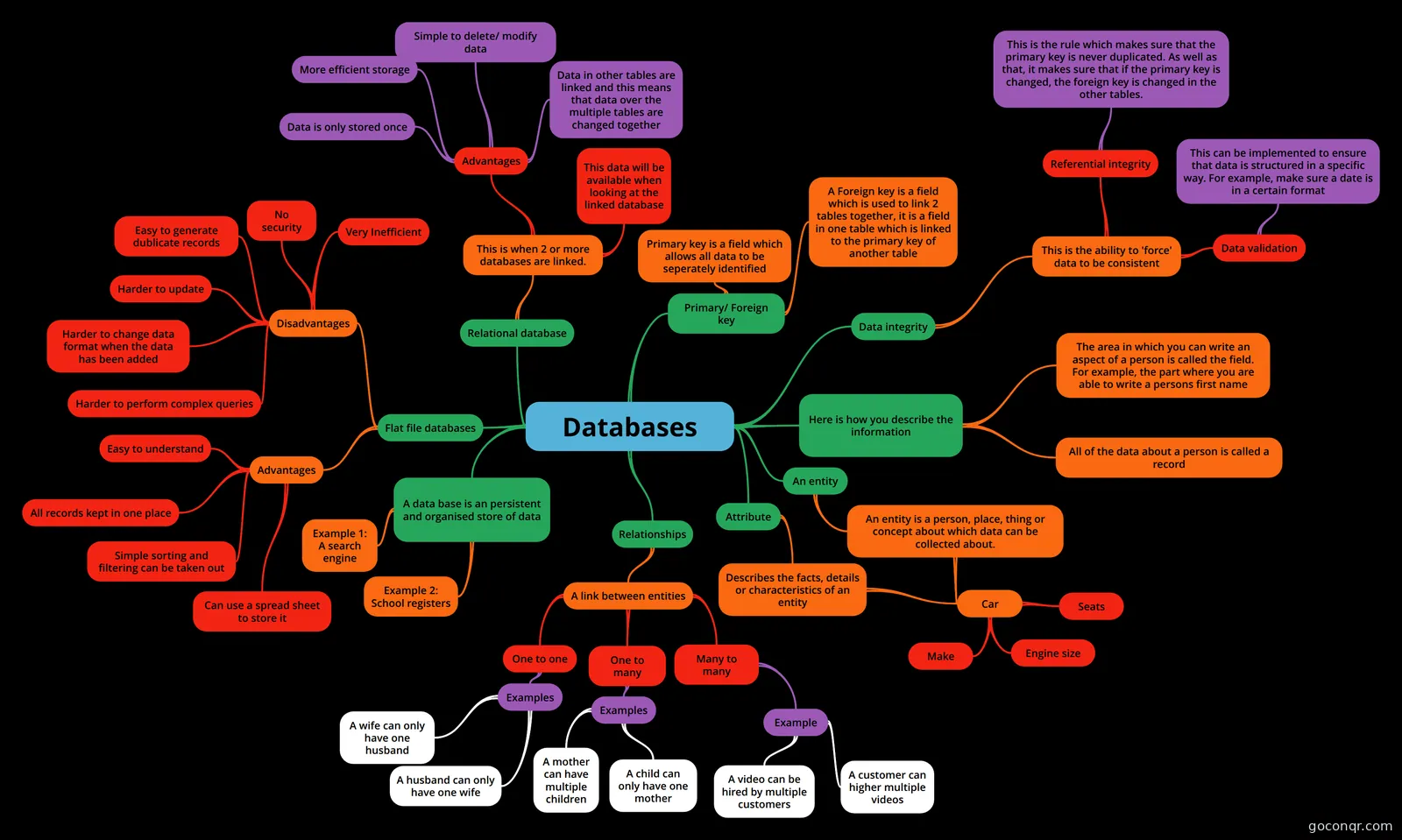 Databases
-
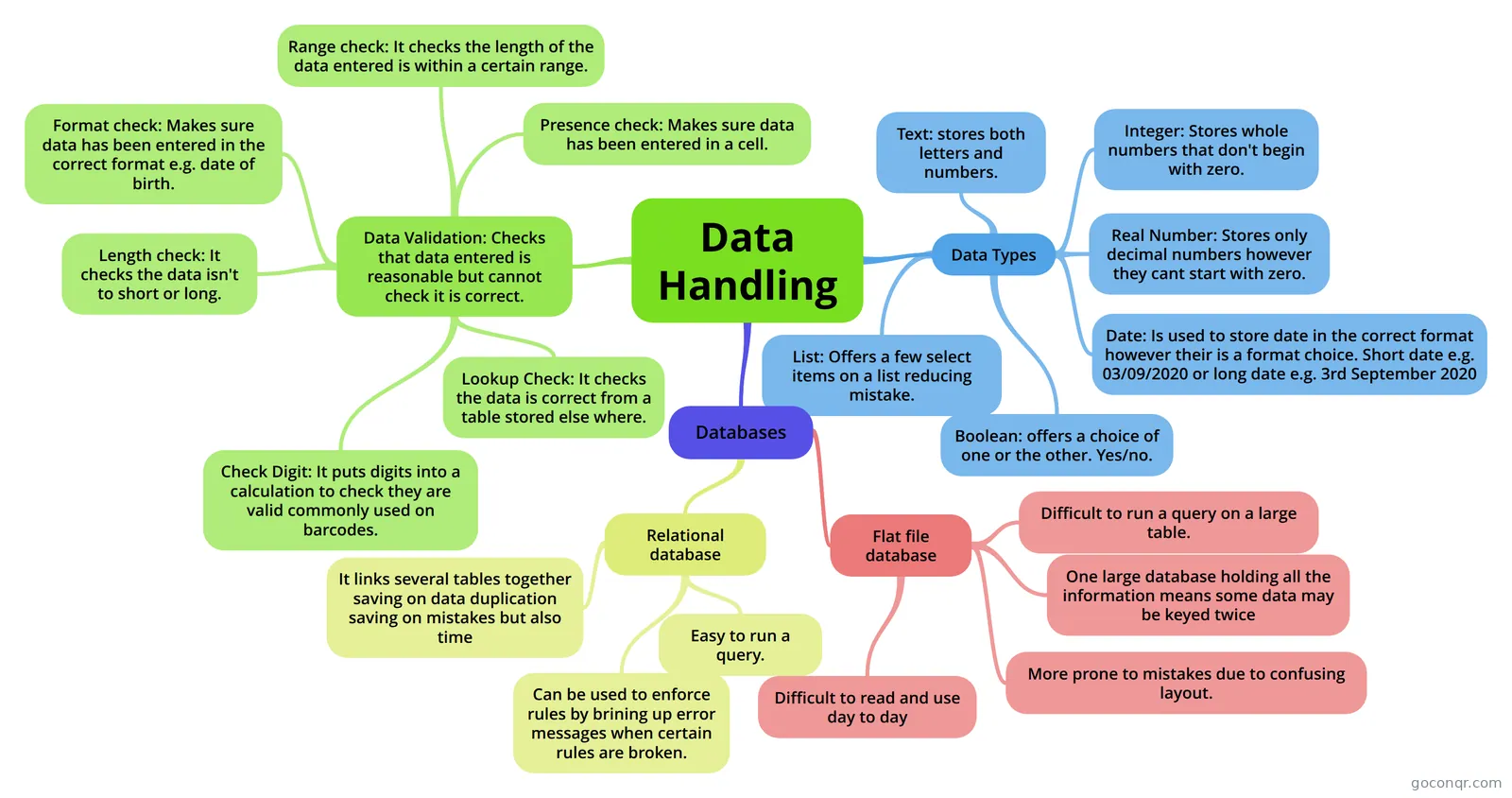 Data Handling
-
Data, Information and Databases
-
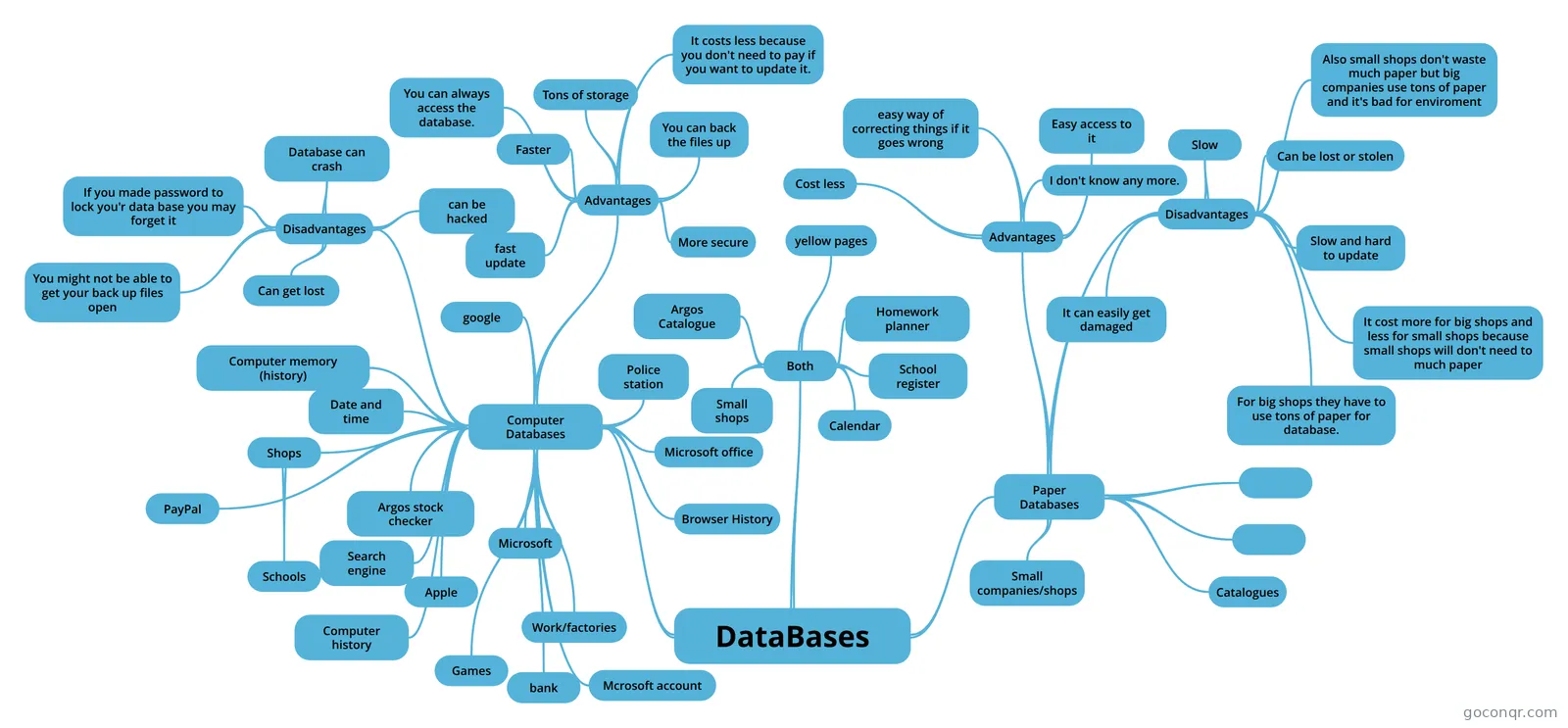 DataBases My mind map about computer and paper databases.
Flashcards
See all 17 flashcards-
21 cardsDatabases What is a database?
-
21 cardsRelational Database Flash Cards! This can be used for computing and IT revision
-
12 cardsSQL SQL -BY sam wright
-
14 cardsDatabase Flashcards Do you need to use a computer to create a database
-
25 cardsDatabase FlashCards
-
7 cardsDatabase/spreadsheets What is a paper database?
-
18 cardsDatabases Keywords on Databases
-
15 cardsDatabase Tools A wizard that automatically creates basic forms using all the available fields and minimal formatting.
Flowcharts
Slides
More Computing and ICT (programming, computer science, digital skills, educational technology) topics
About Databases
GoConqr OriginalWhat this unit covers
The resources here follow the usual route through database work. The mind map called Databases starts with flat-file and relational databases, then lists advantages such as data consistency and password access for certain employees. Other maps set out terms: table, record, field, primary key, foreign key, entity, attribute and referential integrity. Several maps on tools and techniques focus on tables.
Where to start
Begin with a mind map to get the vocabulary straight. The ICT - Databases map defines a record as a single row within a table, and a table as a collection of records. Then move to the flashcards. Decks such as Database Terms and Database - Terminology help you learn the terms, while the Topic 8 decks cover data types like integer, real, text and date/time.
Testing yourself
Next, try a quiz. The Database quiz asks which software is used to create databases. The 2.1.5 quiz tests ideas such as persistent storage, data redundancy, data inconsistency and the role of a Database Management System. If you miss a question, go back to the matching map and read that branch again. Then retake the quiz.
- Read a map on the topic.
- Learn the terms with a flashcard deck.
- Take a quiz and note what you missed.
- Return to the map for those gaps.
Going further
Some resources look at applied work. The Search Flow Chart shows how a recipe search matches ingredients across tables. The Secure Database for Mr Banana map covers data types, user needs and security measures. There are also notes on Microsoft Access 2010 and Mongoose, plus quizzes on Oracle SQL and MS Access.
Where it sits
This unit belongs to the strand Data, Information Systems and AI, within Computing and ICT. Teachers can use the maps and decks as ready-made starters or revision tasks.
Pick one map that matches your topic, then make your own flashcards from it.
Frequently asked questions
Which resource should I open first?
Start with the mind map called Databases. It sets out flat-file and relational databases and their advantages. Once the terms make sense, take the Database quiz to see what you remember, then move on to a flashcard deck for the vocabulary.
What do the mind maps cover?
The maps cover database terms such as table, record, field, primary key and foreign key, plus relationships, normalisation, data dictionaries and parameter queries. A large group looks at tools and techniques, especially tables. One map covers SQL commands.
Are the resources free to use?
Yes. Every resource on this page is free to open, study and take, with no account needed. They were made by GoConqr users, not by GoConqr itself, so styles and depth vary from one resource to the next.
Which exams do these resources suit?
The listed resources mention GCSE ICT, GCSE Computer Science, GCSE Computing, A-level Computing and EPQ. Most are aimed at secondary school students, so they suit GCSE-style revision of terms, data types and database tools.
Is there anything on SQL or specific software?
Yes. There is a flashcard deck called SQL, a mind map on SQL commands, and quizzes on Oracle SQL and MS Access. You will also find notes on Microsoft Access 2010 and a deck on Access 2013.
Can I make my own versions?
Yes. A free account saves your quiz scores and lets you create your own quizzes, mind maps, flashcards and notes. Teachers can build a set for a class, and students can turn a map into a deck of cards.