
Mapa mental
Data Protection
Contenido del mapa
Data Protection
Viruses
- a piece of code which is capable of copying itself and typically has a detrimental effect, such as corrupting the system or destroying data.
- Types
- Malware
- Malware' is an umbrella term used to refer to a variety of forms of hostile or intrusive software, including computer viruses, worms, trojan horses, ransomware, spyware, adware, scareware, and other malicious programs.
- Trojan
- software “Trojans" can be used to steal data or even act as keylogging software. Trojans can be acquired in the following ways: • Email attachments. • Application exploits, such as vulnerabilities in web browsers or messaging clients – regular Windows Updates should prevent exposure to this method. See Solving Windows Security Problems by Checking for Updates for more on this. • A common method with the arrival of highspeed internet is via websites containing executable content, such as ActiveX. A competent Internet security suite should provide protection in conjunction with an up to date browser
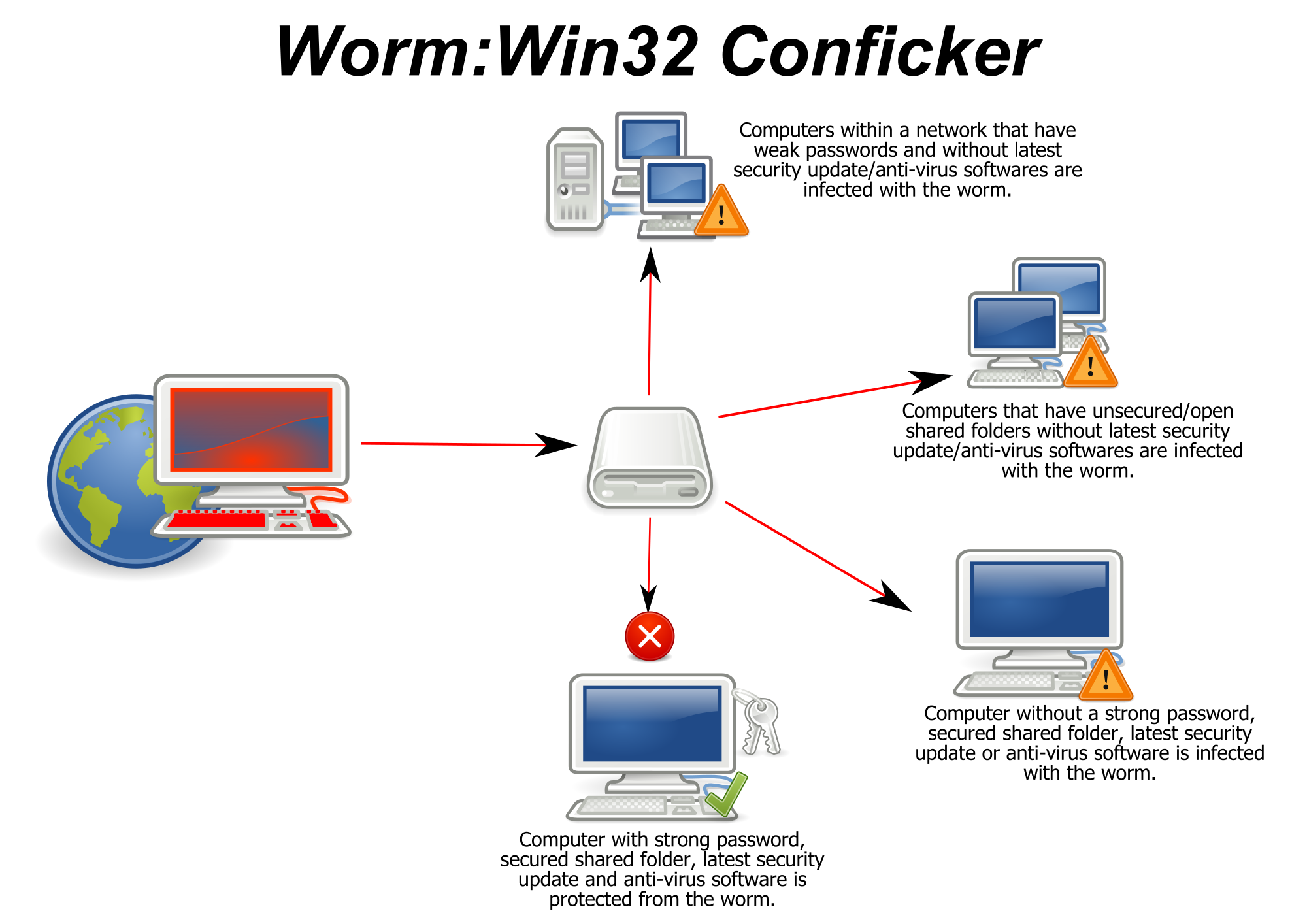
- Worm
- A computer worm is a standalone malware computer program that replicates itself in order to spread to other computers. Often, it uses a computer network to spread itself, relying on security failures on the target computer to access it. Unlike a computer virus, it does not need to attach itself to an existing program.
- duplicates itself making it hard to find the starting virus
- Spyware
- Spyware is a type of malware that is installed on a computer without the knowledge of the owner in order to collect the owner's private information. Spyware is often hidden from the user in order to gather information about internet interaction, keystrokes (also known as keylogging), passwords, and other valuable data.
- Malware
- Preventions
- Anti-virus software
- a removal tool such as Spybot Search & Destroy would be a good option for anyone intending on using their machine securely.
- All antivirus software is built upon the ability to scan your computer system, identify problems and issues and then deal with them.
- Perform daily scans
- enabling complete, daily scans of a system's entire hard drive adds another layer of protection. These daily scans can be invaluable in detecting, isolating, and removing infections that initially escape security software's attention.
- Disable autorun
- Many viruses work by attaching themselves to a drive and automatically installing themselves on any other media connected to the system. As a result, connecting any network drives, external hard disks, or even thumb drives to a system can result in the automatic propagation of such threats
- Disable image previews
- Simply receiving an infected Outlook e-mail message, one in which graphics code is used to enable the virus' execution, can result in a virus infection. Prevent against automatic infection by disabling image previews in Outlook.
- Don't click on email links or attachments
- It's a mantra most every Windows user has heard repeatedly: Don't click on email links or attachments. Yet users frequently fail to heed the warning. Whether distracted, trustful of friends or colleagues they know, or simply fooled by a crafty email message, many users forget to be wary of links and attachments included within email messages, regardless of the source. Simply clicking on an email link or attachment can, within minutes, corrupt Windows, infect other machines, and destroy critical data.
- Anti-virus software
Hacking
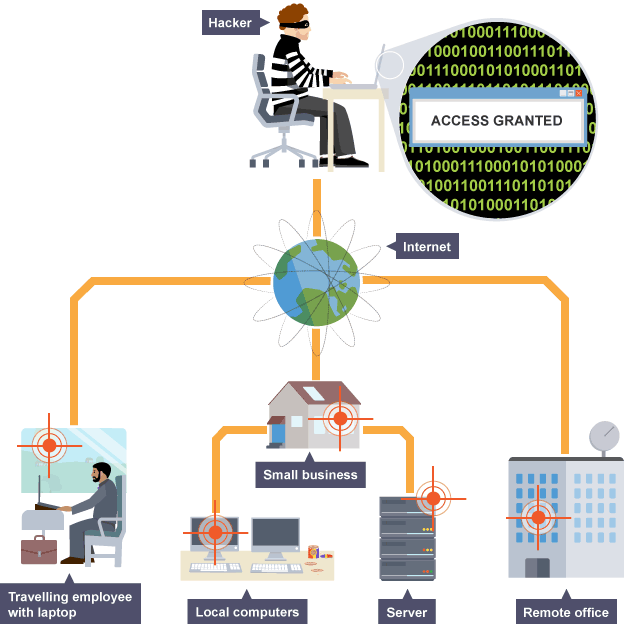
- top gain unauthorized access to data in a system or computer.
- Prevention
- Keep your scripts and downloaded programs updated
- keep your passwords a secret
- Never leave scripts on your account that are not being used.
- Firewall
- A firewall monitors connections to and from your computer. If it spots something suspicious, it closes the connection or disconnects it. Most operating systems include a firewall and it should be turned on by default. Hackers, people who try to gain access to your computer without your permission, will have a harder time if your firewall is enabled
Phishing
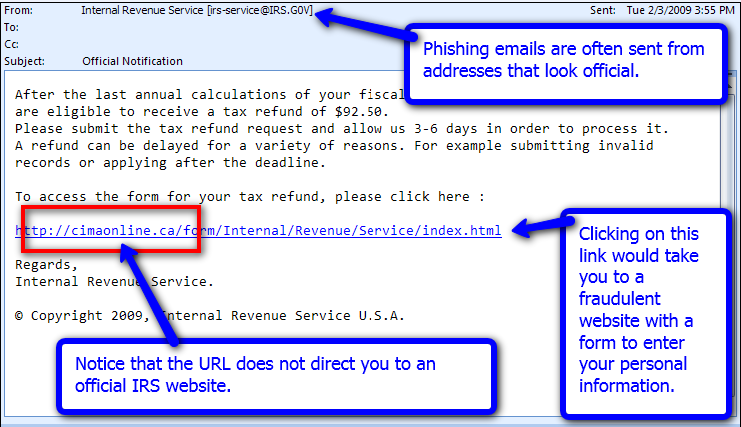
- the fraudulent practice of sending emails purporting to be from reputable companies in order to induce individuals to reveal personal information, such as passwords and credit card numbers, online.
- Use your spam filter: If you detect a phishing email, mark the message as spam and delete it. This ensures that the message cannot reach your inbox in future.
- Spear phishing
- is an email that appears to be from an individual or business that you know. But it isn't. It's from the same criminal hackers who want your credit card and bank account numbers, passwords, and the financial information on your PC.
- do not click the links and enter your details. check if the address is http or https.
- when a link is https it means it is secure.
Legal
- The computer missuse act
- Accessing computer material without permission, eg looking at someone else's files. Accessing computer material without permission with intent to commit further criminal offences, eg hacking into the bank's computer and wanting to increase the amount in your account. Altering computer data without permission, eg writing a virus to destroy someone else's data, or actually changing the money in an account.
- The computer protection act
- This was introduced to regulate personal data. This helps to provide protection against the abuse of personal information. Find out more about the Data Protection Act.
- The computer missuse act
Imágenes y archivos del mapa
Información
- Descripción
- Mapa Mental sobre Data Protection, creado por george mclean el 09/03/2016.
- Creado por
- george mclean
- Visitas
- 0
- Valoración