
Mapa mental
3.1.2 - Software

Contenido del mapa
3.1.2 - Software
Systems Development LifeCycle (SDLC)
- 1. Feasibility and Problem Definition
- Problem Definition is where you "fully define" a problem.
- A "Systems Analyst" and the "Client" discuss the problem.
- This ensures all the issues are fully understood by both parties.
- A "Systems Analyst" and the "Client" discuss the problem.
- Feasibility is an "analysis of the viability" of an idea.
- This study helps to decide if the proposed idea is actually possible to carry out.
- Questions that need to be asked in a feasibility study:
- Technology
- Do they have the right tech?
- Is there tech available to complete the project?
- Economics
- Workers?
- Can the company afford it?
- Work space?
- Would people buy it?
- Technology
- Problem Definition is where you "fully define" a problem.
- 2. Requirements
- Refines project goals into defined functions and operations of the intended application.
- Analyses end-user information needs.
- A "Requirements Specification" is written.
- This document outlines:
- Functionality
- External Interfaces
- Performance
- Attributes
- Design Constraints
- A "Data Flow Diagram" (DFD) is created to show:
- External entities
- Data source or destination.
- Data Stores
- Location of data.
- Processes
- An operation performed on the data.
- Data Flow
- Movement between entities, processes or data stores.
- External entities
- This document outlines:
- 3. Analysis and Design
- Describes desired features and operations in detail.
- Features and operations described:
- Screen Layouts
- Business Rules
- Process Diagrams
- Pseudocode
- Features and operations described:
- Data is collected through:
- "Questionnaires"
- Sending out questionnaires and analysing responses.
- "Observations"
- Observing current procedures to see how things could be more efficient.
- "Structured Interviews"
- Interviewing staff at different levels in the company.
- "Questionnaires"
- A "Design Specification" is written.
- This document includes:
- Input and Output Design
- Processing
- Data Structure Design
- This document includes:
- Describes desired features and operations in detail.
- 4. Implementation
- This is where all the code is written.
- 5. Testing
- Brings all the pieces together into a special testing environment.
- The following things are looked for:
- Bugs
- Errors
- Interoperability
- The following things are looked for:
- Testing is used to measure the quality of developed computer software.
- "Systems Testing" tests a completely integrated system to verify that it meets its requirements.
- There are many forms of testing, these include:
- White Box
- Black Box
- Dry Run
- Acceptance
- Installation Planning
- Installing the product.
- Must be done collaborating with the client, not in isolation.
- Brings all the pieces together into a special testing environment.
- 6. Evaluation
- Using criteria, the finished product/system is evaluated against objectives.
- These objectives were originally agreed between the client and the analyst.
- Using criteria, the finished product/system is evaluated against objectives.
- 7. Maintenance
- What happens during the rest of the software's life.
- This includes:
- Changes
- Corrections
- Additions
- Moves to different computing platforms
- There are three forms of maintenance:
- Corrective
- Actions and tests to restore a defect or remove/correct a fault.
- Perfective
- Software maintenance to improve performance and maintainability.
- Adaptive
- Software maintenance performed to make a computer program usable in a changed environment.
- Corrective
- This includes:
- What happens during the rest of the software's life.
- Prototyping
- Prototyping means building a working model of a new systems in order to evaluate it, test it, or have it approved before building the final product.
- Two main types:
- Throwaway
- Quickly designed to show screen layouts and output formats.
- Evolutionary
- Where prototyping is used almost exclusively, going directly from preliminary investigations, via the prototype, to an implemented system.
- Throwaway
- 1. Feasibility and Problem Definition
SDLC Models
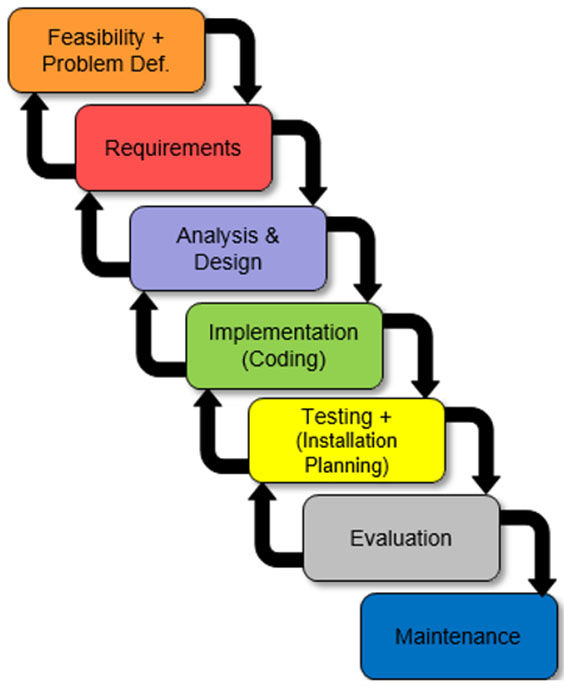
- Waterfall Model
- Cascading effect between phases.
- Each phase has a well defined starting and ending point.
- Has identifiable deliveries to next phase.
- Developers can go back and re-work earlier stages as development progresses.
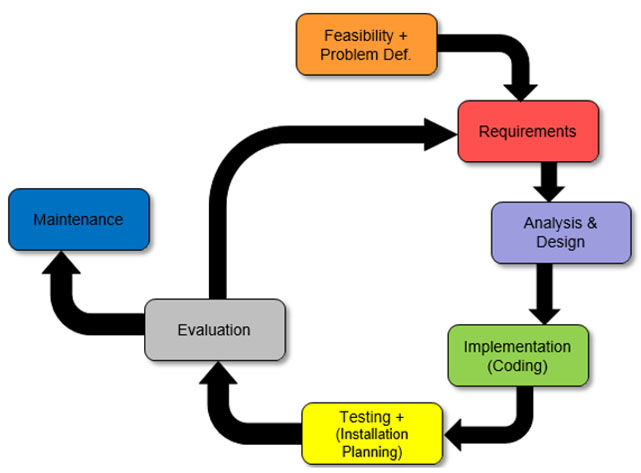
- Spiral Model
- Incremental approach.
- A prototype is built and then evaluated.
- Evaluation leads back into the Requirements phase.
- Waterfall Model
Application Products
- Commercial Products
- Stock Control
- Track quantities of stock
- Track re-orders
- Order Processing
- Placing orders
- Delivery details
- Payment details
- Payroll
- Net and Gross Pay
- Salary
- Wage calculations and decutions
- Process Control
- Keeping a process within boundaries
- Point-Of-Sale
- Tills and checkouts
- Supervised and non-supervised
- Tills and checkouts
- Marketing
- Advertising
- Promotions
- Sales
- Computer-Aided Design (CAD)
- Graphically oriented information
- Design, drafting and display
- Graphically oriented information
- Computer-Aided Manufacture (CAM)
- Physical products and materials
- Design, drafting and production
- Physical products and materials
- Stock Control
- Generic Software Applications
- Word processing
- Spreadsheets
- Desktop Publishing
- Presentation
- Drawing Packages
- Bespoke Software
- Software written to the specification of a particular organisation or customer.
- Areas of need:
- Government
- Many custom built applications for specific needs.
- Finance
- Large Banks
- Processing
- Accounts
- Commercial
- Stock Control
- Order and Processing Systems
- Government
- Knowledge Base Systems
- Computer programs that attempt to replicate the performance of a human expert on some specialised reasoning task.
- Features:
- Specific area of expertise
- Rule based
- Reasons with uncertain data
- Delivers advice
- Explains reasoning to the user
- Made up of four main parts:
- The Rule Base
- Contains all rules that can be applied to the data.
- The Interface Engine
- Uses the rules in the Rule Base.
- Searches through the Knowledge Base.
- Uses the rules in the Rule Base.
- The Human Computer Interface (HCI)
- Allows the user to enter data or queries.
- Presents the results back.
- Allows the user to enter data or queries.
- The Data
- Actual information relating to the Knowledge Base.
- The Rule Base
- Commercial Products
Operating Systems
- Single User
- One user at a time.
- Each user has different rights.
- Keeps user files separate.
- Multi-Tasking
- Many applications open at once.
- Apparently running at the same time.
- Each application is given a small slice of processing time.
- E.g. Listening to music whilst typing an essay.
- Batch Processing
- Designed to take away human interaction.
- Stops people slowing a computer down.
- All information given before processing starts.
- No interaction during processing.
- Large amounts of data.
- Designed to take away human interaction.
- Real Time (Rapid Response)
- Feedback.
- Many sensors.
- Immediate response.
- Need to update files before next input.
- Multi-User
- All computers accessing the same information at the same time.
- Terminals given a small time slice of processing on a server.
- "Thin client"
- Distributed Systems
- File storage spread over a number of machines.
- Access to files is sped up because multiple file requests can be processed at the same time.
- Advantage over single file server.
- Single User
User Interface
- The User Interface is the way in which human users and the computer communicate.
- Forms
- Organise questions or options.
- Resembles a paper based form.
- Filled out by typing or choosing from list.
- Menus
- List of choices given.
- Often touch based.
- Choices often lead to further menus.
- Home option on each screen.
- Simple and restrictive.
- GUIs
- Input via peripheral devices.
- Provides articulated graphical output on the computer monitor.
- Natural Language
- Directed by using everyday human to human interaction.
- Command Line
- Input is provided by typing a command string.
- System provides output by printing text.
Software Utilities
- Compression Software
- Reduces file size.
- Bundles files together.
- Hardware Drivers
- Makes hardware work.
- Anti-virus
- Protects a computer from viruses.
- Removes viruses.
- File Handlers
- Manipulates and controls files on a computer.
- Firewalls
- Protects a computer from attacks or intrusions.
- Compression Software
Imágenes y archivos del mapa



Información
- Descripción
- A Level (F451) Computing Mapa Mental sobre 3.1.2 - Software, creado por AndrewZV el 15/03/2014.
- Creado por
- AndrewZV
- Visitas
- 83
- Etiquetas
- Valoración