
Mapa mental
CHAPTER 8 Implementing SSL VPNs Using Cisco ASA
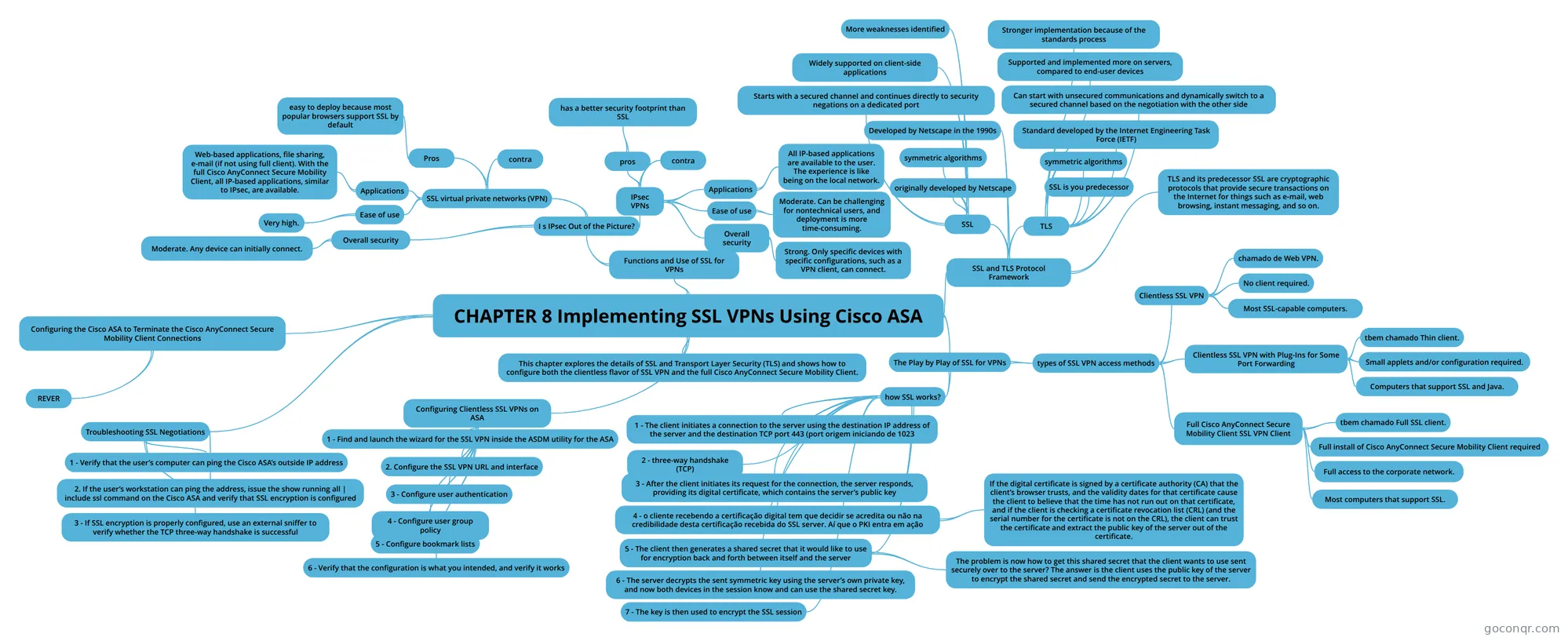
Mind map: Implementing SSL VPNs Using Cisco ASA
Contenido del mapa
CHAPTER 8 Implementing SSL VPNs Using Cisco ASA
This chapter explores the details of SSL and Transport Layer Security (TLS) and shows how to configure both the clientless flavor of SSL VPN and the full Cisco AnyConnect Secure Mobility Client.
Functions and Use of SSL for VPNs
- I s IPsec Out of the Picture?
- SSL virtual private networks (VPN)
- Pros
- easy to deploy because most popular browsers support SSL by default
- contra
- Applications
- Web-based applications, file sharing, e-mail (if not using full client). With the full Cisco AnyConnect Secure Mobility Client, all IP-based applications, similar to IPsec, are available.
- Ease of use
- Very high.
- Pros
- IPsec VPNs
- pros
- has a better security footprint than SSL
- contra
- Applications
- All IP-based applications are available to the user. The experience is like being on the local network.
- Ease of use
- Moderate. Can be challenging for nontechnical users, and deployment is more time-consuming.
- Overall security
- Strong. Only specific devices with specific configurations, such as a VPN client, can connect.
- pros
- Overall security
- Moderate. Any device can initially connect.
- SSL virtual private networks (VPN)
- I s IPsec Out of the Picture?
SSL and TLS Protocol Framework
- Most online transactions that are browser based are secured by SSL or TLS. Both of these protocols provide confidentiality, integrity, and authentication services. These protocols are considered to be operating at the session layer and higher in the OSI logical model. They both can use the public key infrastructure (PKI) and digital certificates for authentication of the VPN endpoints and for establishing encryption keys that may be used.
- TLS and its predecessor SSL are cryptographic protocols that provide secure transactions on the Internet for things such as e-mail, web browsing, instant messaging, and so on.
- SSL
- originally developed by Netscape
- symmetric algorithms
- Starts with a secured channel and continues directly to security negations on a dedicated port
- Widely supported on client-side applications
- More weaknesses identified
- TLS
- SSL is you predecessor
- symmetric algorithms
- Standard developed by the Internet Engineering Task Force (IETF)
- Can start with unsecured communications and dynamically switch to a secured channel based on the negotiation with the other side
- Supported and implemented more on servers, compared to end-user devices
- Stronger implementation because of the standards process
- Developed by Netscape in the 1990s
The Play by Play of SSL for VPNs
- how SSL works?
- 1 - The client initiates a connection to the server using the destination IP address of the server and the destination TCP port 443 (port origem iniciando de 1023
- 2 - three-way handshake (TCP)
- 3 - After the client initiates its request for the connection, the server responds, providing its digital certificate, which contains the server’s public key
- 4 - o cliente recebendo a certificação digital tem que decidir se acredita ou não na credibilidade desta certificação recebida do SSL server. Aí que o PKI entra em ação
- If the digital certificate is signed by a certificate authority (CA) that the client’s browser trusts, and the validity dates for that certificate cause the client to believe that the time has not run out on that certificate, and if the client is checking a certificate revocation list (CRL) (and the serial number for the certificate is not on the CRL), the client can trust the certificate and extract the public key of the server out of the certificate.
- 5 - The client then generates a shared secret that it would like to use for encryption back and forth between itself and the server
- The problem is now how to get this shared secret that the client wants to use sent securely over to the server? The answer is the client uses the public key of the server to encrypt the shared secret and send the encrypted secret to the server.
- 6 - The server decrypts the sent symmetric key using the server’s own private key, and now both devices in the session know and can use the shared secret key.
- 7 - The key is then used to encrypt the SSL session
- types of SSL VPN access methods
- Clientless SSL VPN
- User experience Feels like accessing resources (that are on the corporate network) through a specific browser window or hyperlink.
- Servers that can be used IOS with the correct software, and ASA with the correct licenses.
- How the user looks from the corporate network Traffic is proxied ( Port Address Translation [PAT]) by the SSL server, as the users’ packets enter the corporate network.
- chamado de Web VPN.
- No client required.
- Most SSL-capable computers.
- Clientless SSL VPN with Plug-Ins for Some Port Forwarding
- Some applications can be run locally with output redirected through the VPN. Includes the features of the clientless VPN to the left.
- Traffic is proxied (PAT) by the SSL server as the users’ packets enter the corporate network.
- tbem chamado Thin client.
- Small applets and/or configuration required.
- Computers that support SSL and Java.
- Full Cisco AnyConnect Secure Mobility Client SSL VPN Client
- Clients are assigned their own virtual IP address to use while accessing the corporate network. Traffic is forwarded from the given IP address of the client into the corporate network.
- tbem chamado Full SSL client.
- Full install of Cisco AnyConnect Secure Mobility Client required
- Full access to the corporate network.
- The local computer acts and feels like it is a full participant on the corporate network.
- Most computers that support SSL.
- Clientless SSL VPN
- how SSL works?
Configuring Clientless SSL VPNs on ASA
- 1 - Find and launch the wizard for the SSL VPN inside the ASDM utility for the ASA
- 2. Configure the SSL VPN URL and interface
- 3 - Configure user authentication
- We specify how we are going to go about authenticating the individual users who are trying to connect. We have two general options. The first is that we could use an authentication, authorization, and accounting (AAA) server. Very likely, in a Cisco environment, this is an Access Control Server (ACS) (or Identity Services Engine [ISE]) server. The AAA server could be reached via RADIUS or TACACS+. In the case of authenticating users (end users, specifically SSL VPN users), if the ASA is using the AAA server, it will very likely use RADIUS because that is the recommended method for authentication. The other option is to use the local database, which just like on the router means the running configuration on the local device (in this case, the ASA’s running config). At this point in the wizard, if you want to, you can add additional users to the local database
- 4 - Configure user group policy
- 5 - Configure bookmark lists
- 6 - Verify that the configuration is what you intended, and verify it works
Configuring the Cisco ASA to Terminate the Cisco AnyConnect Secure Mobility Client Connections
- REVER
Troubleshooting SSL Negotiations
- If you have a user who is unable to connect to the Cisco ASA using SSL, follow these steps to isolate the SSL negotiation issues:
- 1 - Verify that the user’s computer can ping the Cisco ASA’s outside IP address
- 2. If the user’s workstation can ping the address, issue the show running all | include ssl command on the Cisco ASA and verify that SSL encryption is configured
- 3 - If SSL encryption is properly configured, use an external sniffer to verify whether the TCP three-way handshake is successful
Información
- Descripción
- Cisco 210 - 260 CCNA security Estudo principal Mapa Mental sobre CHAPTER 8 Implementing SSL VPNs Using Cisco ASA, creado por alessandro moreira el 15/10/2016.
- Creado por
- alessandro moreira
- Visitas
- 0
- Valoración