
Mapa mental
CHAPTER 4: OPERATING SYSTEM SECURITY
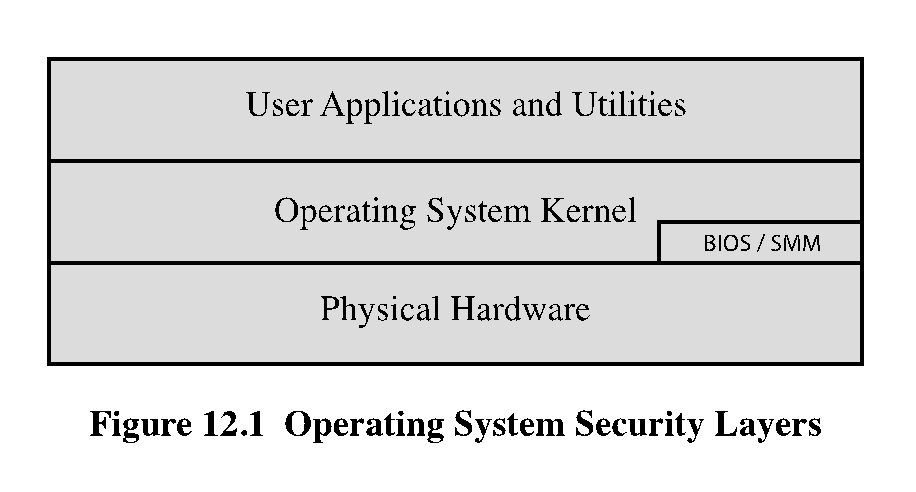
Contenido del mapa
CHAPTER 4: OPERATING SYSTEM SECURITY
4.1 INTRODUCTION TO OS SECURITY
4.8 VIRTUALIZATION SECURITY
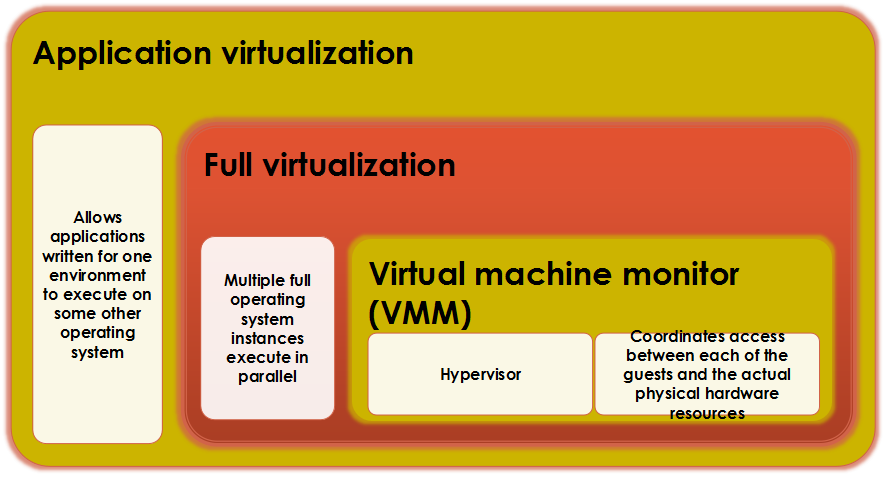
- VIRTUALIZATION ALTERNATIVES
- VIRTUALIZATION SECURITY ISSUES
- Security concerns include:
- Guest OS isolation
- Guest OS monitoring by the hypervisor
- Virtualized environment security
- Security concerns include:
- SECURING VIRTUALIZATION SYSTEMS
- Org. using virtualization should:
- Carefully plan the security of the virtualized system
- Ensure that the hypervisor is properly secured
- Restrict & protect admin access to the virtualization solution
- Org. using virtualization should:
4.7 WINDOWS SECURITY
- 1. PATCH MGT.
- Third party apps also provide automatic update support
- 2. USERS ADMIN & ACCESS CONTROLS
- System ensures the subject's integrity is equal @ higher than the object's level
- 3. APPS & SERVICE CONFIG
- Much of the config information is centralized in the Registry
- Registry keys can be directly modified using the "Registry Editor"
- 4. OTHER SECURITY CONTROLS
- Important to ensure the set of products in use are compatible
- 5. SECURITY TESTING
- 1. PATCH MGT.
4.6 LINUX/UNIX SECURITY
- 1. PATCH MGT.
- Keeping security patches up to date is a widely recognized & critical control for maintaining security
- 2. APPS & SERVICE CONFIG
- Most common implemented using separate text files for each apps. & services
- Generally located either in the /etc directory @ in the installation tree for a specific apps.
- 3. USERS, GROUPS & PERMISSIONS
- Access is specified as granting read, write & execute permissions to each owner, group @ others for each resource
- Guides recommend changing the access permissions for critical directories & files
- Remote exploit
- Local exploit
- 4. REMOTE ACCESS CONTROLS
- Several host firewall programs may be used
- 5. LOGGING & LOG ROTATION
- Should not assume that the default setting is necessarily appropriate
- 6. APPS SECURITY USING A CHROOT JAIL
- Restricts the server's view of the file system to just a specified portion
- 7. SECURITY TESTING
- 1. PATCH MGT.
4.5 SECURITY MAINTENANCE
- LOGGING
- Can only inform you about bad things that have already happened
- Information can be generated by the system, network & applications
- Automated analysis is preferred
- DATA BACKUP & ARCHIVE
- Performing regular b/u of data is a critical control that assists w/ maintaining the integrity of the system & user data
- Backup
- Archive
- Needs & policy relating to backup & archive should be determined during the system planning stage
- LOGGING
4.2 SYSTEM SECURITY PLANNING
- 1. The first step in deploying a news system is planning
- 2. Planning should include a wide security assessment of the org.
- 3. Aim is to maximize security while minimizing costs
- 4. Determine security requirements for the system, apps, data & users
- 5. Identify appropriate personnel and training to install & manage the system
4.3 OS HARDENING
- OS INSTALLATION: INITIAL SETUP & PATCHING
- 1. System security begins w/ the installation of the OS
- 2. Ideally new systems should be constructed on a protected network
- 3. Installation & hardening process should occur before the system is deployed to its intended location
- 4. Initial installation should install the minimum necessary for the desired system
- 5. Overall boot process must also be secured
- 6. The integrity & source of any additional device driver code must be carefully validated
- 7. Critical that the system be kept up to date, w/ all critical security related patches installed
- 8. Should stage & validate all patches on the test systems before deploying them in production
- REMOVE UNNECESSARY SERVICES, APPS & PROTOCOLS
- Fewer software packages are available to run the risk is reduced
- System planning process should identify what is actually required for a given system
- When performing the initial installation the supplied defaults should not be used
- CONFIGURE USERS, GROUPS & AUTHENTICATION
- Not all users w/ access to a system will have the same access to all data & resources on that system
- Elevated privileges should be restricted to only those users that require them & needed to perform a task
- CONFIGURE RESOURCE CONTROLS
- Once the users & groups are defined, appropriate permissions can be set on data & resources
- Many of the security hardening guides provide lists of recommended changes to the default access configuration
- INSTALL ADDITIONAL SECURITY CONTROLS
- Further security possible by installing & configuring additional security tools:
- Anti-virus software
- Host-based firewalls
- IDS or IPS software
- Application white-listing
- Further security possible by installing & configuring additional security tools:
- TEST THE SYSTEM SECURITY
- Should be done following the initial hardening of the system
- Repeated periodically as part of the security maintenance process
- OS INSTALLATION: INITIAL SETUP & PATCHING
4.4 APPLICATION SECURITY
- APPS CONFIGURATION
- May include creating & specifying appropriate data storage areas for apps
- Some apps @ services may include:
- Default data
- User acc.
- Scripts
- ENCRYPTION TECHNOLOGY
- Is a key enabling tech. that may be used to secure data both in transit & when stored
- Must be configured & appropriate cryptographic keys created, signed & secured
- APPS CONFIGURATION
Imágenes y archivos del mapa
Información
- Descripción
- Network Security Mapa Mental sobre CHAPTER 4: OPERATING SYSTEM SECURITY, creado por Nurmarahain Abdull Rahman el 03/11/2016.
- Creado por
- Nurmarahain Abdull Rahman
- Visitas
- 0
- Valoración