
System and Endpoint Security
305 resources created by 284 users
This System and Endpoint Security page on GoConqr gathers community-made quizzes, mind maps, flashcards and notes, from forms of attack and malware to Windows access control, Unix and Linux hardening, and endpoint protection. It's built for school students revising a topic, university students and professional candidates filling gaps, and teachers after ready-made material. There are over 300 resources here, including more than 20 quizzes and over 250 mind maps. Pick a starting point, try a quiz to find your gaps, then build your own revision set.
Top System and Endpoint Security resources
-
38 questions70-411 - MCSA: Administering Windows Server 2012 - Exam 6 Your company has a main office and a branch office. The network contains an Active Directory domain named c...
-
20 questionsChapter 9 Review Questions Due to a recent string of thefts in your office, you need to harden your local system. What two actions are...
-
21 cardsOCR GCSE - Computer Science - Paper 1 - System Security What is a Passive Attack?
-
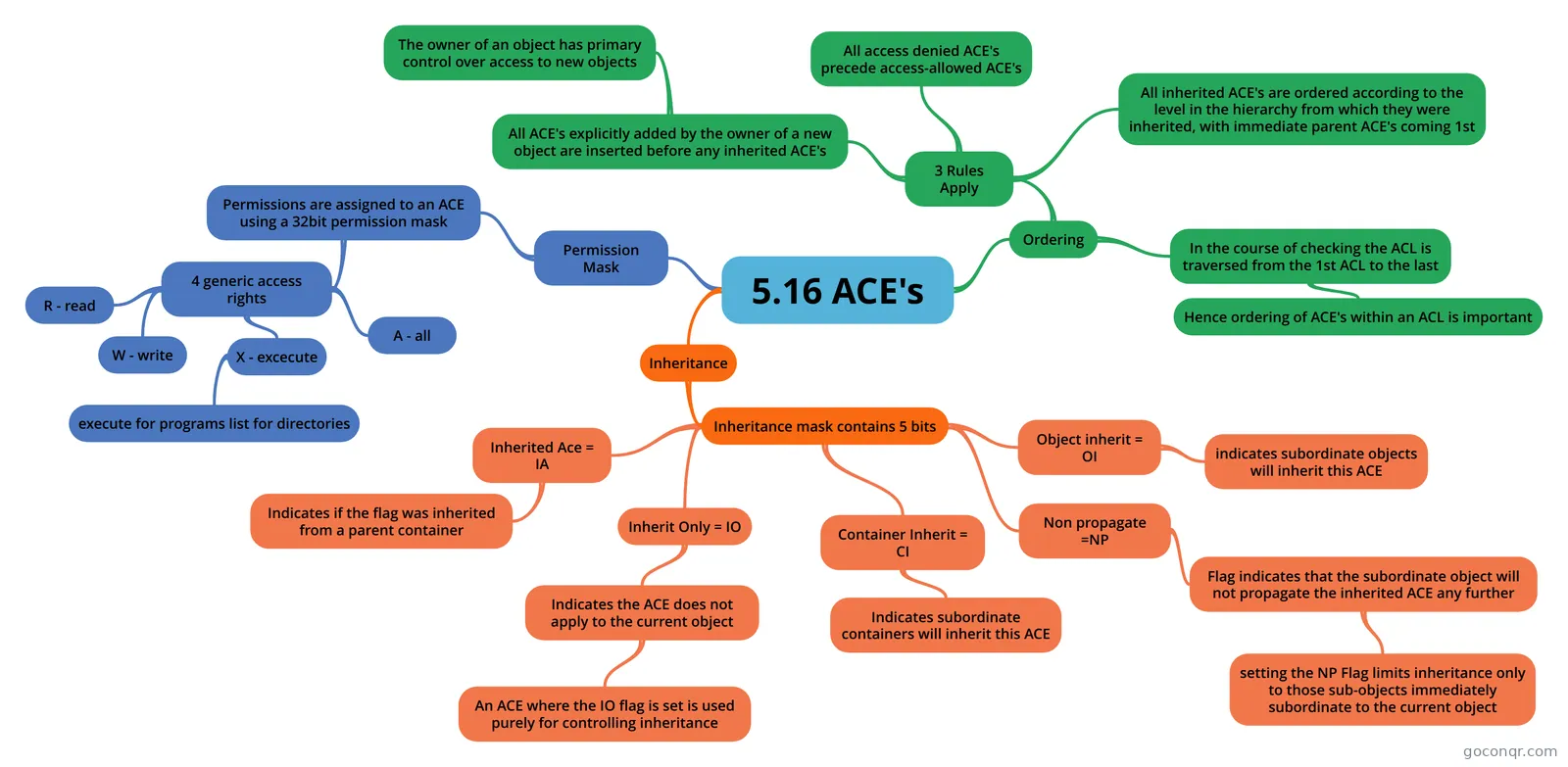 Mind map 5.16 ACE's
-
74 cardsVolume 4 - End Point Protection What is EPP?
-
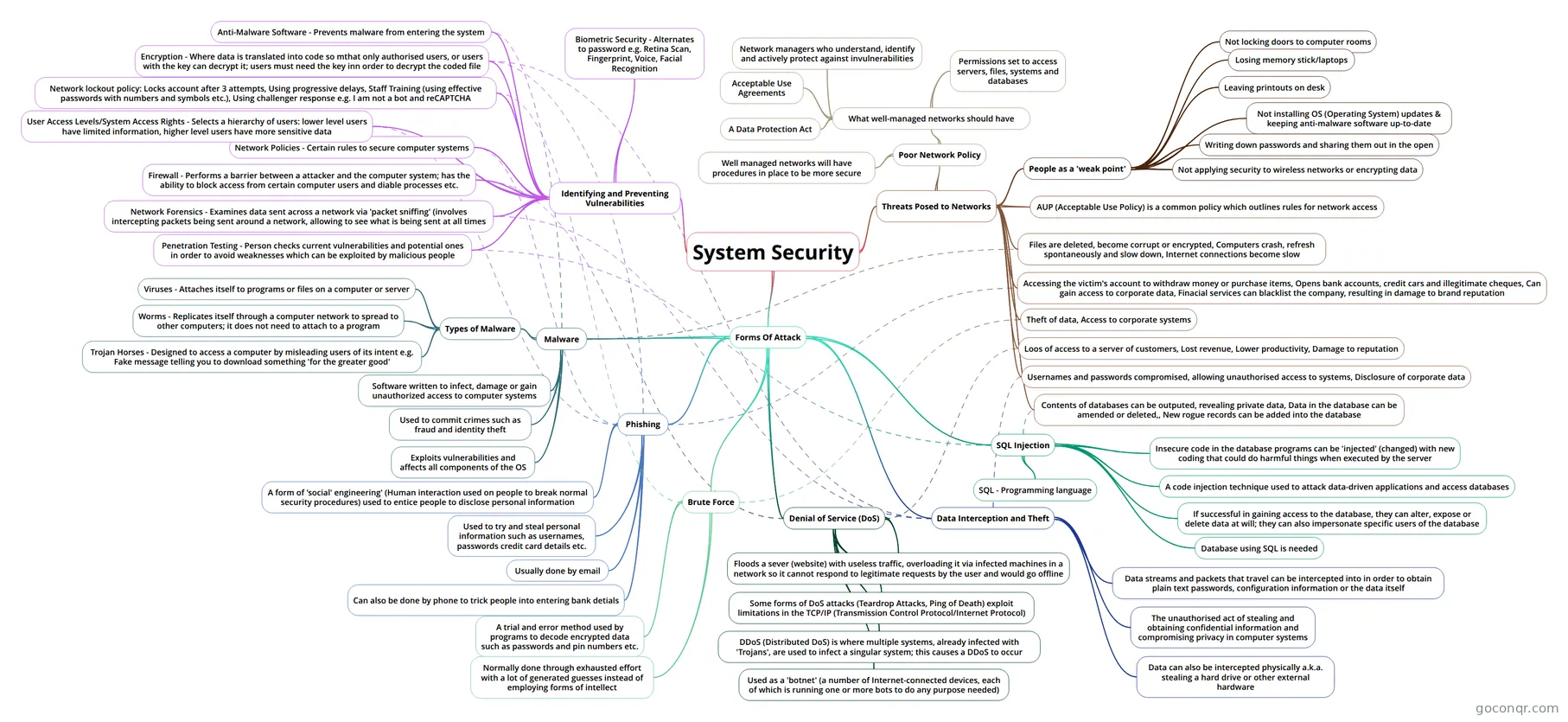 Mind map System Security
-
40 questions70-411 - MCSA: Administering Windows Server 2012 - Exam 5 Your network contains AD named contoso.com. The domain contains RADIUS server named Server1 that runs Windo...
-
50 questions70-410 - MCSA: Windows Server 2012 - Installing and Configuring - Exam 2 You have a server named Server1. Server1 runs Windows Server 2012 R2. Server1 has a thin provisioned disk n...
Quizzes
See all 20 quizzes-
38 questions70-411 - MCSA: Administering Windows Server 2012 - Exam 6 Your company has a main office and a branch office. The network contains an Active Directory domain named c...
-
20 questionsChapter 9 Review Questions Due to a recent string of thefts in your office, you need to harden your local system. What two actions are...
-
40 questions70-411 - MCSA: Administering Windows Server 2012 - Exam 5 Your network contains AD named contoso.com. The domain contains RADIUS server named Server1 that runs Windo...
-
50 questions70-410 - MCSA: Windows Server 2012 - Installing and Configuring - Exam 2 You have a server named Server1. Server1 runs Windows Server 2012 R2. Server1 has a thin provisioned disk n...
-
47 questions70-411 Microsoft Exam: Test 2 - Volume 2 Your network contains 25 Web servers that run Windows Server 2012 R2. You need to configure auditing polici...
-
20 questionsLibro T10 - Securing Your System Typing lsof -i | grep LISTEN as root produces three lines of output, corresponding to the sendmail, sshd, a...
-
60 questionsLPIC - 3 - Security - 303 - 300 Which directive is used in an OpenVPN server configuration to send network configuration information to the...
-
20 questionsExamen 110: Security Typing lsof -i | grep LISTEN as root produces three lines of output, corresponding to the sendmail, sshd, a...
Mind maps
See all 257 mind mapsFlashcards
See all 24 flashcards-
21 cardsOCR GCSE - Computer Science - Paper 1 - System Security What is a Passive Attack?
-
74 cardsVolume 4 - End Point Protection What is EPP?
-
71 cardsMOD 5 DAY 01 Flashcards OS (Operating System)
-
42 cards1.4 Security Controls for Hosts What is a Trusted OS?
-
27 cardsIT security What are the qualities used to define and analyse Security
-
46 cardsDay 5 - Obj. Security & File System Permissions Define a security descriptor
-
48 cardsDay 4 - Logon and Authentication CTL + ALT + DEL =?
-
28 cardsSystem Hardening (D-6) What are the 2 primary location in Solaris where network based services are started?
Notes
-
Secure System Design Trusted OS Trusted Computing Base the kernel and associated hardware and processes must be designed to support the enforcement of a security policy Security Features support for multilevel security Assurance secure de...
-
Revision Revision Notes : Pages 172-193 System Security Intellectual property - an idea that you “invented” that belongs to you, for example, an image that is copyrighted. Malware - is a malicious form of software that i...
-
Basic Resource Protection - created from Mind Map to ensure that each object is accessed correctly and those processes that are allowed to do so Access Control internal protection mechanism seen in CPU instructions that may only be executed in supervisor mode A...
-
Post Installation Tasks - created from Mind Map Configuring network connection Set time zone Enable Remote Desktop
Topics in System and Endpoint Security
More Cybersecurity topics
About System and Endpoint Security
GoConqr OriginalWhat this unit covers
The page brings together material on protecting computers and the devices people use every day. Much of it looks at threats: the flashcard deck OCR GCSE - Computer Science - Paper 1 - System Security covers passive, active, brute force and (D)DoS attacks, plus malware. The mind map System Security adds phishing, SQL injection, data interception and theft, and ways of identifying and preventing vulnerabilities.
Endpoint protection and hardening
For the endpoint side, the flashcard deck Volume 4 - End Point Protection goes into disk encryption, the evil maid attack, traditional antivirus and heuristic detection. The quiz Chapter 9 Review Questions asks how to harden a local system after thefts in an office. System Hardening (D-6) turns to starting and stopping network services on Linux and Solaris.
Operating system access control
A large group of resources looks at how systems decide who can do what. Day 4 - Logon and Authentication covers the logon process and the GINA. Day 5 - Obj. Security & File System Permissions covers security descriptors and DACLs. The mind map on ACEs explains inheritance flags, and there are also maps on Windows ACLs, passwords, and Unix and Linux security enhancements.
Where to start
- Begin with a mind map such as System Security to see the whole picture.
- Work through a flashcard deck to fix the key terms.
- Take a quiz, then return to the map for anything you missed.
Professional candidates can use the Windows Server quizzes, such as 70-411 - MCSA: Administering Windows Server 2012 - Exam 6, as exam-style practice. School students will find the GCSE Computer Science deck the natural first stop.
Where it sits
This unit belongs to the strand System, Application and Data Security in Cybersecurity. Open any resource, work through it, and make your own maps and flashcards to match what you need.
Frequently asked questions
Which resource should I start with?
If you are revising for school, start with the flashcard deck OCR GCSE - Computer Science - Paper 1 - System Security, then look at the System Security mind map. If you want a wider overview of attacks and defences, the mind map is a good first stop before any quiz.
What do the mind maps cover?
There are over 250 of them. Many are titled System Threats, while others cover Windows ACLs, passwords, Unix and Linux security enhancements, SELinux, operating system protection and Endpoint Security. They suit quick revision and spotting what you still need to learn.
Which exams are the resources linked to?
The listed resources mention GCSE Computer Science and MCSA 70-411. The GCSE material is aimed at school students, while the Windows Server quizzes suit professional candidates and university students wanting exam-style questions on administration and security.
Are the resources free to use?
Yes. Every resource listed here is free to open, study and take, with no account needed. They were made by GoConqr users, not by GoConqr itself. A free account also saves your quiz scores and lets you make your own quizzes, mind maps, flashcards and notes.
Are there quizzes on Windows security?
Yes. Several quizzes are based on Windows Server, including 70-411 - MCSA: Administering Windows Server 2012 - Exam 6 and 70-410 - MCSA: Windows Server 2012 - Installing and Configuring - Exam 2. Flashcards on logon, authentication and file permissions support them.
What if I cannot find the topic I need?
Try a nearby mind map or flashcard deck first, as many overlap. If a topic is still missing, you can make your own quiz, mind map, flashcards or notes, which helps you cover exactly the gaps in your revision.