
Apuntes
Sin título

Contenido del apunte (2)
Página 1
Website: a collection of individual but related webpages that are often stred together and hosted by a webserver
site, new site, empty site, 'choose location you want to save to'
A webpage is created using 3 layers:
3 Web Development layers:
Content layer: CSS (cascading stylesheet)
Presentation layer: HTML (HyperText Markup Language)
Behaviour layer: JAVAscript
HTML
a text based language used to develop the content layer of websites.
<html>
<head>
<title>An example of html code</title>
</head>
<body
</body>
</html>
Tags:
special markers used in HTMl to tell the computer what to do with the
text. A tag is needed at the start and end of the block of text to which
the tag applies.
<html> tells the computer we are creating a html (beginning)
<head> a section where you provide information about your document
<title> tells the computer that you want to put the text between the tags as a title. The text as the title does not appear on the webpage but the browser's window.
<body> a section where you insert the content of your document and visual information about how it is to appear on the webpage.
<h1>-<h6> tells that you want the text to be a heading of type h1 for example.
<p></p> start and end a new paragraph
<b> bold
<u> underline
<i> italics
<br> means insert a line break. there is no closing tag
<hr> insert a horizontal line. there is no closing tag
Alignment text
text has to be in a separate paragraph for specific alignment attribute
<p align="left">This is an example of left aligned</p> there "left", "center" and "right"
CSS
a different text-based language
Stylesheets are attached to webpages (although they can be written into HTML)
Many websites have one or more common stylesheets attached to every page in the wbsite, making all the pages have a similar appearance (font styles, colour scheme etc)
Advantages:
Saves time
Gives website a consistent look
Examples:
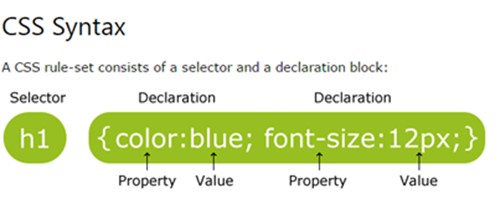
h1 {font-size: 22pt} ";" is between styles "," lists in styles
h1 {text-align: center; color: blue} notice American speeling of COLOR and CENTER
Font Families
some fonts cannot be displayed by all web browsers, so we must give a prioritized list of fonts.
2 ways of specifying a font:
by the name of the font: Arial, Times New Roman, Calibri
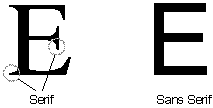
by whether the font is SERIF or SAN serif
h1 {font-family: Calibri, Arial, sans-serifif calibri can't be used, then Arial will be used, if not, then san serif font will be used
Página 2
Información
- Descripción
- ICT (information & communication technologies) Apunte sobre Sin título, creado por Safi S el 29/09/2016.
- Creado por
- Safi S
- Visitas
- 1
- Valoración