
How to Create a Group
Diapositivas del conjunto (3)
-
- If you don't see a Group that covers a particular topic or area of interest then the best thing to do is to simply create one of your own!
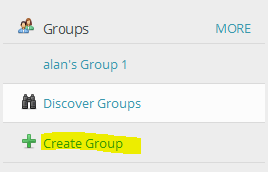
- The Create a Group button will be located on the left-hand side of your GoConqr dashboard. Click on it to begin the Group creation process.
-
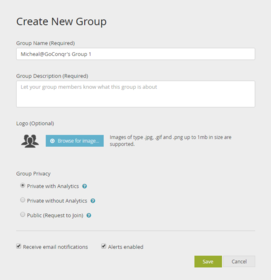
- After you have selected Create a Group you will be brought to a screen with options for giving your Group a name along with a space for inserting a description of what it does and who it's aimed at.
- You can also make your Group stand out a bit more by giving it some visual flair through adding a logo.
- In addition, you can choose to keep your Group private (which means you have complete control over who to invite) or make it public (which means others can send you requests to join, but you still have control over accepting or declining these).
- Once you're happy with your selections, just hit the Save button.
- And that's it. Congratulations, you've just made a new Group!
-
- If you've opted to make your Group Public, then it's likely that the requests to join it will come rolling in (if your Group looks interesting to other users of course!).
- As the Group creator it's up to you to accept these requests, or to to decline them.
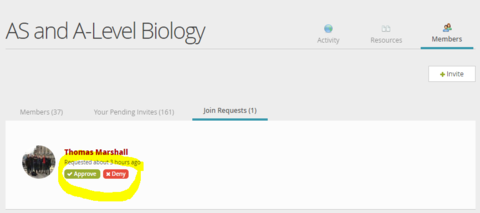
- You can check to see if you've received requests to join a Group on the Latest Alerts icon (the little bell to the top right of your dashboard). Alternately, check the Members tab in your Group and go to Join Requests.
- Once viewing an incoming request, you will see the user's name. Clicking on this will bring you to their profile (if you wish to see it). If you're happy to welcome them to the Group, just select Approve. Remember: The more users you accept, the more active your Group will be!
Información
- Descripción
- Making your own Group with GoConqr is easy. But it's even easier when you have a guide to take you through it step by step!
- Creado por
- Micheal Heffernan · abr 2016
- Actualizado
- 13 dic 2016
- Visitas
- 64
- Etiquetas
- Valoración