
Apuntes
HEXADECIMAL CHAPTER 11
Contenido del apunte (3)
Página 1
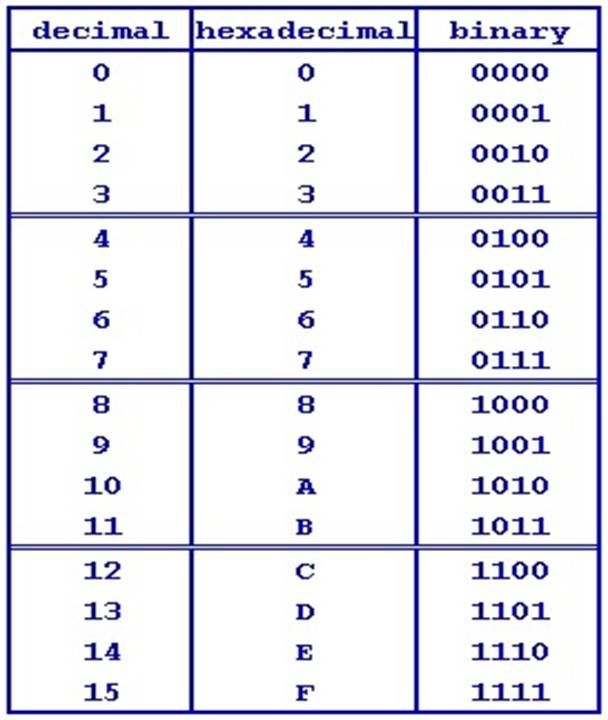
HEXADECIMAL - BASE 16 changes binary into a base value more readable to humans
Hexadecimal is a number system based on 16; column values are powers of 16.
Hex requires 16 distinct symbols to represent the values from 0 to 15 in denary, so we use A for 10, B for 11, and so on.
Hex is used because it is easy to convert between binary and hex (one nibble or four bits is one hex digit).
It is used because it is easier for a programmer to remember and work with hex values than binary.
1) 31
2) 83
3) 7F
4) FF
5)
1) 92 = 10010010
2) 5C = 01011100
3) FB = 11111011
4)ABCD = 1010101111001101
5) FFFF = 1111111111111111
b
1) 10010011 = 93
2) 11111111 = FF
3) 1101010101111111 = D57F
4) 1100111010111100 = CEBC
5) 1111111110101010 = FFAA
Página 2
Images, sound and instructions
All data stored and used by the computer is represented in binary. And all images, sound and instructions are represented by binary patterns.
Images
-Representing Black and white images is simple as a pixel that is black is represented by 1 and white or blank is represented by 0. The character can be represented in binary by simply choosing 1 for black and 0 for white. Each row is one byte and the whole character is described by eight bytes.
-In reality, images are far more complex than this, with several colours to be represented. In a single bit we can only represent two colours; for more colours we need to use more bits.
* Using two bits can represent 2^2 or four colours.
*Using three bits can represent 2^3 or eight colours.
*Using eight bits we can represent 2^8 or 256 and with 16 bits 2^16 or 65,536
Some images such as a flower graphic may use 24 bits per pixel as opposed to a simple image that only requires one bit per pixel - a space invader graphic - and thus the computer needs to have information about the data to reproduce the images accurately.
Metadata: The information about the image that allows the computer to interpret the stored binary accurately to reproduce the image. This must contain the width and height in pixels and the colour depth BPP (bits per pixel). The metadata includes information about the colour depth, the resolution in dpi and the dimensions.
Colour Depth: The number of bits used for each dot or pixel. The more bits, the greater the number of colours that can be represented.
Resolution: The number of pixels or dots per unit, for example DPI (dots per inch)
File Types: Image files are stored in a variety of formats, but either as a set of pixels in a bitmap or vector form. In vector graphics, format images are made up of primitive shapes such as lines, shapes and ellipses together with other information about the shape, including a set of control points the shape must pass through. Bitmaps do not scale well however vectors do.
Página 3
Información
- Descripción
- Apunte sobre HEXADECIMAL CHAPTER 11, creado por Thomas Walton el 02/03/2017.
- Creado por
- Thomas Walton · mar 2017
- Actualizado
- 14 mar 2017
- Visitas
- 0
- Valoración