
Test
Spring Development Training 2017: week 5
Crea una cuenta gratis para terminar este test
Guarda tu progreso y consulta tu resultado final.
¿Ya tienes cuenta? Inicia sesión
Preguntas del test (9)
1Git is a distributed version control system created to manage large source code repositories among a large number of developers.
- AVerdadero
- BFalso
2With Git, while it is a distributed system, you still must push to the repository from which you pulled.
- AVerdadero
- BFalso
3You are the only developer that will be working on a new feature. The master branch, and develop branch will eventually need this feature. Select the best course of action for how to begin working on this feature.
- Acheckout develop, branch feature, make your edits, commit
- Bcheckout master, make your edits, commit, push
- Ccheckout develop, make your edits, commit, push
- Dcheckout master, branch feature, make your edits, commit
4You can avoid many rebasing problems by remembering to never
- rebase after pushing a branch
- rebase after commits use your branch
- rebase after pulling someone else's branch- AVerdadero
- BFalso
5You wish to exclude certain files from git which you do not want to check into the project. The best option for managing this is:
- Aedit the .gitignore file to create an exclusion list matching these files.
- Bedit the .ignore file to enter a regular expression to match these files.
- CThe entire folder is always committed to the project so you should never commit them in the first place.
- DGit is smart enough to ignore the most common environment files that should not be committed.
6If you are still working on a feature in a "feature" branch, but need to work on bug fix on master what should you do?
- Acommit, push, checkout master
- Bcommit, merge feature, checkout master
- Ccommit, push, merge master
- Dstash, merge master
- Ereset, checkout master
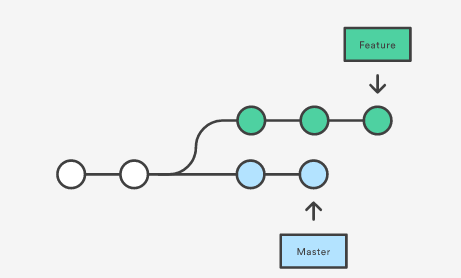
7Given the commit history to the left, suppose you are ready to move the feature back into master, what is the best way to do this?
- AMerge
- BRebase
- CStash push, checkout master, stash pop, commit
- DYou should not be making bug fixes on master
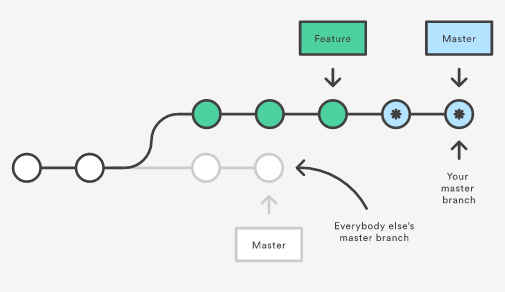
8Given the commit history to the left, suppose you want to move other peoples changes to master onto your feature branch, what is the best way to do this?
- AMerge
- BRebase
- CStash push, checkout master, stash pop, commit
- DYou cannot merge or rebase master in this scenario.
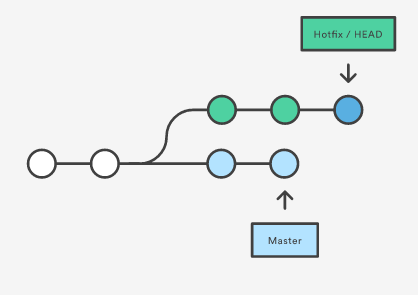
9Given the scenario to the left. You wish to undo the last 2 commits on your hotfix branch and discard their history. What Git command should you use.
- Arollback
- Brevert
- Creset
- Dcheckout
Información
- Descripción
- Test your understanding of Git
- Autor
- Stefcho Stefchov
- Idioma
- English
- Visitas
- 54
- Etiquetas
- Valoración
- Aún sin valoraciones Valora este test