
Test
Network+ Chapter 1 Test pt.1
Este test tiene tipos de pregunta que se abren en el reproductor de siempre.
Preguntas del test (60)
1-- topologies are the easiest to troubleshoot and can easily scale to large sizes.
- AStar
- BMesh
- CHybrid
2IP is a [blank_start]Network[blank_end] layer protocol
- ANetwork
- BData-Link
- CPhysical
3Internet Explorer is an example of an [blank_start]Application[blank_end] layer protocol
- AApplication
- BPresentation
- CTransportation
4Ethernet is an example of a [blank_start]Data Link[blank_end] layer protocol
- AData Link
- BPhysical
- CTransport
5T1 can be considered a [blank_start]Physical[blank_end] layer protocol
- APhysical
- BData-Link
- CSession
6Layer 2 of the OSI model is the [blank_start]Data Link layer[blank_end], which provides the physical transmission of the data and handles error notification, network topology, and flow control
- AData Link layer
- BPhysical
- CNetwork
- DPresentation
7[blank_start]Cable modems[blank_end] use RG-6 [blank_start]coax[blank_end] cables
- ACable modems
- Bcoax
8To get the high data-transfer speed, like 1 Gbps, you need to use a wire standard that is highly rated, such as [blank_start]Category 5e or Category 6[blank_end]
- ACategory 5e or Category 6
- BCategory 6 or GigE
- CCoax
9To connect two switches together or a hub to a switch, you need a [blank_start]crossover[blank_end] cable
- Acrossover
- Bethernet
- Cswitch
10One of the biggest benefits of using switches instead of hubs in your internetwork is that each switch port is actually its own [blank_start]collision[blank_end] domain.
- Acollision
- Bbroadcast
- Canycast
11Switches can’t break up [blank_start]broadcast[blank_end] domains.
- Abroadcast
- Bcollision
- Cmultiple
12To connect remote LANs together through something known as a [blank_start]wide area network[blank_end]
- Awide area network
- Blocal area network
- Ccampus area network
13[blank_start]local area network (LAN)[blank_end] is usually restricted to spanning a particular geographic location such as an office building, a single department
- Alocal area network (LAN)
- Bcampus area network (CAN)
- Cwide area network (WAN)
14A [blank_start]router[blank_end] can connect the two LANs.
- Arouter
15the users on each [blank_start]LAN[blank_end] enjoy much faster response times when accessing resources, and administrative tasks are a lot easier, too.
- ALAN
16[blank_start]Workstations[blank_end] are often seriously powerful computers that run more than one central processing unit (CPU) and whose [blank_start]resources[blank_end] are available to other users on the network to access when needed
- AWorkstations
- Bresources
17A [blank_start]client[blank_end] machine is any device on the network that can ask for access to resources like a printer or other hosts from a server or powerful workstation.
- Aclient
18The terms workstation, client, and [blank_start]host[blank_end] can sometimes be used interchangeably. Computers have become more and more powerful and the terms have become somewhat fuzzy because [blank_start]hosts[blank_end] can be clients, workstations, servers, and more! The term [blank_start]host[blank_end] is used to describe pretty much anything that takes an IP address.
- Ahost
- Bhost
- Chost
19[blank_start]Servers[blank_end] are also powerful computers. They get their name because they truly are “at the service” of the network and run specialized software known as the network operating system to maintain and control the network
- AServers
20In a good design that optimizes the network’s performance, [blank_start]servers[blank_end] are highly specialized and are there to handle one important labor-intensive job . This is not to say that a single [blank_start]server[blank_end] can’t do many jobs, but more often than not, you’ll get better performance if you dedicate a [blank_start]server[blank_end] to a single task.
- Aservers
- Bserver
- Cserver
21[blank_start]host[blank_end] means any network device with an IP address.
- Ahost
22[blank_start]WAN[blank_end] networks are what we use to span large geographic areas and truly go the distance. Like the Internet, [blank_start]WAN[blank_end]s usually employ both routers and public links, so that’s generally the criteria used to define them
- AWAN
- BWAN
23[blank_start]WAN[blank_end]s can utilize either private or public data transport media such as phone lines.
- AWAN
24[blank_start]WAN[blank_end]s usually need a router port or ports, span larger geographic areas and/ or can link disparate locations, but are usually slower.
- AWAN
25In an internetwork, hosts still use hardware [blank_start]addresses[blank_end] to communicate with other hosts on the LAN. However, they use [blank_start]logical[blank_end] addresses (IP addresses) to communicate with hosts on a different [blank_start]LAN[blank_end] (other side of the router)
- Alogical
- BLAN
- Caddresses
26Each connection into a [blank_start]router[blank_end] is a different [blank_start]logical[blank_end] network.
- Arouter
- Blogical
27[blank_start]Multiprotocol Label Switching[blank_end] (MPLS) stands for?
- AMulti-protocol Label Switching
28[blank_start]MPLS[blank_end] has become one of the most innovative and flexible networking technologies on the market, and it has some key advantages over other [blank_start]WAN[blank_end] technologies
- AMPLS
- BWAN
29[blank_start]Physical[blank_end] layout flexibility Prioritizing of data Redundancy in case of link failure One-to-many connection [blank_start]MPLS[blank_end] is a switching mechanism that imposes [blank_start]labels[blank_end] (numbers) to data and then uses those [blank_start]labels[blank_end] to forward data when it arrives at the MPLS network
- APhysical
- BMPLS
- Clabels
- Dlabels
30The [blank_start]labels[blank_end] are assigned on the edge of the MPLS network, and forwarding inside the MPLS network (cloud) is done solely based on labels through [blank_start]virtual[blank_end] links instead of physical links
- Alabels
- Bvirtual
31Computers connected together in [blank_start]peer-to-peer[blank_end] networks do not have any central, or special, authority— they’re all [blank_start]peer[blank_end]s, meaning that when it comes to authority, they’re all equals
- Apeer-to-peer
- Bpeer
32Computers coexisting in a peer- to-peer network can be [blank_start]client[blank_end] machines that access resources and [blank_start]server[blank_end] machines and provide those resources to other computers. This actually works pretty well as long as there isn’t a huge number of users on the network, if each user backs things up locally, and if your network doesn’t require much [blank_start]security[blank_end]. If your network is running Windows, Mac, or Unix in a local LAN workgroup, you have a [blank_start]peer-to-peer[blank_end] network.
- Aclient
- Bserver
- Cpeer-to-peer
- Dsecurity
33peer-to-peer networks definitely present [blank_start]security-oriented[blank_end] challenges
- Asecurity-oriented
- Blayout-oriented
- Cbackup-oriented
34the [blank_start]physical[blank_end] topology of a network is also a type of map. It defines the specific characteristics of a network, such as where all the workstations and other devices are located and the precise arrangement of all the [blank_start]physical[blank_end] media such as cables.
- Aphysical
- Bphysical
35a network’s physical topology gives you the lay of the land and the [blank_start]logical[blank_end] topology shows how a digital signal or data navigates through that layout.
- Alogical
36the [blank_start]bus[blank_end] topology consists of two distinct and terminated ends, with each of its computers connecting to one [blank_start]unbroken[blank_end] cable running its entire length.
- Abus
- Bunbroken
37Some of the benefits of using a bus topology are that it’s [blank_start]easy[blank_end] to install and it’s not very expensive, partly because it doesn’t require as much [blank_start]cable[blank_end]
- Aeasy
- Bcable
38[blank_start]fault tolerance[blank_end] is the capability of a computer or a network system to respond to a condition automatically, often resolving it, which reduces the impact on the system.
- Afault-tolerance
39A [blank_start]star[blank_end] topology’s computers are connected to a central point with their own individual cables or wireless connections. You’ll often find that central spot inhabited by a device like a hub, a switch, or an access point.
- Astar
40Star topology offers a lot of advantages over bus topology, making it more widely used even though it obviously requires more [blank_start]physical[blank_end] media. One of its best features is that because each computer or network segment is connected to the [blank_start]central[blank_end] device individually, if the cable fails, it only brings down the machine or network segment related to the point of [blank_start]failure[blank_end].
- Aphysical
- Bcentral
- Cfailure
41Another great thing about a star topology is that it’s a lot more [blank_start]scalable[blank_end]— all you have to do if you want to add to it is run a new [blank_start]cable[blank_end] and connect to the machine at the core of the star.
- Ascalable
- Bcable
42It's the center of a [blank_start]star[blank_end] topology network that can give you the most grief if something goes wrong with it. If that [blank_start]central[blank_end] hub happens to fail, down comes the whole network
- Astar
- Bcentral
43[blank_start]Ring[blank_end] Topology- In this type of topology , each computer is directly connected to other computers within the same network.
It has a lot in common with the [blank_start]bus[blank_end] topology because if you want to add to the network, you have no choice but to break the cable [blank_start]ring[blank_end], which is likely to bring down the entire network! This is one big reason that ring is not ideal.- ARing
- Bbus
- Cring
44[blank_start]Mesh[blank_end] Topology In this type of topology, you’ll find that there’s a path from every machine to every other one in the network
- AMesh
45[blank_start]hybrid[blank_end] mesh topology networks will have quite a few connections between certain places to create redundancy (backup).
- Ahybrid
46it isn’t a full-on [blank_start]mesh[blank_end] topology if there isn’t a connection between [blank_start]all[blank_end] devices in the network.
- Amesh
- Ball
47In Mesh Topologies. For each n locations or hosts, you end up with n( n–1)/ 2 connections. This means that in a network consisting of only [blank_start]four[blank_end] computers, you have 4( 4– 1)/ 2, or [blank_start]6[blank_end] connections
- A4
- B6
48A full mesh physical topology is least likely to have a [blank_start]collision[blank_end], which happens when the data from two hosts trying to communicate simultaneously “[blank_start]collide[blank_end]s” and gets lost.
- Acollision
- Bcollide
49Point-to-Point Topology As its name implies, in a point-to-point topology you have a direct connection between [blank_start]two[blank_end] routers or switches, giving you one communication path. The routers in a point-to-point topology can be linked by a [blank_start]serial[blank_end] cable, making it a [blank_start]physical[blank_end] network, or if they’re located far apart and connected only via a [blank_start]circuit[blank_end] within a Frame Relay or MPLS network, it’s a [blank_start]logical[blank_end] network instead.
- A2
- Bserial
- Cphysical
- Dcircuit
- Elogical
50remember that a big drawback to peer-to-peer network sharing is that it’s not very [blank_start]scalable[blank_end]. With this in mind, you probably won’t be all that surprised that even if both machines have a wireless point-to-point connection, this network still won’t be very [blank_start]scalable[blank_end].
- Ascalable
- Bscalable
51What you see here is a lightning bolt and a couple of round things with a bunch of arrows projecting from them, right? Well, the two round things radiating arrows represent our network’s two routers, and that lightning bolt represents a [blank_start]WAN[blank_end] link. These symbols are industry standard, and I’ll be using them throughout this book, so it’s a good idea to get used to them!
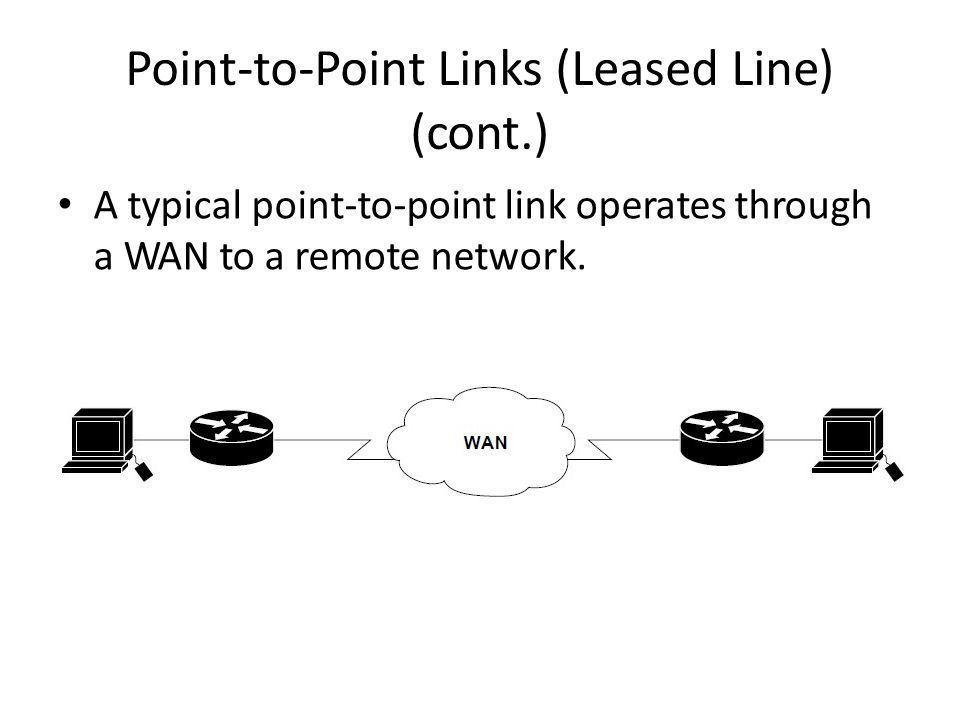
- AWAN
52a [blank_start]point-to-multipoint[blank_end] topology consists of a succession of connections between an interface on one router and multiple destination routers— one point of connection to multiple points of connection. Each of the routers and every one of their interfaces involved in the [blank_start]point-to-multipoint[blank_end] connection are part of the same [blank_start]network[blank_end].
- Apoint-to-multipoint
- Bpoint-to-multipoint
- Cnetwork
53[blank_start]hybrid[blank_end] topology means just that— a combination of two or more types of physical or [blank_start]logical[blank_end] network topologies working together within the same [blank_start]network[blank_end].
Lammle, Todd. CompTIA Network+ Study Guide (Comptia Network + Study Guide Authorized Courseware) (p. 18). Wiley. Kindle Edition.- Ahybrid
- Blogical
- Cnetwork
54Remember, a [blank_start]star[blank_end] topology really shines when it comes to making additions to the network, moving things around, and making any kind of changes happen quickly, efficiently, and cost effectively.
Lammle, Todd. CompTIA Network+ Study Guide (Comptia Network + Study Guide Authorized Courseware) (p. 20). Wiley. Kindle Edition.- Astar
55Here’s a list of things to keep in mind when you’re faced with coming up with the right topology for the right network:
- [blank_start]Cost[blank_end]
- Ease of [blank_start]installation[blank_end]
- Ease of maintenance
- [blank_start]Fault-tolerance[blank_end] requirement
- and security requirements.
Lammle, Todd. CompTIA Network+ Study Guide (Comptia Network + Study Guide Authorized Courseware) (p. 20). Wiley. Kindle Edition.- Ainstallation
- BFault-tolerance
- CCost
56Today’s networks can get pretty complicated, so we need to have a standard way of communicating with each other intelligibly about exactly which part of the network we’re referencing. This is the reason we divide networks into different parts called backbones and [blank_start]segments[blank_end].
Lammle, Todd. CompTIA Network+ Study Guide (Comptia Network + Study Guide Authorized Courseware) (p. 20). Wiley. Kindle Edition.- Asegments
57You can see that the network [blank_start]backbone[blank_end] is actually kind of like our own. It’s what all the network segments and servers connect to and what gives the network its structure. As you can imagine, being such an important nerve center, the [blank_start]backbone[blank_end] must use some kind of seriously fast, robust technology— often Gigabit Ethernet. And to optimize network [blank_start]performance[blank_end]— its speed and efficiency— it follows that you would want to connect all of the network’s servers and segments directly to the network’s [blank_start]backbone[blank_end].
Lammle, Todd. CompTIA Network+ Study Guide (Comptia Network + Study Guide Authorized Courseware) (p. 20). Wiley. Kindle Edition.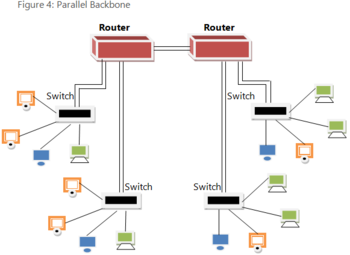
- Abackbone
- Bbackbone
- Cperformance
- Dbackbone
58When we refer to a [blank_start]segment[blank_end], we can mean any small section of the network that may be connected to, but isn’t actually a piece of, the backbone. The network’s workstations and servers organized into [blank_start]segments[blank_end] connect to the network backbone, which is the common connecting point for all [blank_start]segments[blank_end];
Lammle, Todd. CompTIA Network+ Study Guide (Comptia Network + Study Guide Authorized Courseware) (p. 21). Wiley. Kindle Edition.- Asegment
- Bsegments
- Csegments
59A [blank_start]campus area network[blank_end] (CAN) refers to a network that encompasses several buildings. It comprises the part of the network where data, services and connectivity to the outside world is provided to those who work in the corporate office or headquarters.
Lammle, Todd. CompTIA Network+ Study Guide (Comptia Network + Study Guide Authorized Courseware) (p. 21). Wiley. Kindle Edition.- Acampus area network
60Classic [blank_start]Storage area networks[blank_end] (SANs) are comprised of high-capacity storage devices that are connected by a high-speed [blank_start]private[blank_end] network (separate from the LAN) using a storage-specific switch. This storage information architecture addresses the collection of [blank_start]data[blank_end], management of data, and use of data. These networks are typically fiber networks.
Lammle, Todd. CompTIA Network+ Study Guide (Comptia Network + Study Guide Authorized Courseware) (p. 21). Wiley. Kindle Edition.- AStorage area networks
- Bprivate
- Cdata
Información
- Descripción
- My test from chapter 1 notes
- Autor
- Tiffany Andrews
- Idioma
- English
- Visitas
- 320
- Etiquetas
- Valoración
- Aún sin valoraciones Valora este test