
Fichas
Code an app
Fichas del conjunto (20)
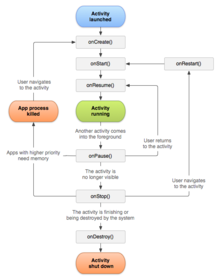
- 1An Activity What is it? What are all custom classes implemented as?A single and focused thing a user can do
An app may consist of many activities
Each activity is implemented as an
implementation of the Activity base class - 22 methods which nearly every activity has?onCreate() - initialises activity
onPause() - deals with the user leaving the activity - 3Android activity lifecycle
- 4onCreate() When is it called? What is called next?Called when the activity is first created
- 5onRestart() When is it called? What is called next?Called after the activity has been stopped prior to being started again
( next is onStart() ) - 6onStart() When is it called? What is called next?Called when the activity is becoming visible to the user
( next is onResume() or onStop() ) - 7onResume() When is it called? What is called next?Called when the activity will be
available for interacting with the user.
( next is onPause() ) - 8onPause() When is it called? What is called next?Called when the system is about to
resume a previous activity or if the user has
navigated away to another portion of the system,
such as pressing the home key.
(next is onResume() or onStop()) - 9onStop() When is it called?Called when the activity is no longer visible to the user because another activity has resumed and is overriding this one
- 10onDestroy() When is it called?The final call we receive before the activity is destroyed
- 11Key Loops The Entire Lifetime (what are the beginning and end points?)the setup is created in onCreate() and releases all remaining resources in onDestroy()
- 12Key Loops The Visible Lifetime (When does the activity start and stop being visible to the user)The user can see the activity between onStart() and onStop()
- 13Key Loops The Foreground Lifetime (When is it the main focus of the phone)between onResume() and onPause(), the activity is interacting with the user and in front of other activities
- 14Call an XML layout in JavasetContentView(R.Layout.{name of XML layout})
- 15Inflate a menu in JavagetMenuInflater().inflate(R.menu.{name of XML activity},menu)
- 16super.onCreate(savedInstanceState); What does it do?calls the SuperClass "Activity" to perform set up work for Main Activity Class
- 17Bundle savedInstanceState What ability does this give the developer?Gives the developer a way to pass information back and forth between screens (different activities) in a bundle
- 18Button How to create a button in java? (and reference it in XML)Button toggleButton = (Button)findViewById(R.id.toggleButton);
- 19Set onClickListener() What is the code?toggleButton.setOnClickListener(new View.OnClickListener() {
public void onClick(View v) {
}
}); - 20Audio Manager How to create an audio manager?mAudioManager =
(AudioManager) getSystemService(AUDIO_SERVICE);
Información
- Descripción
- Masters of Science Mobile App Fichas sobre Code an app, creado por Nathan Hunsdale el 21/05/2014.
- Creado por
- Nathan Hunsdale
- Visitas
- 32
- Valoración