
2585438
Description

Mind Map by jemima.erhabor, updated more than 1 year ago

|
Created by jemima.erhabor
over 11 years ago
|
|
Computer Science
- Cryptography
- Cryptography is derived from the
Greek word 'kryptos' which means
hidden or secret it is also the art
of writing or solving codes
- Ceaser Cipher
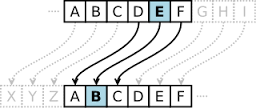
- Julius Ceasar developed the first modern
cipher. It is known as the 'Ceasar Cipher'. Each
character in the message is replaced by the
Character three positions ahead of it in the
alphabet
- Julius Ceasar might have encrypt
messages his messages so he could
send messages to his troop and even if
the messages were caught his enemies
wouldn't understand the message
- Disadvantages on using the Caesar Cipher
- -The Person using it has to be able to understand how to decrypt it
- -Ceasar Ciphers are easy to break/crack
- -It doesn't allow for numbers or symbols
- -It doesn't allow for numbers or symbols
- -Ceasar Ciphers are easy to break/crack
- -The Person using it has to be able to understand how to decrypt it
- Julius Ceasar might have encrypt
messages his messages so he could
send messages to his troop and even if
the messages were caught his enemies
wouldn't understand the message
- Julius Ceasar developed the first modern
cipher. It is known as the 'Ceasar Cipher'. Each
character in the message is replaced by the
Character three positions ahead of it in the
alphabet
- Bar codes
- The supermarkets computers holds a
database containing information on all
the products sold in the store. As the
items are scanned the bar code
number is passed to the computer
where a search is made of the
database. As soon as the number is
matched with the data held in the
computer, the price and description are
matched back till where the costumers
itemised receipts is printed
- The bar codes can be read with a hand-held
scanner or the laser scanner at the checkout. The
scanner emits a beam of light that reflects off
the bar code. The white lines reflect the light
strongly while the black lines reflects less
strongly. These variations in the reflections are
picked up by sensensors in the scanner and
converted into a digital signal
- Making sense of the bar codes
- 1st 2 number- represents the country origin
- Next five-Manufactures number
- Next five- product code
- Last number- Called the 'check digit' or 'check sum' and it's calculated from the other numbers
to confirm the whole number has been read correctly
- Last number- Called the 'check digit' or 'check sum' and it's calculated from the other numbers
to confirm the whole number has been read correctly
- Next five- product code
- Next five-Manufactures number
- 1st 2 number- represents the country origin
- The supermarkets computers holds a
database containing information on all
the products sold in the store. As the
items are scanned the bar code
number is passed to the computer
where a search is made of the
database. As soon as the number is
matched with the data held in the
computer, the price and description are
matched back till where the costumers
itemised receipts is printed
- E-commerce
- Ecommerce means
the sales and
purchases of goods
and services over over
electronics systems
such as the internet
- SSL, Private Key and Public Key Encryption
- -Web browers (e.g. Internet explorer) security technology
- -Allows confidential data (e.g. credit card) to pass from your computer to an interner server
- -If a website is using a Secure Socket Layer, it will encryot your credit card info
- The 'lock' is the public key
- The 'key; is the private key
- The 'key; is the private key
- The 'lock' is the public key
- -If a website is using a Secure Socket Layer, it will encryot your credit card info
- -Allows confidential data (e.g. credit card) to pass from your computer to an interner server
- -Web browers (e.g. Internet explorer) security technology
- Data rights management
- DMR is used to restrict the ability to make copies of electronic media
such as music, films, soft ware and games
- Until recently, almost all music which could be purchased and downloaded via the
internet was protected by DRM
- The DMR protected music could be sold, downloaded and played on a set
number of computers and portable devices
- The DMR protected music could be sold, downloaded and played on a set
number of computers and portable devices
- Until recently, almost all music which could be purchased and downloaded via the
internet was protected by DRM
- DMR is used to restrict the ability to make copies of electronic media
such as music, films, soft ware and games
- Ecommerce means
the sales and
purchases of goods
and services over over
electronics systems
such as the internet
- Cryptography is derived from the
Greek word 'kryptos' which means
hidden or secret it is also the art
of writing or solving codes
- Python Programming
- Python can be used in 2 modes:
- -Interactive mode = let you see your results as you type them
- -Script mode = lets you save your program and run it again later
- -Script mode = lets you save your program and run it again later
- -Interactive mode = let you see your results as you type them
- Data Types
- We can't do much program without the using some data.
Each piece of data has a type:
- -Interger (int) = a whole number
- -Floating point number (float) = a decimal number
- -String (str) = one or more letters, number, punctuation etc. written together "in quotes"
- -Boolean = true or false
- -Boolean = true or false
- -String (str) = one or more letters, number, punctuation etc. written together "in quotes"
- -Floating point number (float) = a decimal number
- -Interger (int) = a whole number
- We can't do much program without the using some data.
Each piece of data has a type:
- Variables
- One of the most important features of
any programming language is the ability
to store data inside variables. A variable
is like a storage box- you can store
something inside it, and you can give it a
name by which you can refer it to later
- One of the most important features of
any programming language is the ability
to store data inside variables. A variable
is like a storage box- you can store
something inside it, and you can give it a
name by which you can refer it to later
- Comparative Operators
- == equal to/equivalent of less than
- < less than
- > greater than
- >= greater than or equal to
- <= less than or equal to
- <= less than or equal to
- >= greater than or equal to
- > greater than
- < less than
- == equal to/equivalent of less than
- Python can be used in 2 modes:
- App inventor
- Smartphone software
- All of these technologies would be useless
without software to bring together.
Software is the name for computer
programs-list of instructions- which tells
the computer hardware how to perform a
task..
- On mobile devices, there are two main pieces of software:
- -The operating system
- -Apps
- -Apps
- -The operating system
- On mobile devices, there are two main pieces of software:
- All of these technologies would be useless
without software to bring together.
Software is the name for computer
programs-list of instructions- which tells
the computer hardware how to perform a
task..
- Operating System
- An operating system(OS) is a aset of
programs that a computer runs all the
time it is switched on. AN OS performs
many tasks, but we can think of it as
the program that gets the computer "up
and running" and makes it work and
look the way it is. Examples of OS on
desktop computers include Microsoft,
Window, Apple MacOS and linux
- An operating system(OS) is a aset of
programs that a computer runs all the
time it is switched on. AN OS performs
many tasks, but we can think of it as
the program that gets the computer "up
and running" and makes it work and
look the way it is. Examples of OS on
desktop computers include Microsoft,
Window, Apple MacOS and linux
- Component designer
- -Palette = holds the components you can use in your program, separated into categories.
- -Viewers = lets you arrange components on a rough preview of the phone screen
- -Components = lists components in the app
- -Media = lists media files for the app
- -Properties = of selected component
- -Properties = of selected component
- -Media = lists media files for the app
- -Components = lists components in the app
- -Viewers = lets you arrange components on a rough preview of the phone screen
- -Palette = holds the components you can use in your program, separated into categories.
- Smartphone software
Media attachments
Want to create your own Mind Maps for free with GoConqr? Learn more.