
Mind map
OCR GCSE Computer Science 1.1

Map content
OCR GCSE Computer Science 1.1
CPU
- The CPUs purpose is to Fetch, Decode and Execute instructions
- Registers
- Small amounts of high speed dedicated memory
- Tend to hold one piece of data
- Types Of Registers
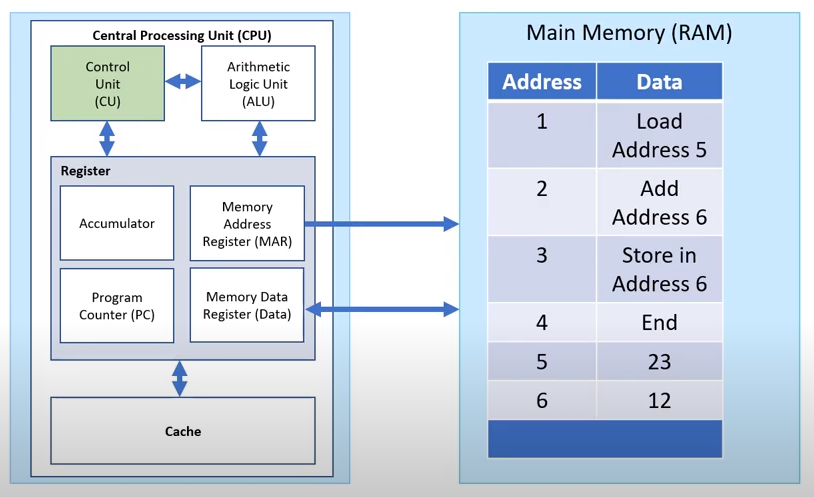
- MAR (Memory Address Register)
- Controls the which pieces of data are fetched Holds the address of the data to be fetched
- PC (Program Counter)
- Keeps track of memory location for the next instruction Usually incremented to next location unless manipulated
- CU (Control Unit)
- Preforms all decoding of the instructions and how data moves around the CPU and memory interaction
- MDR (Memory Data Register)
- Stores any fetched data or any data which is to be transferred to memory
- ALU (Arithmetic Logic Unit)
- Preforms all the calculations and decisions required by the instruction E.g - Boolean operations
- ACC (Accumulator)
- Register that stores the results of any calculation from the ALU
- CIR (Current Instruction Register)
- Register which stores the most recent instructions whilst it is waiting to be decoded and executed
- MAR (Memory Address Register)
- Also known as the processor, "Brains of the CPU"
- Processes data and carries out instructions
- Has a clock speed measured in Hertz
- Cores
- Each processor has a core
- Processors can be multi-core
- Dual core
- Quad core
- 8 core (+)
- Each core executes instructions independently
- For example, Dual cores can execute instructions twice as fast, (2 instructions at the same time
- CPU Performance
- Three things effect CPU performance
- Cache size
- Increasing cache size will reduce the number of memory to disk transfers and thus speed up the processing of instructions
- Cache
- Stores next instructions
- Very fast memory
- Dedicated connections to CPU
- Instructions copied from RAM
- Multiple levels (L1, L2, L3)
- Relatively expensive
- Speeds up the computer, if has large capacity. This is because it can store frequently used instructions
- Cores
- Quadrupling the number of cores, may quadruple the number of instructions exectued per second
- Cores
- A multiple core CPU will have a higher performance than a CPU with less cores
- 2 cores == 2 instructions able to be ran at the same time
- Clock speed
- Doubling the clock speed will double the number of instructions executing per second
- Clock Speed
- A CPU with a higher clock speed will process more instructions per second
- It will have a higher performance than an equivalent CPU with a lower clock speed
- Fetch, Decode and Execute
- 1. The Pc has the address of the next instruction to fetch
- 2. The value in the PC is copied to the MAR
- 3. The CU locates data
- 4. If it is instruction, it is placed in CIR, PC is incremented by 1, The instruction in CIR is decoded by the CU, The instruction is executed by placing any request for data in MAR for it to be collected and copied to MDR
- 3. The CU locates data
- 2. The value in the PC is copied to the MAR
- 1. The Pc has the address of the next instruction to fetch
Buses
- A communication channel which can move data E.g USB (Universal Series Bus) transfers data between the computer system and a external device
- Types Of Bus
- Data Bus
- Carries the data from the memory to the MDR (Memory Data Register)
- Address Bus
- Carries memory address from CPU to any memory locations (MAR) Memory Address Register
- Control Bus
- Carries control signals from processor to other compoments
- Data Bus
Made by (PhantomDevil)
Other Media
- Craig and Dave 1.1 Playlist (http://bit.ly/1_1_Playlist)
System Architecture
- Von Neumann Architecture
Embedded Systems
- A (computer) system within another system
- Examples include: Car, Washing Machine, Dishwasher, Fridge
- Characteristics: Firmware, Dedicated
Images and files in the map
Information
- Description
- GCSE Computer Science Mind Map on OCR GCSE Computer Science 1.1, created by Phantom Devi on 20/05/2021.
- Created by
- Phantom Devi · May 2021
- Updated
- Apr 25, 2022
- Views
- 979
- Rating