
Módulo 14 de 18 · Mídia
mapStateToProps and connect
mapStateToProps and connect
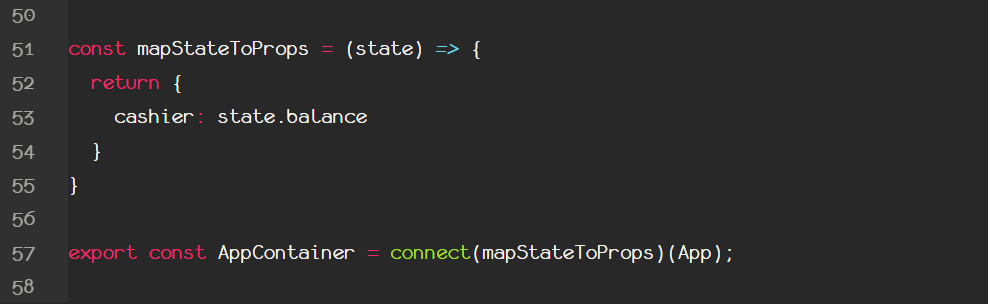
Actually there is a way to connect a component's props to redux's global state. And this is by creating a function. You can name the function as you like, but most of the times as a convention you will see it named as mapStateToProps.
This accepts one argument, which represents the state of the provider, under whose authority the current component is (the App component was wrapped under provider, who is completely connected to the store through the store property, remember?).
Then this function returns an object, with the local props of the App component as properties and the properties of redux's state as values. This takes place at line 53. From that line and after, the App component's cashier prop is bound to the state's balance property. Right?
Well, almost! we need to do something else also for the actual connection to happen.
What does the function we just created to have the power to create a map between the props and the state?
The answer is the place that this function is going to be put, thus we put it as a FIRST argument inside the connect function.
The connect function must be imported exactly like that from the react-redux component, and accepts two arguments. For the second we will talk later, but the first is a function which returns an object, that acts like a map between component's props and redux's state. After the connection, and because the connect function must return a new component with that superpower, inside the new parentheses we put the component that these props are coming from (the component that we want to connect with redux's state in other words, the App).
This new component named AppContainer will be exported and used now inside the provider in the index.js file. The App component has fulfilled it's purpose.