
Flashcards
Android Review
Flashcards do conjunto (111)
- 1What is Android?* A mobile operating system developed by google.
* It's based on the linux kernel.
*It was primarily designed for touchscreen devices
* Bought by google in 2005 - 2What is DVM?* Dalvik Virtual Machine;
* Written by an Bornstein;
* Android virtual machine optimized for mobile devices;
* A standard java compiler turns source code into bytecode and then compile into .dex files that the Dalvik VM can run and use; - 3What is the difference between DVM and JVM?* DVM in comparison to JVM is faster;
* DVM specifically designed for mobile devices;
* JVM is heavier and DVM is lighter; - 4What does the Android Architecture consist of?* Linux Kernel;
* Libraries;
* Android Framework;
* Android Applications; - 5Enumerate some of the components that are in the Libraries.* The DVM is here
* The Media Framework
* SQLite - 6Enumerate some of the components that are in the Android Framework.* Activity Manager;
* Window Manager;
* Content Providers; - 7Enumerate some of the components that are in the Applications.* Browser;
* Camera;
* Calendar;
* Contacts;
And so on... - 8Which are the main component that can be used within and Android Application?* Activities;
* Services;
* Broadcast Receivers;
* Content Providers; - 9What is AAPT (Android Asset Package Tool)?* Part of the SDK;
* It allows us to view, create and update zip-compatible archives (zip, jar, apk);
* Getting Your VersionCode, etc.
* Check your permissions (aapt dump permissions my.apk) - 10What is AVD?* Android Virtual Device
* Contains: A hardware profile, system image, storage area, skin, and other properties. - 11What is APK?* Android Application Package;
* An APK file is file formate used to install software on the Android Operation System;
* Compressed package containing the whole project; - 12What is the Android Context?* An abstract class whose implementation is provided By the Android System;
* It gives the context of the current of the application or the object;
* Can be invoked via: getApplicationContext();
getContext();
getBaseContext();
this (Activity) - 13What is an Android App?* A software application running in the Android platform.
* Is a collection of different activities, services, receivers and listeners;
* It has a single Manifest;
* Is is compiled into a single .apk file - 14What is NDK?* Native Development Kit;
* Toolset that lets you implement parts of you app using native code such as C and C++; - 15When does the Android app Not Responding (ANR) happen?* When the main thread is blocked for a few time;
* 5 seconds in an Activity;
* 10 seconds in the BroadcastReceiver;
* 20 seconds in a Service;
* To avoid it: Not do IO operations on the main thread and connecting to the internet and database; - 16Which language is the Android Framework written in?* The applications and framework layer are written in java;
* The drivers and library layer are written in C and C++; - 17What is the current and the first version of Android?The current is Oreo 8.0
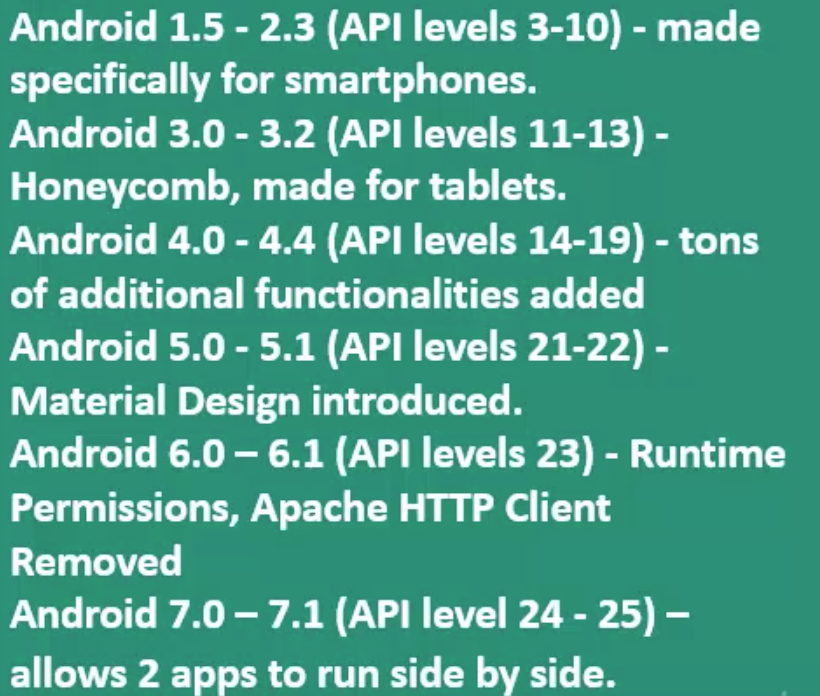
The first one with a name was Android cupcake in April 2009; - 18What is Api Level?A number indicating the corresponding Android Framework;
* It show to the programer which functionalities may be included when designing the application; - 19What is the difference between versionCode and versionName?* VersionCode: An integer that identifies that one version is newer that another, used by developers. Each version code should be bigger than the previous one;
* versionName: a String that shows to the users the specific version of the app; - 20What is an Intent?An Intent is an object you can use to request actions from another application components such as Activities, Services, Broadcast Receivers and Content Providers.
- 21In which general cases we can use Intents?* When we want to start an Activity
* When we want to start a service
* To deliver a Broadcast - 22What is the difference between implicit and explicit Intents?* Explicit Intent is when you ask for a specific component by app name explicitly (to start an activity for example)
* Implicit is the case when you don't ask for the component using directly the app name of it, you use instead the implicit address, that is always an URI which gives access to the component (access the gallery for example)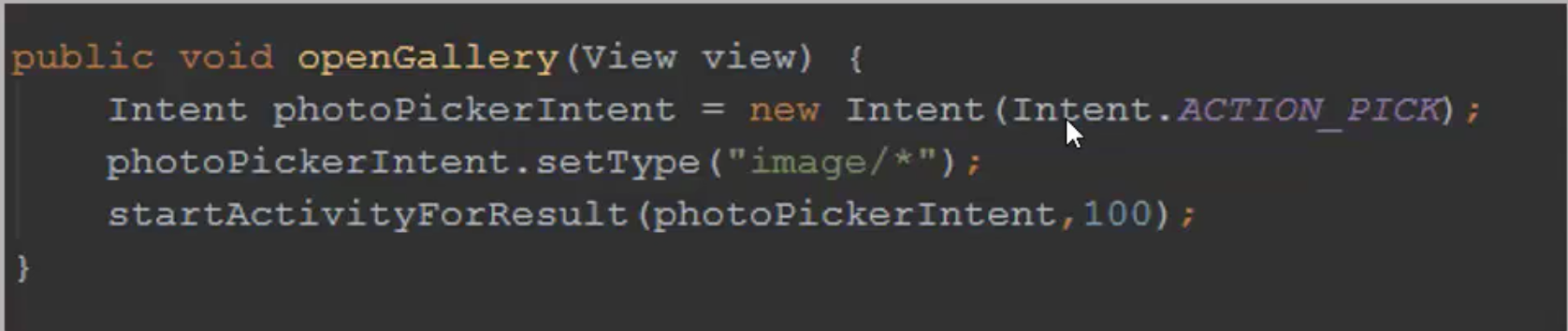
- 23Which kind of information can be contained within an Intent?* The name of the component to start (if explicit)
* A string that specifies the action to be performed (Intent.ACTION_PICK)
* The URI that references the data to be edited, loaded and so on;
* The category of the kind of the component that will be loaded (launcher / browsable)
* Extras with extra information which can be transferred from one intent to another.
* Additional flags whit instructions to the Android System - 24What happens when there is more than one Intent that responds to your implicit Intent?* The user can select which application to use
* The user can select one application as the default to open the kind of content.
* Show a chooser dialog to the user listing the possible options - 25What is the Intent Filter element?* Is an expression you can define in the Manifest file to specify which kind of intents the component would like to receive
* It is specified by the following information in order:
First by the Action
then by data
or by Category
- 26What is a pending Intent?* Is an object that wraps another intent
* Can be a token that you give to a foreign application which grants access to use your application permissions.
* By giving a pending Intent to another application you grant it the right to perform operations you have specified as if the other applications was yours.
The classic example is the Alarm Intent bellow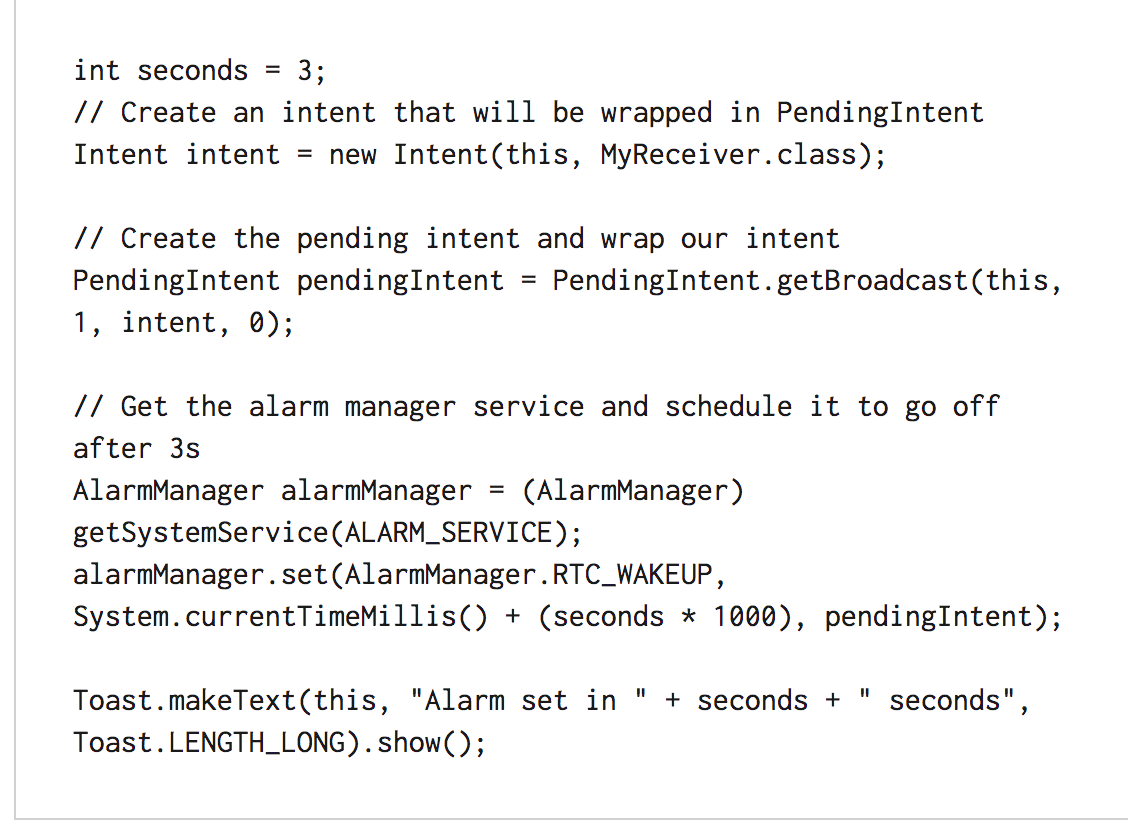
- 27What is meant by intent resolution?* This is the handling of the implicit intent
* When a implicit intent to start an activity is received, the system searches for the best activity for the intent by checking:
the action;
the data;
The intent category; - 28What is sticky intent?* It sticks with Android for future Broadcast Listeners.
* Ex: If BATTERY_LOW occurs, the intent gets stick to Android and if BATTERY_LOW occurs again, the intent will be triggered. - 29Resume for the intent types:Intent - is a message passing mechanism between components of android, except for Content Provider. You can use intent to start any component.
Sticky Intent - Sticks with android, for future broad cast listeners. For example if BATTERY_LOW event occurs then that intent will be stick with android so that if any future user requested for BATTER_LOW, it will be fired;
Pending Intent - If you want some one to perform any Intent operation at future point of time on behalf of you, then we will use Pending Intent. - 30How many manifests can an application have?* Exactly ONE
* Exception is when a 3rd part library is added, so the library itself has a manifest file as well. - 31Why is the package name of the application important?Because it serves as a unique identifier of the application.
- 32Enumerate some of the components of the application that are defined in the Manifest file:* Activities
* Services
* Broadcast receivers
* Content Providers - 33Why do certain permissions need to be defined in the app's manifest file?* But default any application is allowed to perform actions that would impact in other applications or the operating system or even the user, such as reading or writing a file, perform network access, read private user's information, or keep the device awake.
* The permissions allows access to protected parts of the API;
* It also allows to interact with other applications; - 34Enumerate some permissions that may be included in the manifest file:* INTERNET;
* READ_LOGS;
* CALL_EMERGENCY_NUMBERS;
* SET_WALLPAPERS;
* DEVICE_POWER; - 35What can be contained within the activity tag into the manifest file?Information about:
- Activities
- services
- receivers
- providers
- used libraries
- themes - 36Which are the two required elements within the manifest's declaration?;
;
They may occur only once - 37What is an activity in the application?An application component which is visualized in a separated screen;
* Usually an application is composed by several activities; - 38Can you explain the "last in first out" stack mechanism in the context of activities?In an application, each activity can start another activity. When the new activity is started, the old one is stopped but at the same time is preserved by the system, so when the user presses the back button, the LAST the was visible will become first visible again.
- 39What is the difference between startActivity and startActivityForResult?In the startActivityForResult we expect some result being returned from the started activity. In order to properly receive this return data, we need to implement the callback method onActivityResult in the activity which is waiting the result;
- 40In which phase of the Activity lifecycle should be declared the global state (layout for example)?* Global state always within the onCreate method
* All the important components must be initialized here
* within the setContentView we define the layout - 41Which are the phases of an activity Lifecycle?onCreate();
onStart();
onRestart();
onResume();
onPause();
onStop();
onDestroy(); - 42Between which calls does the entire cycle of the activity happens?Between onCreate() where all resources are created;
And onDestroy() where all resources are released; - 43Between which calls can the user see and interact with the activity?Between onStart(); - is the visible phase of the activity after it has been created
And onStop(); - where another activity is started for example and the first activity in the stack will be the activity that started the new one; - 44How can a destroyed activity's state be saved?* Within onSaveInstanceState();
* save information in the bundle
* don't forgot to implement the onRestoreInstanceState or check the bundle within the onCreate() method; - 45If nothing is specified what happens to the activity when some device's configuration are changed in runtime?* With orientation changes for example, the onDestroy() method is called and followed by the call to onCreate() method again, so all activity lifecycle will be executed again.
* You can handle it changing the configuration change in the manifest file to certain activities, and you will need to handle it by yourself, but it isn't advised, implementing onSaveInstanceState is a best practice. - 46Which method is called to shutdown an Activity?There are two method that may be called
* finish(); ask to finish the activity itself;
* finishActivity() - to allow others to finish the activity; - 47What is seamlessness (transparencia)?Stands for non-interrupted flow of the application
* It is up to the developer handle all hindrances (obstacles) for the user (low battery, configuration changed, permission wanted) - 48What are fragments?Are activities fragment at the same screen in the same time;
Have their own layout;
Can be added and removed from the activity in runtime;
Have their own lifecycle;
Case be re-used in different activities; - 49What is the difference among DialogFragment, ListFragment and PreferenceFragment?All of them extend Fragment class;
PreferenceFragment -> displays user preferences as a list
ListFragment -> displays a list of elements that are managed by an adapter - 50Which is the interface to interact with fragments inside an activity?FragmentManager
- 51What is fragment transaction?Is the ability to add, replace, remove and perform another actions with fragments on user's interaction. Each of those operations are called transactions;
* In order to achieve this operations you need to interact with the FragmentTransaction API.
- 52Which are the states within a fragment can exist?Resumed;
Paused;
stoped; - 53What is the difference between a fragment and an activity in terms of their lifecycle?* They way they are stored in the back stack is different;
* By default the Activity is added at the top of the back stack, in order to be able to be called by an user's tap in the back button;
* if we want the same behavior by the fragment we need to call addToBackStack() method; - 54Is there a correlation between the activity's and fragment's lifecycle?* Yes;
* Each lifecycle callback in the activities results in a similar callback for each fragment; - 55In comparison to an activity, are there additional lifecycle callbacks for the fragments?* YES
* onAttach();
* onCreateView();
* onActivityCreated();
* onDestroyView();
* onDetach(); - 56What is a service?* A component of the application that allows you to execute long-term operation in the background;
* It doesn't have a user interface;
* A service isn't a thread, it doesn't run on a separated thread; - 57Which are the basic forms a service takes?* started - within an activity for example, via startService()
-a service may continue running event if the component whose started it is destroyed.
* bound service - A started service can't interact with the component whose started it, whereas bound service are the ones who can do that. So imagine cases like a audio player, its activity may can bind itself and start a bound service, doing that this activity can receive events like pause, play and stop. - 58How long does a bound service run for?As long as there is a component bound to it;
- 59Should a service be declared in order to be used?* Yes, within the tag inside the manifest file you must declare that this application is able to execute the service thought the tag ;
- 60What is the difference between stopSelf() and stopService() within the service's context?* stopSelf() is called by the service itself when the job it was meant to execute is done;
* stopService() is called by another component in order to stop the service's execution; - 61Does the service run in a separate from the UI thread?* NO;
* By default it runs in the main thread of that application - 62When a service is created why is it better to extend IntentService rather then Service directly?* Because intent service has a default worker thread that executes all intents, whereas in the service you always create a new thread the executes this service, which can make the process slow.
- 63Which are the ways to permanently store data in Android?* SharedPreferences
* Internal Storage;
* External Storage;
* SQLite Databases;
* Network connection; - 64What kind of data can be saved via SharedPreferences?* Primitive
* Stored as key-value pairs
* In order to user SharedPreference you need to call getSharedPreferences() to return the object and retrieve the needed data; - 65By default what is the status of the files saved directly in the device's internal storage?* They are private to the application (other application can't access them)
* When the application is uninstalled the files get removed as well; - 66What is specific for the external storage option?* You need to acquire the respective permissions to be declared inside the manifest file;
READ_EXTERNAL_STORAGE
WRITE_EXTERNAL_STORAGE
(If you declare just write permission you also get the read permission implicitly)
* Files can be stored on the SD card;
* By default the files can be accessed by other applications as well; - 67What is always returned by an executed SQLite query?* A CURSOR that points to all rows found by the query;
- 68Can an SQLite database be debugged in Android?* YES;
* Via an sqlite3 database tool; - 69Why do the android resources need to be externalized?* They can be maintained independently;
* Alternative resources may be provided for different devices;
* Internationalization; - 70Where are the element's IDs stored in the project?* they are stored in the class R
- 71Enumerate some of the subdirectories within the res directory:Color/
Drawable/
Layout/
Values/
Raw/
Mipmap/ - 72What are 9 patch images?* a stretchable bitmap image;
* automatically resized to fit the contents of the view;
* usually used for background of buttons; - 73What alternative resources can be provided for the screen orientation?* PORT : when the device is in portrait mod
* Land : Used when the device is in landscape mode - 74What is the R class in your application?* It is generate by the AAPT (android asset packaging tool) with all the ids to the defined resources within the res/ directory;
- 75When dealing with multiple resources, which one takes precedence?* the locale qualifier almost always takes precedence;
- 76What do the symbol at (@) and plus symbol mean in the element's ID declaration?android:id="@+id/btn_next"
* the at symbol means that an id string comes next
* the plus sign means that we are asking for creating a new resource reference in the resource file. - 77What is the difference between padding and margin?* Margin is the space left between components
* padding is the space left between the content inside a component and its own outside border. - 78How should a layout whose the content is dynamic be built?A layout can be populated with view at run time, using adapter. The adapter binds the data to the view
- 79What is a view group?The base class for layouts;
The invisible container;
It holds view and view groups;
Relative Layout; - 80How are the children within a LinearLayout aligned?All of them are aligned in a single direction;
Vertically or Horizontally;
Achieved via orientation; - 81What is the purpose of the layout weight attribute?* Specify how much of the available space will be taken for an specific view;
* It assigns an importance value to the view;
* Lets say that you have three buttons in your linear layout and you want to distribute them equally in the layout, so in order to do that you must use the same weight value inside them. - 82What is the default position of the children within the RelativeLayout?* Always top-left of the layout
- 83How are the elements visualized within a ListView?* The ListView elements look like a list of an scrollable elements. The design of each row is achieved by the implementation of an adapter.
- 84What is the difference between list view and recycler view?View holder by default;
Easy to control the items via Layout manager;
You can add effects easily to each item of the recycler view through ItemAnimator - 85What is an Adapter?It helps data to be transmitted and visualized within a view;
An adapter defines the layout of each individual row of the list and provides data the the ListView or Recycler view - 86How can we make a button without border?In the xml you must use :
style = "?android:attr/borderlessButtonStyle"
When you access android directly you are using the default styles from android - 87If you want to save the text the user is typing in a control view, which kind of view should be used?EditText
- 88How can the data be restricted in an EditText?android:inputType
- 89How can the user be provided with autocomplete suggestions?We user AutoCompleteTextView;
You will need an adapter to set the options selectable options within the view; - 90Which is the collection that holds the menu options for an activity?Options Menu
- 91How are different menu items stored?With a tang inside an element
- 92what dialog boxes are supported in Android?Alert dialog;
Progress Dialog;
DatePicker Dialog;
Time Picker Dialog - 93Describe the main thread:* It's created when the application is launched usually referred as the UI thread;
* All components running in the same process, are instantiated by the UI thread;
* The android ui toolkit may be accessed ONLY from the ui thread; - 94When may the UI thread be blocked?* When all of the process from an application happens on one thread;
* when long operations are performed on the UI thread; - 95What are the backgrounds or the worker threads?Extra threads, different from UI thread, where long operation can be done without blocking the UI thread;
- 96How can you start a thread in android?* Through a Runnable
* Using an AsyncTask - 97How does AsyncTask work?It is defined as a computation that is done on a background thread;
Its result is published to the UI thread; - 98How is AsyncTask defined?With Params;
Progress;
Result; - 99Which are the phases defined within AsyncTask?onPreExecute()
doInBackground(params...)
onProgressUpdate()
onPostExecute(Result) - 100Which are the obligatory parts a notification should have?A small icon;
A title;
A detailed text; - 101How many actions should be added to a Notification?At least one, in order the user to be redirect to the corresponding activity this notification is related with, it's necessary this push notification configuration;
- 102Can you control how a set of notifications are going to be shown?Yes, when you add them priority;
- 103What is a BroadcastReceiver?Is an Android component app that corresponds to system-wide broadcast announcements.
- 104Enumerate some of the available Android BroadcastReceivers:External Power Being Connected/ disconnected;
Screen turning on/off;
Battery getting low;
Picture captured; - 105Can an application notify its own BroadcastReceivers?Yes, an application can do it; For example the SMS app broadcasting that an SMS has been receiver, so other applications can receive it and trigger something if needed;
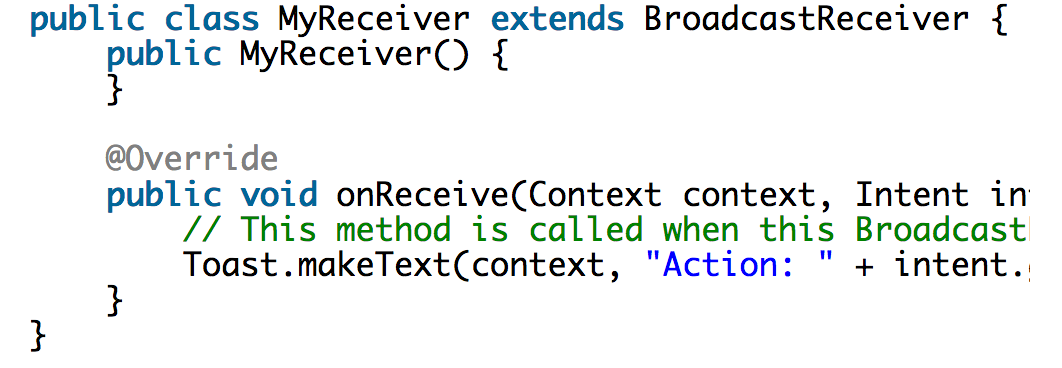
- 106Explain how BroadcastReceivers work:Are dormant application components that can be registered for various system or application events, these events are Intents. Once any of these events occurs, the system notifies any broadcast receiver registered to it and brings them up to execution, which could be notifies the user about something or performing another job;
- 107How to register a broadcast receiver?It can be done through manifest file using Intent Filters in a static way, or you can do it programmatically in a dynamic way.
- 108How to create a broadcast receiver?If you notice the Intent object is passed with all the additional information required and also you’ve the Context object available to do other tasks like maybe start a service (context.startService(new Intent(this, TestService.class));)
- 109What are content providers?Content Providers are the central mechanism in Android that allows you access data from another applications - mostly informations stored in databases or flat files
- 110What operations are supported by content providers?Content Providers support 4 basic operations: CRUD operations. Create, read, update, delete
- 111—
Informações
- Descrição
- FlashCards sobre Android Review, criado por Jose Fernando Meyer em 19-10-2017.
- Criado por
- Jose Fernando Meyer
- Visualizações
- 1
- Avaliação