
Flashcards
Learning aim B flashcards
Flashcards do conjunto (124)
- 1CommunicationLet people keep in touch
that means moving data in the form of text,photos,videos and audio - 2Real-time informationservices that provide up to date info
- 3CommerceCommerce means business so these services involve money in some way
- 4GovernmentThese involve 'official' public services
- 5EntertainmentMeans services for leisure and fun
- 6DownloadMeans LEGAL download services , such as for games,music and movies
- 7BusinessMeans companies using websites to increase efficiency and save money
- 8Educationinvolves workplace training for businesses as well as learning for schools
- 9VLEsServices that provide virtual classrooms for students and teachers
- 10SaaSSoftware as a service lets you use applications online so you only pay for software on demand
- 11Pay per clickA host of website (Facebook) displays ad for other companies (Adidas)
If a visitor clicks the ad, they are sent to the advertisers site (Adidas.com)
The host earns money for each visitor who clicks on the advert
this process is called pay per click - 12Types of online AdvertisingSponsored links,banner ,pop up , email
- 13Why companies choose to advertise onlineMultimedia
targeting and cookies
links - 14How ads can be annoyingPersonal privacy,not everyone is happy with use of cookies and history
Adware, Type of malware that generates unwanted ads ,often as pop ups
Auto-play video , some ads play as soon as the page loads
Distraction ,ads can take up your attention from what your trying to do - 15Online software -v- Standalone softwarestandalone software is built on your PC,from a CD or downloaded key Advantage: it's on your hard -drive so runs fast and doesn't need internet
Online software is accessed over the internet via your web browser
Key advantage: you can access the software on all devices - 16Advantages to online softwareMultimedia
Automatic updates
Pay monthly
Save on Hardware - 17But there are risksReliability: if your online software service is unavailable, you can't access your files
security: your online could be at risk from hackers wanting access - 18Online softwareLevels of access
File permissions
version control - 19RFID chipsCan be read on multiple devices
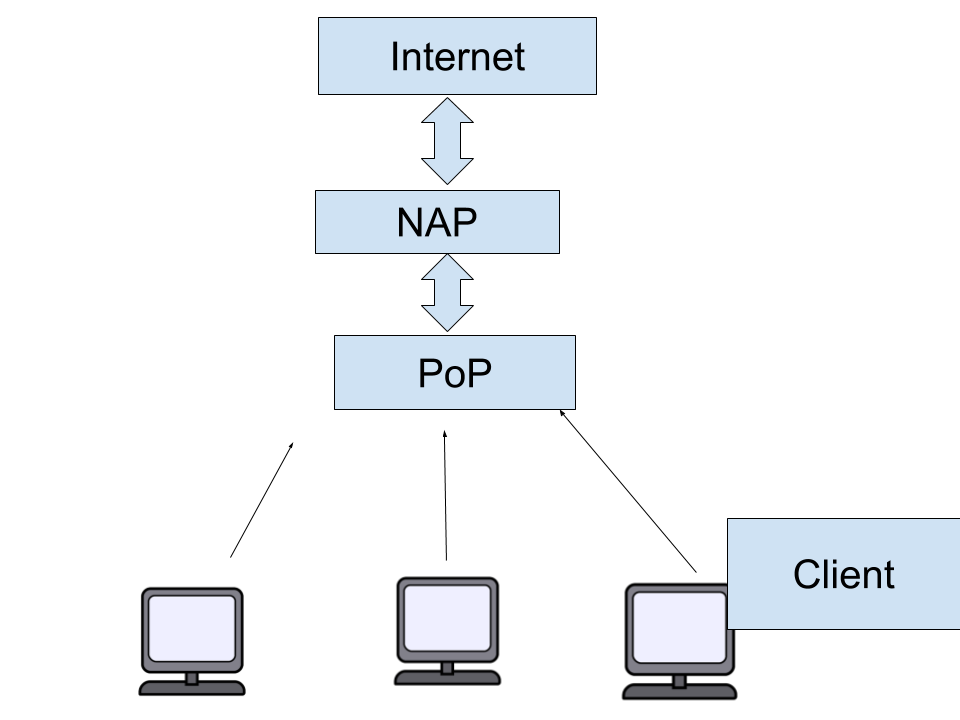
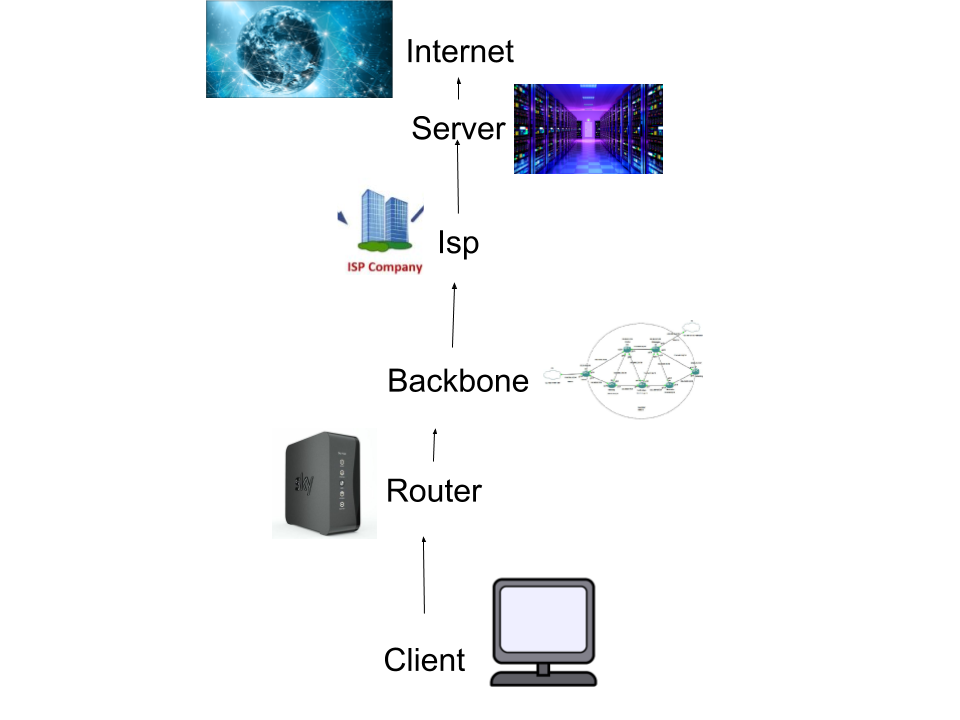
more reliable than bar codes - 20ServerA computer or computer program which manages access to a centralized resource or service in a network.
- 21ClientA desktop computer or workstation that is capable of obtaining information and applications from a server.
- 22RouterA small device that provides internet connection
- 23BackboneA backbone is a part of computer network that interconnects various pieces of network, providing a path for the exchange of information between different LANs or subnetworks. A backbone can tie together diverse networks in the same building, in different buildings in a campus environment, or over wide areas.
- 24Network diagram
- 25Backbone diagram
- 26Dial up connections advantagesAdvantage: can use existing telephone wires
Gives connections where broadband is not available - 27Dial up connections disadvantagesOlder tech can give poor receptions
Can't use landline and internet at the same time - 28Broadband advantagesBetter reception and speed than dial-up
- 29Broadband DisadvantagesWired, so has to be used on a stationary computer
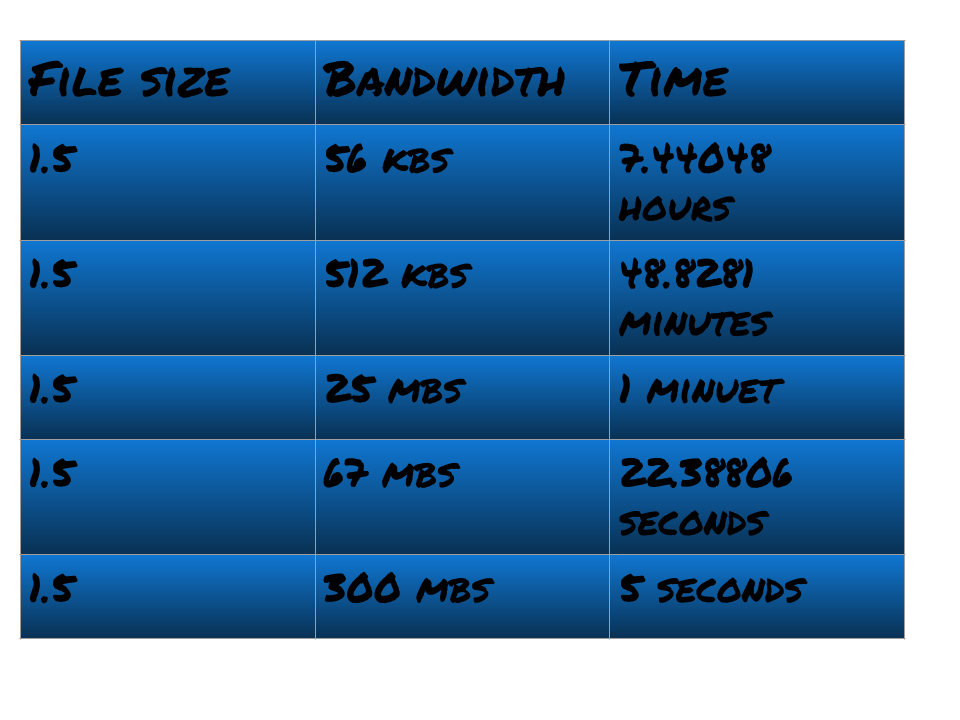
- 30Bandwidth speeds
- 31HTTP (Hypertext transfer protocol)HTTP is a set of rules that handles what we do on the web.
It handles your request to load a page on the web server. - 32HTTPS (Hypertext transfer protocol secure)It is the more secure version of HTTPS it can be shown as a little padlock in the search bar.
Protects privacy from 'hackers'. - 33FTP (File transfer protocol)An old protocol that was invented even before the web was born.
It is often used by web developers to transfer files to their server. - 34TCP (Transmission Control Protocol)It specifies how data is exchanged by providing communications that identify how it should be broken into packets
- 35IP (Internet protocol)Internet Protocol address is a numerical label assigned to each device participating in a computer network that uses the Internet Protocol for communication.
- 36HyperlinksA hyperlink is used to take you to a website ,document or a web page from another website once clicked
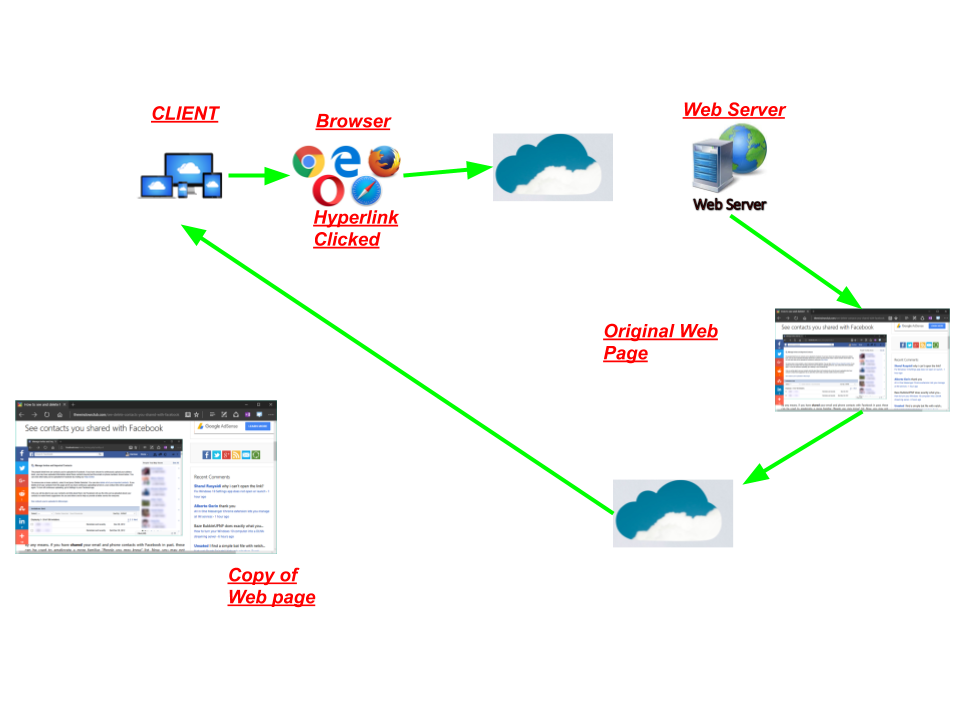
- 37BrowsersA browser is a computer program with an interface for displaying HTML files, used to navigate to the World Wide Web.
- 38Web serversA Web server is a program that uses HTTP (Hypertext Transfer Protocol) to serve the files that form Web pages to users, in response to their requests.
- 39URLUniform resource locator
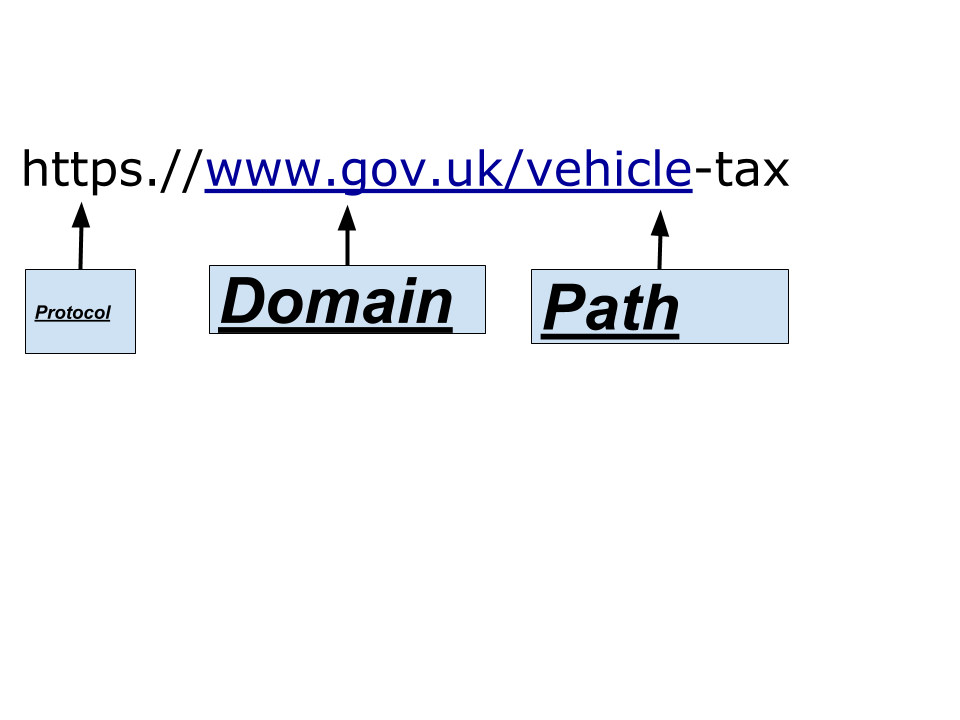
- 40Search engine diagramA program that searches for and identifies items in a database that correspond to keywords or characters specified by the user, used especially for finding particular sites on the World Wide Web.
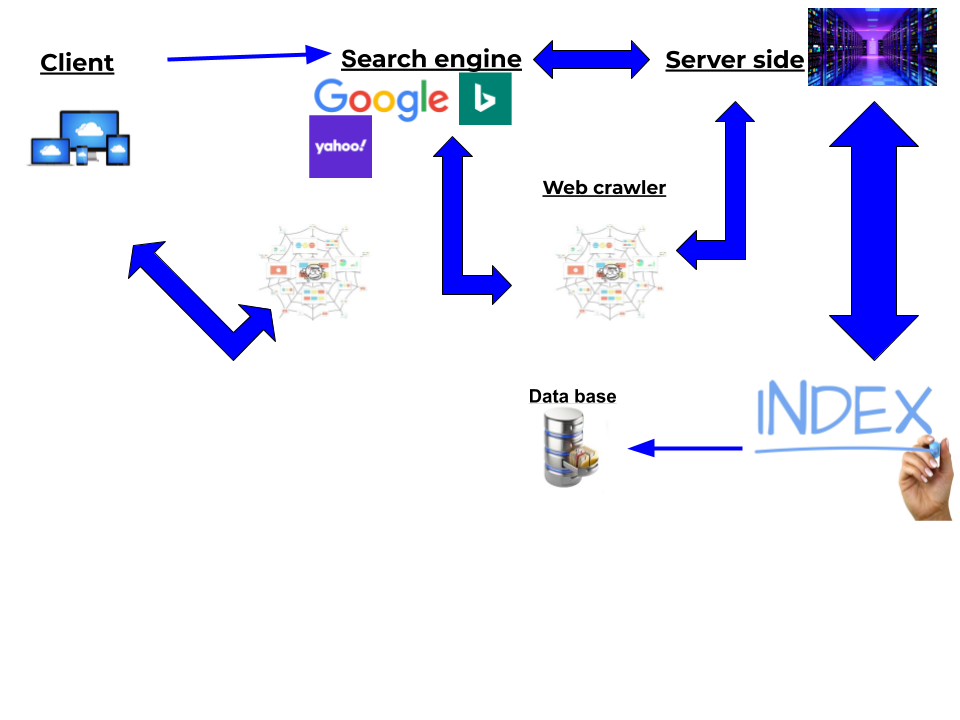
- 41Client sideClient-side means that the action takes place on the user's (the client's) computer. Server-side means that the action takes place on a web server. ... For this reason, most things that can be accomplished using Java Script can be done without needing access to a web server.
- 42Web crawlerA crawler is a program that visits Web sites and reads their pages and other information in order to create entries for a search engine index. The major search engines on the Web all have such a program, which is also known as a "spider" or a "bot."
- 43Server sideServer-side means that the action takes place on a web server.
- 44IndexAn index is a method of sorting data by creating keywords or a listing of the data. A great example of an index of Computer Hope's hardware listing
- 45Databasea structured set of data held in a computer, especially one that is accessible in various ways
- 46Sponsored link resultsGoogle sponsored links, another name for Google ads or Ad Words ads, are an option that Google offers to sites and businesses that want to pay a fee to appear in the search results for relevant search queries. ... These sponsored results differ from the organic Google results in that they're paid.
- 47Advertsan advertisement is something which shows a product to make you buy it
- 48PopularityGoogle sorts the websites by popularity
- 49CC (Carbon copy)When you want to send an email to multiple people you can send Carbon copies to other people
- 50BCC (Blind carbon copy)Its the exact same as CC but the people you send the Email to can't see the other people that the email has been sent to.
- 51Address book/Contact groupA place where you can store all your contacts to make it easier to email.
- 52Benefits of using EmailSending speed
If one person isn't online you can still send an email. - 53Drawbacks of using EmailEmail could get stolen/hacked
You need an internet connection to access your emails.
You need to spell there Email 100% correctly - 54SMTPShort for Simple Mail Transfer Protocol, a protocol for sending e-mail messages between servers. Most e-mail systems that send mail over the Internet use SMTP to send messages from one server to another
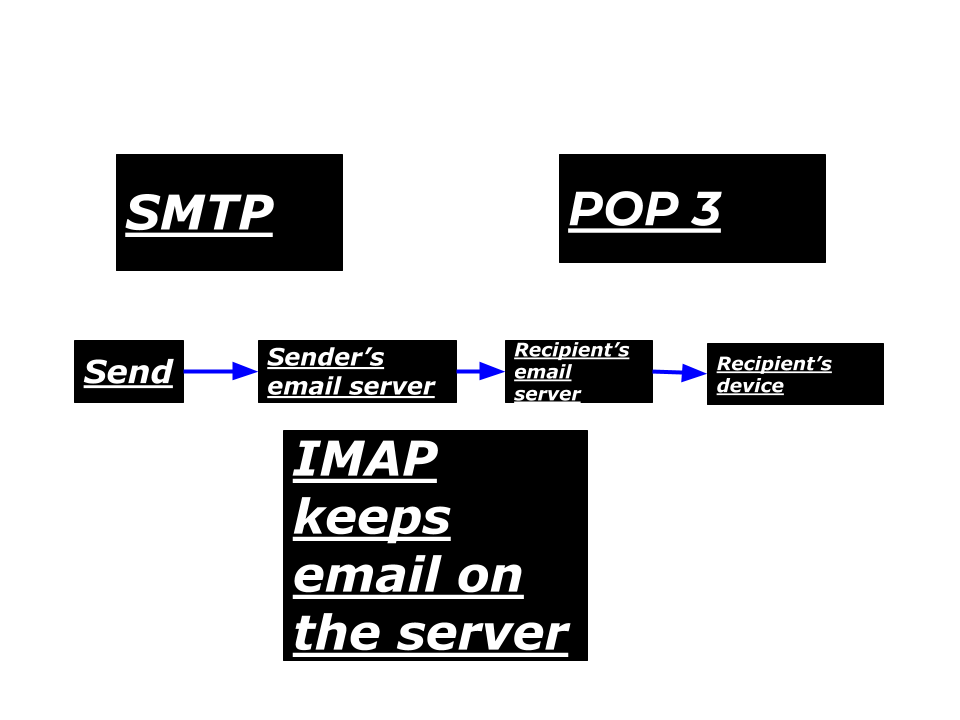
- 55IMAPAn IMAP client synchronizes the e-mail on your computer with the contents of your account on the e-mail server. IMAP synchronizes your computer with the email server.
- 56POP 3POP3 (Post Office Protocol 3) is the most recent version of a standard protocol for receiving e-mail. POP3 is a client/server protocol in which e-mail is received and held for you by your Internet server.
- 57WebmailWebmail are web-based email accounts. ... Examples include Hotmail, G Mail and Yahoo Mail. Webmail allows the users to access their emails as long as they have access to an Internet connection and a web browser. This also means that the user cannot read an old email or draft a new email offline.
- 58Email clientEmail client is a desktop application that enables configuring one or more email addresses to receive, read, compose and send emails from that email address through the desktop interface.
- 59description of packet switchinga mode of data transmission in which a message is broken into a number of parts which are sent independently, over whatever route is optimum for each packet, and reassembled at the destination.
- 60Advantages of data switchingEfficient use of Network.
Easily get around broken bits or packets.
High Data Transmission in a Packet Switching is very easy. - 61Disadvantage of data switchingIn Packet Switching Packets arriving in wrong order.
Requires Large amount RAM (Random Access Memory) to handle large amount of data communication in packets.
Switching Nods required more procession power to reconstruct packets. - 62What are codecs?A codec is a device or computer program for encoding or decoding a digital data stream or signal.
- 63Simplex with exampleSignals go in one direction at a time.

- 64Full duplex with exampleSignals go in both directions at a time
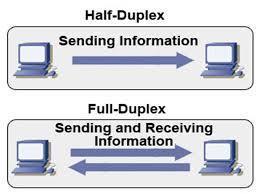
- 65Half duplex with exampleSignals go in both directions but not at the same time.
- 66Serial transmission descriptionBits of data are transferred one at a time over a wire.
- 67Parallel transmission descriptionBits of data are transferred simultaneously
a whole byte can be transferred at the same time. - 68Serial transmission benefitGood over large distances.
- 69Parallel transmission benefitFaster because more bits transferred per second.
- 70Serial transmission limitationComplex because data has to be broken down into individual bits.
- 71Parallel transmissiono
- 72UTP (UnShielded Twisted Pair)Twisted copper wires
Used for LANs - 73STP(Shielded Twisted Pair)Twisted copper wires
Used for LANs - 74UTP (UnShielded Twisted Pair) Benefitsc
- 75InfraredInfrared is a very high frequency light that can transfer data .
- 76Infrared: advantagesIt is very reliable
- 77Infrared: disadvantagesShort range.
Devices must be in line of sight.
Can suffer from interference - 78BluetoothBluetooth uses waves with short wavelengths to transmit data.
- 79Bluetooth: advantagesGood for medium distances.
- 80Bluetooth: disadvantagesCan suffer from interference from other devices. e.g a microwave oven that's near a computer device
- 81SatelliteUses satellite in space to relay data between points on earth. e.g GPS
- 82Satellite: AdvantagesGood for very long distances
- 83Satellite: disadvantagesVery expensive
- 84Network Interface CardIt is a circuit board installed in a computer that provides a dedicated network connection to the computer.
- 85Network Access Point (NAP)A Network Access Point (NAP) was a public network exchange facility where Internet service providers (ISPs) connected with one another in peering arrangements.
- 86Client side processingClient-side is viewing a web page from a home device
- 87Client side processing example
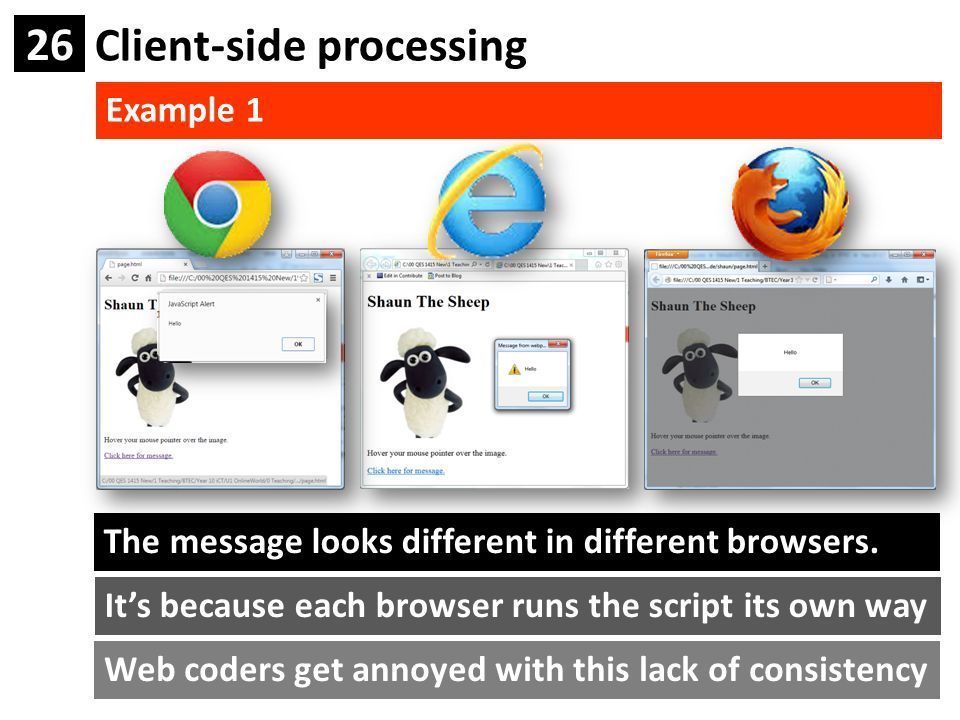
- 88Client side advantagesFaster on the client because data doesn't need to travel back to the serve across.
Data can't be intercepted - 89Client side disadvantagesBrowser-specific. different browsers process client scripts in different ways.
- 90Server side processingServer-side processing happens when a page is first requested and when pages are posted back to the server
- 91Server side processing example
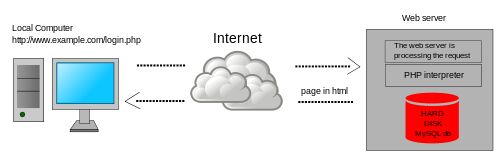
- 92Server side processing advantagesServers are powerful computers
No browser involved - 93Server side processing disadvantagesSecurity, when data is sent back through the internet there is a risk that it might get hacked
- 94DatabaseA place where your date of birth, name, phone number etc.
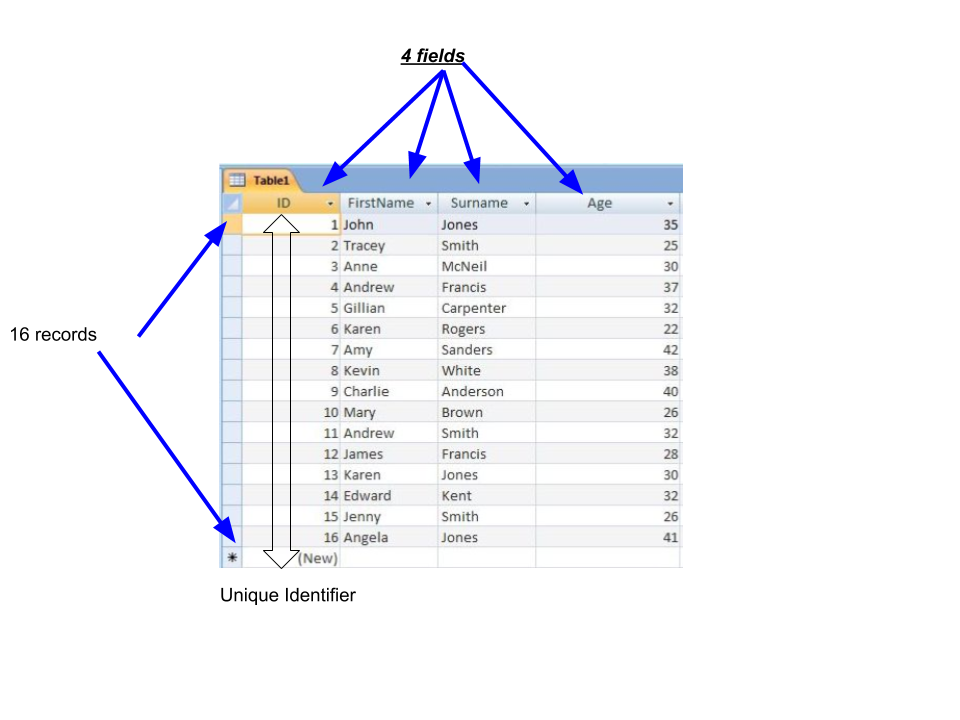
- 95TableA table where information is held about someone or something
- 96Fieldthe fields are the columns in the table e.g name , surname date of birth etc.
- 97RecordA record is one row that stores data about a single item e.g student detail
- 98Primary keyThe primary key is a special field with a unique identifier e.g student ID
- 99Foreign keywhen your unique identifier appears in another table
- 100RelationshipA relationship, in the context of databases, is a situation that exists between two relational database tables when one table has a foreign key that references the primary key of the other table
- 101Data types and uses

- 102TextAny kind of characters, including letters and numbers.
e.g: LA6 2HJ - 103NumberNumerical values,
e.g:1.5 - 104Date/TimeDates and times
e.g 01/04/2014
e.g 13.30 - 105BooleanOne of two values, such as yes, no / true, false
- 106Online DatabaseA database that can be accessed around the world
- 107Local DatabaseA database inside a network to keep it secure
- 108One feature of an online databaseShops, to keep a number of stock over a number of the same shops around the world.
- 109One feature of an local databaseit holds data internally within a business . e,g doctors/schools
- 110DBMSAllows you to create your own database
- 111SQLThe language used by DBMS to search a database
- 112tags
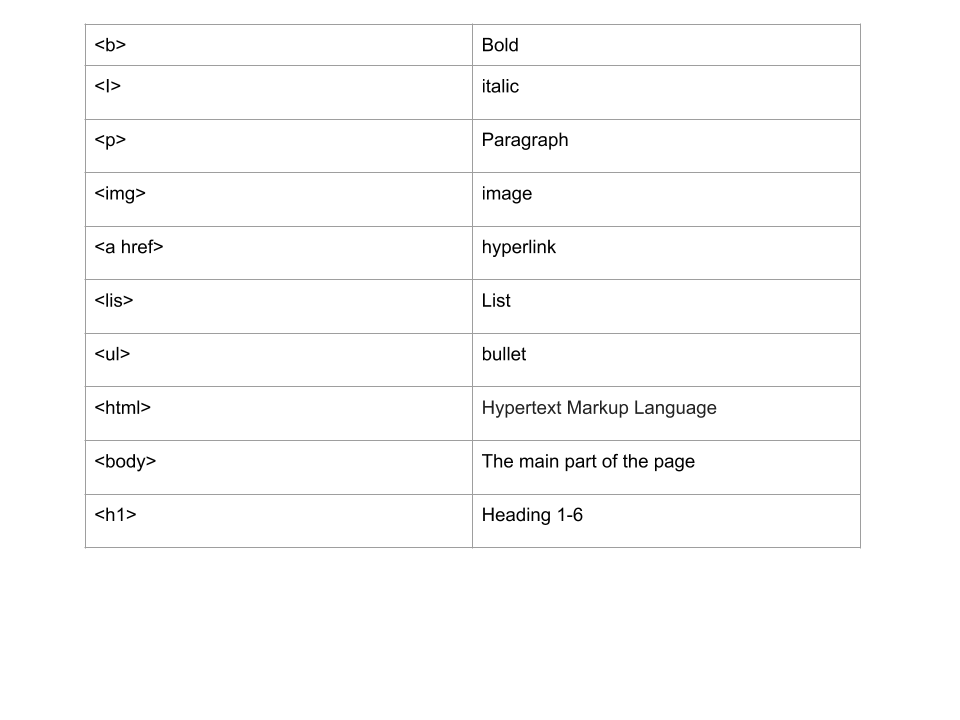
- 113HTMLHypertext Markup Language, a standardized system for tagging text files to achieve font, colour, graphic, and hyperlink effects on World Wide Web pages.
- 114E-votingVoting via the internet
- 115Freedom of information Act 2000Public authorities are obliged to Publish certain information if it's requested.
Members of the public are entitled to request information from public authorities. - 116The copyright,designs and patents actcopyright gives the creators some types of media rights control how they're used and distributed. Music,books,videos and software can be covered by copyright law
- 1178 principles of the data protection act
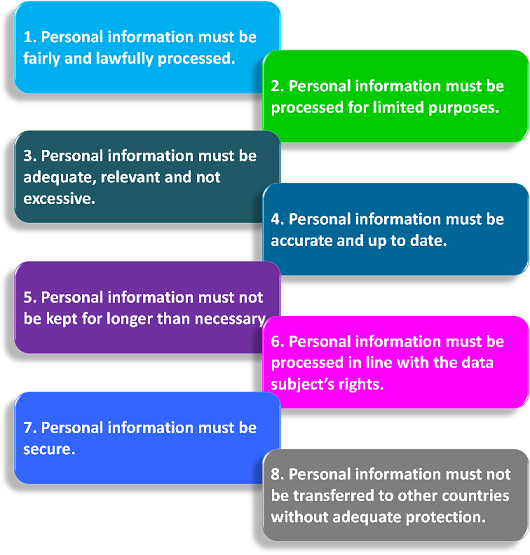
- 118The Computer Misuse Act 1990Accessing computer material without permission (access without damage)
accessing computer material without permission with intent to commit further crimes
altering computer data without permission - 119The Computer Misuse Act 1990(Methods of access data)Phishing- where you are asked for personnel data but it is a scam.
Piggybacking-where hackers gain legal entry to a restricted site
Pharming- when visiting a web site your a automatically direct you to a fake website - 120CCTVcameras that track your movements
- 121GPS devicestracks your movements from space
- 122Airport passenger liststracks who is on the fight
- 123Monitoring emailmonitoring you by accessing your email.
- 124Monitoring websites visitedyou can be monitored through the web
Informações
- Descrição
- FlashCards sobre Learning aim B flashcards , criado por Harvey Quinney em 21-10-2019.
- Criado por
- Harvey Quinney
- Visualizações
- 7
- Avaliação