
Flashcards
SIT772 - SQL
Flashcards do conjunto (200)
- 1SQLStructure Query Language
- 2DDLData Definition Language
Commands to create database objects such as; tables, indexes and views, as well as commands to define access rights. - 3DMLData Manipulation Language
Commands to Insert, Update, Delete and Retrieve Data - 4DDL Commands examplesCREATE SCHEMA AUTHORIZATION, CREATE TABLE, NOT NULL, UNIQUE, PRIMARY KEY, FOREIGN KEY, DEFAULT, CHECK, CREATE INDEX, CREATE VIEW, ALTER TABLE, CREATE TABLE AS, DROP TABLE, DROP INDEX, DROP VIEW
- 5DML Commands ExamplesINSERT, SELECT, WHERE, GROUP BY, HAVING, ORDER BY, UPDATE, DELETE, COMMIT, ROLLBACK,
- 6DML Comparison Operators examples=, <,>,<=,>=,<>, !=
- 7DML Logical Operators examplesAND/OR/NOT
- 8DML Special Operators examplesBETWEEN, IS NULL, LIKE, IN, EXISTS, DISTINCT
- 9DML Aggregate Functions examplesCOUNT, MIN, MAX, SUM, AVG
- 10CREATE SCHEMA AUTHORIZATIONCreates a database schema
- 11CREATE TABLECreates a new table in the user's database schema
- 12NOT NULLEnsures that a column will not have null values
- 13UNIQUEEnsures that a column will not have duplicate values
- 14PRIMARY KEYDefines a Primary Key for a Table
- 15FOREIGN KEYDefines a Foreign Key for a Table
- 16DEFAULTDefines a Default value for a Column (when no value is given)
- 17CHECKValidates data in an attribute
- 18CREATE INDEXCreates and index for a table
- 19CREATE VIEWCreates a dynamic subset of rows and columns from one or more tables (see Chapter 8, Advanced SQL)
- 20ALTER TABLEModifies a table's definition (adds, modifies, or deletes attributes or constraints)
- 21CREATE TABLE ASCreates a new table based on a query in the user's database schema
- 22DROP TABLEPermanently deletes a table (and its data)
- 23DROP INDEXPermanently deletes an index
- 24DROP VIEWPermanently deletes a View
- 25INSERTInsert rows into a table
- 26SELECTSelects attributes from rows in one or more tables or views
- 27WHERERestricts the selection of rows based on a conditional expression
- 28GROUP BYGroups the selected rows based on one or more attributes
- 29HAVINGRestricts the selection of grouped rows based on a condition
- 30ORDER BYOrders the selected rows based on one or more attributes
- 31UPDATEModifies an attribute's values in one or more table's rows
- 32DELETEDeletes one or more rows from a table
- 33COMMITPermanently saves data changes
- 34ROLLBACKRestores data to its original values
- 35=, <, >, <=, >=, <>, !=Used in conditional expressions
- 36AND/OR/NOTUsed in conditional expressions
- 37BETWEENChecks whether an attribute value is within a range
- 38IS NULLChecks whether a attribute value is NULL
- 39LIKEChecks whether an attribute value matches a given string pattern
- 40INChecks whether an attribute value matches any value within a value list
- 41EXISTSChecks whether a subquery returns any rows
- 42DISTINCTLimits values to unique values
- 43Aggregate FunctionsUsed with SELECT to return mathematical summaries on columns
- 44COUNTReturns the number of rows with non-null values for a given column
- 45MINReturns the minimum attribute value found in a given column
- 46MAXReturns the maximum attribute value found in a given column
- 47SUMReturns the sum of all values for a given column
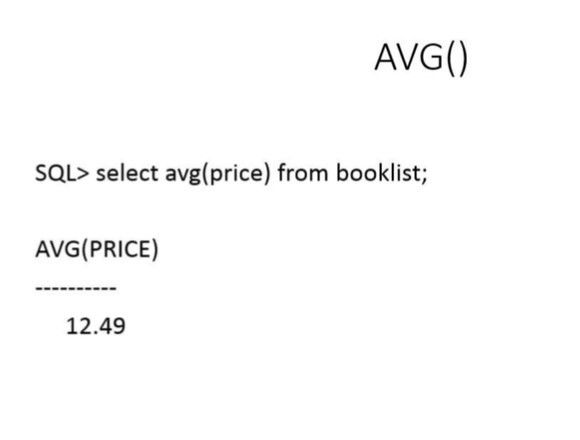
- 48AVGReturns the average of all values for a given column
- 49AuthenticationThe process through which a DBMS verifies that only registered users can access the database
- 50SchemaA logical grouping of database objects, such as tables, indexes, views and queries, that are related to each other. Usually, a schema belongs to a single user or application
- 51FKForeign Key
- 52PKPrimary Key
- 53CHARFixed-length character data, 1 to 255 characters
- 54VARCHARVariable-length character data, 1 to 2,000 charcters.
VARCHAR is automatically converted to VARCHAR2 in Oracle. - 55NUMBERNumeric data. NUMBER (9,2) is used to specify numbers that have two decimal places and are up to nine digits long, including the decimal places.
Some RDBMSs permit the use of a MONEY or a CURRENCY data type. - 56NUMERICNumeric data. DBMSs that do not support the NUMBER data type typically use NUMERIC instead
- 57INTInteger values only. INT is automatically converted to NUMBER in Oracle
- 58SMALLINTSmall integer values only. SMALLINT is automatically converted to NUMBER in Oracle
- 59DATEDATE Formats vary. Commonly accepted formats are DD-MON-YYYY, DD-MON-YY, MM/DD/YYYY and MM/DD/YY
- 60NUMBER (L,D) or NUMERIC (L,D)The declaration NUMBER(7,2) or NUMERIC(7,2) indicates that numbers will be stored with two decimal places and may be up to seven digits long, including the sign and the decimal place (eg; 12.32 or -134.99)
- 61INTEGERMay be abbreviated as INT. Integers are (whole) counting number, so they cannot be used if you want to store numbers that require decimal places
- 62SMALLINTLike INTEGER but limited to integer values up to six digits. If your integer values are relatively small, use SMALLINT instead of INT.
- 63DECIMAL(L,D)Like NUMBER(L,D), but the storage length is a minimum specification. That is, greater lengths are acceptable, but smaller ones are not. DECIMAL(9,2), DECIMAL(9), and DECIMAL are acceptable
- 64CHAR(L)Fixed-length character for up to 255 characters. If you store strings that are not as long as the CHAR parameter value, the remaining spaces are left unused. Therefore, if you specify CHAR(25), strings such as Smith and Katzenjammer are each stored as 25 characters. However,a US area code is always three digits long, so CHAR(3) would be appropriate if you wanted to store such codes
- 65VARCHAR(L) or VARCHAR2(L)Variable-length character data. The designation VARCHAR2(25) or VARCHAR(25) will let you store charcters up to 25 characters long. However, unlike CHAR, VARCHAR will not leave unused spaces. Oracle automatically converts VARCHAR to VARCHAR2
- 66DATEStores dates in the Julian format.
- 67Other Data Types in SQLTIME, TIMESTAMP, REAL, DOUBLE, FLOAT, INTERVAL DAY TO HOUR, LOGICAL, CURRENCY, AUTONUMBER
- 68CREATE TABLEA SQL command that creates a table's structures using the characteristics and attributes given
- 69Reserved WordsWords used by a system that cannot be used for any other purpose.
For example, in Oracle SQL, the word INITIAL cannot be used to name tables or columns - 70Constraints examplesNOT NULL, UNIQUE, PRIMARY KEY, FOREIGN KEY, CHECK
- 71INSERT INTO publisher VALUES (21225,'Plain Donkey publisher','Smithson','615','223-3234','VIC','Y');- The row contents are entered between parentheses. Note that the first character after VALUES is a parenthesis and that the last character in the command sequence is also a parenthesis.
- Character (string) and date values must be entered between single quotes (‘ ‘).
- Numerical entries are not enclosed in single quotes.
- Attribute entries are separated by commas.
- A value is required for each column in the table. - 72SELECT columnlist FROM tablelist [WHERE conditionlist ]Use the WHERE clause to add conditional restrictions to the SELECT statement that limit the rows returned by the query. The following syntax enables you to specify which rows to select:
- 73=Equal to
- 74<Less than
- 75<=Less than or equal to
- 76>Greater than
- 77>=Greater than or Equal to
- 78<> or !=Not Equal to
- 79+ -Addition
Subtraction - 80* / ^Multiple
Divide
Raise to the Power - 81Logical Operators AND, OR, and NOT.OR: For the row to be selected at least one of the conditions must be true
AND: For a row to be selected all the specified conditions must be true
NOT: For a row to be selected the specified condition must be false. - 82<> []< > means you have to provide the information to this item [ ] means the item is optional.
- 83What is the SQL command you use to add a row into the database?INSERT
- 84When can the NULL entry be accepted during adding a new row into a database?Only if the corresponding attribute is optional
- 85The result of a SQL SELECT statement is a ____ .Table
- 86When retrieving data using a SELECT statement, you can use logical operators in the ____ clause.WHERE
- 87Which of the following is correct? a) SQL indexes can be created on the basis of any selected attribute b) SQL indexes can be created on the basis of any unique attribute c) SQL indexes can be created on the basis of any NULL attribute d) SQL indexes can be created on the basis of any numeric attributeSQL indexes can be created on the basis of any selected attribute
- 88Changes made to table contents are not physically saved on disk until what occurs? a) Database is closed b) Program is closed c) COMMIT command is used d) Any of the aboved) any of the above
- 89A primary key should be defined as _____. a) NULL b) Not NULL c) Either of the above can be used d) none of the above are correctb) Not NULL
- 90Considering binary relationships, possible cardinality ratios are_____ . a) one:one b) 1:N c) M:N d) all of aboved) all of above
- 91Association among several entities is called a _____. a) Extraction b) Relationship c) Combination d) Associationb) Relationship
- 92In a relational database, all data are ____ via relations. a) normalised b) stored c) accessed d) stored and accessedd) stored and accessed
- 93Relationship participation_______ a) can be 1:1, 1:M or M:N b) may be unary, binary or ternary c) is either optional or mandatory d) may be recursivec) is either optional or mandatory
- 94A foreign key is ____ a) an attribute that is underlined b) an attribute that uniquely identifies each row in a table c) an attribute that depends on another attribute d) an attribute that relates to the primary key in another tabled) an attribute that relates to the primary key in another table
- 95What best describes the RENAME command? a) The RENAME command is not a valid command b) The RENAME command is used to rename a database c) The RENAME command is used to rename an SQL file d) The RENAME command is used to change the name of the database object, such as tables and viewsd) The RENAME command is used to change the name of the database object, such as tables and views
- 96To modify a database column, we need to use a what command? a) ALTER b) MODIFY c) CHANGE d) You can not modify a database column once it is createda) ALTER
- 97Which is not a valid SQL command? a) DROP b) WHERE c) ALTER d) SPECIFYd) SPECIFY
- 98What is a substitution variable used for in SQL? a) Substitution variables are used to store columns b) Substitution variables are used to store rows c) Substitution variables are used to store elements of command text d) Substitution variables are used to store tablesc) Substitution variables are used to store elements of command text
- 99Which is the correct statement? a) The JOIN operation selects all records that match either left or right table records b) The JOIN operation selects records that have matching values in both tables c) The JOIN operation selects records from the first table with matching right table records d) The JOIN operation selects records from the the second table with matching left table recordsb) The JOIN operation selects records that have matching values in both tables
- 100Which is the correct statement? a) The EXCEPT (MINUS) statement in SQL combines rows from two queries and returns only the rows that appear in the second set but not in the first b) The EXCEPT (MINUS) statement in SQL combines rows from two queries and returns only the rows that appear in both queries c) The EXCEPT (MINUS) statement in SQL combines rows from two queries and returns only the rows that appear in the first set but not in the second d) The EXCEPT (MINUS) statement in SQL combines rows from two queries and returns only the columns that appear in the first set but not in the secondc) The EXCEPT (MINUS) statement in SQL combines rows from two queries and returns only the rows that appear in the first set but not in the second
- 101The “property of closure” for relational algebra operators means a) The use of relational algebra operators on existing relations produces new relations b) The use of relational algebra operators on existing relations produces closed relations c) The use of relational algebra operators on existing relations produces existing relations d) The use of relational algebra operators on existing relations produces old relationsa) The use of relational algebra operators on existing relations produces new relations
- 102The SQL keyword BETWEEN is used: a) to limit the columns displayed b) for ranges c) to match any value within a value list d) None of the aboveb) for ranges
- 103Which one of the following sorts rows in SQL? a) SORT BY b) ALIGN BY c) ORDER BY d) GROUP BYc) ORDER BY
- 104To remove duplicate rows from the results of an SQL SELECT statement, the ____ qualifier specified must be included. a) ONLY b) UNIQUE c) SINGLE d) DISTINCTd) DISTINCT
- 105CREATE TABLECREATE TABLE works
(employeename CHAR(15) NOT NULL,
companyname CHAR(15) NOT NULL,
salary NUMBER(7),
PRIMARY KEY (employeename, companyname)); - 106INSERT INTOINSERT INTO works VALUES ('Jones', 'Values', 15000);
- 107Tables owned by userSELECT table_name FROM user_tables;
- 108To check if a certain table exists in your databaseSELECT table_name FROM user_tables
WHERE table_name = 'works'; - 109DESCRIBE (view table structure)DESC works
- 110SELECT ALL (view data in atble)SELECT * FROM works;
- 111EXIT or QUIT Oracle SQLEXIT
or
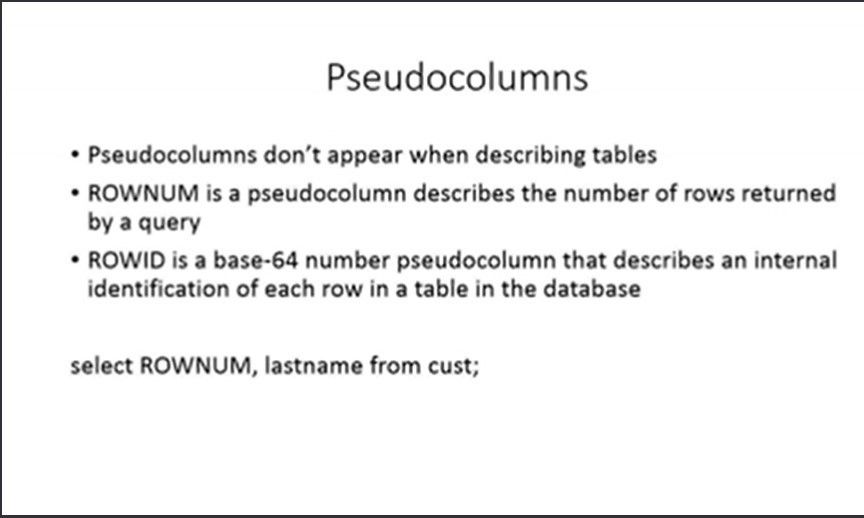
QUIT - 112PSEUDOCOLUMNS
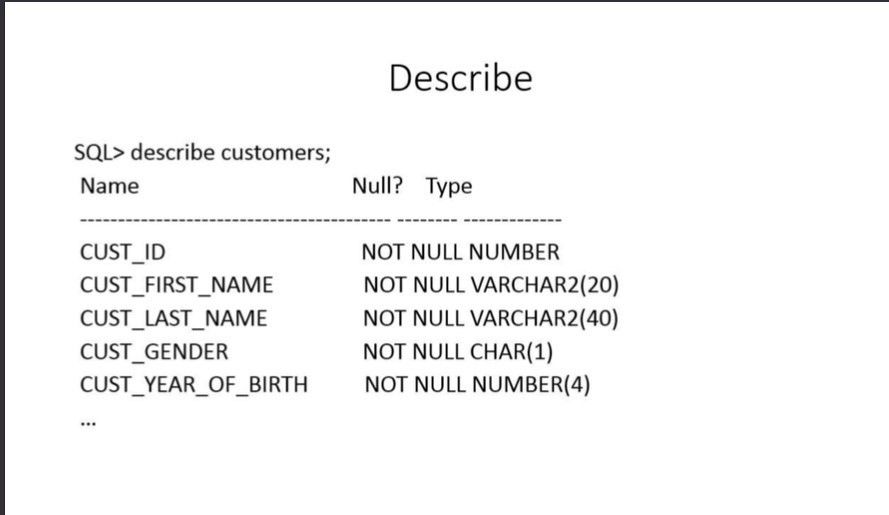
- 113DESCRIBE
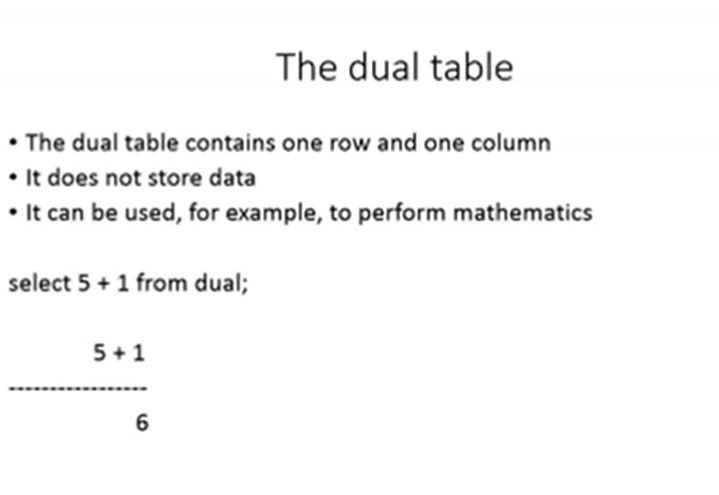
- 114DUAL TABLE
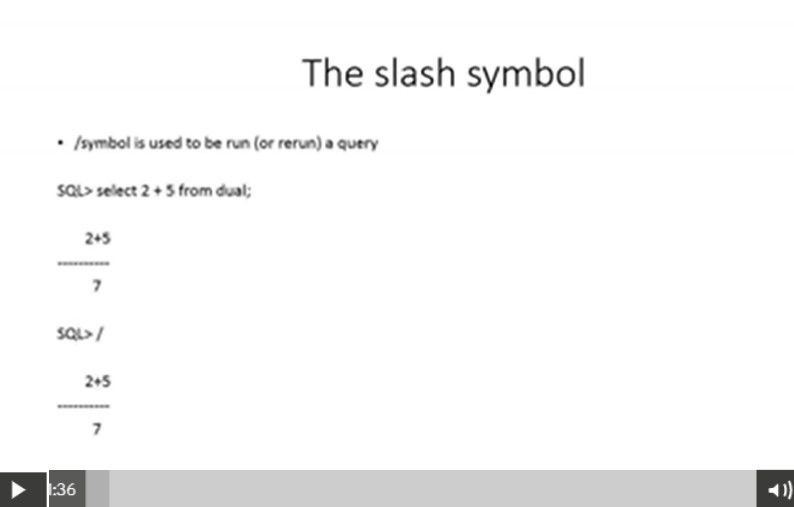
- 115RE RUN (slash symbol / )
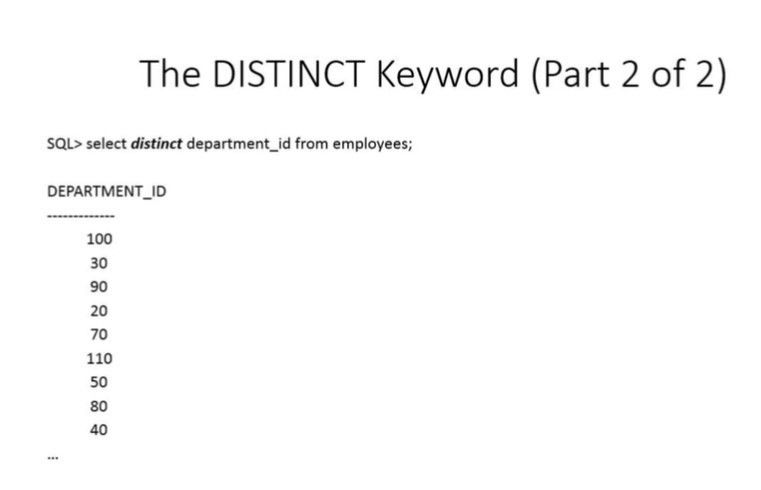
- 116DISTINCT (select distinct data... no data repetitions)
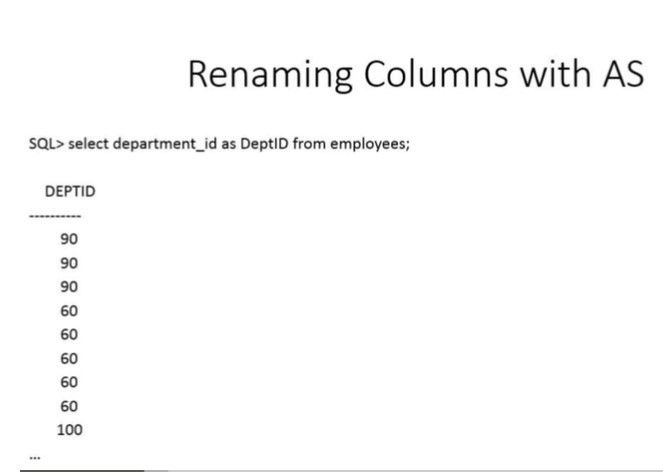
- 117Renaming Columns with AS
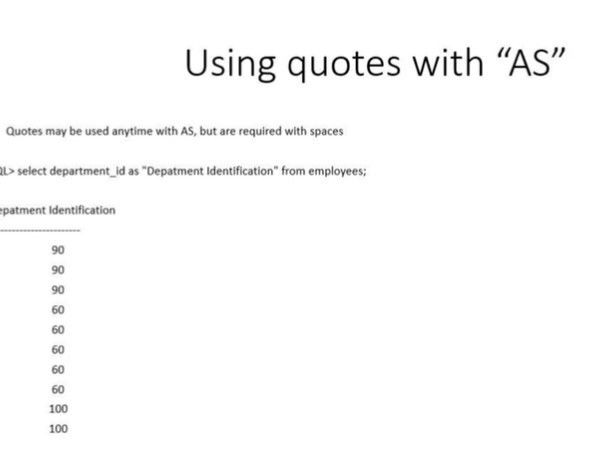
- 118Renaming columns with "AS" if there are spaces within the new title, double quotation marks must be used. eg: SELECT dept_id as "Department Identification"
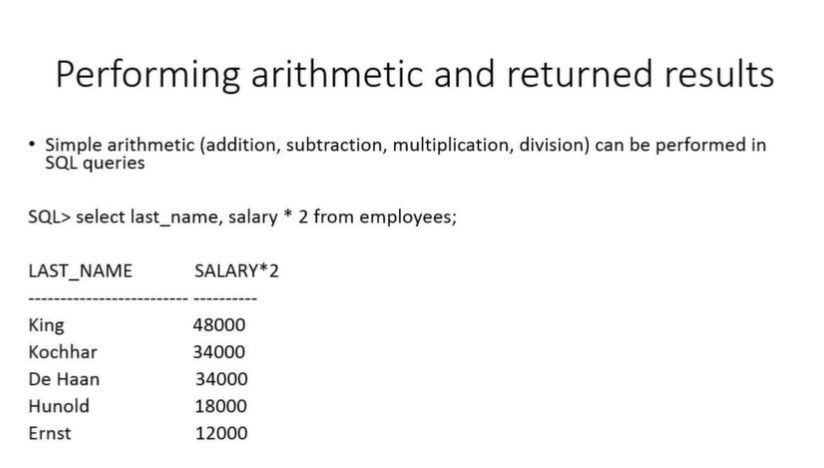
- 119ARITHMETIC ON RETURNED RESULTS
- 120RENAMING AND CONCATENATING ||
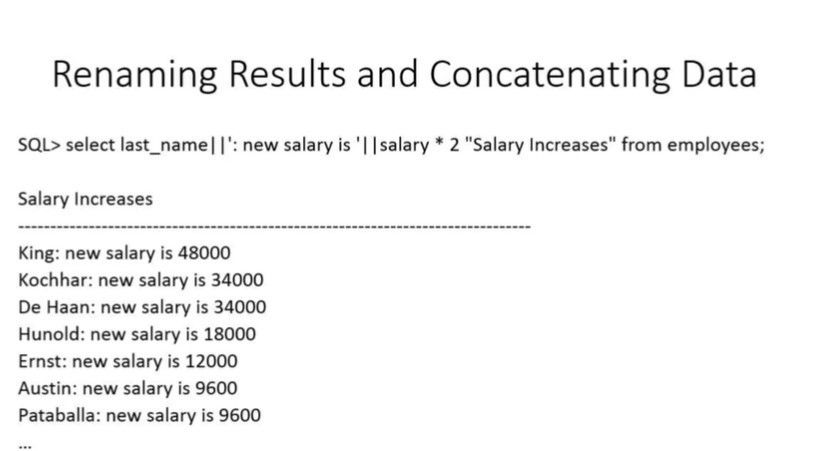
- 121NVL Handling NULL values
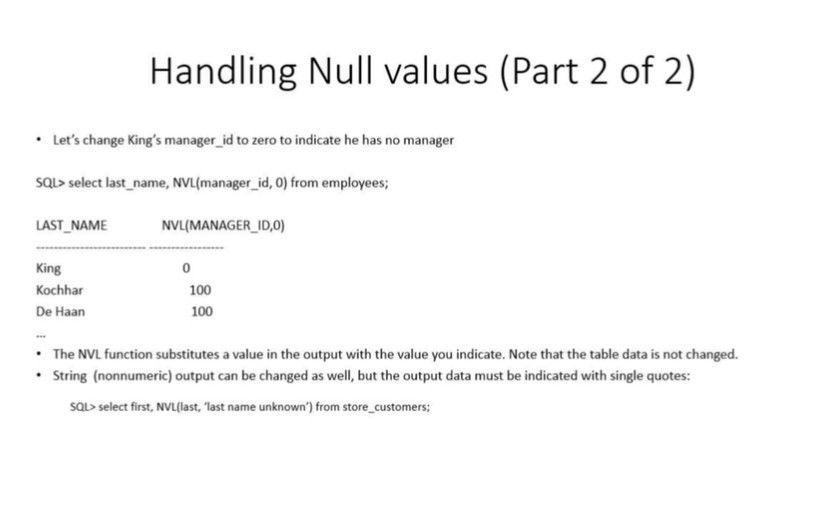
- 122WHERE
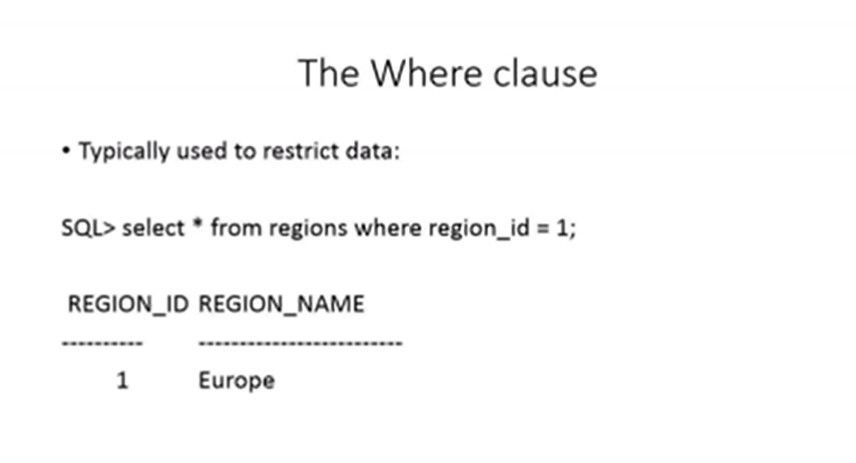
- 123WHERE with OPERATOR >
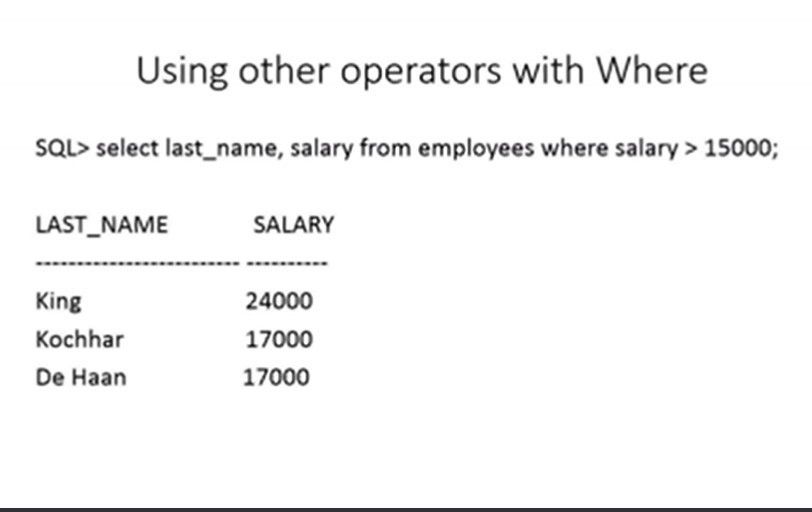
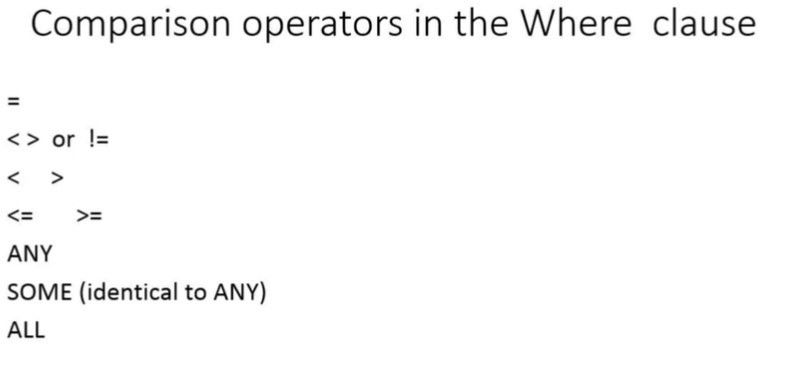
- 124COMPARISON OPERATORS in the WHERE clause
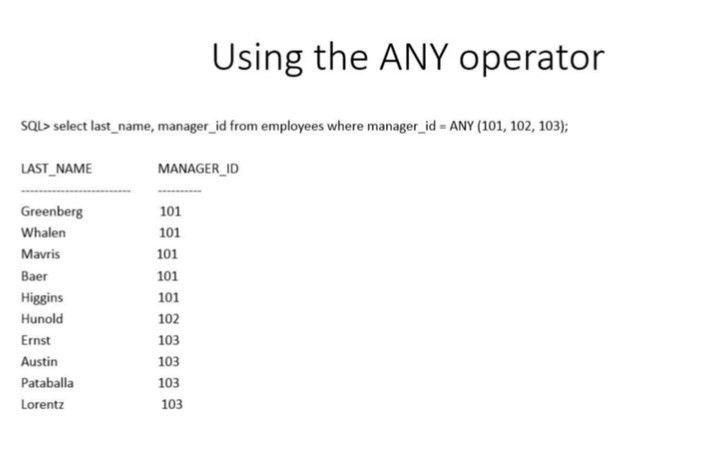
- 125ANY operator
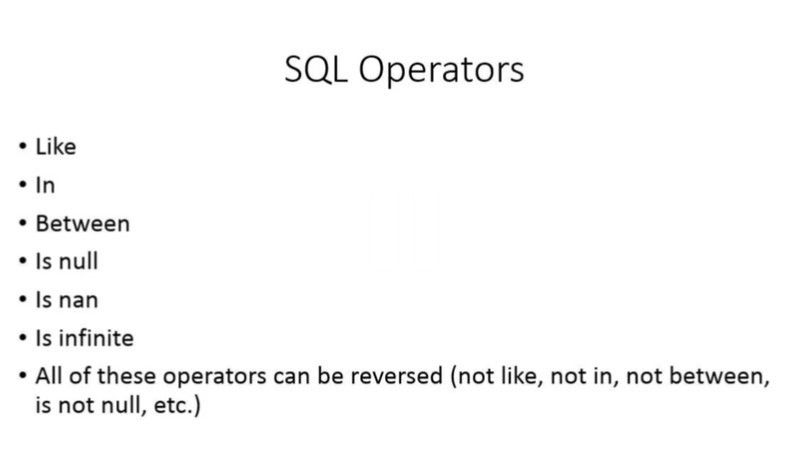
- 126SQL OPERATORS
- 127IS NANIs Not A Number
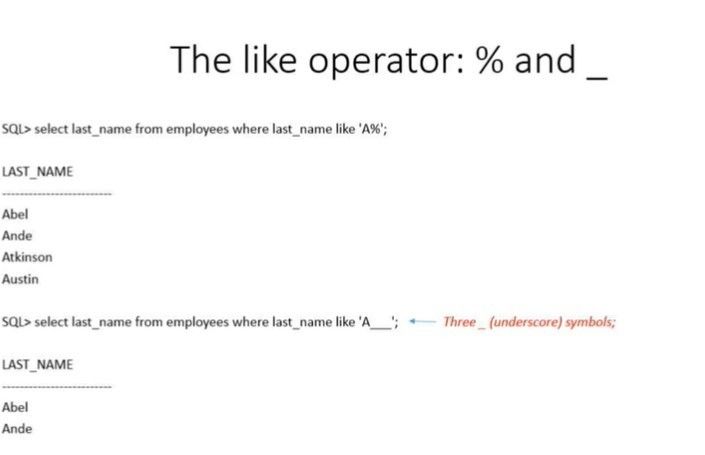
- 128LIKE operator %
- 129NOT LIKE
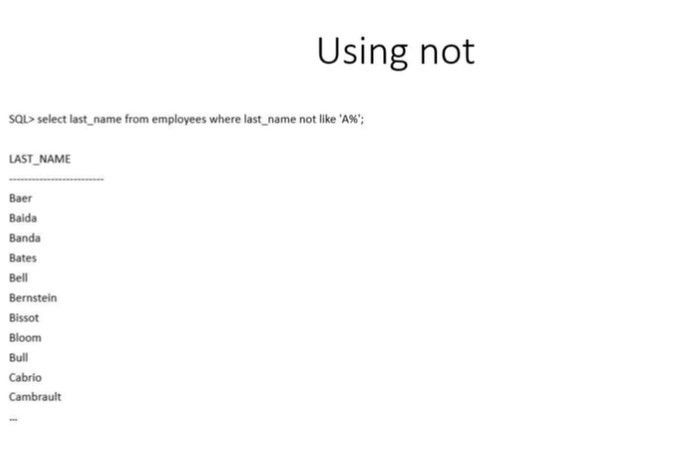
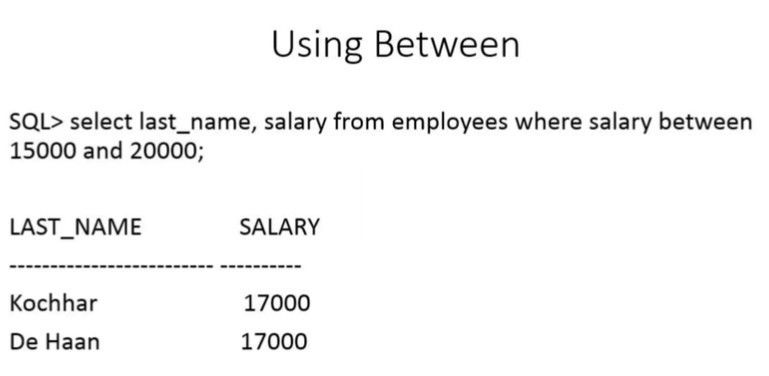
- 130BETWEEN between 15000 and 20000 (would return 15000 AND 20000 and everything in between)
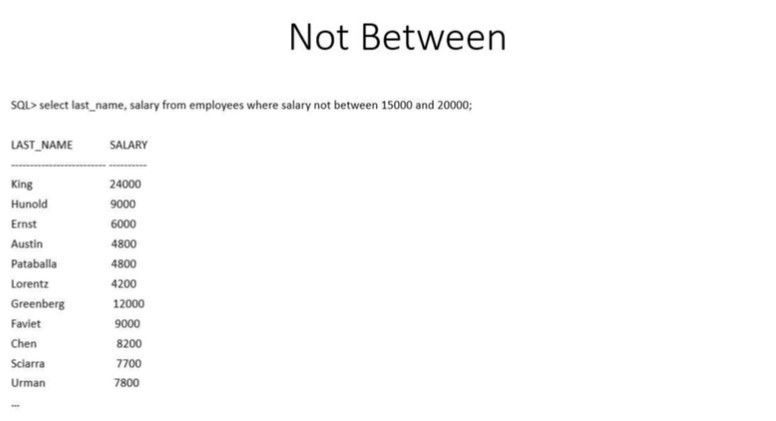
- 131NOT BETWEEN
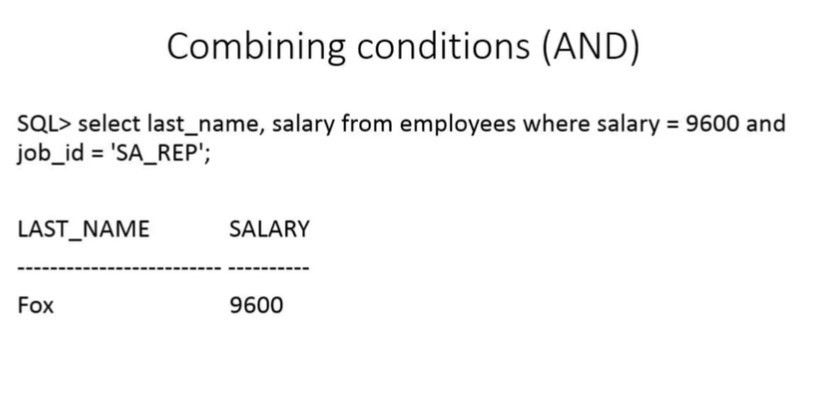
- 132AND combining conditions
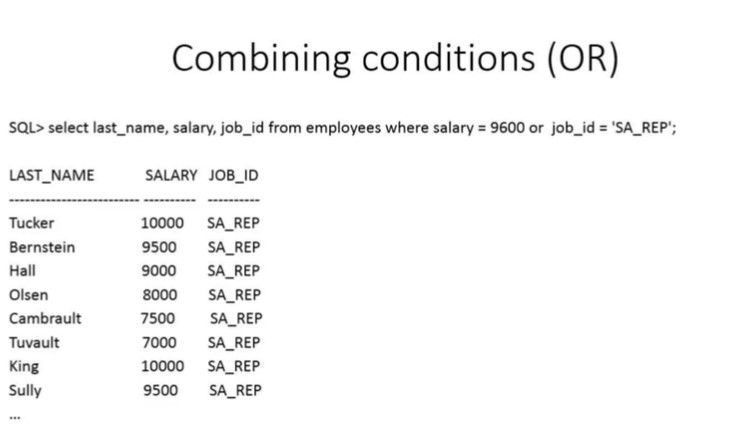
- 133OR combining conditions
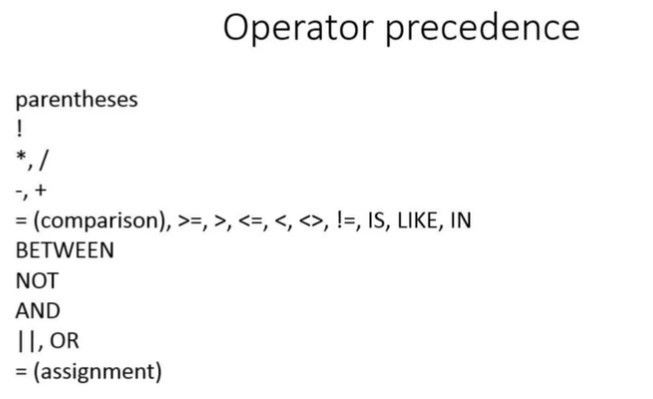
- 134OPERATOR PRECEDENCE
- 135In which three situations does a transaction complete? a) When a DELETE statement is executed. b) When a ROLLBACK command is executed. c) When a PL/SQL anonymous block is executed. d) When a data definition language (DDL) statement is executed. e) When a TRUNCATE statement is executed after the pending transaction.b) When a ROLLBACK command is executed.
d) When a data definition language (DDL) statement is executed.
e) When a TRUNCATE statement is executed after the pending transaction. - 136Which statement is true regarding the default behaviour of the order by clause? a) In a character sort, the values are case-sensitive. b) NULL values are not considered at all by the sort operation. c) Only those columns that are specified in the SELECT list can be used in the ORDER BY Clause. d) Numeric values are displayed from the maximum to the minimum value if they have decimal positions.a) In a character sort, the values are case-sensitive.
- 137Which 3 tasks can be performed using SQL functions built into Oracle Database? a) Displaying a date in a nondefault format. b) Finding the number of characters in an expression. c) Substituting a character string in a text expression with a specified string. d) Combining more than 2 columns or expressions into a single column in the output/a) Displaying a date in a nondefault format.
b) Finding the number of characters in an expression.
c) Substituting a character string in a text expression with a specified string. - 138Which Normal Form is a table in if it has no multi-valued attributes and no partial dependencies? a) 1NF b) 2NF c) 3NF d) 4NFb) 2NF
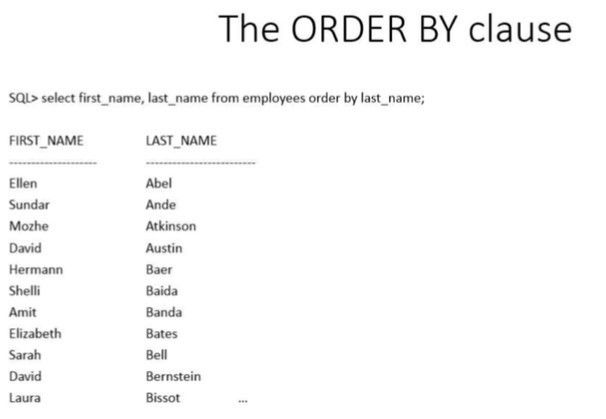
- 139ORDER BY
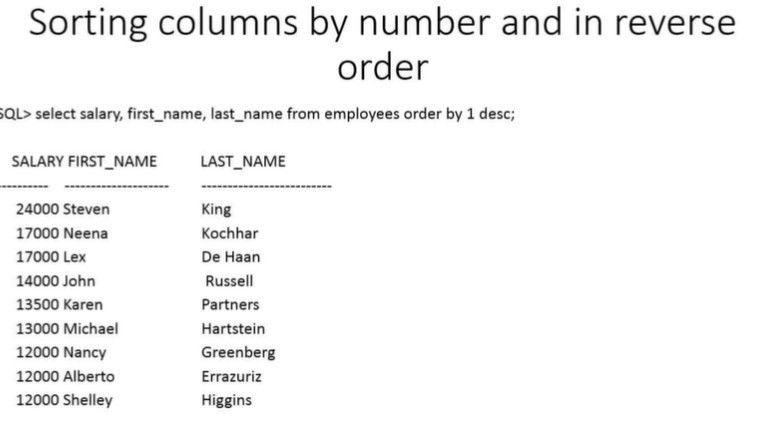
- 140SORTING
- 141JOINING TABLES
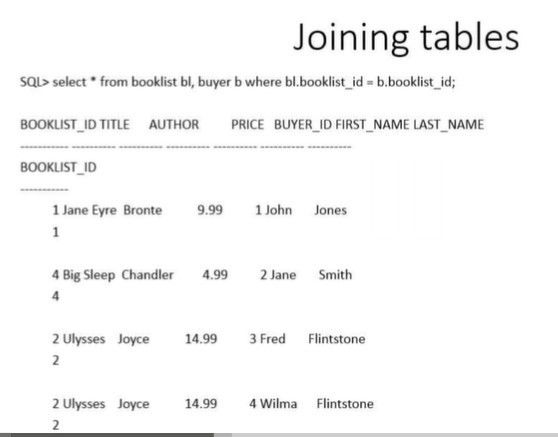
- 142EQUIJOIN
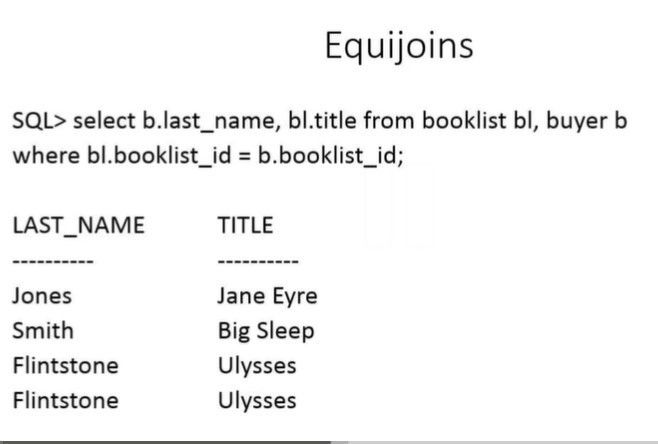
- 143module 2 retrieving datathe order by clause
- 144CARTESIAN PRODUCT Avoid. Can crash system. Duplicate returns.
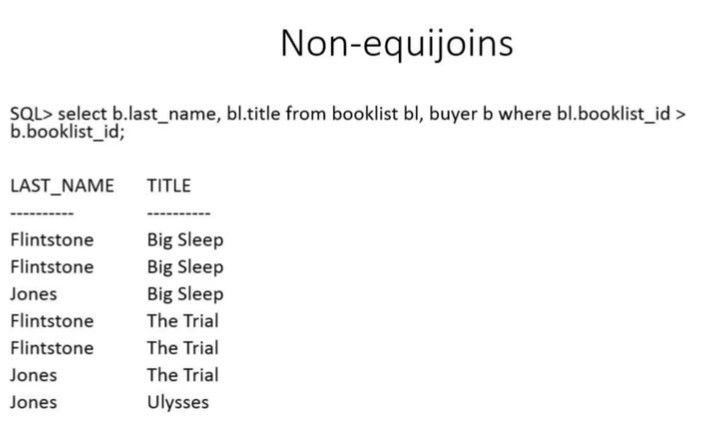
- 145OUTER JOINS equijoin + null values (+) if (+) on Right of WHERE clause, it points to the Left side of the FROM clause. If (+) on LEFT of WHERE clause, it points to the RIGHT side of FROM clause.
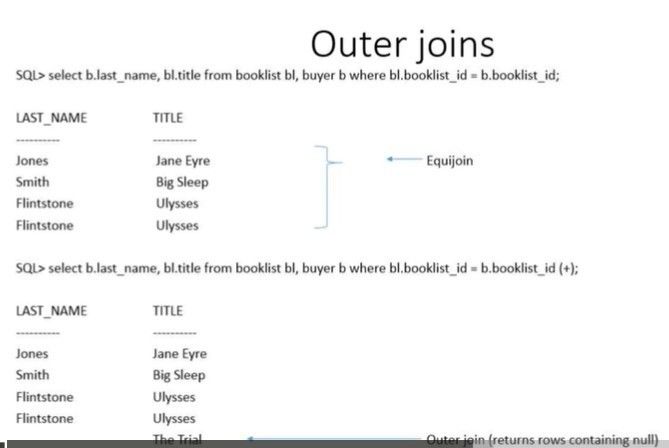
- 146LEFT AND RIGHT OUTER JOINS
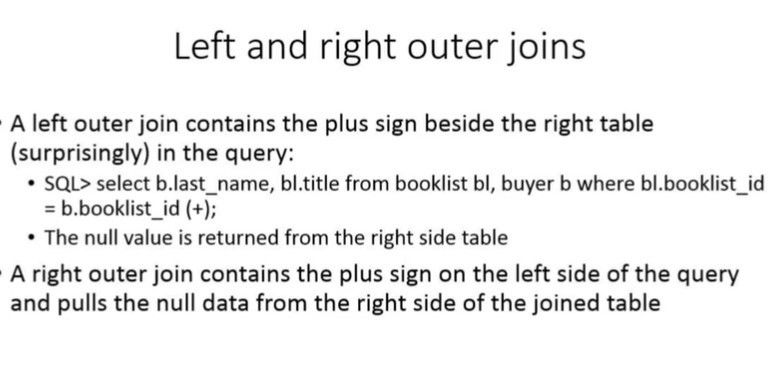
- 147RIGHT OUTER JOIN
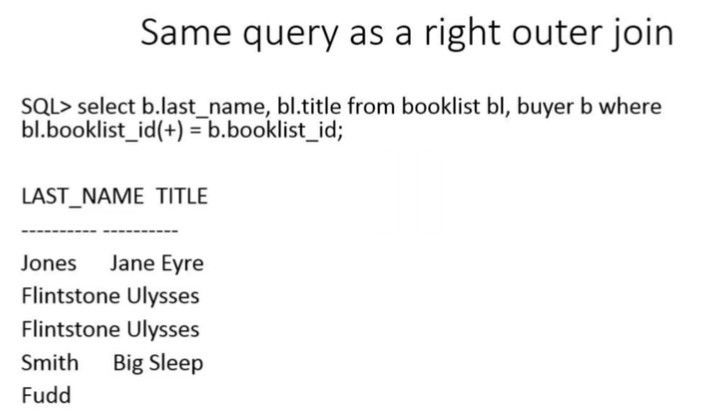
- 148INNER JOIN
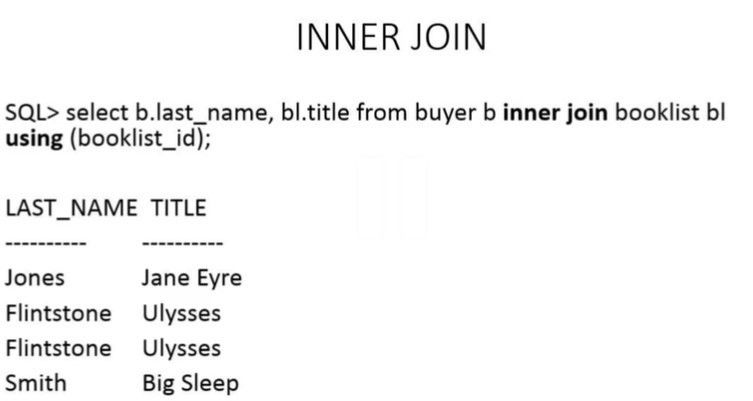
- 149LEFT AND RIGHT OUTER JOINS Left Joins (adds Null values to Left Column) Right Join (adds Null values to R Column) Outer = Non-Equi, or Outside Joining data
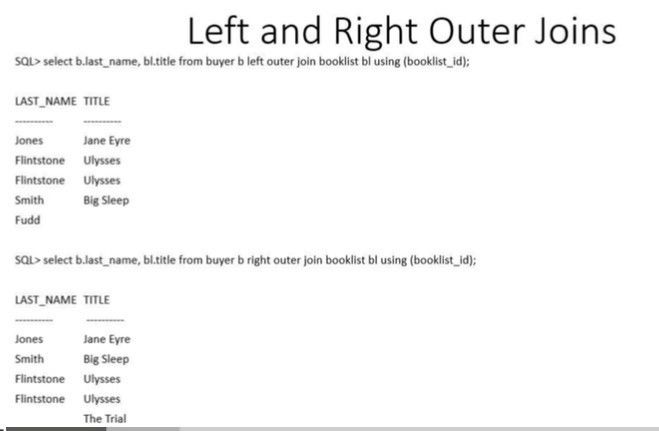
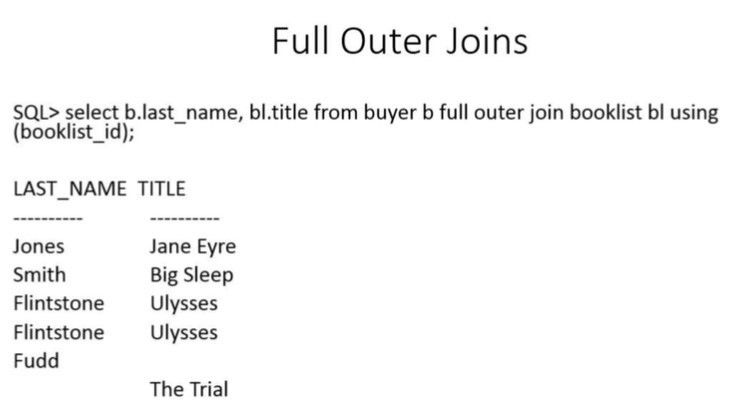
- 150FULL OUTER JOIN Adds NULLS from BOTH COUMNS
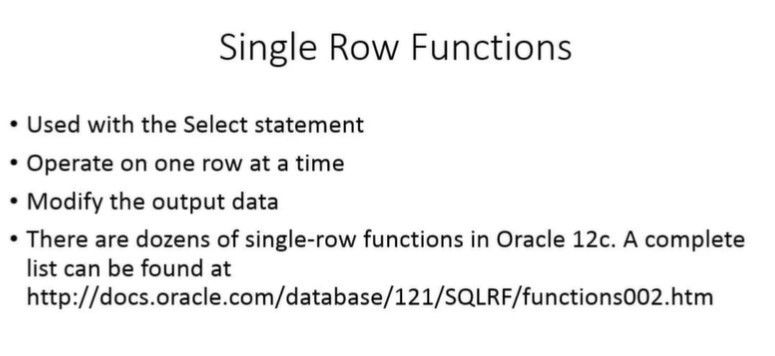
- 151SINGLE ROW FUNCTIONS
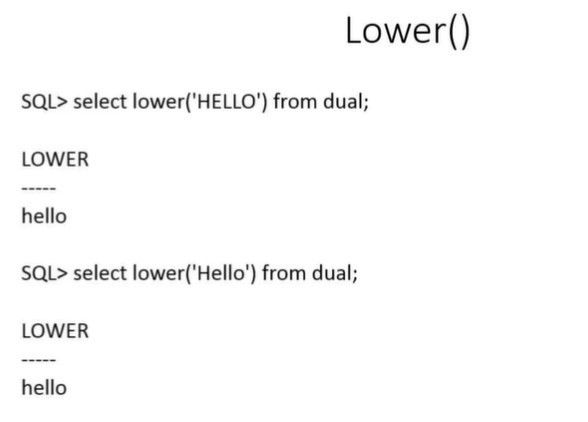
- 152LOWER FUNCTION converts text to lower case
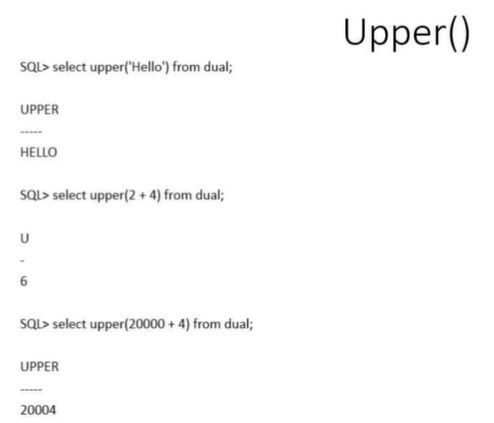
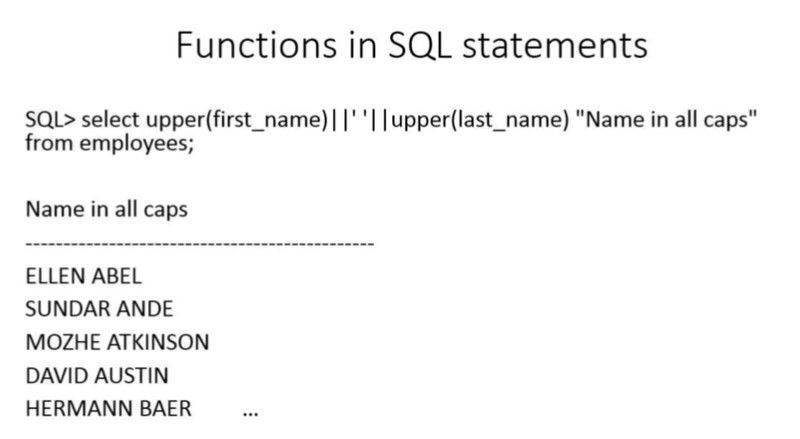
- 153UPPER FUNCTION converts to upper case
- 154CONCATENATE FUNCTION
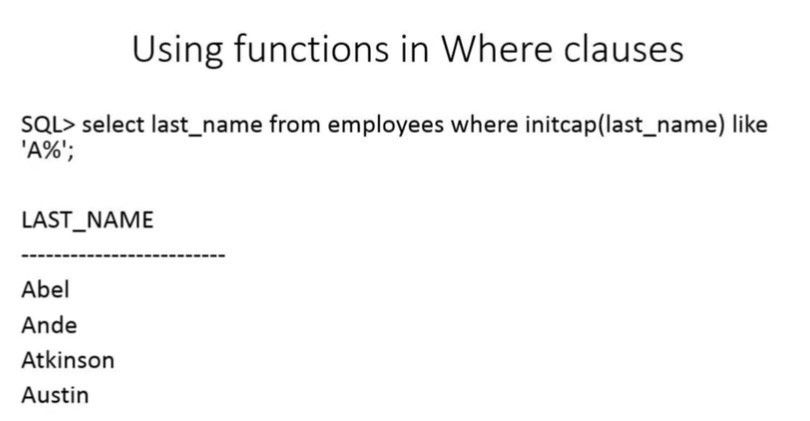
- 155INITCAP Initial Capital changes text to first letter capitalized
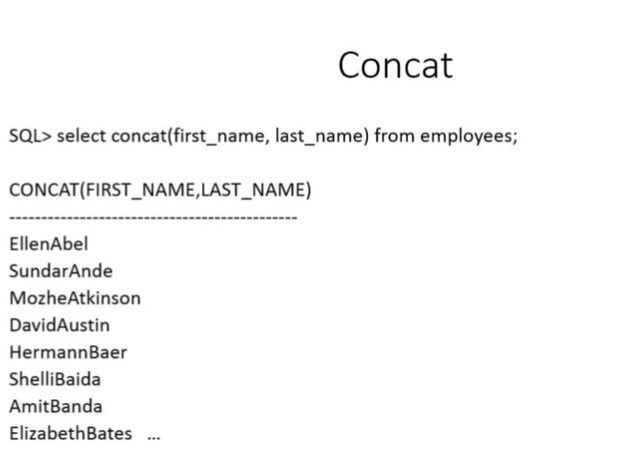
- 156CONCAT function
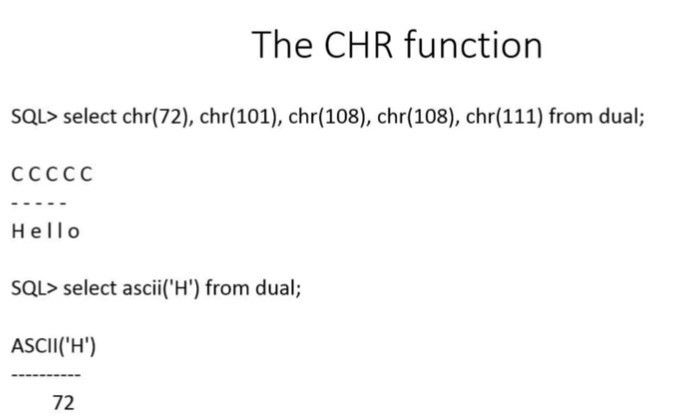
- 157CHR function
- 158LENGTH function
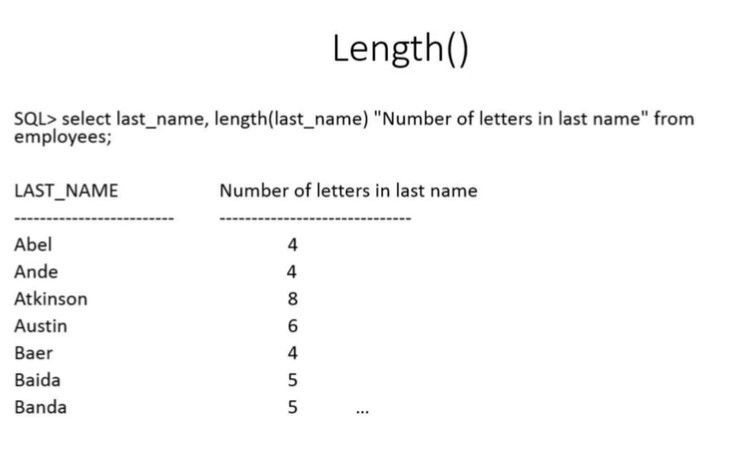
- 159TRIM function cleans up inputted data entry eg. entered space before name
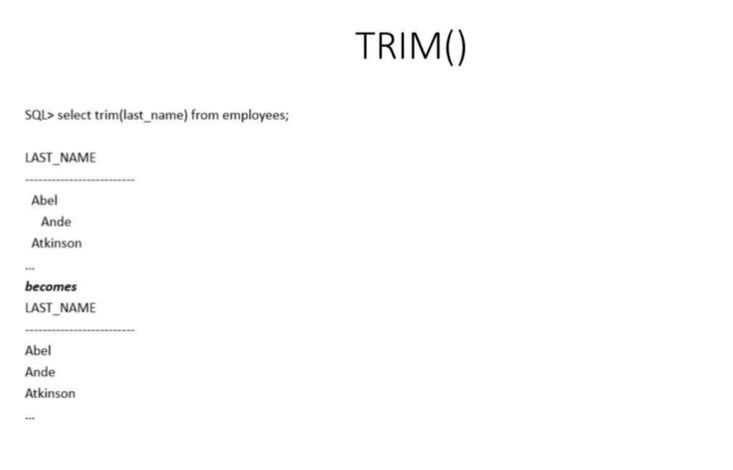
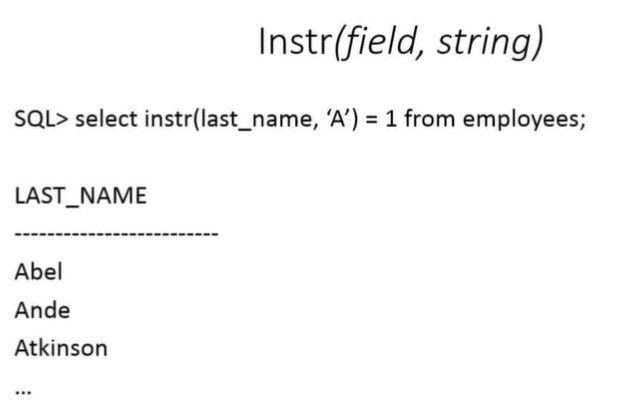
- 160INSTR FUNCTION (In String)
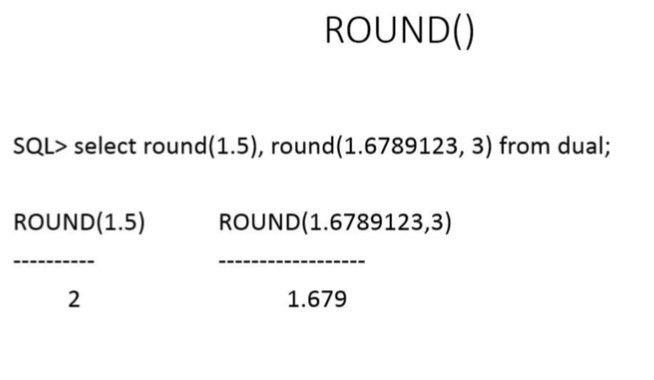
- 161ROUND () FUNCTION rounds numbers
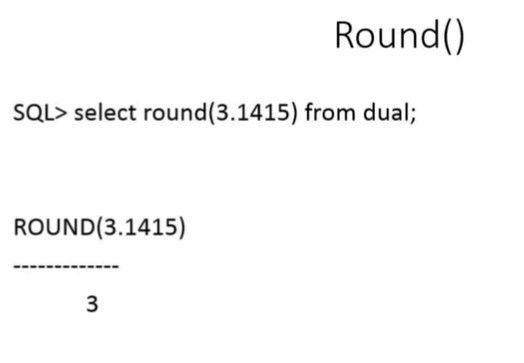
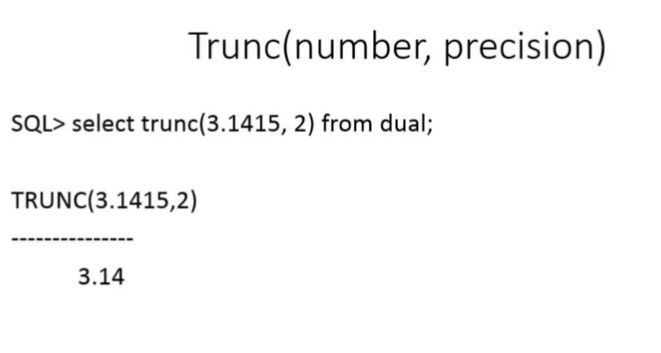
- 162TRUNCATE function chops off to precise decimal (does not round)
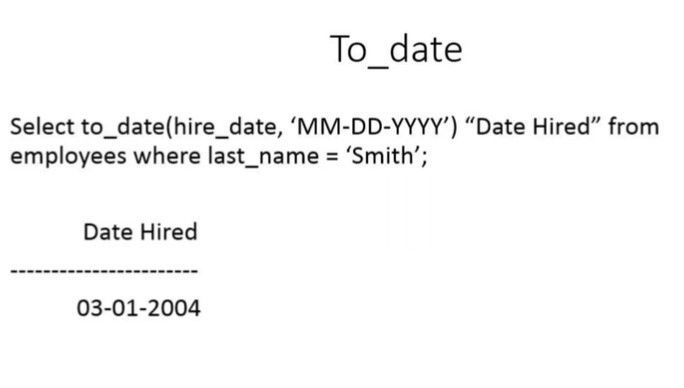
- 163TO DATE FUNCTION
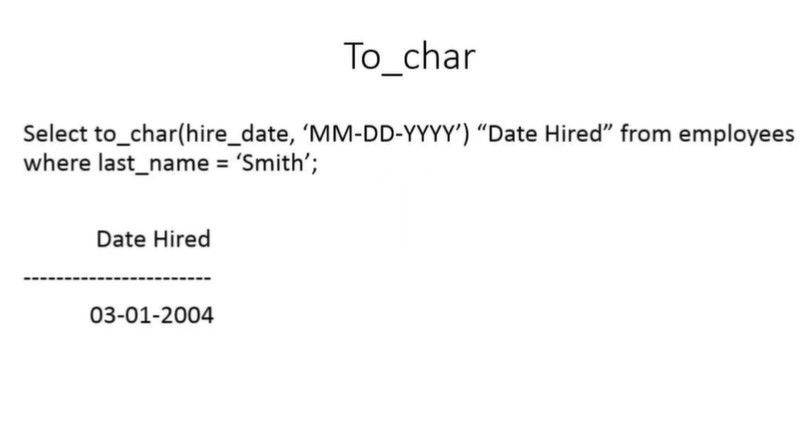
- 164TO_CHAR function converts data to a string format
- 165AVG FUNCTION AGGREGATE
- 166MATH ON AGGREGATE FUNCTIONS
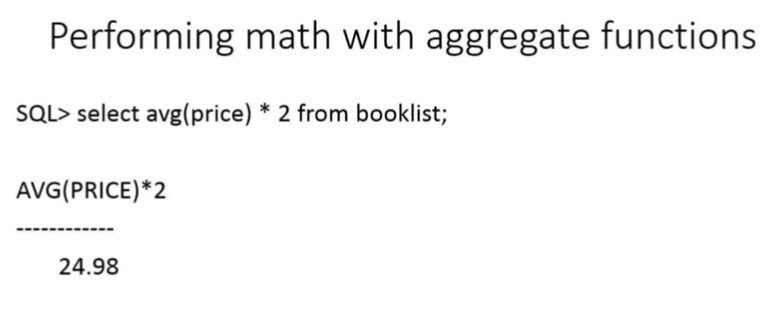
- 167AVG with DISTINCT (if there's any repeated values.. it will not go into AVG function)
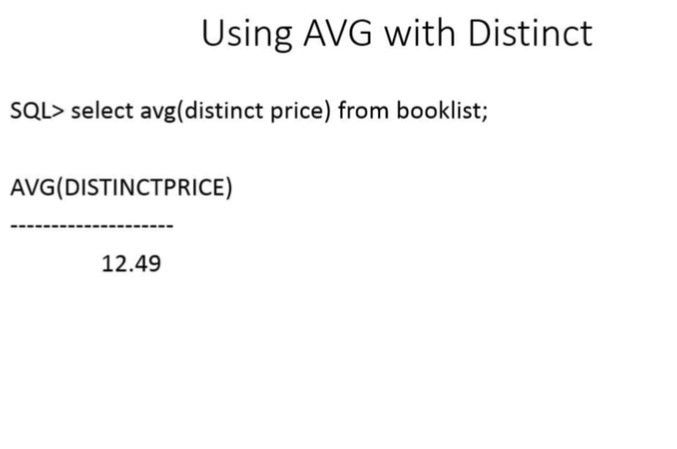
- 168COUNT function
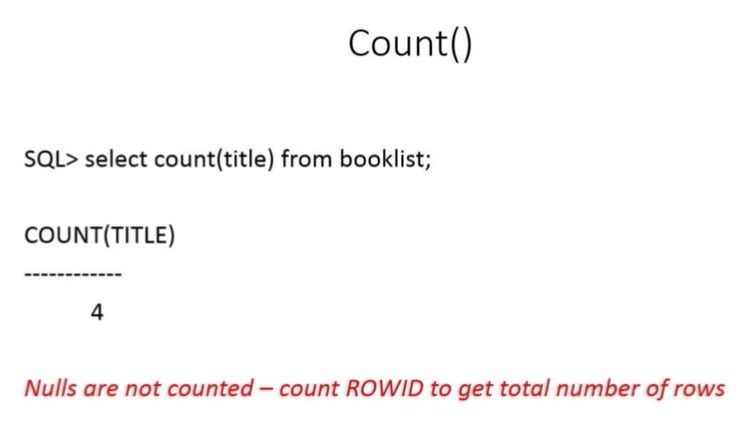
- 169MIN() MAX() FUNCTIONS
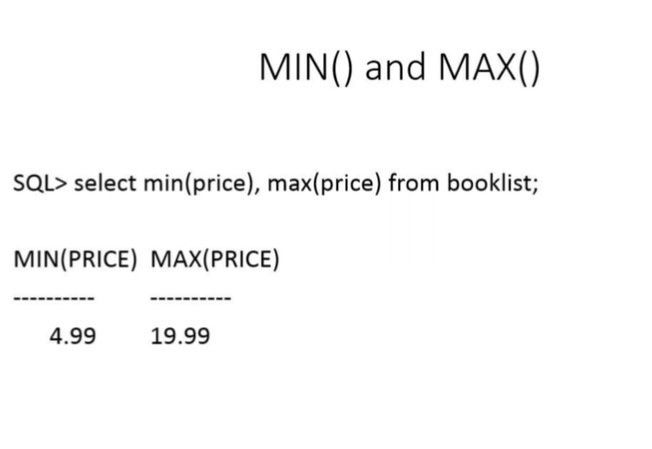
- 170STANDARD DEVIATION function
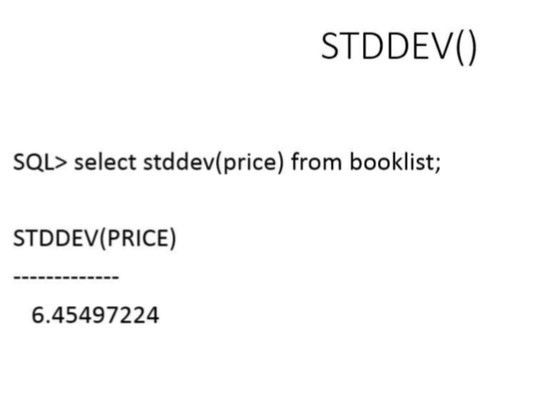
- 171SUM() Variance Function
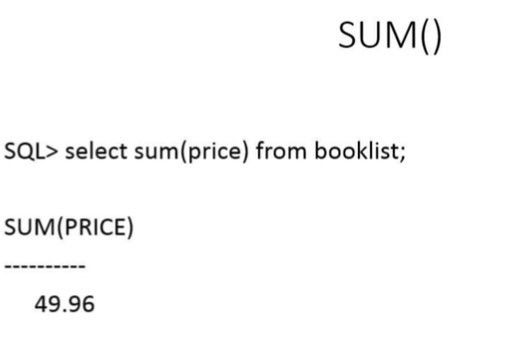
- 172VARIANCE function
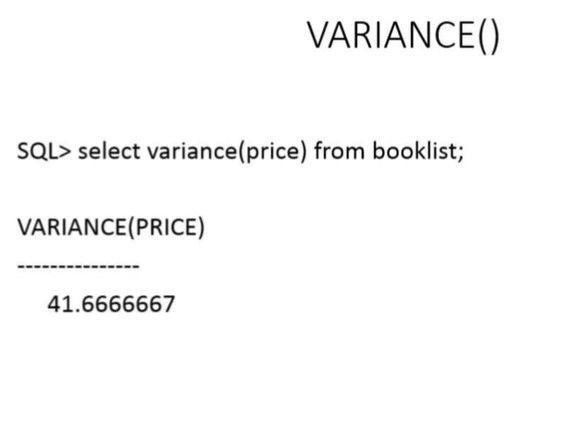
- 173GROUP BY
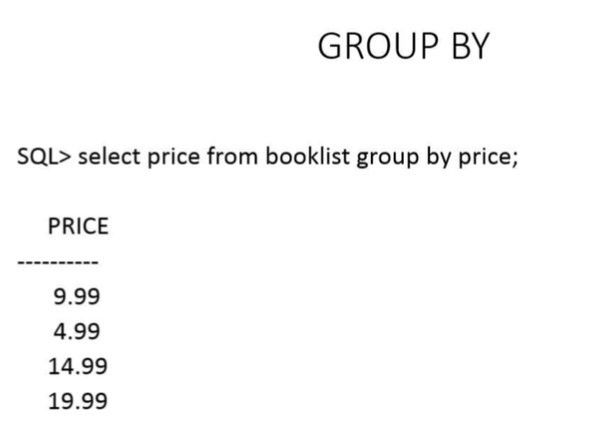
- 174GROUP BY multiple columns
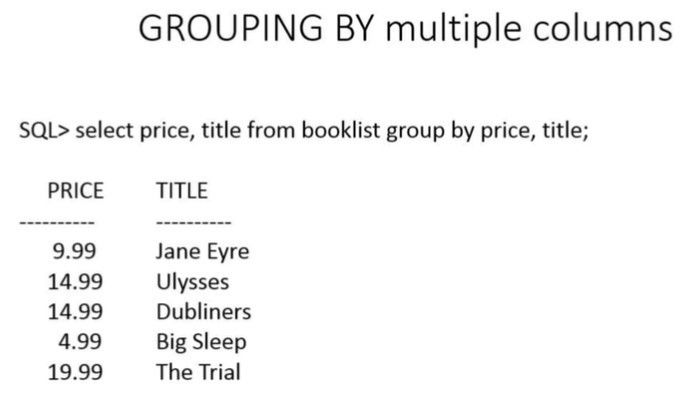
- 175HAVING
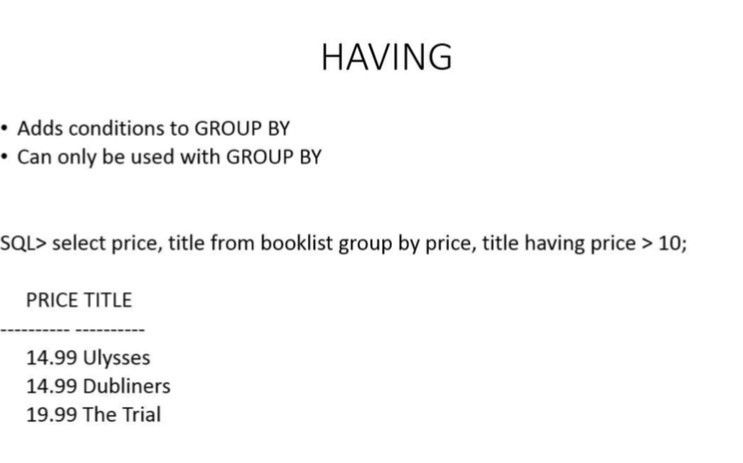
- 176COUNTING GROUPS OF ROWS
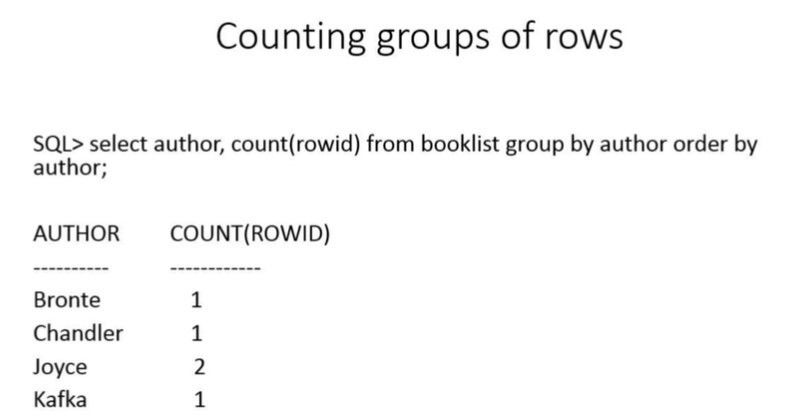
- 177TYPE MISMATCH
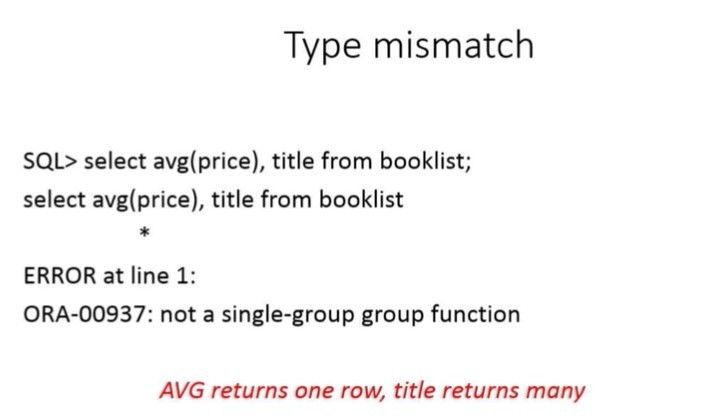
- 178CONVERSION FUNCTIONS
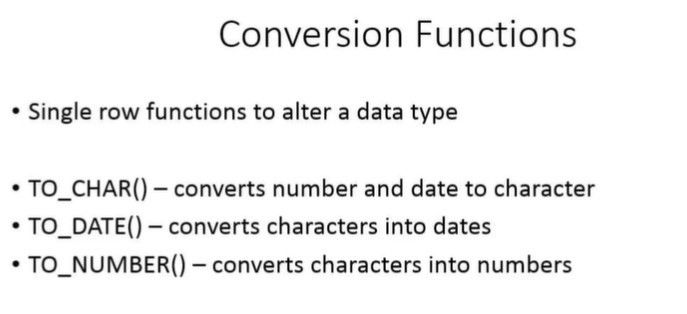
- 179More Uses of TO_CHAR
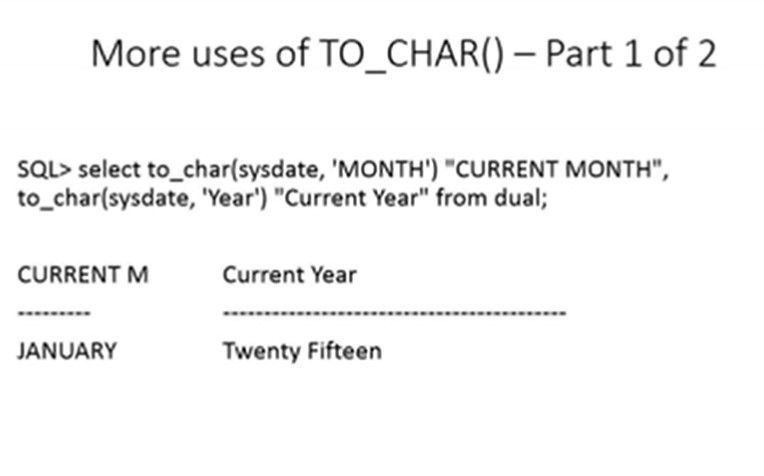
- 180More Uses of TO_CHAR
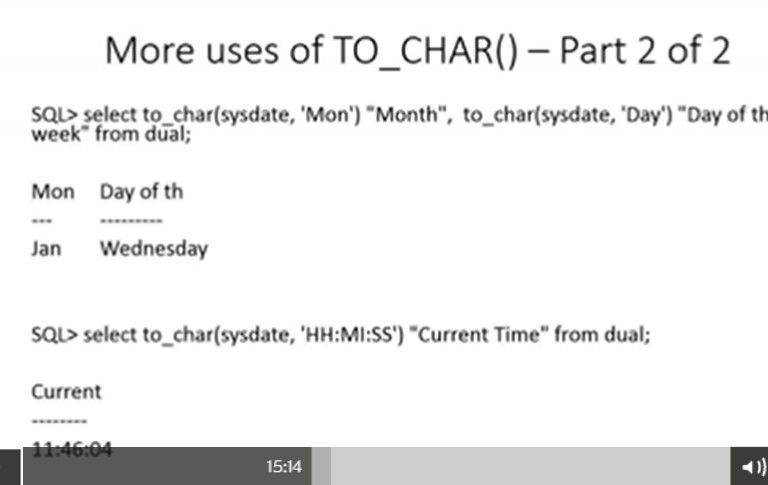
- 181TO DATE
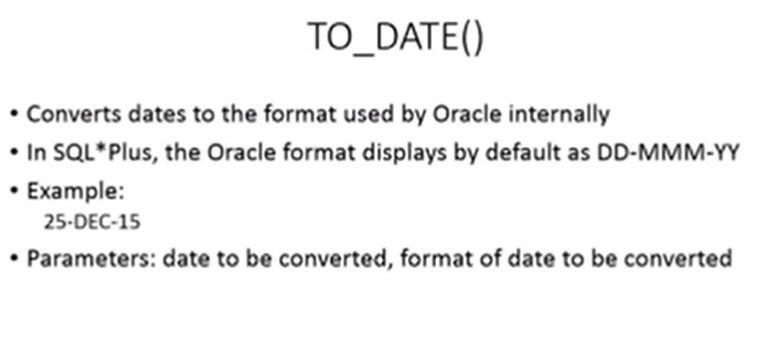
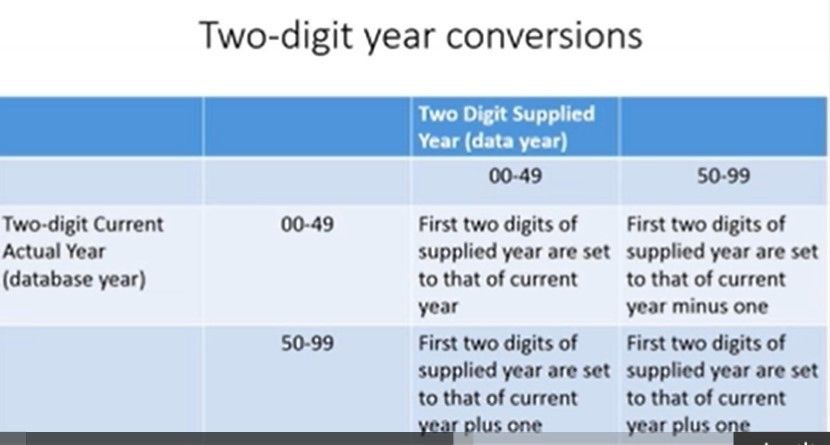
- 182TWO-DIGIT YEAR CONVERSION
- 183TO DATE CONVERSION
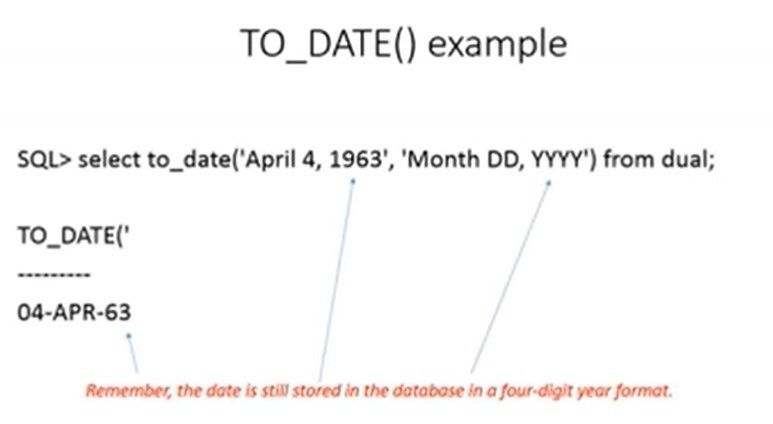
- 184TO NUMBER
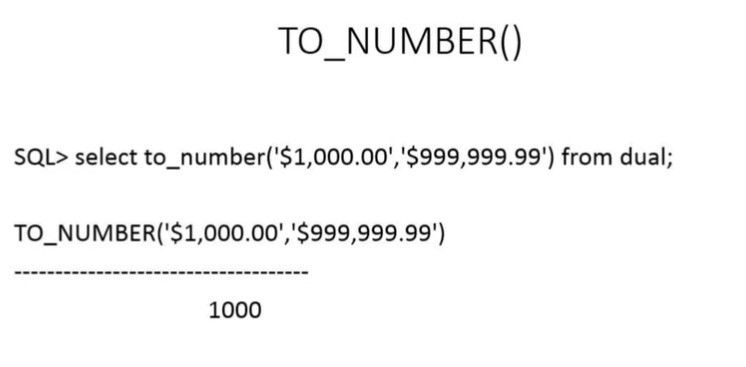
- 185DATE TIME
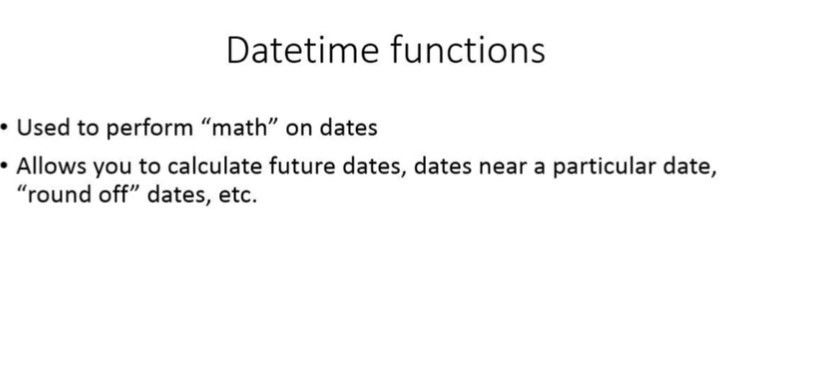
- 186ADD MONTHS
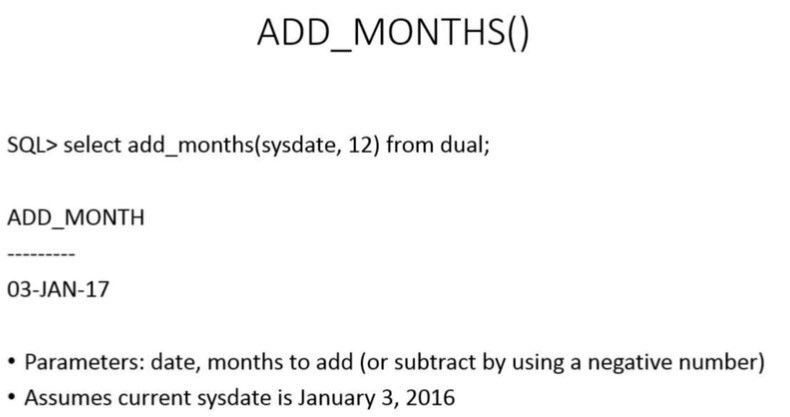
- 187LAST DAY
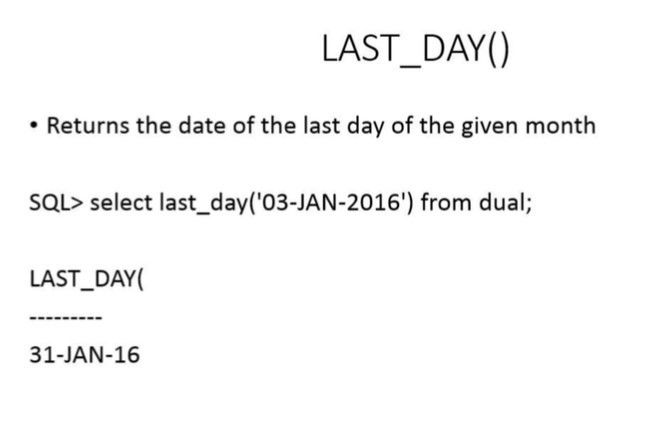
- 188MONTHS BETWEEN
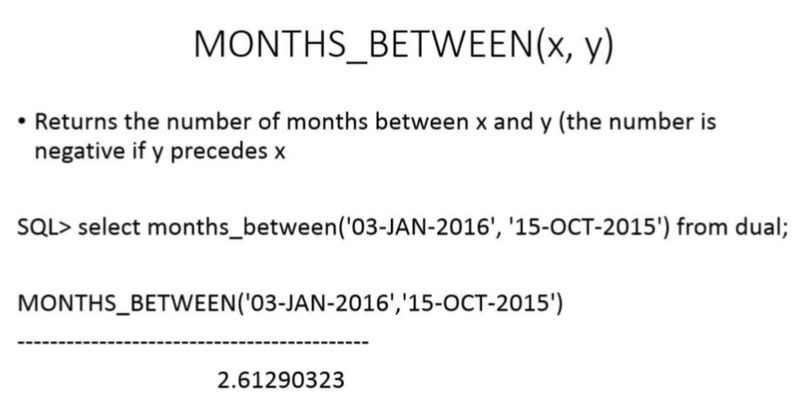
- 189NEXT DAY
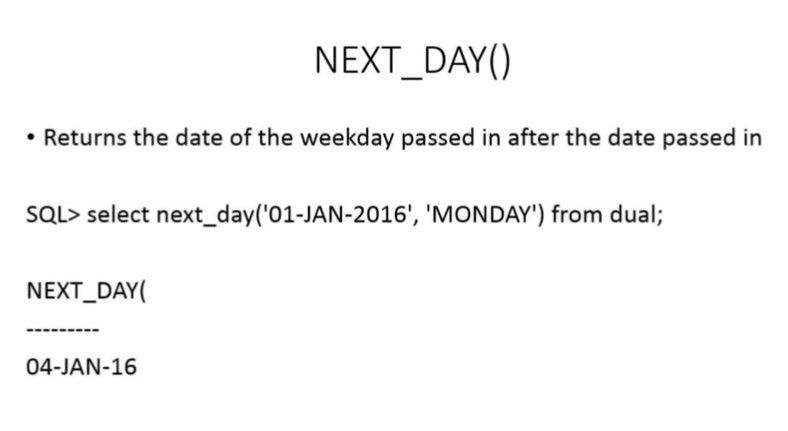
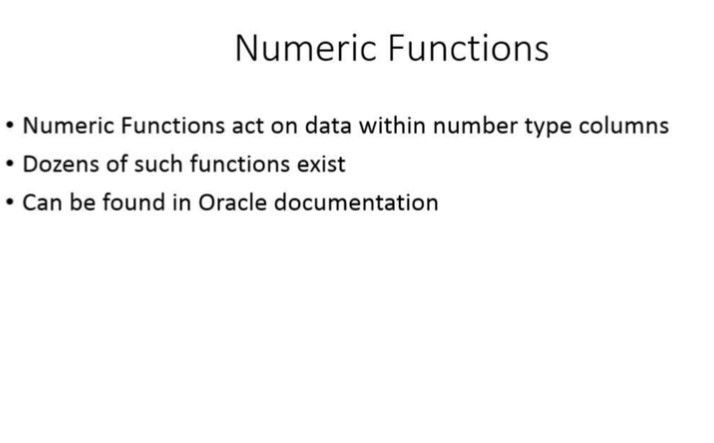
- 190NUMERIC FUNCTIONS
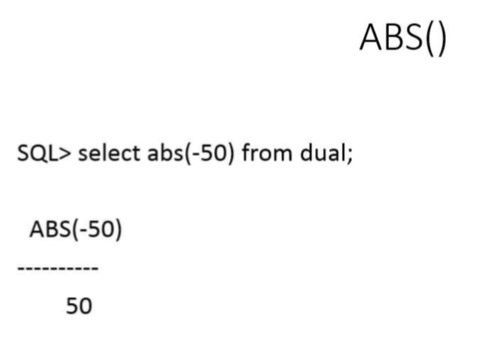
- 191ABSOLUTE VALUE ABS
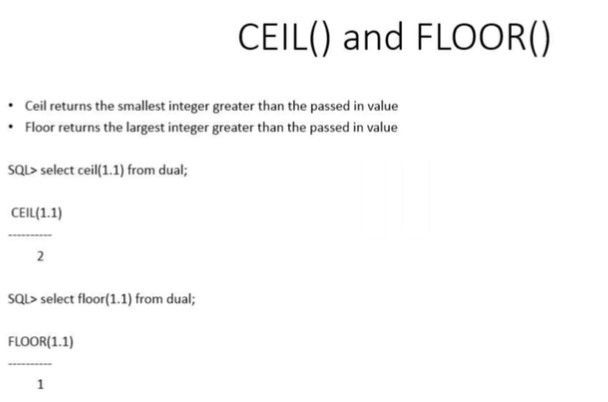
- 192CEIL() FLOOR()
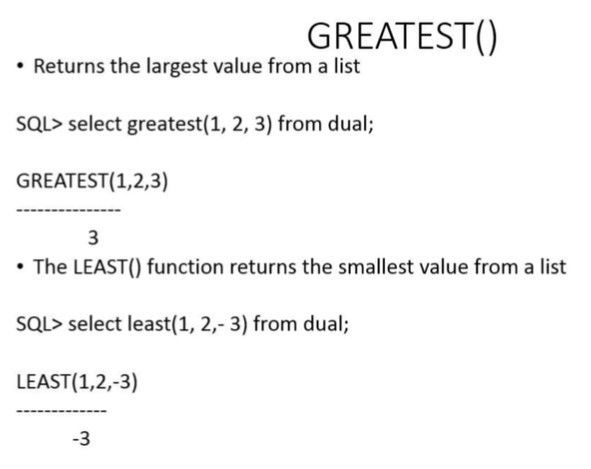
- 193GREATEST
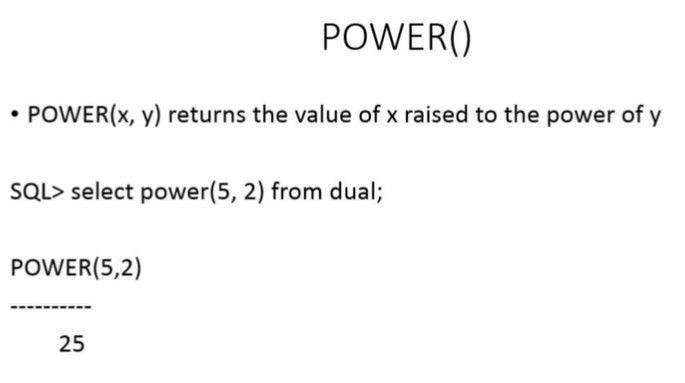
- 194POWER
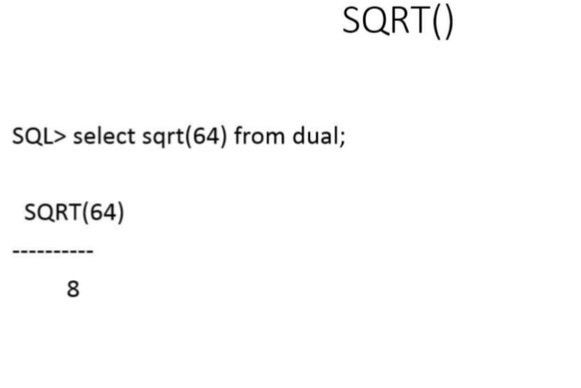
- 195square root SQRT
- 196ROUND
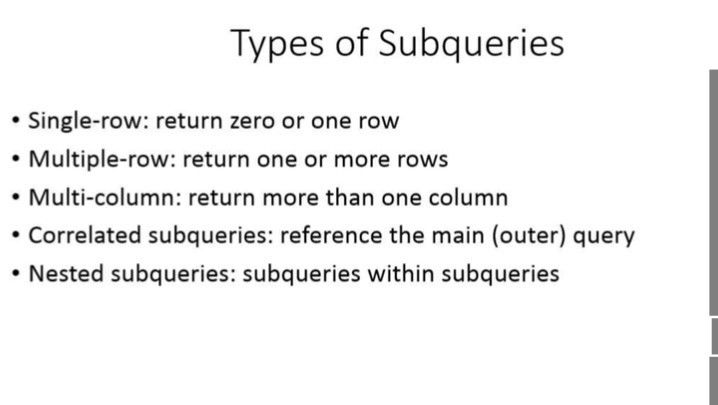
- 197TYPES OF SUBQUERIES
- 198SINGLE-ROW
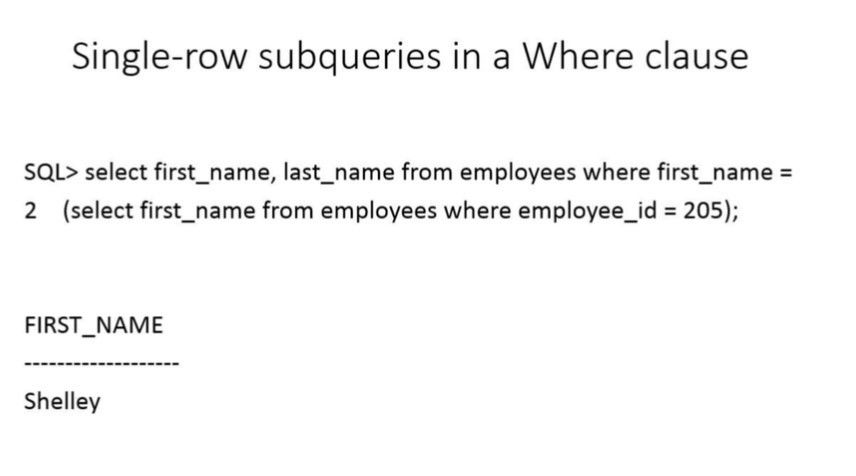
- 199USING DIFFERENT OPERATORS in the WHERE clause
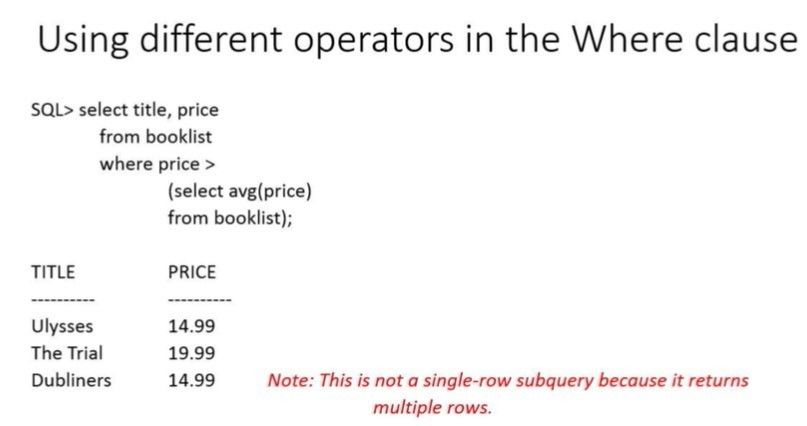
- 200USING A SUBQUERY in a FROM clause (inline View)
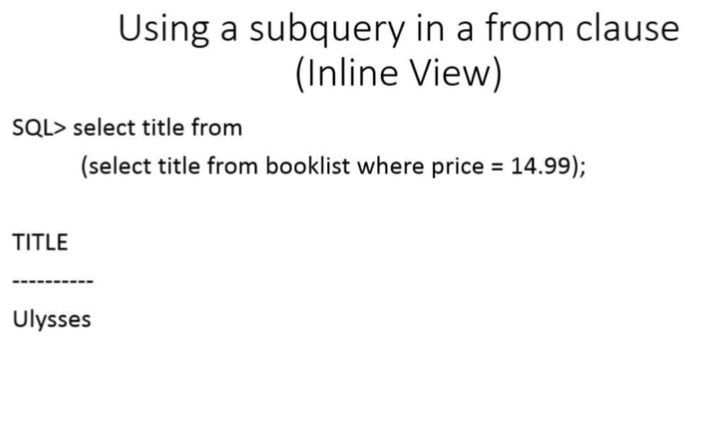
Informações
- Descrição
- SIT772 FlashCards sobre SIT772 - SQL, criado por Amber Saxon em 25-11-2019.
- Criado por
- Amber Saxon
- Visualizações
- 1
- Avaliação