
Flashcards
Week 2 - Info Systems

Flashcards do conjunto (47)
- 1Although managers and business professionals do not need to be IT experts, they should: ? And what do they need to know?- Have a basic understanding of how computer hardware and software works
- Recognise that the effective use of IT Infrastructure can benefit a business's performance and productivity.
* We need to not only understand how to use technology, but why we use it and the benefits it brings.
* We need to know how to manage the data and the information it produces (file management).
*Businesses has come to rely on IT as a critical component to the success of the business. - 2What are the 5 components to a computer based information system?- Hardware
- Software
- Data
- Procedures
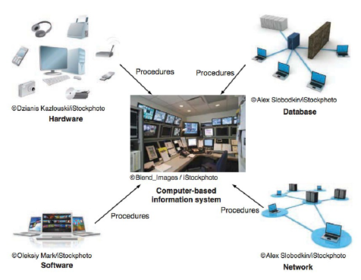
- People - 3What does hardware consist of? what do these devices do together?Consists of :
- Processor
- Monitor
- Keyboard
- Printer
*These devices accept, process and display data and information - 4What is a Network?A connecting system (wireline or wireless) that permits different computers to share resources (can be regarded as part of hardware).
- 5What is software?A program or collection of programs that enable the hardware to process data.
- 6What is a database?A database (data) is a collection of related files or tables containing data
- 7What are procedures?The instructions for combining the above components (Hardware, network, software, database) to processes information and generate the desired output.
- 8Components of a computer based information system
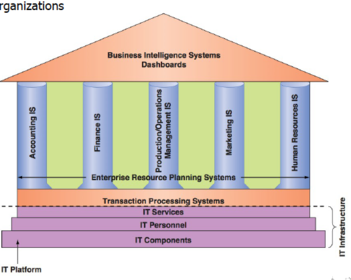
- 9The components are integrated to form a wife variety of Info Systems found within organisations:
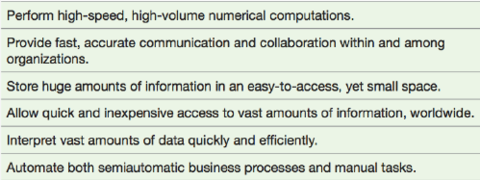
- 10What are capabilities of Computer based Information systems?
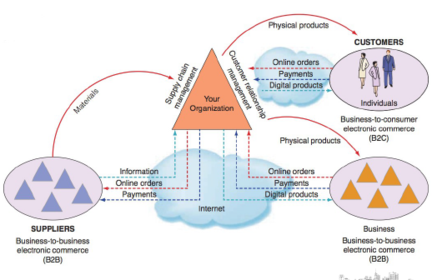
- 11Certain information systems support parts of organisations, others support entire organisations, and still others support groups of organisations.
- 12What do you need to know about computer hardware - what are the 4 basic hardware categories?- Input
> Keyboard, mouse, document scanners, bar-code scanners, microphones, magnetic ink readers
- Processing
> CPU and primary storage - main memory
- Output
> Video displays, printers, audio speakers, overhead projections, plotters
- Secondary Storage
> Magnetic disks, optical disks, magnetic tapes - 13What are the basic components of the computers? (Map)
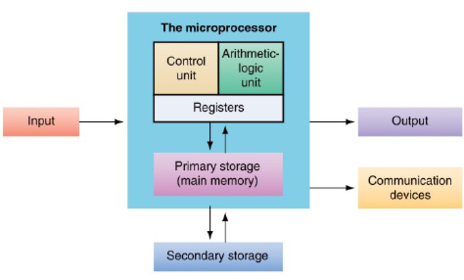
- 14Peripheral device types - What are types of Input devices? name at least 5.● Keyboards
● Mouse
● Optical MouseTouchpad
● Graphics Tablet
● Joystick
● Touchscreen
● Stylus
● Digital pen
● Vocie recognition - 15What are types of output devices? name at least 5.Monitors
● Flexible Displays
● Retinal Scanning displays
● Head-up displays
● Printers
● Laser Printers
● Plotters
● Voice Output
● Pocket Projector - 16In modern business, what provides a competitive advantage?Productive working by having the right equipment
- 17Competitive advantage - Main memory- Too little means constant memory swapping
- Slows processing
- Needs more memory if processing too many programs - 18Competitive advantage - CPU- Speed expressed in hertz
- Needs the CPU to be faster if handling complex tasks - 19Competitive Advantage - data storage> Main memory is volatile
- Contents lost when power is off
> Magnetic and optical disks are nonvolatile
- Saved contents survive after power is turned off - 20Storage, Input & Output Technology The capabilities of Computer Systems depend not only on the speed and capacity of the CU but also on the speed, capacity and design of the peripheral devices:- Secondary Storage
- Input Technology
- Output Technology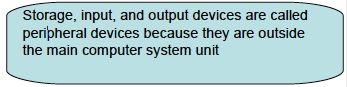
- 21One of the major problems relating to Source Data Information is how to get lots of data into a computer quickly. What has been developed are devices known as Source Data Automation. What is SDA?The process of collecting data at their point of origin in digital form.
- 22SDA captures data is a computer-readable form at the time and place the data are created. Examples include: (list at least 4)● Optical Character Recognition (OCR)
● Bar Code readers
● QR Codes for use with smart phones
● Magnetic Ink Character Recognition (MICR)
● Handwriting Recognition
● Digital Scanners
● Magnetic Strip readers
● Sensors - 23What is Client-server computing?- The client (or PC) is smart and does most of the work
- It only uses the server when needed
- Client computers used for word processing, spreadsheets, database access (connect to servers for Web, e-mail, database)
- Provides fast, large, powerful service - 24Client-Server computing (map)
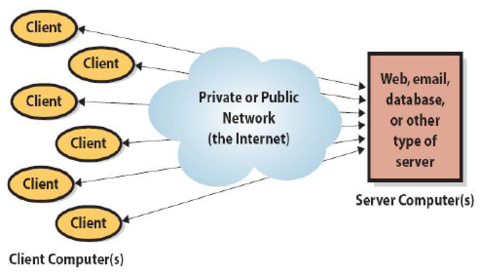
- 25What is cloud computing?- Refers to computer networking on the Internet
- New term used in IS
- Stores data on servers accessed only by the internet - 26Examples of Cloud Computing?- When you access a video from Facebook, you are accessing computing
services in the cloud
– You don’t know which server is processing or playing the video
- Google Docs - 27Software drives the hardware: What should hardware requirements be determined by?Your hardware requirements should be determined by what you’re going to use
your computer for! - 282 Types of Software?– Operating or system software
● Program that controls computer’s operation and resources
– Application programs
● Perform specific user tasks - 29Software constraints?Particular version of operating system is written for particular type of hardware
● Must conform to computer hardware. Example is Mac OS versus Windows
– Application programs written to use on a particular operating system - 30Software (diagram)
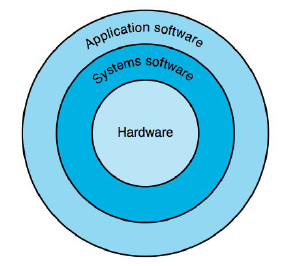
- 314 Software defects?– All too often software is inefficient, poorly designed and has errors
– SEI defines good software as usable, reliable, defect free and cost effective
– On average professional programmers make between 100 – 150 errors every
1000 lines of code
– Critical step in reducing this is better design - 32What is the difference between owning & licensing?- When users buy a computer program, they are buying a licence to use it: the ownership remains with the development company
- 33What are open source programs?- Used by individuals and organisations
- They are operating systems and application programs
- Owned by a the open-source community
- No licence fee
- Companies make money by offering support - 34What are examples of which Open Source Software is available for free or for a small fee?- Mp3 players, open office etc.
- 35What is Application Software?Programs written for a specific application to perform functions specified by business or end users.
- 36What does Application software do?- Tells the hardware how to do the input, storage, processing and output functions
- It employs the capabilities of a computer directly to a task that the user wishes to perform
- Acts as the interface between the operating system and the hardware devices - 37Personal application software categories
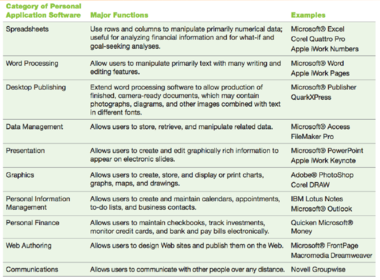
- 38Types of Installed Software Applications?- Spreadsheets (Excel)
- Data management (Access)
- Web Browsers (Firefox or Internet Explorer)
- Apps for mobile phone - 39Types of Web-Based Applications?- VU Collaborate
- Web search engines (Google)
- Email - 40Why is Collaboration critical in Business?- Assist with collaborative tasks
- Make life easier
- No need for face-to-face meetings
- Wont lose or misplace work
- Able to know who is contributing and who is not
- Create better results
- Collaborative skills are highly marketable - 41What are the 5 Components of a Collaboration Information System?
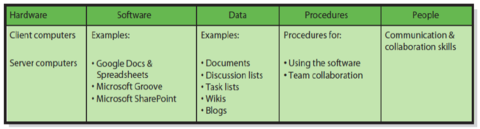
- 42Exchange of Data in various forms is essential to collaboration. What are forms of exchanging data?- Documents
- Discussions
- Task lists
- Calendars - 43What are types of software and cloud servers support sharing of data? Some data is free and bundled in other applications.- Microsoft Outlook
- Dropbox
- Google Docs
- Microsoft Powerpoints
* Procedures for business use of the software must be defined. - 44What are Spreadsheets?- Table of data in column and rows
- Rows identified by numbers
- Columns identified by letters - 45What is a worksheet?- Refers to a spreadsheet
- Workbook is a collection of worksheets in a single file - 46What is a cell?- Cell is intersection of a row and column
- Cell address is of the form 'column row' e.g. D3 is the 4th column along the 3rd row down.
- Cells hold data, formulas, labels
- Almost no limit to number of rows and columns - 47Are large amounts of data better suited to spreadsheets or databases?Databases
Informações
- Descrição
- • Why should you care how a computer works? • What is a Source Date Automation? • What is the difference between a Client and a Server? • What is Cloud Computing? • What do you need to know about software? • What is Application Software?
- Criado por
- jenniferelkhoury
- Visualizações
- 131
- Avaliação