
Flashcards
Security + _Chapter 1 _Understanding Network Devices and Cabling
Flashcards do conjunto (24)
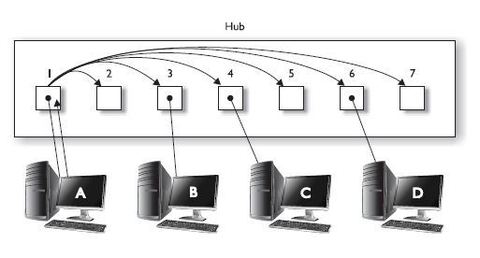
- 1HUB-The hub is an older networking device used to connect all the systems together in a network environment.
-The hub is a layer 1 device that receives signal from one system and sends the signal to all ports on the hub.
-The drawback to the hub is that it uses up bandwidth by sending data to every port on the hub.
-Another drawback is that it is a security issue if all systems on the network receive the data that the hub sends to all ports. This is a huge security concern and is one reason you should not use hubs on the network - 2Switch-A switch is similar to a hub in that it is used to connect all systems together in a network environment.
-The switch is a layer 2 device that filters traffic by the layer 2 address.
-The layer 2 address is the MAC address, or hardware address that is assigned to the network card by the manufacturer.
-The switch receives the data, then filters the traffic by sending the data only to the port that the destination system resides on
-The switch is able to filter the traffic because it stores the MAC addresses of each system connected to the switch, and the port that system is connected to, in the MAC address table.
-The MAC address table is a table stored in memory on the switch and is responsible for tracking what ports each system is connected to. - 3Switch Benefitsfiltering
a switch filters traffic, which prevents others from viewing confidential information.
-port mirroring
also known as port monitoring is a feature that allows the administrator to copy traffic from other ports to a single destination port (known as a monitoring port).
The switch filters traffic by default, so the administrator cannot monitor network traffic; switch vendors came up with a way to copy all traffic to a single port so the administrator could connect their monitoring system to that port.
The commands used to configure a port is known as an interface
port security
a feature of a network switch that lets you configure a port for a specific MAC address; this allows you to control which systems can connect to the switch because the switch can temporarily disable the port until the correct system is plugged into the switch.
-disable ports
It’s a security best practice that if you have ports on the switch that are not being used, you should disable them, so they cannot be used. Use the shutdown command. - 4Collision DomainsA collision domain is a group of network systems that share the same network segments and can have their data collide with one another.
EX: In a network hub, if one system sends data, any other system connected to that hub can send data at the
same time, resulting in data collision because the hub creates a shared network segment that all systems have
access to. With a switch, each port on the switch creates a collision domain that is its own network segment, so
because no other system is on the network segment, there won’t be data collision. - 5EXAMA switch offers great security because it filters traffic by sending traffic to the port and that the destination system resides on. Be able to describe features such as port security, port mirroring, and the need to disable unused ports.
- 6VLANS• Virtual LANS (VLANS)
• The purpose of a VLAN is to create multiple networks within the one network switch.
• One way to do this is by placing ports on the switch in groups known as VLANS
• When a system is connected to a port on the switch, it becomes a member of the VLAN that the port is associated with
• When a system is the member of one VLAN, it cannot communicate with systems on another VLAN (It’s as if each VLAN has its own switch with no connections to another switch).
• Communication across VLANs is not allowed without a router
• Once VLAN is created, you can place different ports in particular VLANs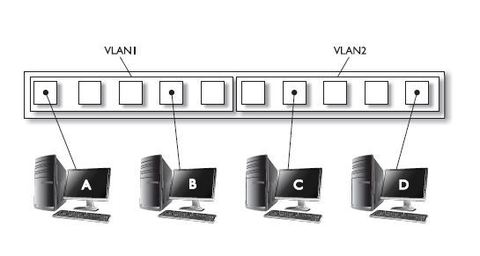
- 7EXAMVLANS are a way to create communication boundaries on the network; by default, systems in one VLAN cannot communicate with systems in another VLAN.
- 8Routers• A router is a layer 3 device on the OSI (open systems interconnection) model; that’s responsible for routing or sending data from one network to another network.
• The router uses a routing table that resides in its memory to determine the networks that the routers knows how to send data to
• Routers define the boundary of the network by creating a broadcast domain.
• A broadcast domain is a group of systems that can receive one another’s broadcast messages.
• A broadcast message is a message that is destined for all systems; routers are strategically placed on the network to keep those broadcast messages within your network because broadcast traffic does not pass through the router. - 9RoutersThe show ip route command displays the routing table on a Cisco router
The listing has 3 routes: route to 23.0.0.0 and 24.0.0.0 network shows because the router is connected to those networks
A static route (code S) that the administrator added has been configured to pass data to the 24.0.0.2 system to reach the 25.0.0.0 network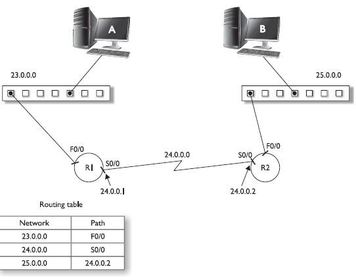
- 10Load Balancer• A load balancer is a device that’s designed to split the load between components such as servers and routers.
• Multiple servers or devices divide the workload instead of a single server
• This increases overall performance because more systems are working at the same time to handle incoming request - 11Firewalls and Proxy Servers• A firewall is a network device that controls what traffic is allowed to enter/leave the network
• Firewalls filters traffic based on rules placed on the firewall indicating what traffic is allowed or not allowed
• Typically you start with a deny-all rule that states all traffic is denied, unless you specify by building a rule for a special type of traffic
• A proxy server is a type of firewall; that associated with being able to control outbound communication by limiting what web sites an employee can visit.
• Proxy servers are different from firewalls in the sense that an employee will first authenticate to the proxy server (via username/password) and based on that username the administrator will decide whether employee is allowed to use the internet
• Proxy servers perform a high level of logging so the administrator can see what sites are visited - 12EXAMProxy Server makes the request for internet resource on behalf of the user, the company will filter and log what web sites users have visited
- 13UNDERSTANDING NETWORK CABLING• Cabling is the transmission medium for data sent between hosts on a LAN
• Three primary types of cable media that can be used to connect systems to a network:
o Coaxial cable
o Twisted-pair cable
o Fiber optic cable
• Transmission rates supported on each of these physical media are measured in millions of bits per second or megabits per second (Mbps) - 14Coaxial Cable• Coaxial or coax cable looks like the cable used for cable TV signal to TV
• One strand (a solid core copper wire) runs down the middle of the cable
• Around that strand is a layer of insulation; covering that insulation is braided wire and metal foil, which shields against electromagnetic interference
• A final layer of insulation covers the braided wire
• Coaxial cable is more resistant to outside interference because of the layers of insulation
• It is more resistant to outside interference than unshielded twisted-pair (UTP) cable
- 15Coaxial Cable• Two types of coax cabling: the two differ in thickness and maximum cable distance than signal can carry
Thinnet
Thicknet - 16Thinnet Refers to RG-58 cabling – a flexible coaxial cable about ¼-inch thick
Used for short distance communication; flexible enough to maneuver between workstations
Connects directly to workstation network adapter card by using a British naval connector (BNC); uses the network adapter card’s internal transceiver
Maximum length is 185 meters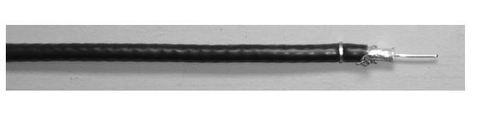
- 17Thicknet refers to RG-8 cabling; named derived from being thicker than the thinnet
½-inch thick and can support data transfer over longer distances than thinnet
Maximum cable length of 500 meters; usually used as backbone to connect several smaller thinnet based networks
Because of thickness, this cable is hared tor work than thinnet
A transceiver is connected directly to the thicknet cable by using the vampire tap
Connection from the transceiver to the network adapter card is made using a drop cable to connect to the adapter unit interface (AUI) port connector
- 18Twisted-Pair Cable• Twisted-pair cabling gets its name from having four pairs of wires that are twisted to help reduce crosstalk or interference from outside electronic devices
• Crosstalk is interference from adjacent wires - 19Two forms of twisted-pair cablesUnshielded-Twisted Pair (UTP)
Shielded-Twisted Pair (STP) - 20Unshielded-Twisted Pair UTP are similar to telephone cables
Twisted-pair cable for network use contains four pairs of wires; each member of the pair of wires contained in the cable is twisted around the other; the twist in the wires help shield against electromagnetic interference
The maximum distance of UTP is 100 meters
- 21UnShielded-Twisted Pair UTP cable uses small plastic connectors designated as registered jack 45 or (RJ-45)
The network RJ-45 connector contains 8 contacts, one for each wire in a UTP cable
RJ-11 connector is a telephone connector and has 4 contacts
RJ-45 and RJ-11 will need a special crimping tool when creating the cables to make contact between the pins in the connector and wires inside the cables
UTP cables is easier to install than coaxial
Twisted-pair cable is more susceptible to interference than coaxial and shouldn’t be used in environments containing large electrical devices
UTP cabling has different flavors known as grades or categories
Each category was designed for a specific type of communication or transfer rate
CAT 5e is most popular and can reach transfer rates of over 1,000 Mbps or 1 gigabit per second Gbps - 22UnShielded-Twisted PairA network that uses UTP cabling, will come across different types of cable for different purposes

- 23UnShielded-Twisted Pair Straight-through cables
• CAT 5 UTP cabling usually uses only four wires when sending and receiving information on the network.
• The four wires of the eight used are wires 1,2,3,6
• Straight-through cable is when you configure the wire for the same pin at either end of the cable –
- 24UnShielded-Twisted PairStraight-through cables
-This figure shows the meaning of pins on a network and on a hub/switch.
-wires 1 and 2 are used to transmit data (TX) from the computer, wires 3 and 6 are used to receive information (RX) on the computer
-The transmit pin on computer is connected to the receive pin (RX) on the hub via wires 1 and 2
-Data sent from computer is received at network hub -data sent from hub is received at computer
-the transmit pins (TX) on the hub are connected to the receive pins (RX) on the computer (wires 3 and 6)
pin 1 on the computer is connected to pin 1 on the hub by the same wire (thus the term straight-through)
• All pins are matched straight through to the other side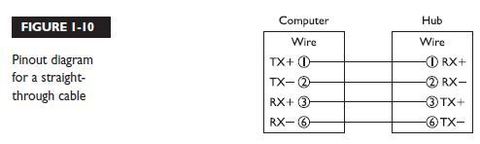
Informações
- Descrição
- CompTIA Security+ Certification Study Guide
- Criado por
- Kimberly Stover
- Visualizações
- 8
- Avaliação