
Mapa mental
IT Professional
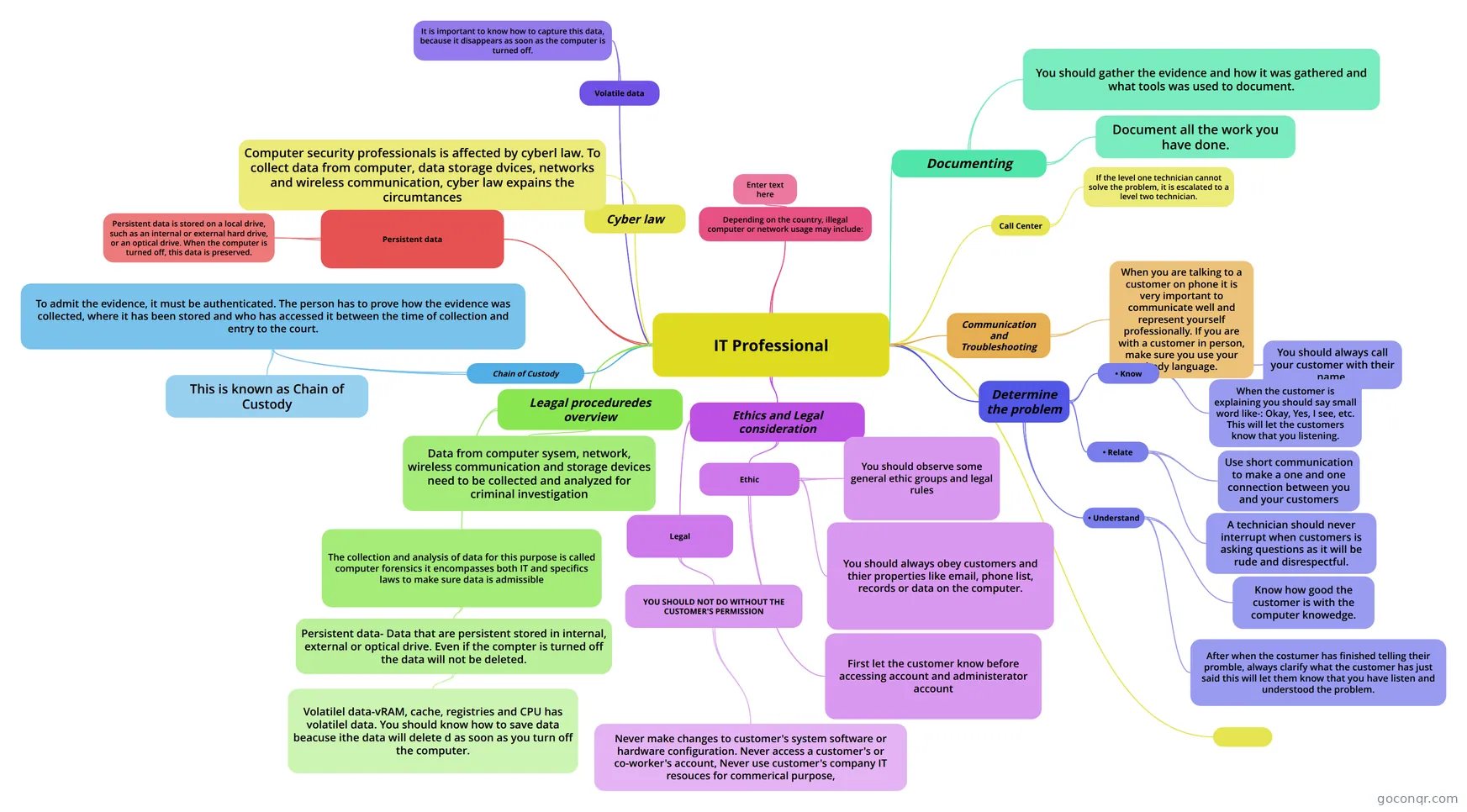
Mind map: IT professional computer forensics
Conteúdo do mapa
IT Professional
Communication and Troubleshooting
- When you are talking to a customer on phone it is very important to communicate well and represent yourself professionally. If you are with a customer in person, make sure you use your body language.
Determine the problem
- • Know
- You should always call your customer with their name.
- When the customer is explaining you should say small word like-: Okay, Yes, I see, etc. This will let the customers know that you listening.
- • Relate
- Use short communication to make a one and one connection between you and your customers
- A technician should never interrupt when customers is asking questions as it will be rude and disrespectful.
- • Understand
- Know how good the customer is with the computer knowedge.
- After when the costumer has finished telling their promble, always clarify what the customer has just said this will let them know that you have listen and understood the problem.
- • Know
Ethics and Legal consideration
- Ethic
- You should observe some general ethic groups and legal rules
- You should always obey customers and thier properties like email, phone list, records or data on the computer.
- First let the customer know before accessing account and administerator account
- Legal
- YOU SHOULD NOT DO WITHOUT THE CUSTOMER'S PERMISSION
- Never make changes to customer's system software or hardware configuration. Never access a customer's or co-worker's account, Never use customer's company IT resouces for commerical purpose,
- YOU SHOULD NOT DO WITHOUT THE CUSTOMER'S PERMISSION
- Ethic
Leagal proceduredes overview
- Data from computer sysem, network, wireless communication and storage devices need to be collected and analyzed for criminal investigation
- The collection and analysis of data for this purpose is called computer forensics it encompasses both IT and specifics laws to make sure data is admissible
- Persistent data- Data that are persistent stored in internal, external or optical drive. Even if the compter is turned off the data will not be deleted.
- Volatilel data-vRAM, cache, registries and CPU has volatilel data. You should know how to save data beacuse ithe data will delete d as soon as you turn off the computer.
- Persistent data- Data that are persistent stored in internal, external or optical drive. Even if the compter is turned off the data will not be deleted.
Cyber law
- Computer security professionals is affected by cyberl law. To collect data from computer, data storage dvices, networks and wireless communication, cyber law expains the circumtances
Documenting
- You should gather the evidence and how it was gathered and what tools was used to document.
- Document all the work you have done.
Chain of Custody
- To admit the evidence, it must be authenticated. The person has to prove how the evidence was collected, where it has been stored and who has accessed it between the time of collection and entry to the court.
- This is known as Chain of Custody
- To admit the evidence, it must be authenticated. The person has to prove how the evidence was collected, where it has been stored and who has accessed it between the time of collection and entry to the court.
Persistent data
- Persistent data is stored on a local drive, such as an internal or external hard drive, or an optical drive. When the computer is turned off, this data is preserved.
Volatile data
- It is important to know how to capture this data, because it disappears as soon as the computer is turned off.
Call Center
- If the level one technician cannot solve the problem, it is escalated to a level two technician.
Depending on the country, illegal computer or network usage may include:
- Enter text here
Informações
- Descrição
- Cisco IT essential Mapa Mental sobre IT Professional, criado por mgurung2 em 13-02-2014.
- Criado por
- mgurung2
- Visualizações
- 39
- Tags
- Avaliação