
Mapa mental
DNS (Domain Name System)
Conteúdo do mapa
DNS (Domain Name System)
¿What is it?
- It is an application-layer protocol. Host, routers, name servers communicate to resolve names
- The DNS protocol runs over UDP and uses port 53
- ¿How does it work?
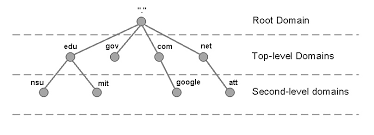
- Hierarchy:
- 1. Root DNS Servers
- In the internet there are 13 root DNS servers (labeled A through M). Most of which are in North America. Each 'server' is actually a cluster of replicated servers, both for scurity and reliability purposes
- 2. Top-level domain (TLD) servers
- These servers are responsible for top-level domains such as com, org, net, edu, and gov, and all of the country top-level domains such as uk, fr, ca and jp. The company Network Solutions maintains the TLD servers for the com top-level domain. The company Educase maintains the TLD servers for the edu top-level domain.
- 3. Authoritative DNS servers
- Every organization with publicly accessible hosts must provide publicly accessible DNS records that map the names of those hosts to IP addresses. An organization's authoritative DNS server houses these DNS records. An organization can choose to implement its own authoritative DNS server to hold these records or can pay to have these records stored in a authoritative DNS server of some service provider
- local DNS server
- Each ISP has a local DNS server. When a host connects to an ISP, it provides the host with the IP addresses of one or more of its local DNS servers. When host makes DNS query, query is sent to its local DNS server - --> Acts as proxy, forwards query into hierarchy
- 1. Root DNS Servers
- Catching
- once (any) name server learns mapping, it caches mapping -->cache entries timeout (disappear) after some time >TLD servers typically cached in local name servers >>Thus root name servers not often visited
- DNS Resource Records
- Each DNS reply message carries one or more resource records
- Four-tuple that contains the following fields: (Name, Value, Type, TTL)
- We will ignore TTL for the moment (determines when a resource should be removed from a cache)
- The meaning of "Name" and "Value" depend on "Type"
- If a DNS server is authoritative for a particular hostname, then the DNS server will contain a Type A record for the hostname. (Even if the DNS server is not authoritative it may contain a Type A record in its cache). If a server is not authoritative for a hostname, then the server will contain a Type NS record for the domain that includes the hostname and a Type A record that provides the IP address of the DNS server in the Value field of the NS redord.
- Type =A
- "Name" is a hostname and "Value" is the IP address for the hostname. Thus, a Type A record provides the standard hostname-to-IP address mapping. As an example, (relay1.bar.foo.com, 145.37.93.126, A) is a Type A record.
- Type =NS
- Name is a domain and Value is the hostname of an authoritative DNS server that knows how to obtain the IP addresses for hosts in the domain. This record is used to route DNS queries further along the query chain. As an example, (foo.com, dns.foo.com, NS) is a Type NS record
- Type = CNAME
- then Value is a canonical hostname for the alias hostname Name. This record can provide querying hosts of canonical name for a hostname. As an example (foo.com, relay1.bar.foo.com, CNAME) is a CNAME record
- Type = MX
- Value is the canonical name of a mail server that has an alias hostname Name. As an example, (foo.com, mail.bar.foo.com, MX) (like CNAME but only for mail servers)
- Four-tuple that contains the following fields: (Name, Value, Type, TTL)
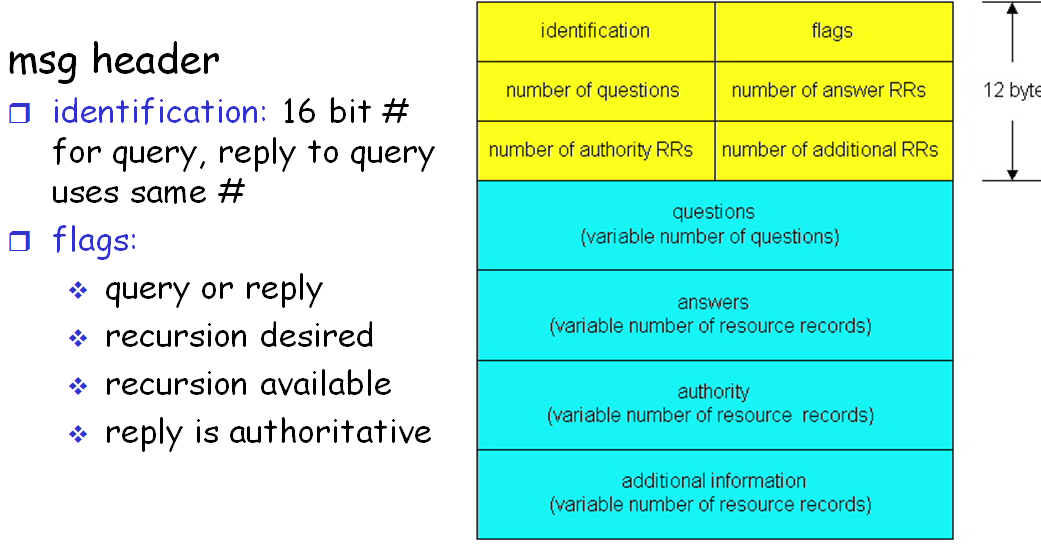
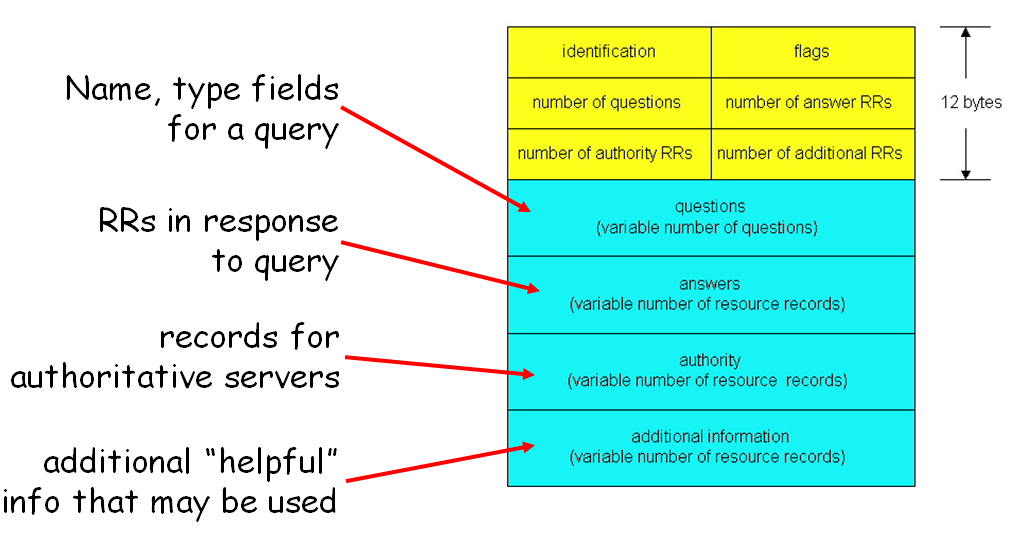
- DNS Messages
- Only two kinds
- Query
- Reply
- Both use the same FORMAT
- Only two kinds
- Each DNS reply message carries one or more resource records
- ¿How are records introduced in the DNS database?
- First: register the domain name at a registrar
- ¿What is a registar?
- Comercial entity that
- Verifies the uniqueness of the domain name
- Enters the domain name into the DNS database
- collects a small fee for its servicces
- Comercial entity that
- Provide the registar with the names and IP addresses of your primary and secondary authoritative servers
- Example: dns1.networkutopia.com, dns2.networkutopia.com, 212.212.212.1, and 212.212.212.2
- For each of these two authoritative DNS severs, the registrar would then make sure that a Type NS and a Type A record are entered into the TLD servers
- For the first one: (networkutopia.com., dns1.networkutopia.com, NS) (dns1.networkutopia.com, 212.212.1,A)
- ¿What is a registar?
- First: register the domain name at a registrar
- Hierarchy:
- It is a distributed database implemented in hierarchy of many name servers
- The DNS servers are often UNIX machines running the Berkeley Internet Name Domain (BIND) software
- ¿Why isn't it centralized?
- 1. A single point of failure
- 2. Traffic volume
- 3. Distant centralized database
- 4. High maintenance
- Doesn't scale!
- Distributed is highly scalable
- ¿What services does it provide?
- hostname to IP address translation
- host aliasing (alias and cannonical host names)
- Mail server aliasing
- Load distribution. replicated Web servers: set of IP addresses for one canonical name
- It is an application-layer protocol. Host, routers, name servers communicate to resolve names
Basics
Imagens e arquivos do mapa
Informações
- Descrição
- Informática (Redes De Computadores) Mapa Mental sobre DNS (Domain Name System), criado por William Glez em 28-09-2017.
- Criado por
- William Glez
- Visualizações
- 1
- Avaliação