
Mapa mental
Teaching and Learning with Technology
Conteúdo do mapa
Teaching and Learning with Technology
Technological negatives
- Screen Time
- Technology isn't going to go away students need to develop tech literacy. Advise parents them what their kids are looking at.
- Get parents to have boundaries on screen time - if parents are having issues with their kids not participating in home activities
- Technology isn't going to go away students need to develop tech literacy. Advise parents them what their kids are looking at.
- Screen Time
Student Learning
- Self Regulation
- Time Management
- Peer learning
- Effort regulation
- Growth mindset
- Gives students the ability to learn and change with students effort
- Grit - passion and perseverance for long goals
- Growth mindset
- Metacognition
- Critical Thinking
- Self Regulation
ICT
- Information and communications technology
- ICT Frameworks
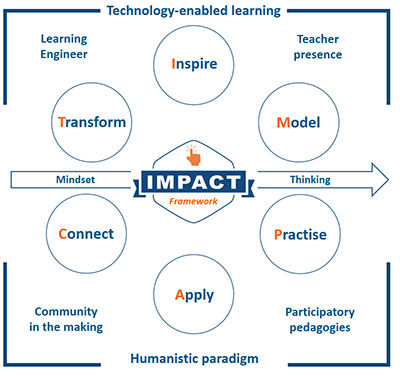
- IMPACT
- Inspire
- motivate and emotionally connect learners to content and each other
- Model
- explicit instruction, demonstrate concept
- Practice
- repeat, stepped process, drafting
- Apply
- look for relationship, compare/contrast, visible thinking
- Connect
- engage with experts, student to student and beyond classroom
- Transform
- create a representation of new knowledge, reflect on what know
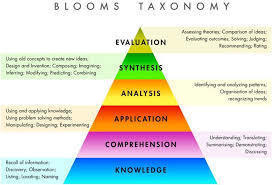
- Blooms Taxonomy
- 6 levels to Bloom's Taxonomy
- Knowledge
- lower thinking skills
- Comprehension
- Application
- Analysis
- Synthesis
- Evaluation
- Higher thinking skills
- Knowledge
- 6 levels to Bloom's Taxonomy
- Inspire
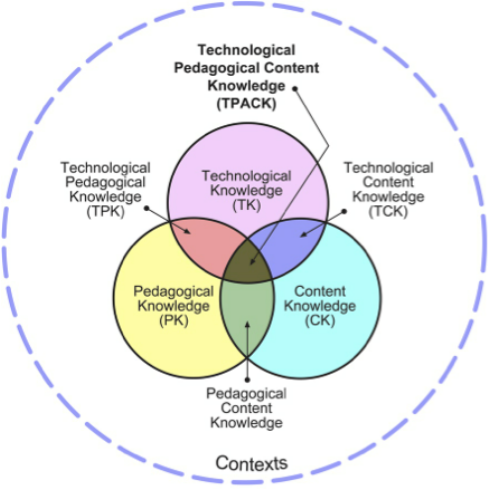
- TPACK
- TCK
- How the subject matter better illuminated by the use of this technology
- TPK
- Is this the best technological tool for the chosen teaching strategy?
- Technological, Pedagogical and Content Knowledge
- PCK
- How do the chosen teaching strategies allow students to meet the skill and content objectives
- it means that technologies are used in ways that enhance student learning
- TCK
- IMPACT
- ICT Frameworks
- Information and communications technology
Student Centred Learning
- Student centred learning focuses on the student rather than the teacher - it usually is used for group learning
- Learning Theories
- Constructivist - Constructionist
- The knowledge is student-based - they construct their own knowledge/ predictions
- Example: Project based learning - mathletics
- The knowledge is student-based - they construct their own knowledge/ predictions
- Behaviourist - Cognitivist
- knowledge is teacher-based and exists external to the student
- Technologies
- Content-specific
- games that present information incrementally with questions to be answered by the learner - Correct answers are rewarded and incorrect answers are reindicated.
- Content-free
- that are blank empty and can be applied to any content/ subject domain - students have to do something in that space. Constructivist - Constructionist - view of learning. Log programming
- Content-specific
- Example: direct based learning - Projects, big questions, like ShowMe App and Educreation
- Technologies
- knowledge is teacher-based and exists external to the student
- Constructivist - Constructionist
- Learning Theories
- Student centred learning focuses on the student rather than the teacher - it usually is used for group learning
Teacher Centred Learning
- A teacher-centred approach is one where activity in the class is centred on the teacher.. Usually a traditional way of teaching to allow students to have knowlledge quickly
Australian Curriculum
- Australian Standards for Teachers
- Graduate Level
- Standard 1.1; Demonstrate knowledge and understanding of physical, social and intellectual development and characteristics of students and how these may affect learning.
- Standard 1.6;Demonstrate knowledge and understanding of strategies for differentiating teaching to meet the specific learning needs of students across the full range of abilities.
- Standard 3.4; Demonstrate knowledge of a range of resources, including ICT, that engage students in their learning.
- Standard 4.5; Demonstrate an understanding of the relevant issues and the strategies available to support the safe, responsible and ethical use of ICT in learning and teaching.
- Standard 6.2; Understand the relevant and appropriate sources of professional learning for teachers.
- Standard 2.5; Know and understand literacy and numeracy teaching strategies and their application in teaching areas.
- Standard 2.6; Implement teaching strategies for using ICT to expand curriculum learning opportunities for students.
- Standard 7.4; Understand the role of external professionals and community representatives in broadening teachers’ professional knowledge and practice
- Graduate Level
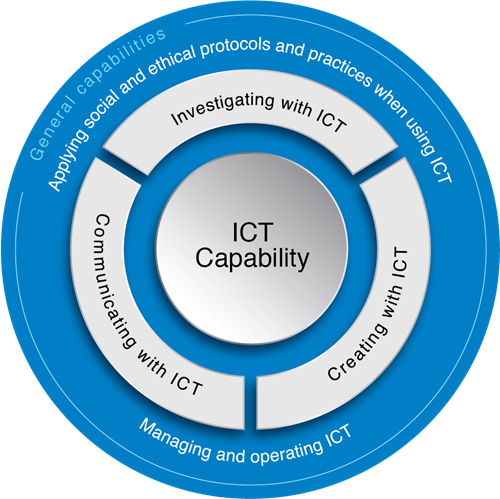
- General capabilities
- 7 General Capabilities taught to students in years F-10
- ICT
- Investigating with ICT
- These will help students to learn how to manage and operate with ICT and apply social and ethical protocols and practices
- Communicating with ICT
- Creating with ICT
- Investigating with ICT
- Math
- English
- Art
- Humanities and Social Science
- HPE
- Science
- ICT
- 7 General Capabilities taught to students in years F-10
- Australian Standards for Teachers
Assistive Technology
- Assistive technology: focus on students who have specific learning needs
- General areas of assistive technologies
- General areas
- Access
- Access technologies to enable students to engage with the curriculum
- Supportive
- Supportive technologies to improve efficiency within learning episodes - remove barriers
- Curriculum
- Curriculum applications to enhance learning in a specific curriculum focus
- Framework
- Framework applications to cater to learning needs (e.g. PowerPoint, Word -literacy supported)
- Access
- Examples
- Environment recognition: Seeing AI read, identify things.
- Immersive readers: MS Office
- Handwriting recognition: Pen to Print
- Immersive readers: MS Office
- Access Hardware for curriculum engagement
- - Alternative keyboards - Mouse alternative - Switch system - Interactive systems - Virtual Reality - Transformation hardware - Communication devices VI Hardware - screen magnification and enhancement - OCR and screen reading - Braille devices
- Transforming Content
- Written content may need to be transformed before student can effectively engage with the text
- Three step process
- Create digital copy
- Recognise content (OCR - optical content recogniser)
- Place digital content to an appropriate digital format for the student
- Three step process
- Written content may need to be transformed before student can effectively engage with the text
- Assistive technology: focus on students who have specific learning needs
Teacher Pedagogical practices with ICT
- Instructional
- Instructional practise divided the learning activities into smaller units with use of positive and negative feedback for corrections.
- Revelatory
- The activities and knowledge are placed in order for students to discover the content.
- Conjectual
- This enables students to manipulate ideas and hypotheses to develop their knowledge further
- Pedagogical Beliefs
- Dualistic
- right or wrong knowledge handed down by authority
- Multiplistic
- multiple views but still believe that most knowledge is certain
- Relativistic
- most knowledge as tentative and contextual and generated by the self
- Relativism
- that knowledge is uncertain and based on the weight of accumulated evidence.
- Teachers use technologies based on their beliefs about how students learn
- Dualistic
- Approaches to use EdTech/ICT
- Supplementary
- same same
- Enrich/ Augment
- Add to existing practice
- Transform/ leverage
- change practice
- Supplementary
- Instructional
Imagens e arquivos do mapa
Informações
- Descrição
- Mapa Mental sobre Teaching and Learning with Technology, criado por Cleo Kalatzis em 02-10-2019.
- Criado por
- Cleo Kalatzis
- Visualizações
- 15
- Avaliação