
Educational Technology
1,412 resources created by 1,250 users
This Educational Technology page on GoConqr gathers community-made mind maps, quizzes, flashcards, slide sets, notes and flowcharts, from ICT in teaching and blended learning to multimedia learning theory and computer-assisted language learning. It's built for university students working through the topic, and for teachers after ready-made material. There are over 1,300 resources here, including more than 1,200 mind maps, 28 quizzes and 16 flashcard decks. Open a mind map to get your bearings, then try a quiz.
Select topic
- Digital Pedagogy and Critical Thinking53
- Digital Literacy and 21st Century Skills32
- Technology Integration Models and Standards31
- Technology Integration in the Classroom58
- E-Learning, Blended Learning and Flipped Classrooms85
- Personal and Virtual Learning Environments46
- Digital Tools and Learning Resources22
- Multimedia Learning and Digital Storytelling15
- Gamification and Game-Based Learning22
- Technology in Language Teaching161
- Technology for Writing Skills105
- Copyright and Online Safety5
Top Educational Technology resources
-
Mind map Educational Technology What is Educational Technology? It is more than just simply implementing technology into the classroom. It ...
-
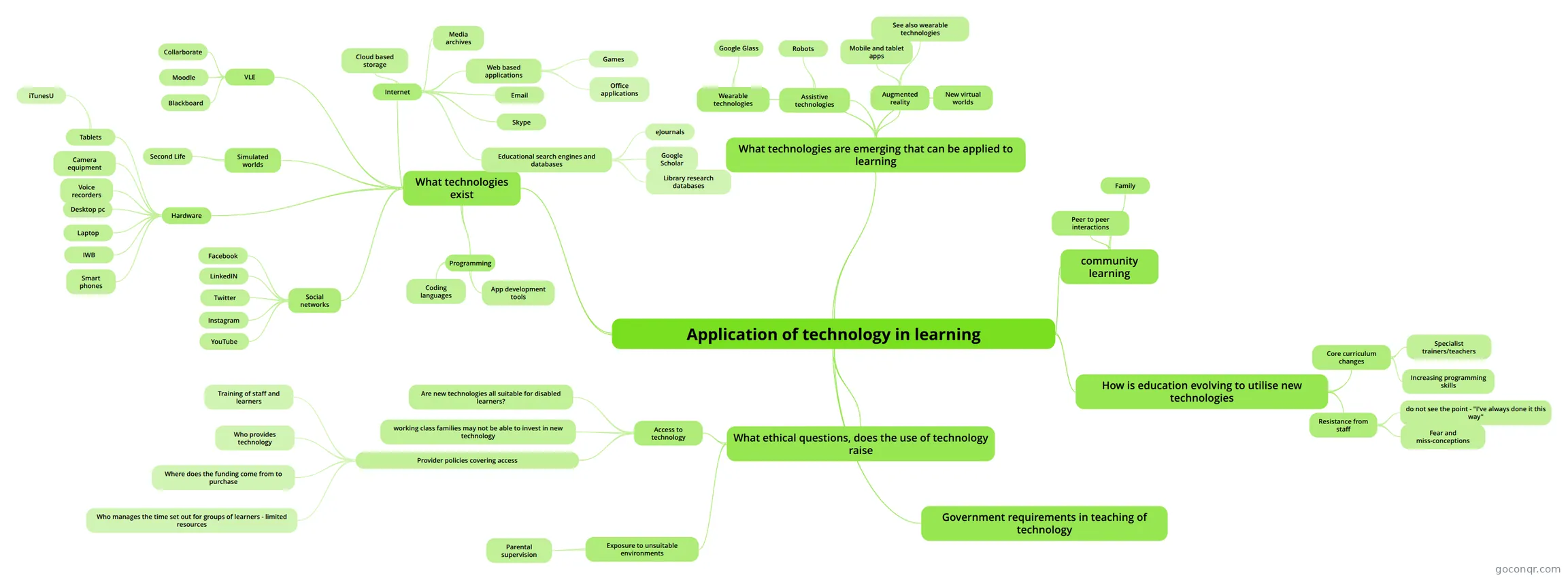 Mind map Application of technology in learning Exploration of Technology in learning, in preparation for presentation and report
-
Mind map INNOVATIVE EDUCATIONAL TECHNOLOGIES
-
Mind map Interactive Multimodal Learning Environments A concept map of an article on interactive multimodal learning environments.
-
Mind map Educational Technologies for teaching and learning
-
80 questionsMidterm Examination LCD is a non material technology.
-
28 cardsED1441 What are the Big6?
-
Mind map TECHNOLOGY
Quizzes
See all 38 quizzes-
80 questionsMidterm Examination LCD is a non material technology.
-
10 questionsHow to Keep our Students Safe 1. An AUP is a document that clearly outlines what is and is not acceptable behavior, as well as the conseq...
-
5 questionsEducational Technology QUIZ 1 This generation prefers learning opportunities that: (Select all answers that apply)
-
15 questionsWeb Tools Quiz Chapters 13-14 A learning ecology is the fluidity and agility of technology-supported learning as individuals connect and ...
-
8 questionsTeahers: Digital Tools for Effective English Teaching Which tool is best for collaborative writing?
-
30 questionsChapter 1 EdTech What is the type of teacher that is being a model when it comes to behavior, language, dealing with colleag...
-
42 questionsTema 4 How many groups can new technologies be divided into?
-
10 questionsBrown_Katie An AUP is a document that clearly outlines what is and is not acceptable behavior, as well as the consequen...
Mind maps
See all 1,265 mind maps-
Educational Technology What is Educational Technology? It is more than just simply implementing technology into the classroom. It ...
-
Application of technology in learning Exploration of Technology in learning, in preparation for presentation and report
-
INNOVATIVE EDUCATIONAL TECHNOLOGIES
-
Interactive Multimodal Learning Environments A concept map of an article on interactive multimodal learning environments.
-
Educational Technologies for teaching and learning
-
TECHNOLOGY
-
Tools for learning: Technology and teaching strategies
-
Teacher professional identity and the nature of technology integration
Flashcards
See all 17 flashcards-
28 cardsED1441 What are the Big6?
-
55 cardsEDC101 - Unit Test
-
22 cardsUnit 3. Tools for Communities of Practice (CoP) Communities of practice (CoP)
-
16 cardsGlossary subject Q's Can you define the phrase ‘digital world’?
-
7 cardsITSE Standards
-
61 cardsUsing technology to support learning True or false: Monitoring progress: Technology can be used for data accuracy and time lines
-
6 cardsUse of ICT in teaching and learning
-
10 cards1_Becoming a 21st Century Teacher
Flowcharts
See all 30 flowchartsNotes
See all 41 notes-
RESOURCES AND ICT - creado desde un Mapa Mental TASK 1: CONCEPTUAL IMAGES TASK 2: TPACK TASK 3 - COMIC LIFE
-
School organization good - creado desde un Mapa Mental TASK 1.TPACK TASK 2.Treasure Hunt: cartographic projections TASK 3. Telling Stories: Free Resources and visual presentations
-
Design of Educational Digital Resources USE CONTEXT Digital resources are one of the most important learning tools at this moment. As teacher we must to be involved in this technological world because students are too. When we design a digital resourc...
-
Design of Educational Digital Resources DESIGN OF EDUCATIONAL DIGITAL RESOURCES The Web is a tool in search of a metaphor.(Christopher M. Hoadley, 1996) The purpose of this digital learning era is to faciliate the teaching/learning process. It also helps to...
-
Educational Technology: My Definition Educational Technology Educational technology is not simply resigned to the concept of implementing technology in the classroom, nor is it merely a focus on the presentation of content or media output. Rather, educati...
-
Discipline related Category- Discipline-Specific - These apps are specific to teaching and learning within an academic discipline, such as biology, algebra, graphic design, composition, etc. Resource Identification- Project Noah Resourc...
-
Science Category- Discipline-Specific - These apps are specific to teaching and learning within an academic discipline, such as biology, algebra, graphic design, composition, etc. Resource Identification- Project Noah Resourc...
-
Multiple Literacies - definitions Print Literacies: •The ability to comprehend and create a variety of written texts, encompasing a knowledge of gramar, vocabular and discourse features alongside reading and writing skills. Texting Literacies: •The ab...
Slides
See all 21 slidesTopics in Educational Technology
More Education and pedagogy (incl. teaching methods, curriculum, educational psychology) topics
About Educational Technology
GoConqr OriginalWhat the page covers
Most of what you will find here is mind maps, and they range widely. Some ask why we use technology at all, such as the three versions of Why Use ICT's in Teaching?, which pick out engagement, games and efficient use of time. Others look at theory, such as Multimedia Learning Theory of Richard Mayer and Interactive Multimodal Learning Environments, which covers the feedback, pacing and pretraining principles.
Where to start
Begin with the mind map Educational Technology. It asks how we learn, and links effective pedagogy to real-world application, social media and more than memorising facts. Next, read INNOVATIVE EDUCATIONAL TECHNOLOGIES for ICT-based learning and the 4Cs of 21st century skills, then Creating with ICT for creativity in student work.
- Get the big picture from the opening map.
- Read a theory map, such as the one on Mayer's multimedia learning.
- Move to practice: blended learning, flipped classroom workflow, screencasting, 3D printing.
- Look at barriers, such as Factors preventing teachers from integrating technology.
Using quizzes and maps together
Read a map first, then test yourself. Educational Technology QUIZ 1 is a sensible first check, and Web Tools Quiz Chapters 13-14 and How to Keep our Students Safe add more. Note any question you miss, then go back to the matching map. The flashcard deck ITSE Standards and the deck on the Big6 and Super 3 help with key terms.
Language learning and teaching tools
If your interest is languages, look at the maps on computer-assisted language learning and the slide set Theoretical Supports for CALL. Teachers can also open the slide sets on using GoConqr in the classroom for ideas to adapt.
Where it sits
This unit belongs to the strand Teaching Methods and Classroom Practice, within Education and pedagogy. Pick a map that matches your current question, and build your own notes alongside it.
Frequently asked questions
Which resource should I open first?
Start with the mind map Educational Technology. It sets out how we learn, effective pedagogy, real-world application and the role of technology and social media. After that, INNOVATIVE EDUCATIONAL TECHNOLOGIES and Creating with ICT give a wider view of ICT and 21st century skills.
What do the mind maps cover?
They cover reasons for using ICT in teaching, multimedia learning theory, blended learning, flipped classrooms, mobile apps, 3D printing, video making and language learning with technology. Several also look at barriers that stop teachers from bringing technology into lessons.
Are the resources free to use?
Yes. Every resource listed here is free to open, study and take, with no account needed. A free account also saves your quiz scores and lets you make your own quizzes, mind maps, flashcards and notes.
Who made these resources?
They were made by GoConqr users, not by GoConqr itself. That means style and depth vary, so it helps to compare a few maps on the same topic, such as the several blended learning versions, before settling on notes.
Which quizzes are there?
There are more than 20 quizzes on the page. Examples include Educational Technology QUIZ 1, Web Tools Quiz Chapters 13-14 and How to Keep our Students Safe. Use them after reading a map to see which ideas need another look.
Who is this page for?
It suits university students, who make up most of the resources, and teachers looking for ready-made material on classroom technology. Students can use maps and flashcards to learn the theory, while teachers can browse slide sets and workflows for practical ideas.