
Mapa mental
Unit 2A Programming 12/11/19
Conteúdo do mapa
Unit 2A Programming 12/11/19
Data
- There are different types of data such as characters,strings,floats (decimals)
- A sting is 1 or more characters "37" is a sting because it has speech marks
- When you adding two string: stringA= "2" stringB="5" stringA+stringB=25 . You do not add them because they are not integers you put the two stings together
- A Substring is a string that you get from the original string
- e.g scien is a substring of computerscience
- A sting is 1 or more characters "37" is a sting because it has speech marks
- Raw facts and figures before they have been processed
- Information is processed data
- There are different types of data such as characters,strings,floats (decimals)
Constant
- typically shown in uppercase
- Data values that stay the same every time a program is executed are known as constants. Constants are not expected to change.
- It is a temporary memory location
Variable
- A variable is a location in a memory in which you can temporarily store texts or numbers
- Rules for python: A variable name must start with a letter or the underscore character
- Declaring a variable:you give it a name and a type(string/int/char/float). In python you don't need to write the type, python will assume the type
- Initializing a variable is when you assign a specific value to the variable. This uses the assigning construct
Arithmetic operators
- The operation DIV is used for integer division
- For example 17 DIV 3=5
- MOD -Modulus- is used to find the remainder when dividing one integer by another
- Exponent ^ e.g 5^2 =25
- Remember BODMAS when calculating
- The operation DIV is used for integer division
INPUT Statement
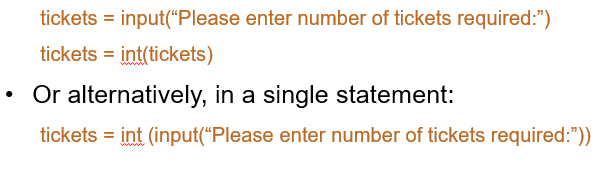
- In some languages, such as python you can combine a user prompt with an input statement e.g
- In python all input is assumed as a string. Therefore if you are inputting an integer or a real number, you have to convert it before it can be used in the calculation
Concatenating Strings
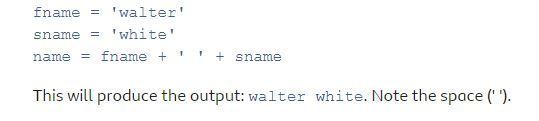
- Strings can be joined together to form a new string of data. This is called concatenation. We use the + symbol to concatenate strings. For example:
Using comments
- we use comments to: describe the aim of the program, to state the author of the program, to explain what the code does.
- Comments start with a # sign
- They are ignored when your program is translated to machine code and executed
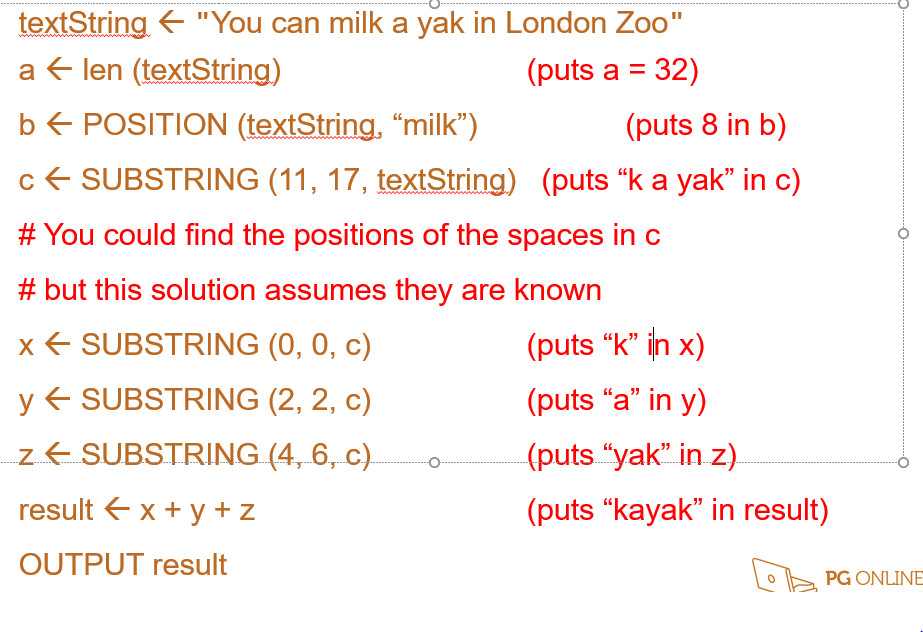
len is the length, a is the length of the string which is 32(you count the spaces), when you are counting the position start counting from 0 and include the spaces. e.g "milk" is position 8. The fourth line- you take the 11th position to the 17th position.Including the 11th position but excluding the 17th position(k a ya).
- ARRAYS
Programming constructs
- Assignment
- Sequence -when instructions are executed in the order that they are written in consecutively.
- Selection-An IF statement is a selection statement. A program branch depending on a decision
- Iteration-sometimes called a loop, is a repeating section of a code.FOR … END FOR, WHILE … ENDWHILE , REPEAT … UNTIL
- WHILE loop does something while the condition is true- condition control loop
- repeat.. until the condition is checked at the end. while..endwhile the condition is checked at the beginning
- FOR...ENDFOR- use when you know how many times the code is repeated- count controlled loop
- Counter controlled iterations are used when you want to iterate a known number of times.• Counter controlled iterations use a variable which can be used within the code to know how many times the code has been run.
- • Code must be indented within an iteration.
- WHILE loop does something while the condition is true- condition control loop
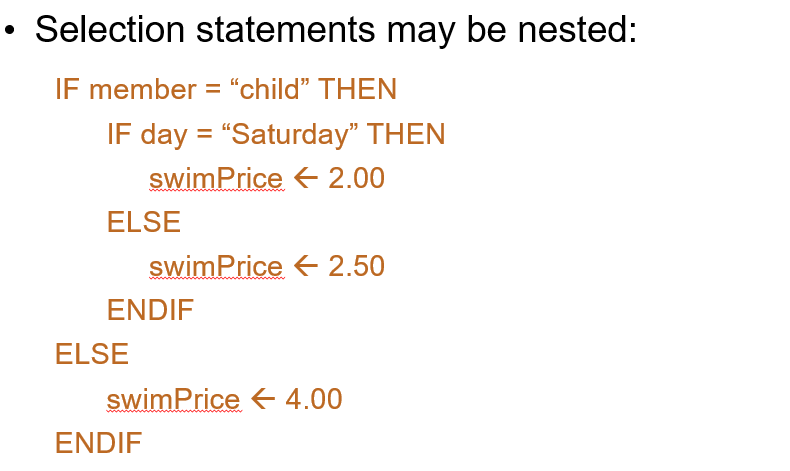
- nested selection statement- an if statement within an if statement
- • Incrementing a variable increases its value by one. • Decrementing a variable decreases its value by one.
Imagens e arquivos do mapa
Informações
- Descrição
- Mapa Mental sobre Unit 2A Programming 12/11/19, criado por sydelle wontumi em 12-11-2019.
- Criado por
- sydelle wontumi
- Visualizações
- 0
- Avaliação