
Mapa mental
ICT
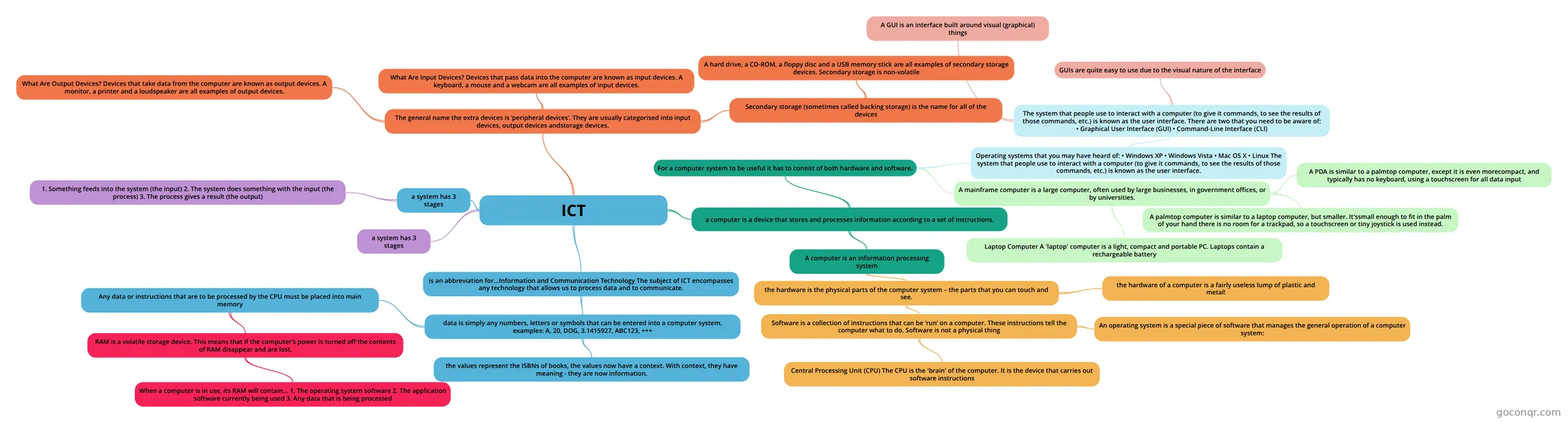
Mind map: ICT information and communication technology
Conteúdo do mapa
ICT
is an abbreviation for...Information and Communication Technology The subject of ICT encompasses any technology that allows us to process data and to communicate.
- data is simply any numbers, letters or symbols that can be entered into a computer system. examples: A, 20, DOG, 3.1415927, ABC123, +++
- the values represent the ISBNs of books, the values now have a context. With context, they have meaning - they are now information.
- Any data or instructions that are to be processed by the CPU must be placed into main memory
- RAM is a volatile storage device. This means that if the computer’s power is turned off the contents of RAM disappear and are lost.
- When a computer is in use, its RAM will contain… 1. The operating system software 2. The application software currently being used 3. Any data that is being processed
- RAM is a volatile storage device. This means that if the computer’s power is turned off the contents of RAM disappear and are lost.
- data is simply any numbers, letters or symbols that can be entered into a computer system. examples: A, 20, DOG, 3.1415927, ABC123, +++
a system has 3 stages
- 1. Something feeds into the system (the input) 2. The system does something with the input (the process) 3. The process gives a result (the output)
a computer is a device that stores and processes information according to a set of instructions.
- A computer is an information processing system
- the hardware is the physical parts of the computer system – the parts that you can touch and see.
- Software is a collection of instructions that can be ‘run’ on a computer. These instructions tell the computer what to do. Software is not a physical thing
- Central Processing Unit (CPU) The CPU is the 'brain' of the computer. It is the device that carries out software instructions
- An operating system is a special piece of software that manages the general operation of a computer system:
- the hardware of a computer is a fairly useless lump of plastic and metal!
- Software is a collection of instructions that can be ‘run’ on a computer. These instructions tell the computer what to do. Software is not a physical thing
- the hardware is the physical parts of the computer system – the parts that you can touch and see.
- For a computer system to be useful it has to consist of both hardware and software.
- Operating systems that you may have heard of: • Windows XP • Windows Vista • Mac OS X • Linux The system that people use to interact with a computer (to give it commands, to see the results of those commands, etc.) is known as the user interface.
- The system that people use to interact with a computer (to give it commands, to see the results of those commands, etc.) is known as the user interface. There are two that you need to be aware of: • Graphical User Interface (GUI) • Command-Line Interface (CLI)
- A GUI is an interface built around visual (graphical) things
- GUIs are quite easy to use due to the visual nature of the interface
- The system that people use to interact with a computer (to give it commands, to see the results of those commands, etc.) is known as the user interface. There are two that you need to be aware of: • Graphical User Interface (GUI) • Command-Line Interface (CLI)
- A mainframe computer is a large computer, often used by large businesses, in government offices, or by universities.
- Laptop Computer A 'laptop' computer is a light, compact and portable PC. Laptops contain a rechargeable battery
- A palmtop computer is similar to a laptop computer, but smaller. It'ssmall enough to fit in the palm of your hand there is no room for a trackpad, so a touchscreen or tiny joystick is used instead.
- A PDA is similar to a palmtop computer, except it is even morecompact, and typically has no keyboard, using a touchscreen for all data input
- Operating systems that you may have heard of: • Windows XP • Windows Vista • Mac OS X • Linux The system that people use to interact with a computer (to give it commands, to see the results of those commands, etc.) is known as the user interface.
- A computer is an information processing system
a system has 3 stages
The general name the extra devices is ‘peripheral devices’. They are usually categorised into input devices, output devices andstorage devices.
- What Are Input Devices? Devices that pass data into the computer are known as input devices. A keyboard, a mouse and a webcam are all examples of input devices.
- What Are Output Devices? Devices that take data from the computer are known as output devices. A monitor, a printer and a loudspeaker are all examples of output devices.
- Secondary storage (sometimes called backing storage) is the name for all of the devices
- A hard drive, a CD-ROM, a floppy disc and a USB memory stick are all examples of secondary storage devices. Secondary storage is non-volatile