
Mapa mental
Semaphores, Shared Memory and Message Queues
Conteúdo do mapa
Semaphores, Shared Memory and Message Queues
Tecnológico de Costa Rica, Carrera: Ingeniería en Computación, Sede: Cartago, Curso: Principios de sistemas operativos, Profesor: Esteban Arias Méndez, Estudiante: Jason David Espinoza Siles, Carné: 201223941, II semestre, 2016, Libro: Begining Linux Programming: capítulo 14. Reporte #7
Semaphores
- When you write programs that use threads operating in multiuser systems, multiprocessing sys- tems, or a combination of the two, you may often discover that you have critical sections of code, where you need to ensure that a single process (or a single thread of execution) has exclusive access to a resource. Semaphores have a complex programming interface. Fortunately, you can easily provide a much- simplified interface that is sufficient for most semaphore-programming problems.
- To prevent problems caused by more than one program simultaneously accessing a shared resource, you need a way of generating and using a token that grants access to only one thread of execution in a criti- cal section at a time.
- Semaphore Definition
- The simplest semaphore is a variable that can take only the values 0 and 1, a binary semaphore. This is the most common form. Semaphores that can take many positive values are called general semaphores. For the remainder of this chapter, we concentrate on binary semaphores.
- Linux Semaphore Facilities
- semget
- The semget function creates a new semaphore or obtains the semaphore key of an existing semaphore
- semop
- The function semop is used for changing the value of the semaphore
- semctl
- The semctl function allows direct control of semaphore information
- semget
Shared Memor y
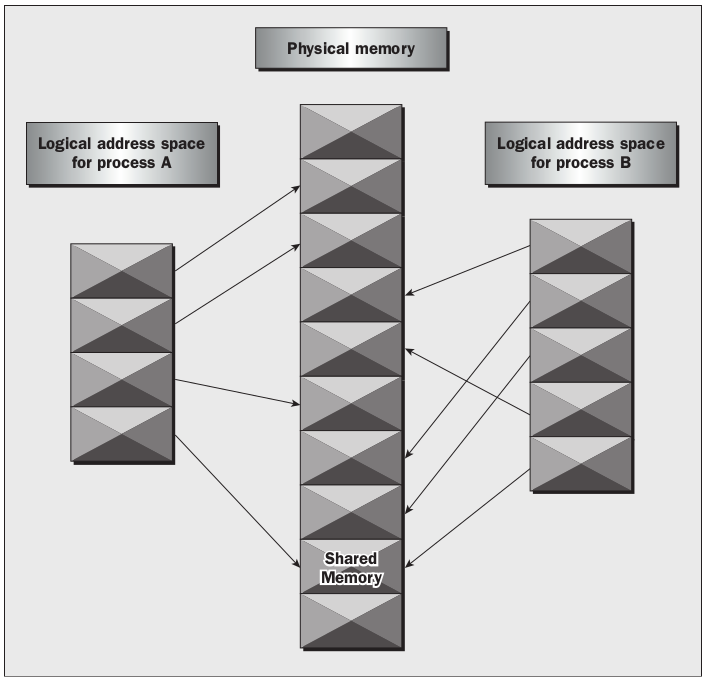
- Shared memory is the second of the three IPC facilities. It allows two unrelated processes to access the same logical memory. Shared memory is a very efficient way of transferring data between two running processes. Although the X/Open standard doesn’t require it, it’s probable that most implementations of shared memory arrange for the memory being shared between different processes to be the same physical memory.
- Shared memory is a special range of addresses that is created by IPC for one process and appears in the address space of that process. Other processes can then “attach” the same shared memory segment into their own address space. All processes can access the memory locations just as if the memory had been allocated by malloc . If one process writes to the shared memory, the changes immediately become visible to any other process that has access to the same shared memory.
- Shared memory provides an efficient way of sharing and passing data between multiple processes. By itself, shared memory doesn’t provide any synchronization facilities. Because it provides no synchro- nization facilities, you usually need to use some other mechanism to synchronize access to the shared memory. Typically, you might use shared memory to provide efficient access to large areas of memory and pass small messages to synchronize access to that memory.
- shmget
- You create shared memory using the shmget function
- shmat
- When you first create a shared memory segment, it’s not accessible by any process. To enable access to the shared memory, you must attach it to the address space of a process. You do this with the shmat function
- shmdt
- The shmdt function detaches the shared memory from the current process. It takes a pointer to the address returned by shmat . On success, it returns 0, on error –1. Note that detaching the shared memory doesn’t delete it; it just makes that memory unavailable to the current process.
- shmctl
- The control functions for shared memory are (thankfully) somewhat simpler than the more complex ones for semaphores
Message Queues
- Message queues provide a reasonably easy and efficient way of passing data between two unrelated processes. They have the advantage over named pipes that the message queue exists independently of both the sending and receiving processes, which removes some of the difficulties that occur in synchro- nizing the opening and closing of named pipes. Message queues provide a way of sending a block of data from one process to another. Additionally, each block of data is considered to have a type, and a receiving process may receive blocks of data having different type values independently. The good news is that you can almost totally avoid the synchronization and blocking problems of named pipes by sending messages. Even better, you can “look ahead” for messages that are urgent in some way. The bad news is that, just like pipes, there’s a maximum size limit imposed on each block of data and also a limit on the maximum total size of all blocks on all queues throughout the system.
- msgget
- You create and access a message queue using the msgget function
- msgsnd
- The msgsnd function allows you to add a message to a message queue
- msgrcv
- The msgrcv function retrieves messages from a message queue
- msgctl
- The final message queue function is msgctl , which is very similar to that of the control function for shared memory
IPC Status Commands
- Although they’re not required for X/Open compliance, most Linux systems provide a set of commands that allow command-line access to IPC information, and to tidy up stray IPC facilities. These are the ipcs and ipcrm commands, which are very useful when you’re developing programs.
- Displaying Semaphore Status
- To examine the state of semaphores on the system, use the ipcs -s command. If any semaphores are present.
- Displaying Shared Memory Status
- Like semaphores, many systems provide command-line programs for accessing the details of shared memory. These are ipcs -m and ipcrm -m <id> (or ipcrm shm <id> ).
- Displaying Message Queue Status
- For message queues the commands are ipcs -q and ipcrm -q <id> (or ipcrm msg <id> ).
Imagens e arquivos do mapa
Informações
- Descrição
- Mapa Mental sobre Semaphores, Shared Memory and Message Queues, criado por Jason Espinoza Siles em 05-10-2016.
- Criado por
- Jason Espinoza Siles
- Visualizações
- 0
- Avaliação