
Operating Systems
269 resources created by 240 users
This Operating Systems page on GoConqr gathers community-made quizzes, mind maps, flashcards, notes and slides, from interrupts, processes and deadlocks to file systems, Windows editions and Linux. It's built for school students revising a topic, university students and professional candidates filling gaps, and teachers after ready-made material. There are over 2,000 resources here, including more than 250 quizzes, over 1,200 mind maps and more than 400 flashcards. Pick a topic, try a quiz to find your gaps, then make your own revision sets.
Top Operating Systems resources
-
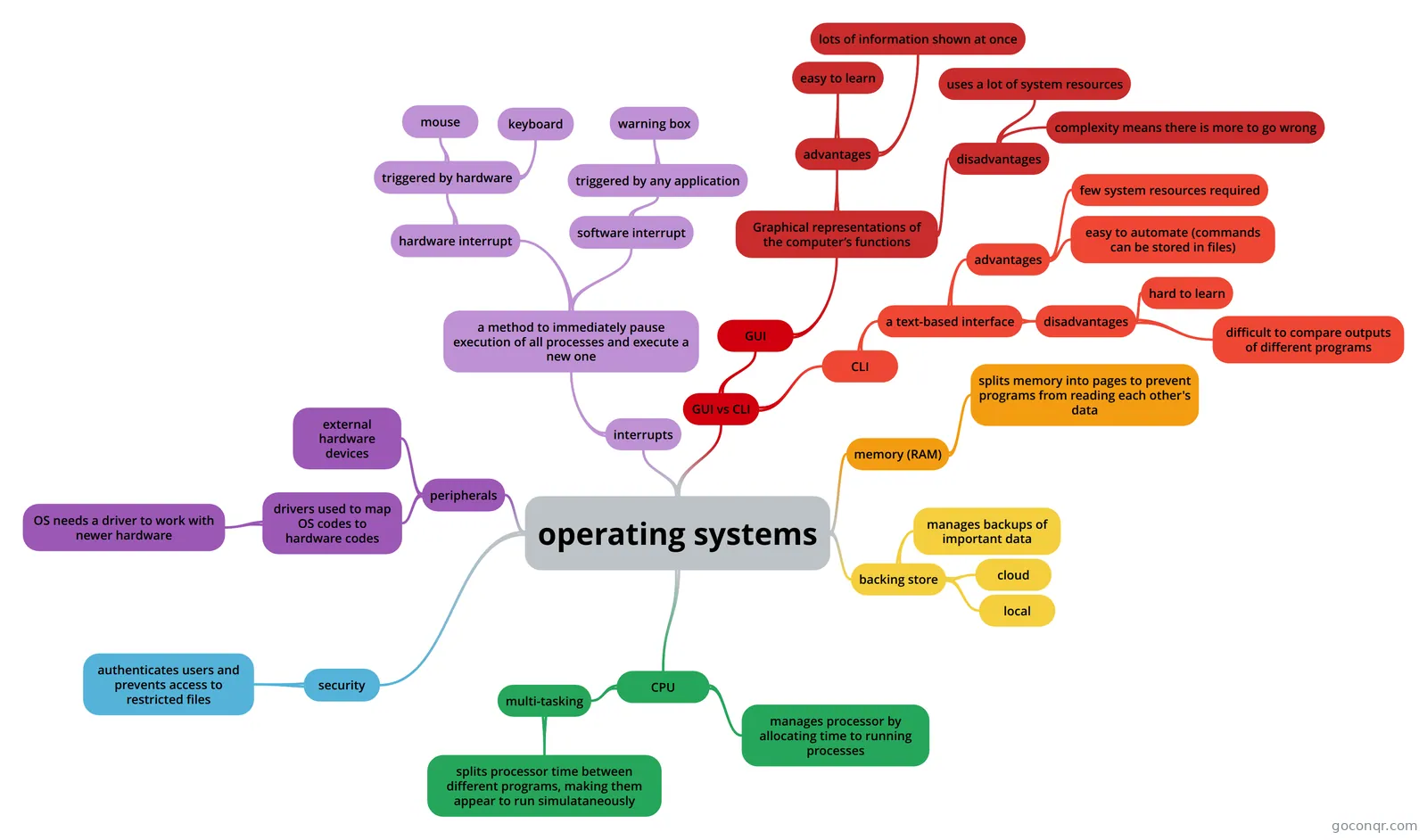 Mind map operating systems resources an operating system manages mindmap
-
127 questionsITN 106 - Mid Term Exam Prep ITN 106 - Microcomputer Operating Systems Exam Prep. Includes Chapters 3, 7, 9, 10, 11, 12.
-
200 questionsOperating Systems What are the 4 components of a computer system?
-
103 questionsOS | Quizzes #3 and #4
-
38 questionsCisco IT Essentials 7.0 - Chapter 12: Mobile, Linux, and macOS Operating Systems Study Quiz Which two location data sources can locator apps use to determine the position of a mobile device? (Choose ...
-
74 questionswww.OS.com V
-
42 questionsChapter 5 exam - version 4.1 What are two features of the active partition of a hard drive? (Choose two.)
-
54 questionsCS 372 Quiz 2 Practice This is the second quiz questions for practice. This is also a partial review for Midterm 1.
Quizzes
See all 53 quizzes-
127 questionsITN 106 - Mid Term Exam Prep ITN 106 - Microcomputer Operating Systems Exam Prep. Includes Chapters 3, 7, 9, 10, 11, 12.
-
200 questionsOperating Systems What are the 4 components of a computer system?
-
103 questionsOS | Quizzes #3 and #4
-
38 questionsCisco IT Essentials 7.0 - Chapter 12: Mobile, Linux, and macOS Operating Systems Study Quiz Which two location data sources can locator apps use to determine the position of a mobile device? (Choose ...
-
74 questionswww.OS.com V
-
42 questionsChapter 5 exam - version 4.1 What are two features of the active partition of a hard drive? (Choose two.)
-
54 questionsCS 372 Quiz 2 Practice This is the second quiz questions for practice. This is also a partial review for Midterm 1.
-
23 questionsComputer File Systems FAT is defined as
Mind maps
See all 103 mind maps-
operating systems resources an operating system manages mindmap
-
The Components of an Operating System By: Jessica Kramarczyk NOTE: Assumptions are marked by a star in the bottom- right hand corner of nodes
-
Operating systems
-
Operating System Operating system
-
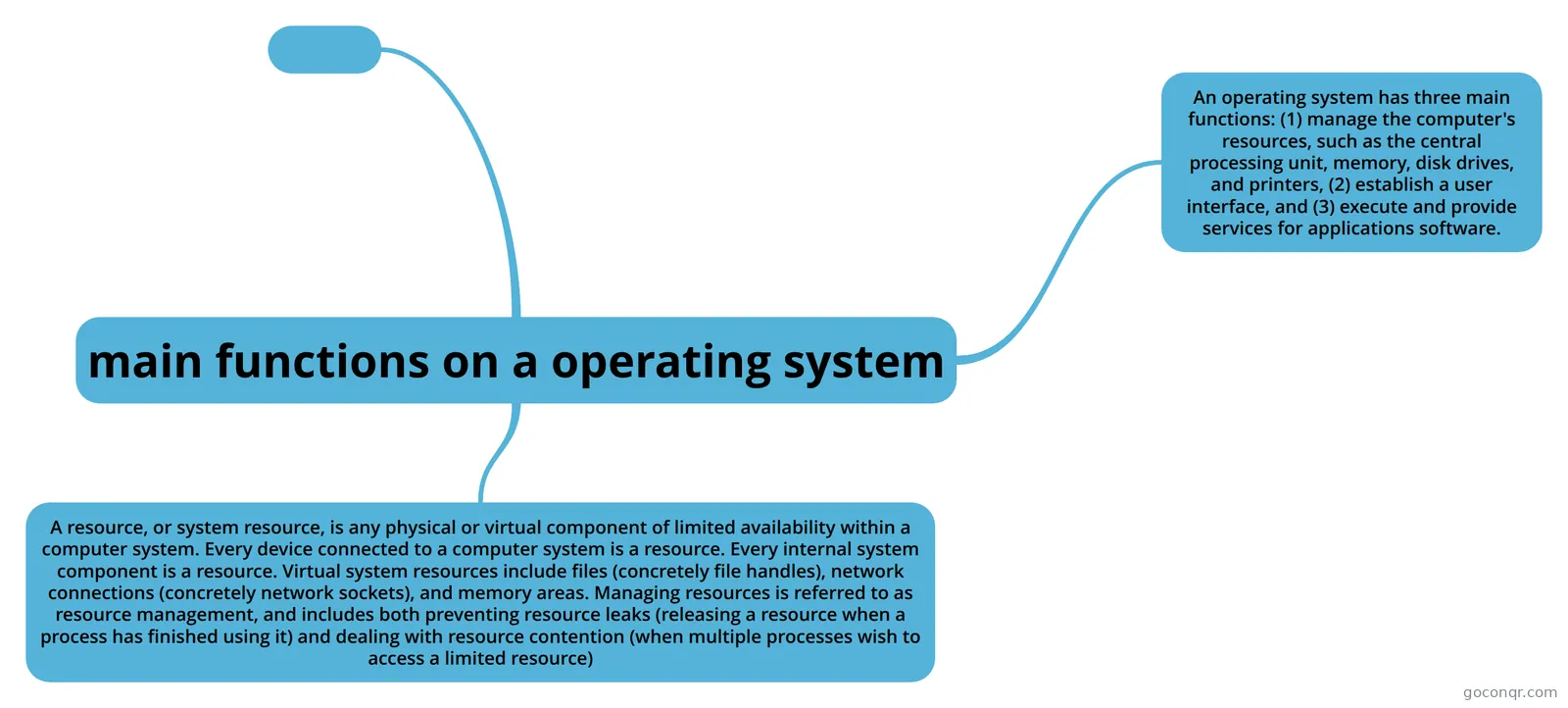 main functions on a operating system thing on operating systems and the main functions
-
operating systems what is an operating system
-
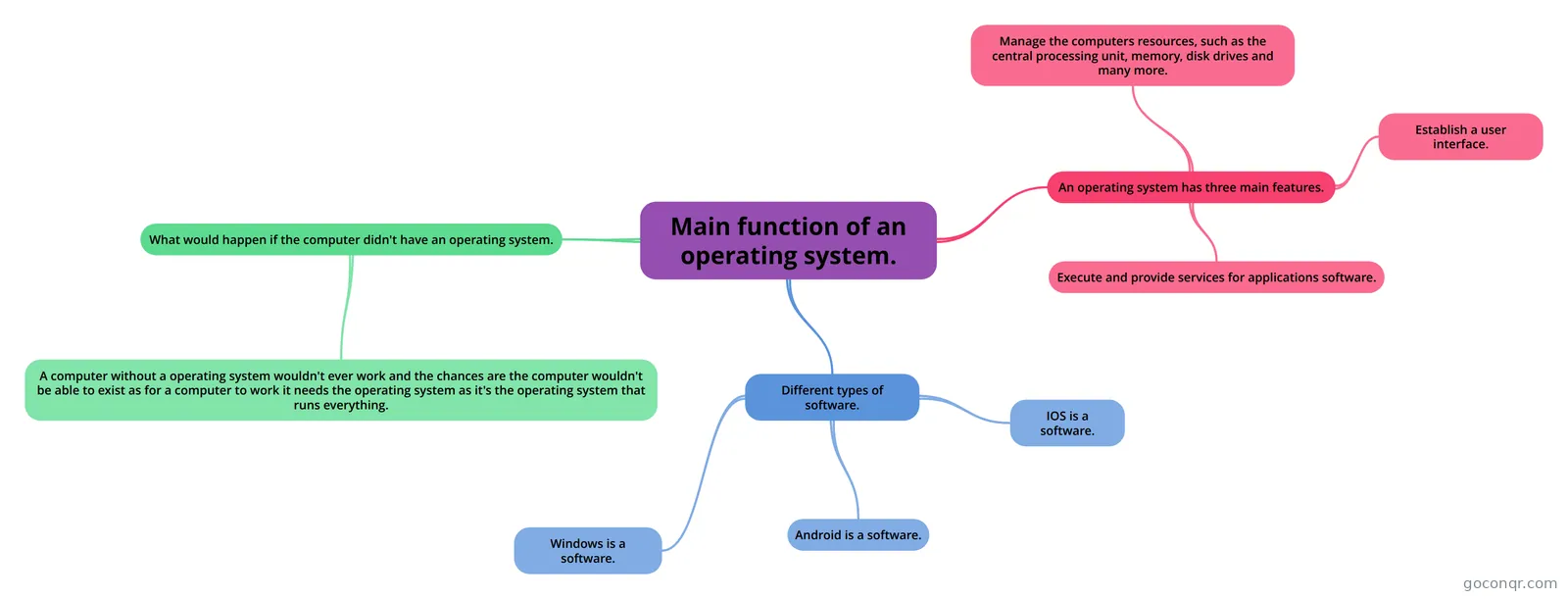 Main function of an operating system. OPerating systems
-
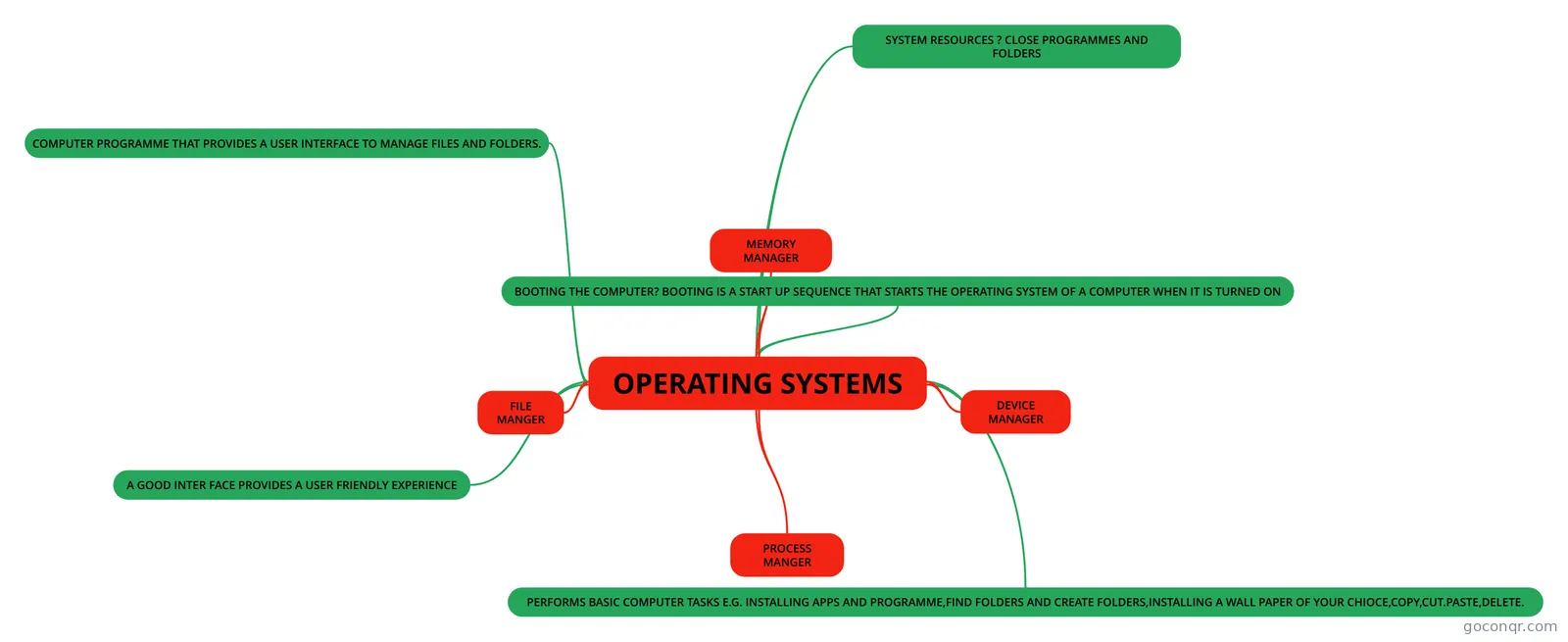 OPERATING SYSTEMS OPERATING SYSTEMS
Flashcards
See all 99 flashcards-
20 cardsSCIA 360 Chapter 5 Test 1 Chapters 1-5
-
42 cardsITMT-1358-Windows Client Operating Sys Flash Cards for ITMT 1358 Windows OS Client
-
20 cardsSCIA 360 Chapter 3 The optimal selection of cache size and replacement algorithm can result in 80 to 90 percent of all request...
-
20 cardsSCIA 360 Chapter 4 Test 1 Chapters 1-5
-
20 cardsSCIA 360 Chapter 2 Test 1 Chapters 1-5
-
20 cardsSCIA 360 Chapter 1 With distributed operating systems, users need to be aware of which processor is actually running their app...
-
4 cardsMY OPERATING SYSTEMS OPERATING SYSTEM FUNCTIONS In any computer, the operating system: controls the backing store and peripheral...
-
5 cardsOperating Systems Booting the Computer
Flowcharts
Notes
-
mutex_lock vs enter_region
-
File System Consistency Two kinds of consistency checks can be made: blocks and files.To check for block consistency, the program builds two tables, each one containing a counter for each block, initially set to 0. The counter in the first t...
-
Identifying Windows Operating System Editions Identifying Windows Operating System Editions The following are the six main editions of Windows 7: • Windows 7 Starter • Windows 7 Home Basic • Windows 7 Home Premium* • Windows 7 Professional *&n...
-
User-level threads vs Kernel-level threads A major difference between user-level threads and kernel-level threads is the performance.Doing a thread switch with user-level threads takes a handful of machine instructions.With kernel-level threads it requires a f...
-
software Multi-tasking: most systems commonly have several programs loaded into a memory at the same time. The operating system will also be running background tasks just to manage the computer itself. A processor can only exe...
-
DNS Project 3.5.2. OProfile OProfile (oprofile) is a system-wide performance monitoring tool. It uses the processor's dedicated performance monitoring hardware to retrieve information about the kernel and system executables,...
-
Lab 3-1: Find Files and Determine File Types TEST 1. Use find command to search for all files in entire directory structure that have been modified in the past 20 days and display their type. 2. Use find command again and search for named pipe and socket files. ...
-
Operating system the operating system is where the computer manages all the hardware and software. it also provides a user interface for you to be able to not code and just get the files up.its also helps boots (starts) the computer u...
Slides
More Computing and ICT (programming, computer science, digital skills, educational technology) topics
About Operating Systems
GoConqr OriginalWhat the resources cover
This unit sits in the Computer Systems strand of Computing and ICT. The listed material runs from the basic job of an operating system to the detail of how one works inside. The mind map operating systems starts with interrupts, separating hardware interrupts (triggered by the mouse or keyboard) from software ones. Other maps cover Main Functions of an Operating System, Types of Operating Systems (OS), Job and Processor Scheduling, virtual storage management and Deadlocks.
Where to start
If the topic is new, begin with a broad map such as The Components of an Operating System, or the notes called Role of the Operating System. Then move to the slide set Role of an operating system and the flashcards A451: Functions of An Operating System.
- Read a general map on functions and types.
- Work through flashcards on processes, threads and inter process communication.
- Move on to memory, scheduling, deadlocks and file systems.
Quizzes and maps together
Use a map to see how ideas link, then test yourself. The quiz Computer File Systems asks about FAT, corrupted sectors and partition tables. CS 372 Quiz 2 Practice looks at processes and Mach. Wrong answers show you which map to reread.
Windows, Linux, mobile and certification
Practical material is here too. The Cisco IT Essentials quiz on Chapter 12 covers mobile, Linux and macOS, including how locator apps find a device. The flashcards ITMT-1358-Windows Client Operating Sys list terms like BitLocker and Client Hyper-V. Several quizzes follow the 98-349 lessons, and others suit GCSE, A-level and professional exam revision.
Make it yours
Choose one topic this week, take a quiz, then build a map or flashcard set of what you missed.
Frequently asked questions
Which resource should I open first?
For a general overview, try the mind map called The Components of an Operating System, or the notes Role of the Operating System. Both explain what an operating system does. After that, the quiz Computer File Systems or the flashcards on processes and threads make good next steps.
What do the mind maps cover?
They range from the functions and types of operating systems to interrupts, scheduling, virtual storage, process synchronisation and deadlocks. There is also a map on Android-specific changes to Linux. Over 1,200 mind maps are listed, so you can compare how different authors organise the same topic.
Are the resources free to use?
Yes. Every resource listed here is free to open, study and take, with no account needed. They were made by GoConqr users, not by GoConqr itself. If you sign up for a free account, you can also save quiz scores and create your own quizzes, maps, flashcards and notes.
Which exams and levels do these resources suit?
Most resources suit school students and university students, with some for professional candidates. Listed resources mention GCSE Computer Science, GCSE ICT, IGCSE ICT, A-level Computing, A-level Computer Science, IT Essentials, MTA 98-349, MCSA and MD-100. Check each title to see whether it fits your course.
Is there anything on Windows and Linux specifically?
Yes. You will find quizzes such as Win 7 Midterm and Exploring Windows 10, notes giving overviews of Windows XP, Vista and 7, and flashcards on Linux and Unix system architecture. The Cisco IT Essentials chapter quiz also covers mobile, Linux and macOS.
What if I can't find the topic I need?
Try a related title first, since many topics appear under different names, such as functions of an operating system. If nothing fits, you can make your own quiz, mind map, flashcards or notes with a free account and use them for your own revision.