
REVISION SLIDES
Slides do conjunto (59)
-
-
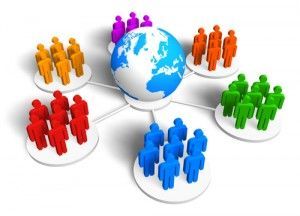
- People who are computer literate, and have the equipment, can form groups or
- ‘societies’ online. These groups are known as online communities , and they provide
- a place for people with similar interests to come together and exchange views. Where
- the community involves a group of people who keep in up-to-date contact with each
- other, they may be referred to as a network of friends .
- Example: Macmillan cancer research online community - http://community.macmillan.org.uk/
-
- These are frequently updated online journals with diary-like entries which allow people to express their thoughts and feelings and give details of their daily activities. Typically, a blog includes text, photos and sometimes video.
- Example: BoingBoing - http://boingboing.net/

-
- These are sites which allows users to create and exchange really short text entries. A popular example of this type of site is Twitter™.

-
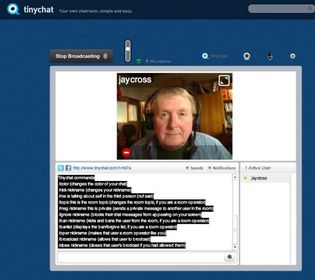
- Online communication within communities is sometimes referred to as
- chat . Some of the large interactive communities where people take part in the same
- conversation or type of chat at the same time are known as chatrooms .
- Example:Tiny Chat - http://tinychat.com/category/popular
-
- An online community which meets in a computer generated enviroment for example Gta V which has over 33 million players world wide.

-
- netiquette is a combination of 'net' (from internet) and 'etiquette'. It means respecting other users' views and displaying common courtesy when posting your views to online discussion groups.

-
- An access point to the internet. Normally, it is a location which contains all of the hardwarewhich allows internet users access to the internet. An Internet Service Provider (ISP) may
- operate several PoPs in their area to allow good access to the internet.
- https://www.youtube.com/watch?v=vUD8U7eLbQ0 (Incorporar)
-
- NAP An interchange between networks within the internet. It allows ISPs to interconnect with each other.
- https://www.youtube.com/watch?v=5NHrois0JDs (Incorporar)
-
- The protocol used to route packets of information across the internet.An individual unit of data which is carried across a network, including the internet. It is made up of a header which identifi es the packet and a body which is the actual data message. It is one of the functions of the Transmission Control Protocol (TCP) to organise an internet message into packets.
- https://www.youtube.com/watch?v=zyL1Fud1Z1c (Incorporar)
-
Transmission Control Protocol (T.C.P)
- The protocol that takes data from a user’s application program and passes it to the IP for
- transfer across the internet. The reverse operation is performed at the destination computer,
- i.e. the TCP reassembles the data (from individual packets) and forwards them to the user’s
- application program. The close relation with the IP means that the terms are usually used in
- combination, i.e. TCP/IP.
- https://www.youtube.com/watch?v=Vdc8TCESIg8 (Incorporar)
-
File transfer protocol (F.T.P)
- A standard protocol which allows fi les to be transferred between two computers on a TCP-basednetwork. It is commonly used to download programs to your computer from other servers and toupload web pages that you have created to the server that is hosting them on the internet.
- https://www.youtube.com/watch?v=8IC8-WIkE2c (Incorporar)
-
Internet Service Provider (I.S.P)
- Direct connection to the internet would be very costly and so ISPs provide a cost-effectivegateway for people and organisations to get onto the internet. In the UK there are manyISPs, with some of the most popular ones being BT (British Telecom), Virgin Media and Sky.
- iSP services
- In addition to providing a gateway to the internet, ISPs normally provide additional servicessuch as email. Many also provide web space for the development of websites, technical
- support and troubleshooting.
- https://www.youtube.com/watch?v=ej46ceCK_wU (Incorporar)
-
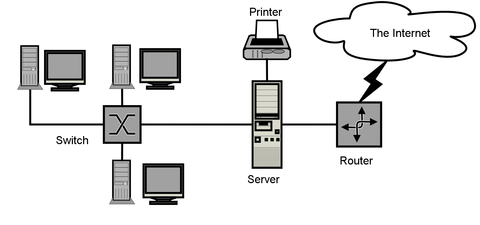
- A computer or program which runs purely to serve the needs of other computers. It runs special
- server software to service the requirements of the users (clients). There are several types of servers,
- including file servers and printer servers on a local area network (LAN), and web and email servers
- that manage communication with the internet.
- https://www.youtube.com/watch?v=wszDDuz_Dow (Incorporar)
-
- A computer which uses the services provided by the server.
- https://www.youtube.com/watch?v=tFiXxzzdgFY (Incorporar)
-
- A piece of hardware that connects two or more networks. In relation to the internet, data from
- the ISP is sent into the network and the router then directs the data packets to the correct
- destinations. The router also handles data travelling in the other direction. Routers can be
- described as ‘directors of traffic’ for the networks.
- https://www.youtube.com/watch?v=CVrYEPHexB4 (Incorporar)
-
- The main connecting data routes between large networks on the internet and smaller networks in local regions.
- https://www.youtube.com/watch?v=yldEK1-7Ws4 (Incorporar)
-
-
- Used by wireless-enabled devices (computers, mobiles, smartphones, etc.) to log in to the internet. Wireless is exactly what it says; there are no wires to connect.
- https://www.youtube.com/watch?v=LSJhIIdZ8q4 (Incorporar)
-
- A wired connection to a broadband supplier. Normally the connection is via a network card in the computer. Cable users havean ethernet connection fromtheir computer to the network.
- https://www.youtube.com/watch?v=njVe6vUxN54 (Incorporar)
-
- A wired connection via a conventional telephone line, which needs a modem to convert signals to and from analogue for transmission.
- https://www.youtube.com/watch?v=bgTxFLHcuKc (Incorporar)
-
- Hyperlink – A link (which can be text or a graphic) which takes you to another web page or location within a document.
- https://www.youtube.com/watch?v=K8IcI6AyutQ (Incorporar)
-
- Web server – It is the job of a web server to deliver web pages to users’ computers.
- https://www.youtube.com/watch?v=-DHjFEzuDjQ (Incorporar)
-
- Wizard – A sequence of dialogue boxes which lead the user through a series of well-defined steps.

-
- Hypertext mark-up language (HtML) – A computer language used to create web pages.
- https://www.youtube.com/watch?v=ofox_6_-gGo (Incorporar)
-
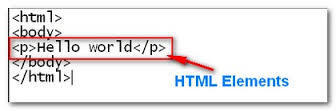
- HtML element – An individual component of a HTML document.
-
- Web pages are searched for using a uniform resource locator (uRL) , which is a string
- of characters that identify a particular web page on the internet. Every web page has a
- unique URL.
- https://www.youtube.com/watch?v=D8c4JZW73cM (Incorporar)
-
- https://www.youtube.com/watch?v=BNHR6IQJGZs (Incorporar)
- Search engines work by retrieving information from the HTML of web pages and storing this on an indexed database. An automated web browser (which is known by different names including crawler, spider and bot) is used to follow every link in awebsite. Each page is analysed as it is found, and relevant data is extracted and stored
- on the search engine’s index database.
-
- A device or program used to encode or decode data.
- https://www.youtube.com/watch?v=GhWki9a7s18 (Incorporar)
-
- Used as a generic term to mean computers, peripheral hardware, mobile telephones, manufacturing plant, environment monitors and many other things.

-
- Any device, such as a Headset, Mouse or printer, attached to a computer to expand its functionality.
- https://www.youtube.com/watch?v=MimBoRRzy50 (Incorporar)
-
- A formatted block of data sent over the networks and the internet. A packet contains the addresses of send and destination, the data and error checking.

-
- Is
- a unshielded twisted pair (UTP) cables are basic pairs of cables twisted
- together. Shielded twisted pair (STP) cables are similar but have a foil
- shielding
- https://www.youtube.com/watch?v=nbIExe78omE (Incorporar)
-
- Solid wire core separated
- from a
- copper-braided outer cable by a plastic
- insulation jacket. The inner cable transmits the data and the outer cable connects to
- earth.
- https://www.youtube.com/watch?v=dlM0pmovWfY (Incorporar)
-
- Glass or
- plastic cables which use
- total internal reflection of
- light to transmit data.
- Normally uses LED or
- laser visible light,
- although infra red has also been
- used.
- https://www.youtube.com/watch?v=0MwMkBET_5I (Incorporar)
-
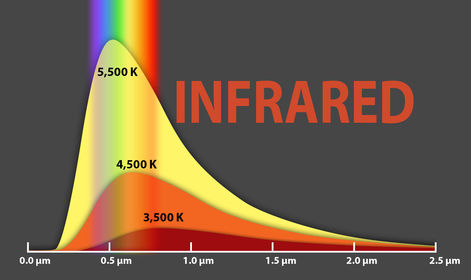
- Short range
- data transmissions
- using infrared light
- (just beyond visible
- light). This is the same
- technology as is used in TV
- handsets.
-
- They are short
- wavelength radio transmissions working at very high
- frequencies.
-
- https://www.youtube.com/watch?v=Dnd28lQHquU (Incorporar)
- In computing and telecommunications, a byte is unit of digital information which commonly consists of eight bits.
-
- A usb is a serial transmission method which was introduced to make many of the connections to a computer look the same. Nowadays USB is used ina wide variety of devices, such as mobile telephones, memory sticks and MP3 players.
- USB ports also supply power to some devices.
- The maximum theoretical transmission rate for USB 2.0 is 480 Mbps, but this is shared
- among all devices on a USB hub, so the rate for each device will be less than this.
- https://www.youtube.com/watch?v=n4jDAOa_BHY (Incorporar)
-
- client-side processing is the use of a scripting language to create code on web pages
- which provides interactivity. The important point is that the interaction takes place
- within the web page and the code is downloaded to the user’s computer when the
- web page is opened by the user’s browser.
- A good example of a client-side interaction is a roll over (often called a mouseover),
- where some code is triggered when you move the mouse over a particular part of
- the web page. This might be something simple like the display of an advertisement,
- or it could be a demand for some data entry (e.g. fi lling in your details on a social
- networking website
- https://www.youtube.com/watch?v=DcBB2Fp8WNI (Incorporar)
-
- Bi-directional transmission has several meanings within data communication, but it
- is essentially about transmitting in both directions. Most recently the term has been
- applied to fi bre optics. Using the current technology, light passes in one direction
- only, so you have to add extra fi bres to the bundle to carry a signal in the opposite
- direction.
- https://www.youtube.com/watch?v=wSg4Ete5zz8 (Incorporar)
-
- Packet switching is a digital networking communications method that groups all transmitted data into suitably sized blocks, called packets, which are transmitted via a medium that may be shared by multiple simultaneous communication sessions.
- https://www.youtube.com/watch?v=dtpvGmQTXTA (Incorporar)
-
Simplex, Half duplex and Full duplex
- Simplex - transmission: sends data in one direction only. A radio broadcast is a good example of simplex transmission.
- Half-duplex - transmission: allows two-way transmissions but the devices don’t transmit at the same time. A system being used to monitor and control manufacturing processescan use half-duplex transmissions. It will send a message to the control computer,which will respond with new settings, but they both cannot send messages at the same time. Some network systems use half-duplex to maximise bandwidth.
- Full duplex - transmission: allows two-way communication at the same time.The telephone system, land or mobile, is an example of a full duplex system.
- https://www.youtube.com/watch?v=73zvwDBpYJs (Incorporar)
-
- An opportunist is a person who takes advantage of opportunities as and when they arise, regardless of planning or principle. In regards to threats to data an opportunist takes advantage of a situation such as leaving your computer logged in to access your files and data.
-
- A virus is a piece of code which is capable of copying itself and typically has a detrimental effect, such as corrupting the system or destroying data.
- https://www.youtube.com/watch?v=6K0iTb0KMSQ (Incorporar)
-
- One of the most insidious types of Trojan horse is a program that claims to rid your computer of viruses but instead introduces viruses onto your computer. The term comes from the a Greek story of theTrojan War, in which the Greeks give a giant wooden horse to their foes, the Trojans, ostensibly as a peace offering.
- https://www.youtube.com/watch?v=ssckV79mNLs (Incorporar)
-
- Phishing is the fraudulent practice of sending emails purporting to be from reputable companies in order to induce individuals to reveal personal information, such as passwords and credit card numbers, online.
- https://www.youtube.com/watch?v=7r8iIgHqkHw (Incorporar)
-
- Physical barriers. These include turning off computers and locking offi ces when the
- systems are unattended to prevent damage by people, the environment (e.g. fi re,
- fl ooding, electrical interference) or theft
-
- Anti-virus software. This is set up to intercept computer viruses before they can
- become resident on the computer. The software can isolate the virus, remove it and
- sometimes repair any damage. Equivalent security programs exist for other types of
- malware
- https://www.youtube.com/watch?v=67-5bzc_GKE (Incorporar)
-
- Password control of access. Passwords are sequences of characters, known only
- to the computer user, which allow access to a computer, network or application.
- Passwords should always be strong so that it is hard for someone else to guess them
- or work them out
-
- Firewall. This is a piece of software that monitors all data arriving at your computer
- from the internet and all data leaving your computer. It stops anything that it thinks
- is harmful or unwanted (such as viruses, spam, Trojan horses and hackers).
- https://www.youtube.com/watch?v=-xnqC2aPb00 (Incorporar)
-
- This is used to codify data so that it cannot be read by anyone who does not have the key to the code. An algorithm, sometimes known as a cipher, is applied to the data at the transmission end and the reverse is applied at the reception end.•
- https://www.youtube.com/watch?v=dut9EnbFym0 (Incorporar)
-
- Access levels. These can be set up to allow individuals to have access to only specific levels of an application and to prevent unauthorised users from accessing particular data.
-
- Backup and recovery. Making a backup of data is the only way of recovering from a total data disaster. Many individuals and organisations back up data to Flash ® solid state storage devices or magnetic tape at night. The tapes are stored safely in a separate place, so that they are not destroyed by any disaster which could destroy the master system
- (fi re, earthquake, etc.). Many types of backup exist, including: Full system backup of all data held for a specific c purpose. Incremental backups of files or data that has been changed since the last full backup. This is faster than running a full back up every time. Backups to removable media, such as a removable hard drive (if you have a large amount of data), USB sticks, CDs and DVDs. It is also possible to back up data across a network (or across the internet) to a server in a completely separate location (for example, backing up data to the cloud).
- https://www.youtube.com/watch?v=fE43sx1m6eE (Incorporar)
-
- The Data Protection Act 1998 (DPA) is an Act of Parliament of the United Kingdom of Great Britain and Northern Ireland which defines UK law on the processing of data on identifiable living people. It is the main piece of legislation that governs the protection of personal data in the UK.
- https://www.youtube.com/watch?v=yQila5tRvek (Incorporar)
-
- The Computer Misuse Act (1990) recognised the following new offences: Unauthorised access to computer material. Unauthorised access with intent to commit or facilitate a crime. Unauthorised modification of computer material.
- https://www.youtube.com/watch?v=uXIAwZvQJ3Y (Incorporar)
-
Copyright, Designs and Patents act 1988
- Copyright, Designs and Patents Act 1988. The Copyright, Designs and Patents Act 1988, is the current UK copyright law. It gives the creators of literary, dramatic, musical and artistic works the right to control the ways in which their material may be used.
- https://www.youtube.com/watch?v=otC_R97O-vo (Incorporar)
-
Freedom of information act 2000
- https://www.youtube.com/watch?v=6FCOlGnv9I0 (Incorporar)
- The Freedom of Information Act 2000 provides public access to information held by public authorities. It does this in two ways: public authorities are obliged to publish certain information about their activities; and. members of the public are entitled to request information from public authorities.
-
Principles Of Data Protection Act
- They must make sure the information is:
- Used fairly and lawfully.
- Used for limited, specifically stated purposes.
- Used in a way that is adequate, relevant and not excessive.
- Accurate.
- Kept for no longer than is absolutely necessary.
- Handled according to people's data protection rights.
- Kept safe and secure
- https://www.youtube.com/watch?v=vHvd6HaPq_s (Incorporar)
Informações
- Descrição
- Slides sobre REVISION SLIDES, criado por Scott Rosser em 07-10-2015.
- Criado por
- Scott Rosser · out 2015
- Atualizado
- 21 abr 2016
- Visualizações
- 4
- Avaliação